
html homework27
1. 使用框架完成如下功能
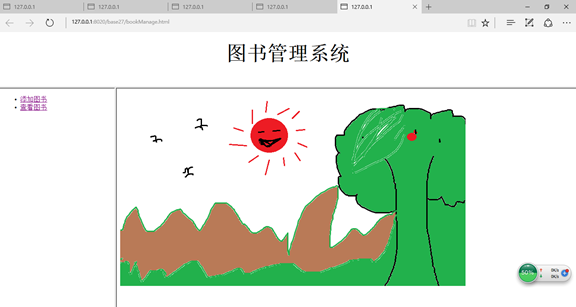
将框架先上下分割成两部分(上半部分的为TopFrame)、再将下半部分垂直分割为两部分(左侧为BottomLeftFrame,右侧为BottomRightFrame),为TopFrame添加一个logo、为BottomLeftFrame添加一个菜单(使用a标签),当点击超链接标签时,在BottomRightFrame中显示目标页面
如图示例(可自行设计)
 <!DOCTYPE html PUBLIC "-//W3C//DTD HTML 4.01//EN"

 "http://www.w3.org/TR/html4/strict.dtd">

 <html xmlns="http://www.w3.org/1999/xhtml" lang="en">

     <head>

         <meta http-equiv="Content-Type" content="text/html; charset=UTF-8" />

         <title></title>

     </head>

     <frameset rows="20%,*">

         <frame name="TopFrame" src="topbook.html"/>

         <frameset cols="20%,*">

             <frame name="BottomLeftFrame" src="bookmenu.html"/>

             <frame name="BottomRightFrame" src="right.html"/>

         </frameset>

     </frameset>

 </html>
 <!DOCTYPE html PUBLIC "-//W3C//DTD HTML 4.01//EN"

 "http://www.w3.org/TR/html4/strict.dtd">

 <html xmlns="http://www.w3.org/1999/xhtml" lang="en">

     <head>

         <meta http-equiv="Content-Type" content="text/html; charset=UTF-8" />

         <title></title>

     </head>

     <body>

     <ul>

         <li><a href="addBook.html" target="BottomRightFrame">添加图书</a></li>

         <li><a href="checkBook.html" target="BottomRightFrame">查看图书</a></li>

     </ul>

     </body>

 </html>
 <!DOCTYPE html PUBLIC "-//W3C//DTD HTML 4.01//EN"

 "http://www.w3.org/TR/html4/strict.dtd">

 <html xmlns="http://www.w3.org/1999/xhtml" lang="en">

     <head>

         <meta http-equiv="Content-Type" content="text/html; charset=UTF-8" />

         <title></title>

     </head>

     <body>

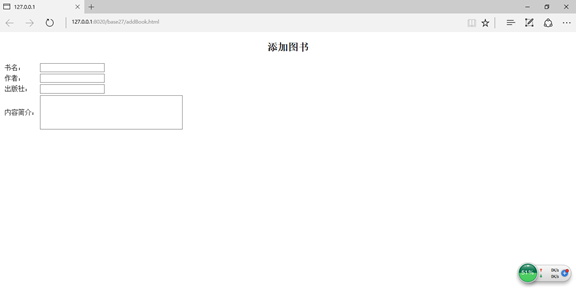
         <h4 align="center"><font size="5"><b>添加图书</b></font></h4>

         <table>

             <tr>

                 <td>书名:</td>

                 <td><input type="text"/></td>

             </tr>

             <tr>

                 <td>作者:</td>

                 <td><input type="text"/></td>

             </tr>

             <tr>

                 <td>出版社:</td>

                 <td><input type="text"/></td>

             </tr>

             <tr>

                 <td>内容简介:</td>

                 <td><textarea rows="5" cols="40"></textarea></td>

             </tr>

         </table>

     </body>

 </html>
 <!DOCTYPE html PUBLIC "-//W3C//DTD HTML 4.01//EN"

 "http://www.w3.org/TR/html4/strict.dtd">

 <html xmlns="http://www.w3.org/1999/xhtml" lang="en">

     <head>

         <meta http-equiv="Content-Type" content="text/html; charset=UTF-8" />

         <title></title>

     </head>

     <body>

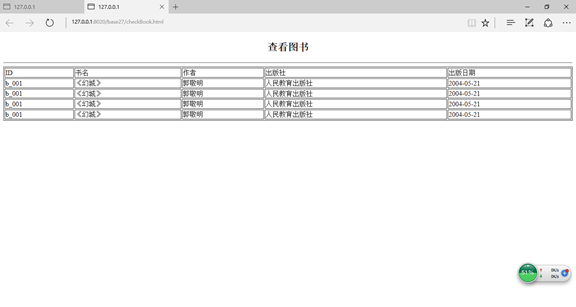
         <h5 align="center"><font size="5"><b>查看图书</b></font></h5>

         <hr />

         <table border="1" width="100%">

             <tr>

             <td>ID</td><td>书名</td><td>作者</td><td>出版社</td><td>出版日期</td>

             </tr>

             <tr>

                 <td>b_001</td><td>《幻城》</td><td>郭敬明</td><td>人民教育出版社</td><td>2004-05-21</td>

             </tr>

             <tr>

                 <td>b_001</td><td>《幻城》</td><td>郭敬明</td><td>人民教育出版社</td><td>2004-05-21</td>

             </tr>

             <tr>

                 <td>b_001</td><td>《幻城》</td><td>郭敬明</td><td>人民教育出版社</td><td>2004-05-21</td>

             </tr>

             <tr>

                 <td>b_001</td><td>《幻城》</td><td>郭敬明</td><td>人民教育出版社</td><td>2004-05-21</td>

             </tr>

         </table>

     </body>

 </html>
 <!DOCTYPE html PUBLIC "-//W3C//DTD HTML 4.01//EN"

 "http://www.w3.org/TR/html4/strict.dtd">

 <html xmlns="http://www.w3.org/1999/xhtml" lang="en">

     <head>

         <meta http-equiv="Content-Type" content="text/html; charset=UTF-8" />

         <title></title>

     </head>

     <body>

     <h5 align="center" ><font size="7">图书管理系统</font></h5>

     </body>

 </html>
 <!DOCTYPE html PUBLIC "-//W3C//DTD HTML 4.01//EN"

 "http://www.w3.org/TR/html4/strict.dtd">

 <html xmlns="http://www.w3.org/1999/xhtml" lang="en">

     <head>

         <meta http-equiv="Content-Type" content="text/html; charset=UTF-8" />

         <title></title>

     </head>

     <body>

     <img src="img/秋天美景.png" />

     </body>

 </html>
 <!DOCTYPE html PUBLIC "-//W3C//DTD HTML 4.01//EN"

 "http://www.w3.org/TR/html4/strict.dtd">

 <html xmlns="http://www.w3.org/1999/xhtml" lang="en">

     <head>

         <meta http-equiv="Content-Type" content="text/html; charset=UTF-8" />

         <title></title>

     </head>

     <body>

     <h5 align="center" ><font size="7">图书管理系统</font></h5>

     </body>

 </html>

 <!DOCTYPE html PUBLIC "-//W3C//DTD HTML 4.01//EN"

 "http://www.w3.org/TR/html4/strict.dtd">

 <html xmlns="http://www.w3.org/1999/xhtml" lang="en">

     <head>

         <meta http-equiv="Content-Type" content="text/html; charset=UTF-8" />

         <title></title>

     </head>

     <body>

     <img src="img/秋天美景.png" />

     </body>

 </html>

 <!DOCTYPE html PUBLIC "-//W3C//DTD HTML 4.01//EN"

 "http://www.w3.org/TR/html4/strict.dtd">

 <html xmlns="http://www.w3.org/1999/xhtml" lang="en">

     <head>

         <meta http-equiv="Content-Type" content="text/html; charset=UTF-8" />

         <title></title>

     </head>

     <body>

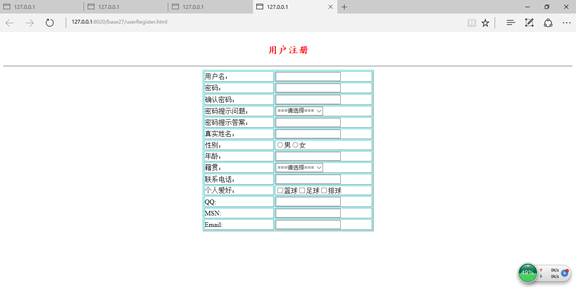
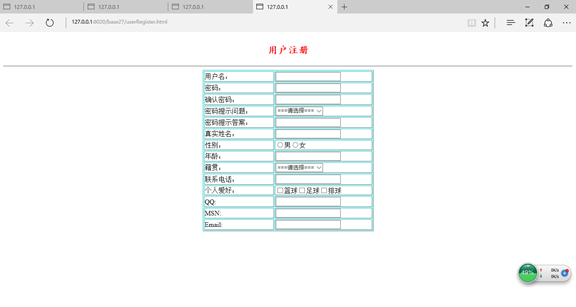
         <h1 align="center"><font size="5" color="red" face="楷体">用户注册</font></h1>

         <hr />

         <table border="1" align="center" width="30%" bordercolor="#00ffff">

             <tr>

                 <td>用户名:</td>

                 <td><input type="text"/></td>

             </tr>

             <tr>

                 <td>密码:</td>

                 <td><input type="password"/></td>

             </tr>

             <tr>

                 <td>确认密码:</td>

                 <td><input type="password"/></td>

             </tr>

             <tr>

                 <td>密码提示问题:</td>

                 <td><select>

                     <option>===请选择===</option>

                     <option>所在学校:</option>

                     <option>专业:</option>

                     <option>班级:</option>

                     <option>职位:</option>

                     <option>家庭住址:</option>

                 </select></td>

             </tr>

             <tr>

                 <td>密码提示答案:</td>

                 <td><input type="text"/></td>

             </tr>

             <tr>

                 <td>真实姓名:</td>

                 <td><input type="text"/></td>

             </tr>

             <tr>

                 <td>性别:</td>

                 <td><input type="radio"name="gender"/>男<input type="radio"name="gender"/>女</td>

             </tr>

             <tr>

                 <td>年龄:</td>

                 <td><input type="number"/></td>

             </tr>

             <tr>

                 <td>籍贯:</td>

                 <td>

                     <select>

                         <option>===请选择===</option>

                         <option>北京</option>

                         <option>上海</option>

                         <option>广州</option>

                         <option>深圳</option>

                         <option>河南</option>

                         <option>四川</option>

                         <option>济南</option>

                         <option>山东</option>

                         <option>河北</option>

                         <option>东北</option>

                         <option>内蒙古</option>

                         <option>石家庄</option>

                         <option>乌鲁木齐</option>

                         <option>天津</option>

                     </select>

                 </td>

             </tr>

             <tr>

                 <td>联系电话:</td>

                 <td><input type="tel"/></td>

             </tr>

             <tr>

                 <td>个人爱好:</td>

                 <td><input type="checkbox"/>篮球<input type="checkbox"/>足球<input type="checkbox"/>排球</td>

             </tr>

             <tr>

                 <td>QQ:</td>

                 <td><input type="text"/></td>

             </tr>

             <tr>

                 <td>MSN:</td>

                 <td><input type="text"/></td>

             </tr>

             <tr>

                 <td>Email:</td>

                 <td><input type="email"/></td>

             </tr>

         </table>

     </body>

 </html>
html homework27的更多相关文章
随机推荐
- Leetcode题目101.对称二叉树(简单)
题目描述: 给定一个二叉树,检查它是否是镜像对称的. 例如,二叉树 [1,2,2,3,4,4,3] 是对称的. 1 / \ 2 2 / \ / \ 3 4 4 3 但是下面这个 [1,2,2,null ...
- 【零基础】一文读懂CPU(从二极管到超大规模集成电路)
一.前言 我们都知道芯片,也知道芯片技术在21世纪是最重要的技术之一,但很少有人能知道芯片技术的一些细节,如芯片是如何构造的.为什么它可以运行程序.芯片又是如何被设计制造出来的等等.本文就尝试从最底层 ...
- Nginx之 Location 的生成
1. Location 的生成 location 的生成大致有三种: 由 location 指令直接生成 命令 location:仅用于 server 内部跳转,如 rewrite 就是命名 loca ...
- LeetCode 10. 正则表达式匹配(Regular Expression Matching)
题目描述 给定一个字符串 (s) 和一个字符模式 (p).实现支持 '.' 和 '*' 的正则表达式匹配. '.' 匹配任意单个字符. '*' 匹配零个或多个前面的元素. 匹配应该覆盖整个字符串 (s ...
- 深度学习变革视觉计算总结(CCF-GAIR)
孙剑博士分享的是<深度学习变革视觉计算>,分别从视觉智能.计算机摄影学和AI计算三个方面去介绍. 他首先回顾了深度学习发展历史,深度学习发展到今天并不容易,过程中遇到了两个主要障碍: 第一 ...
- rsync+inotify 实时双向同步
前言 在遇到需要 nginx 负载均衡,承受较高并发的情况,同时会有双机相同目录内容须保持一致的需求 rsync+inotify 是一个不错的解决方案,相较于 rsync+sersync 在处理大量文 ...
- idea svn 主干分支切换
使用快捷键ctrl+t或者点击工具栏中的 vcs update 出现如下窗口:点击复选框,在框2中进行选择你要切换的分支的地址,点击OK即可 : 查看是否切换成功可以再version control ...
- vue-cli 构建的项目 webpack 如何配置不 build 出 .map 文件?
build命令后占体积最大的竟然是.map文件,webpack如何设置不让编译出.map文件呢?
- Jenkins的详细安装及使用
操作环境:Windows 踩过的坑:1,报错403,因为tomcat限制了访问地址(https://www.cnblogs.com/luoruiyuan/p/6518508.html) 2,构建spr ...
- SSM批量添加数据
如何应对面临批量数据时如何提交给后台 方式1: 使用JSON格式 后台功能接受实现使用@ResponseBody 前端当有多行数据的时候添加到一个数组再通过JSON格式到后台List接收 @Reque ...