
Vue + Springboot 开发的简单的用户管理系统
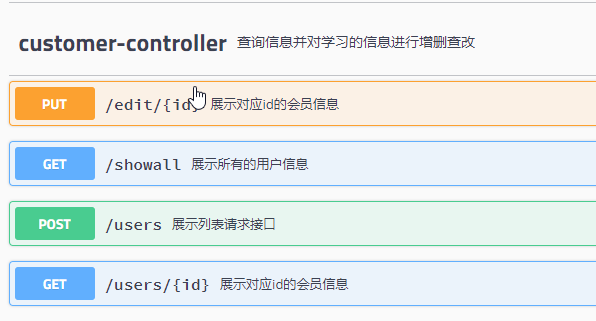
后台接口如下:
页面如下:
1. 主页,显示所有的用户信息
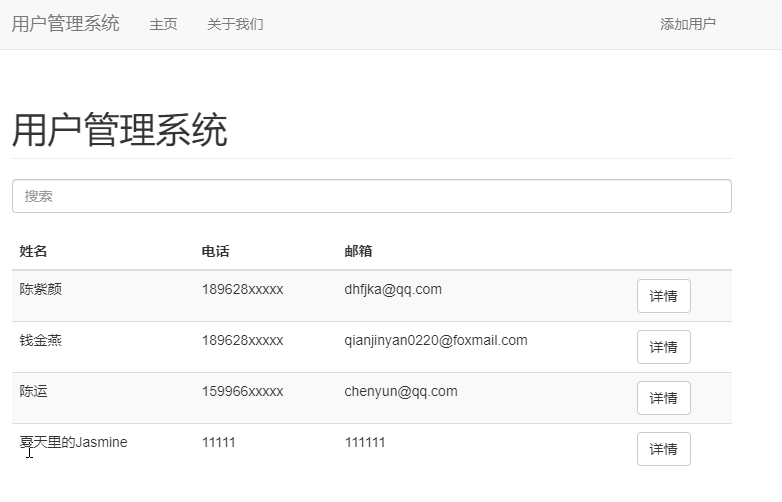
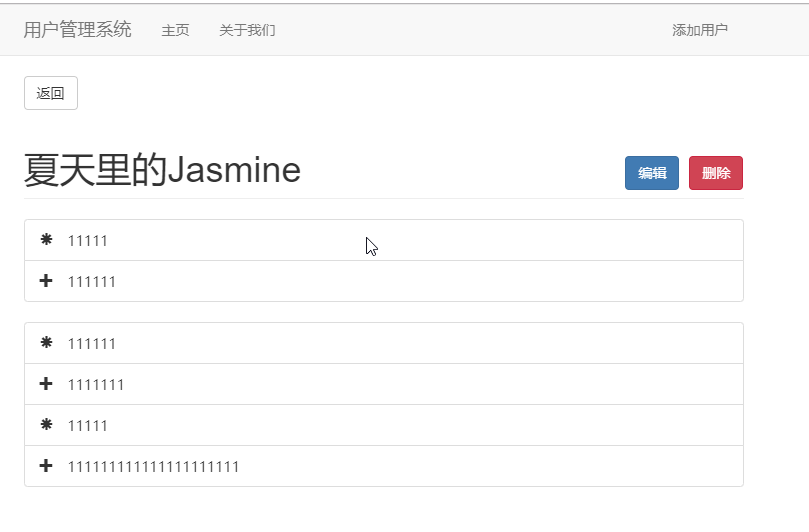
2. 点击详情,看到某个id的用户的详细信息
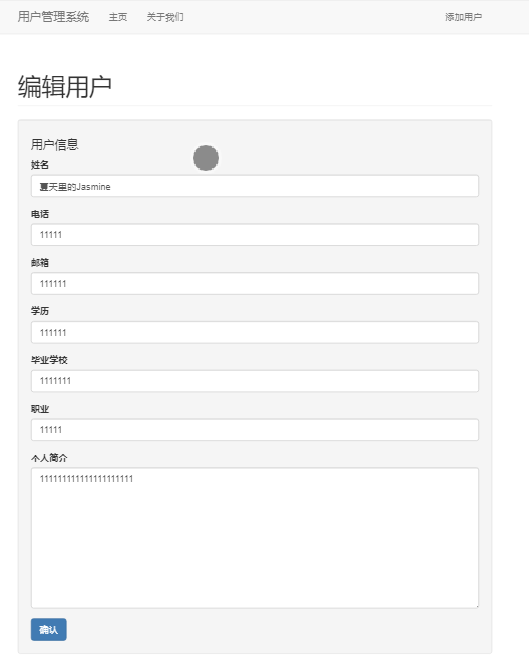
3. 点击编辑按钮,跳转到的详细的编辑(更新)页面
4. 添加用户页面
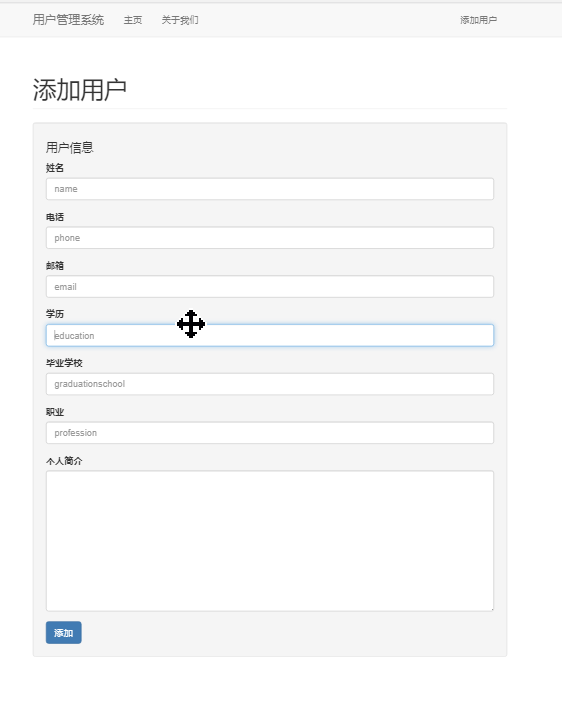
对应的vue代码如下
1. 查看所有用户的信息
<template>

  <div class="customers container">

    <Alert v-if="alert"  v-bind:message="alert"></Alert>

    <h1 class="page-header">用户管理系统</h1>

    <input type="text" class="form-control" placeholder="搜索" v-model="filterInput">

    <br>

    <table class="table table-striped">

      <thead>

        <tr>

          <th>姓名</th>

          <th>电话</th>

          <th>邮箱</th>

          <th></th>

        </tr>

      </thead>

      <tbody>

        <tr v-for="customer in filterBy(customers,filterInput)" :key="customer.name">

          <td>{{customer.name}}</td>

          <td>{{customer.phone}}</td>

          <td>{{customer.email}}</td>

          <td><router-link class="btn btn-default" v-bind:to="'/customer/'+customer.id">详情</router-link></td>

        </tr>

      </tbody>

    </table>

  </div>

</template>

<script>

import Alert from './Alert'

export default {

  name: 'customers',

  data () {

    return {

      customers:[],

      alert:"",

      filterInput:""

    }

  },

  methods:{

    fetchCustomers(){

      this.$http.get("http://10.201.11.128:8085/showall")

          .then((response) => {

            console.log(response);

            this.customers = response.data;

          })

    },

    filterBy(customers,value){

      return customers.filter(function(customer){

         return customer.name.match(value);

      })

    }

  },

  created(){

    if (this.$route.query.alert) {

      this.alert = this.$route.query.alert;

    }

    this.fetchCustomers();

  },

  updated(){

    this.fetchCustomers();

  },

  components:{

    Alert

  }

}

</script>
2. 某个id的用户的详细信息,页面中有编辑和删除按钮
<template>

  <div class="details container">

  	<router-link to="/" class="btn btn-default">返回</router-link>

    <h1 class="page-header">

    	{{customer.name}}

    	<span class="pull-right">

    		<router-link class="btn btn-primary" v-bind:to="'/edit/'+customer.id">

    			编辑

    		</router-link>

    		<button class="btn btn-danger" @click="deleteCustomer(customer.id)">删除</button>

    	</span>

    </h1>

    <ul class="list-group">

    	<li class="list-group-item">

    		<span class="glyphicon glyphicon-asterisk">

    			{{customer.phone}}

    		</span>

    	</li>

    	<li class="list-group-item">

    		<span class="glyphicon glyphicon-plus">

    			{{customer.email}}

    		</span>

    	</li>

    </ul>

    <ul class="list-group">

    	<li class="list-group-item">

    		<span class="glyphicon glyphicon-asterisk">

    			{{customer.education}}

    		</span>

    	</li>

    	<li class="list-group-item">

    		<span class="glyphicon glyphicon-plus">

    			{{customer.graduationschool}}

    		</span>

    	</li>

		<li class="list-group-item">

			<span class="glyphicon glyphicon-asterisk">

				{{customer.profession}}

			</span>

		</li>

		<li class="list-group-item">

			<span class="glyphicon glyphicon-plus">

				{{customer.profile}}

			</span>

		</li>

    </ul>

  </div>

</template>

<script>

export default {

  name: 'cumstomerdetails',

  data () {

    return {

      customer:""

    }

  },

  methods:{

  	fetchCustomers(id){

      this.$http.get("http://10.201.11.128:8085/users/"+id)

          .then((response) => {

            console.log(response);

            this.customer = response.data;

          })

    },

    deleteCustomer(id){

    	console.log(id);

    	this.$http.delete("http://10.201.11.128:8085/users/"+id)

    		.then((response) => {

    			this.$router.push({path:"/",query:{alert:"用户删除成功!"}});

    		})

    }

  },

  created(){

  	this.fetchCustomers(this.$route.params.id);

  }

}

</script>
3. 更新页面
<template>

  <div class="edit container">

    <Alert v-if="alert" v-bind:message="alert"></Alert>

    <h1 class="page-header">编辑用户</h1>

    <form v-on:submit="updateCustomer">

    	<div class="well">

    		<h4>用户信息</h4>

    		<div class="form-group">

    			<label>姓名</label>

    			<input type="text" class="form-control" placeholder="name" v-model="customer.name">

    		</div>

    		<div class="form-group">

    			<label>电话</label>

    			<input type="text" class="form-control" placeholder="phone" v-model="customer.phone">

    		</div>

    		<div class="form-group">

    			<label>邮箱</label>

    			<input type="text" class="form-control" placeholder="email" v-model="customer.email">

    		</div>

    		<div class="form-group">

    			<label>学历</label>

    			<input type="text" class="form-control" placeholder="education" v-model="customer.education">

    		</div>

    		<div class="form-group">

    			<label>毕业学校</label>

    			<input type="text" class="form-control" placeholder="graduationschool" v-model="customer.graduationschool">

    		</div>

    		<div class="form-group">

    			<label>职业</label>

    			<input type="text" class="form-control" placeholder="profession" v-model="customer.profession">

    		</div>

    		<div class="form-group">

    			<label>个人简介</label>

    			<!-- <input type="text" class="form-control" placeholder="profile" v-model="customer.profile"> -->

    			<textarea class="form-control" rows="10" v-model="customer.profile"></textarea>

    		</div>

    		<button type="submit" class="btn btn-primary">确认</button>

    	</div>

    </form>

  </div>

</template>

<script>

import Alert from './Alert'

export default {

  name: 'add',

  data () {

    return {

      customer:{},

      alert:""

    }

  },

  methods:{

    fetchCustomer(id){

        this.$http.get("http://10.201.11.128:8085/users/"+id)

            .then((response) => {

              console.log(response);

              this.customer = response.data;

            })

    },

  	updateCustomer(e){

  		// console.log(123);

  		if (!this.customer.name || !this.customer.phone || !this.customer.email) {

        // console.log("请添加对应的信息!");

  			this.alert = "请添加对应的信息!";

  		}else{

  			let updateCustomer = {

  				name:this.customer.name,

  				phone:this.customer.phone,

  				email:this.customer.email,

  				education:this.customer.education,

  				graduationschool:this.customer.graduationschool,

  				profession:this.customer.profession,

  				profile:this.customer.profile

  			}

  			this.$http.put("http://10.201.11.128:8085/edit/"+this.$route.params.id,updateCustomer)

  				.then((response) => {

  					console.log(response);

  					this.$router.push({path:"/",query:{alert:"用户信息更新成功!"}});

  				})

  			e.preventDefault();

  		}

  		e.preventDefault();

  	}

  },

  created(){

    this.fetchCustomer(this.$route.params.id);

  },

  components:{

    Alert

  }

}

</script>
4. 注册页面
<template>

  <div class="add container">

  	<Alert v-if="alert" v-bind:message="alert"></Alert>

    <h1 class="page-header">添加用户</h1>

    <form v-on:submit="addCustomer">

    	<div class="well">

    		<h4>用户信息</h4>

    		<div class="form-group">

    			<label>姓名</label>

    			<input type="text" class="form-control" placeholder="name" v-model="customer.name">

    		</div>

    		<div class="form-group">

    			<label>电话</label>

    			<input type="text" class="form-control" placeholder="phone" v-model="customer.phone">

    		</div>

    		<div class="form-group">

    			<label>邮箱</label>

    			<input type="text" class="form-control" placeholder="email" v-model="customer.email">

    		</div>

    		<div class="form-group">

    			<label>学历</label>

    			<input type="text" class="form-control" placeholder="education" v-model="customer.education">

    		</div>

    		<div class="form-group">

    			<label>毕业学校</label>

    			<input type="text" class="form-control" placeholder="graduationschool" v-model="customer.graduationschool">

    		</div>

    		<div class="form-group">

    			<label>职业</label>

    			<input type="text" class="form-control" placeholder="profession" v-model="customer.profession">

    		</div>

    		<div class="form-group">

    			<label>个人简介</label>

    			<!-- <input type="text" class="form-control" placeholder="profile" v-model="customer.profile"> -->

    			<textarea class="form-control" rows="10" v-model="customer.profile"></textarea>

    		</div>

    		<button type="submit" class="btn btn-primary">添加</button>

    	</div>

    </form>

  </div>

</template>

<script>

import Alert from './Alert'

export default {

  name: 'add',

  data () {

    return {

      customer:{},

      alert:""

    }

  },

  methods:{

  	addCustomer(e){

  		// console.log(123);

  		if (!this.customer.name || !this.customer.phone || !this.customer.email) {

  			// console.log("请添加对应的信息!");

  			this.alert = "请添加对应的信息!";

  		}else{

  			let newCustomer = {

  				name:this.customer.name,

  				phone:this.customer.phone,

  				email:this.customer.email,

  				education:this.customer.education,

  				graduationschool:this.customer.graduationschool,

  				profession:this.customer.profession,

  				profile:this.customer.profile

  			}

  			this.$http.post("http://10.201.11.128:8085/users",newCustomer)

  				.then((response) => {

  					console.log(response);

  					this.$router.push({path:"/",query:{alert:"用户信息添加成功!"}});

  				})

  			e.preventDefault();

  		}

  		e.preventDefault();

  	}

  },

  components:{

  	Alert

  }

}

</script>
所有页面中带有一个alert组件
<template>

  <div class="alert alert-warning alert-dismissible" role="alert">

  <button type="button" class="close" data-dismiss="alert" aria-label="Close"><span aria-hidden="true">×</span></button>

  {{message}}

</div>

</template>

<script>

export default {

  name: 'alert',

  props:["message"],

  data () {

    return {

    }

  }

}

</script>
Vue + Springboot 开发的简单的用户管理系统的更多相关文章
- php+js实现一个简单的用户管理系统
php + js 实现一个简单的用户管理系统 说实话,我对PHP是抵触的,但是我们的WEB课程刚好学的就是这个,不得已看了看,下面是用PHP实现的一个简单的用户管理系统. 我们首先来看一下目录结构 a ...
- Vue+SpringBoot+Mybatis的简单员工管理项目
本文项目参考自:https://github.com/boylegu/SpringBoot-vue 为了完成此项目你需要会springBoot,mybatis的一些基本操作 运行界面 第一步:搭建前端 ...
- springmvc05-Spring+Springmvc+Hibernate实现简单的用户管理系统
1, 导入\spring-framework-3.2.4.RELEASE\libs\disk下所有包; hibernate-distribution-3.6.7.Final\lib\required下 ...
- C#-MVC开发微信应用(7)--在管理系统中同步微信用户分组信息
在前面几篇文章中,逐步从原有微信的API封装的基础上过渡到微信应用平台管理系统里面,逐步介绍管理系统中的微信数据的界面设计,以及相关的处理操作过程的逻辑和代码.希望从一个更高的层次介绍微信的开发. 在 ...
- vue springboot利用easypoi实现简单导出
vue springboot利用easypoi实现简单导出 前言 一.easypoi是什么? 二.使用步骤 1.传送门 2.前端vue 3.后端springboot 3.1编写实体类(我这里是dto, ...
- Django开发简单采集用户浏览器信息的小功能
Django开发简单采集用户浏览器信息的小功能 Centos环境准备 yum install –y python-pip export http_proxy=http://10.11.0.148:80 ...
- [Abp vNext 入坑分享] - 3.简单的用户模块功能开发
一.简要说明 本篇文章开始进行业务模块的开发模拟,借助user模块来进行业务开发,主要是用户相关的基础操作.主要是先使用Users来体验整个开发的流程.主要是先把一个基础流程跑顺利,在这里我并不会过于 ...
- Vue基础开发入门之简单语法知识梳理(思维导图详解)
基于个人写的以下关于Vue框架基础学习的三篇随笔,在此基础上,做一个阶段性的知识总结,以此来检验自己对Vue这一段时间学习的成果,内容不多,但很值得一看.(思维导图详解)
- Springboot - 建立简单的用户登录系统
在开始编码前,先建立几个Package(可以按个人习惯命名),如图 1.Controllers 用于存放控制器类 2.Models 用于存放数据实体类 3.Repositories 用于存放数据库操作 ...
随机推荐
- selenium3+Python3+sublime text3自动化登录
前言: 对于初学者来说,python自带的IDLE,精简又方便,不过一个好的编辑器能让python编码变得更方便,更加优美些. 不过呢,也可以自己去下载其他更好用的代码编辑器,在这推荐: PyChar ...
- 【Tools】PDF编辑软件-pdfelement 6.8 官网文件中文+破解版本
试用了下,感觉还不错分享给大家. 有币的求赏,小弟下载缺币.没币的从附件下载. 赏币地址:https://download.csdn.net/download/qq_18187161/10744059 ...
- spaces的坑
spacemacs的坑,改镜像源,不能使用退格 emacs25以上可以装spacemacs 目前在mac上装emacs26.1 使用spacemacs的时候会有melpa.org访问慢或者访问不了的问 ...
- 【GStreamer开发】GStreamer播放教程01——playbin2的使用
目标 我们前面已经使用过了playbin2这个element,它可以让我们做的很少而实现很多.本教程会展示当这个element的默认设置在一些特殊情形下不符合我们的需求是可以做的一些深度定制,我们会看 ...
- 微信公众号使用vue,安卓端点击按钮404,ios访问正常问题
情景:微信公众号使用vue开发的单页面,在安卓端点击按钮访问显示404,ios访问正常问题,能正常显示. 解决:将微信公众号菜单按钮设置的路径中把WWW去掉后,安卓.ios都能正常访问. 问题路径ww ...
- 查看cpu核的相关信息
查看CPU信息(型号) cat /proc/cpuinfo | grep name | cut -f2 -d: | uniq -c 80 Intel(R) Xeon(R) CPU E7-4820 v3 ...
- git实现码云的上传和下载
上传步骤: 1.码云上新建一个项目 XXXX? ?(项目名) 2.本地创建一个文件夹E:/XXXX,然后使用git bash? ?? 3.cd 到本地文件夹中E:/XXXX? //如果是在创建的文件中 ...
- 【坑】关于springMvc对JSON日期绑定,得到的日期后面多个时间的问题
文章目录 前言 Mysql的Date() 后记 前言 当我们翻过 解决springMvc对JSON日期绑定 眼前这座大山以后,发现并没有 IG 的荣光在等着我们,反而有个大坑在等着我们.... 比如博 ...
- skywalking 比较有意思的地方
获取agent jar包路径的方法: findPath(); private static File findPath() throws AgentPackageNotFoundException { ...
- Qt界面阴影效果(背景图片)
实现原理: 1.顶层窗体设置为无边框,背景半透明 2.顶层窗体的子窗体使用带有阴影的图片做背景 代码: //CMainWindow.h#ifndef CMAINWINDOW_H#define CMAI ...