
SQL 追踪
SQL追踪(SQL Trace)是一个轻量级的追踪工具,按照事件(Events)记录数据库发生的消息,几乎对数据库性能没有什么影响。SQL Server内置一个Trace,称作默认追踪(Default Trace),默认追踪的ID是1,大家经常使用的SQL Server Profiler,就是利用SQL Trace记录数据库活动的一个工具。SQL Trace在SQL Server数据库引擎种出现的比较早,可以被性能和功能更卓越的扩展事件(Extended Events)取代。
一,查看默认追踪是否启用
默认追踪是系统内置的,TraceID是1,默认是开启的,可以通过系统配置表 sys.configurations 进行查看,配置项ID(configuration_id)是1568:

字段 value=1,表示Default Trace是开启的。
二,禁用或启用默认追踪
如果默认追踪被禁用,需要重新配置启用默认追踪:
exec sp_configure 'show advanced options' , 1 ;

go

reconfigure;

go

exec sp_configure 'default trace enabled' , 1 ;

go

reconfigure;

go
如果默认追踪已经启用,可以重新配置禁用默认追踪:
exec sp_configure 'default trace enabled' , 0 ;

go

reconfigure;

go

exec sp_configure 'show advanced options' , 0 ;

go

reconfigure;

go
三,查看默认追踪的信息
默认追踪记录的数据存储在文件中,可以从系统视图 sys.traces查看文件的路径,文件的大小(Size)和文件的更新方式等信息,追踪文件默认的扩展名是 .trc。
select id

    ,iif(status=1,'running','stopped') as status

    ,path

    ,max_size

    ,start_time

    ,stop_time

    ,event_count

    ,max_files

    ,is_rowset

    ,is_rollover

    ,is_shutdown

    ,is_default

    ,buffer_count

    ,buffer_size as each_buffer_size

from sys.traces

where id=1
默认追踪有5个跟踪文件,每一个文件的最大size默认是20MB,SQL Server负责维护这5个文件,当实例重启的时候或者到达文件Size最大值的时候,SQL Server创建新的文件,将最早创建的跟踪文件删除,依次滚动(Rollover)更新。
四,查看追踪文件的内容
函数sys.fn_trace_gettable,用于从追踪文件中读取数据,以关系表的格式显式:
sys.fn_trace_gettable ( 'filename' , number_files )
参数filename:用于指定追踪文件的名称,其值可以从系统视图sys.traces 中的path获取;
参数number_files:如果number_files 被指定为default,函数读取所有的滚动文件。
函数返回的是关系表,有效字段是:追踪关联的事件绑定的字段,
select *

from sys.fn_trace_gettable(N'C:\Program Files\Microsoft SQL Server\MSSQL11.MSSQLSERVER\MSSQL\Log\log_4.trc',default)
五,查看默认追踪记录的事件列表
函数fn_trace_geteventinfo(trace_id)返回追踪关联的事件列表,使用该函数可以查看默认追踪记录的事件和事件的特定字段:
select categ.name as category,

    te.trace_event_id as event_id,

    te.name as event_name,

    tc.trace_column_id as event_column_id,

    tc.name as column_name,

    tc.type_name as column_type

from sys.fn_trace_geteventinfo(1) as gei

inner join sys.trace_columns tc

    on gei.columnid=tc.trace_column_id

inner join sys.trace_events te

    on gei.eventid=te.trace_event_id

inner join sys.trace_categories categ

    on te.category_id=categ.category_id

order by category,event_id,event_column_id
六,查看事件和Category
Category用于组织事件(Event),是事件的分组,在SQL Server 2012中,共有21个Category,180个Event,每个Event属于唯一的一个Category。
select tc.name as category,

    te.trace_event_id as event_id,

    te.name as event_name

from sys.trace_categories tc

inner join sys.trace_events te

    on tc.category_id=te.category_id

order by category,event_id
七,查看事件绑定的字段
在SQL Server 2012中,事件共有66个字段,但不是每个Event都能绑定所有的66个字段,每个Event能够绑定的字段是固定的,系统预先设置,用户不能修改,视图 sys.trace_event_bindings 用于显示每个事件绑定的字段。
select te.trace_event_id as event_id,

    te.name as event_name,

    tc.trace_column_id as column_id,

    tc.name as column_name,

    tc.type_name as column_type

from sys.trace_event_bindings teb

inner join sys.trace_columns tc

    on teb.trace_column_id=tc.trace_column_id

inner join sys.trace_events te

    on teb.trace_event_id=te.trace_event_id

order by event_id,column_id
八,使用SQL Server Profiler创建SQL Trace
如果用户需要创建自定义的追踪,那么可以使用系统提供的存储过程来实现,但是,使用TSQL代码创建追踪的过程十分繁琐,代码量庞大,整个过程不直观。大家知道,SQL Server Profiler是一个可视化用于查看数据库活动的工具,同时,它也是一个用于创建SQL Trace的工具。使用SQL Server Profiler创建SQL Trace的过程十分简单:选择相应的事件和事件的字段之后,导出SQL Trace 的定义即可。
在创建SQL Trace之后,点击File->Export->Scipt Trace Definition,把SQL Server Profiler用于创建SQL Trace的脚本代码导出:
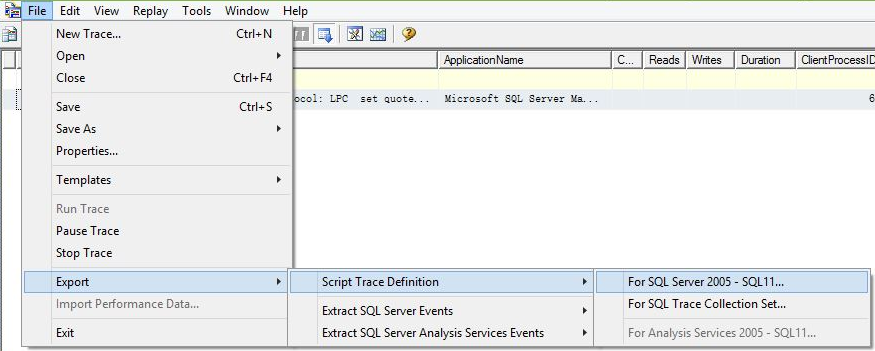
导出的脚本如下,不能直接使用,必须修改一处代码:在创建Trace时,指定存储追踪数据的文件(File) 或 关系表(Table),仅此而已。
-- Create a Queue

declare @rc int

declare @TraceID int

declare @maxfilesize bigint

set @maxfilesize = 5

-- Client side File and Table cannot be scripted

exec @rc = sp_trace_create @TraceID output, 0, N'InsertFileNameHere', @maxfilesize, NULL

if (@rc != 0) goto error

-- Set the events

declare @on bit

set @on = 1

exec sp_trace_setevent @TraceID, 14, 1, @on

exec sp_trace_setevent @TraceID, 14, 9, @on

--delete many commands here ---

-- Set the Filters

declare @intfilter int

declare @bigintfilter bigint

exec sp_trace_setfilter @TraceID, 1, 0, 6, N'%drop%'

-- Set the trace status to start

exec sp_trace_setstatus @TraceID, 1

-- display trace id for future references

select TraceID=@TraceID

goto finish

error:

select ErrorCode=@rc

finish:

go
注:SQL Trace是被扩展事件取代的功能,在后续的版本中将会被移除,建议在以后的开发中使用扩展事件。
参考文档:
Server-wide Configuration Catalog Views (Transact-SQL)
SQL Server 默认跟踪(Default Trace)
SQL 追踪的更多相关文章
- 大商创 sql追踪 用户注册
用户注册sql追踪 用户注册数据表 sql语句分析 ', 'wzd222@qq.com', 'addf92072794a4b668f70815672ba5c8') 主要成分: user_name,mo ...
- SQL追踪器的安装和使用
SQL追踪器主要作用快速查出错误SQL语言.此工具能几秒钟追踪出sql 数据库操作,能几分钟内分析任意项目系统数据库表结构,瞬间无刷新测试.调试 php代码 第一步:下载 https://pan.ba ...
- 使用sql追踪
在会话层面使用sql追踪 1.查看sql追踪默认文件位置 2.设置trace文件名 alter session set tracefile_identifier='ymtrace001'; trace ...
- sql 追踪 神器
http://www.thinkphp.cn/download/690.html 一个中国人开发的php工具箱此工具能几秒钟追踪出sql 数据库操作, 能分析出 Thinkphp3.2 的任意sql ...
- 开启mysql sql追踪
my.ini [mysqld] # The next three options are mutually exclusive to SERVER_PORT below. # skip-network ...
- 大商创开通用户和店铺 sql追踪
添加用户(账号:wmy123 ,密码:wzd222,id:69)INSERT INTO `dsc1`.`dsc_users` (user_name,mobile_phone,email,passwor ...
- 大商创 sql追踪 卖家入驻
' ' ' ', '', '', '') ' Query ' Query ' Query ' Query ' Query ' Query ' Query ' Query ' Query ' Query ...
- Oracle之sql追踪
select * from v$sqlarea t where t.sql_text like '%_070%' order by t.LAST_ACTIVE_TIME desc SELECT * F ...
- 使用工具追踪Entity Framework生成的SQL
学习entity framework期间收集的文章,转自http://www.cnblogs.com/hiteddy/archive/2011/10/01/Difference_among_IQuer ...
随机推荐
- mysql processlist 线程状态
Analyzing 线程是对MyISAM 表的统计信息做分析(例如, ANALYZE TABLE ). checking permissions 线程是检查服务器是否具有所需的权限来执行该 ...
- Access restriction: The type BASE64Encoder is not accessible due to restriction on required library C:\Program Files\Java\jre6\lib\rt.jar
解决方案:在configure build path 中去掉 jre system library,然后重新加载jre system library.....
- vcenter server appliance(vcsa) 配置IP的方法
方法一: vcenter server appliance 5.1 及以后版本包括5.5,在安装完毕后,console界面是没有网络配置项的,如果需要进行IP配置,可以login后,输入命令yast( ...
- php linux 环境搭建
Apache源于NCSAhttpd服务器,经过多次修改,成为世界上最流行的Web服务器软件之一.Apache取自“a patchy server”的读音,意思是充满补丁的服务器,因为它是自由软件,所以 ...
- php 两个二维数组重组新数组,数组下标不同
Array ( [0] => Array ( [PosNum] => 27025008 [start_time] => 20180328164929 [type] => 0 ) ...
- 修改Centos7的网卡ens32 改为eth0
1. 修改网卡配置文件 vim /etc/sysconfig/network-scripts/ifcfg-eno16777984 修改下面两个配置项 NAME=ens32 DEVICE=ens32 改 ...
- Centos7 安装Nodejs
使用EPEL安装 EPEL(Extra Packages for Enterprise Linux)企业版Linux的额外软件包,是Fedora小组维护的一个软件仓库项目,为RHEL/CentOS提供 ...
- Android Fragment(三)ListFragment简单介绍以及Fragment之间通信
一.Fragment通信简单介绍:Fragments之间是不能够直接通信的,他们之间的通信是通过Activity这个中间件来通信的, 为了让Fragment跟它的Activity通信,我们可以在Fra ...
- Hadoop大数据平台构建
基础:linux常用命令.Java编程基础大数据:科学数据.金融数据.物联网数据.交通数据.社交网络数据.零售数据等等. Hadoop: 一个开源的分布式存储.分布式计算平台.(基于Apache) H ...
- 相亲神器记录Swift1.2
这个简单APP是用swfit1.2写的,主要重点是:1.点击键盘return键可退出键盘. 2.各个控件值的传递. Storyboard界面设计: View代码: import UIKit class ...