
Nmap结果文件XML文件解析
对nmap扫描结果xml格式的文件进行解析,无需直接xml解析或读取,可直接使用模块:
1.nmapparser
安装:pip install nmapparser
Demo:
#!/usr/bin/env python
# Copyright (C) 2007 Guilherme Polo <ggpolo@gmail.com>
#
# This program is free software; you can redistribute it and/or modify
# it under the terms of the GNU General Public License as published by
# the Free Software Foundation; either version 2 of the License, or
# (at your option) any later version.
#
# This program is distributed in the hope that it will be useful,
# but WITHOUT ANY WARRANTY; without even the implied warranty of
# MERCHANTABILITY or FITNESS FOR A PARTICULAR PURPOSE. See the
# GNU General Public License for more details.
#
# You should have received a copy of the GNU General Public License
# along with this program; if not, write to the Free Software
# Foundation, Inc., 59 Temple Place, Suite 330, Boston, MA 02111-1307
# USA
"""
A demo script showing how to use nmapparser.
""" import sys
import re
from nmapparser import NmapParser def usage():
"""Show demo usage."""
print "Usage: %s xmlfile1.xml xmlfile2.xml ..." % __file__ def getaddress(str):
reg=u"addr': '(.*?)'}"
lister=re.compile(reg)
mylist=re.findall(lister,str)
#print mylist
return mylist[0] def main(args):
parser = NmapParser()
for xmlf in sys.argv[1:]:
print "%s\nParsing %s" % ('*' * 75, xmlf)
parser.parse(xmlf) if not parser.parsed:
continue print "Options:", parser.options
print "Finish time:", parser.runstats.finished.time h_stats = parser.runstats.hosts
print "Hosts -> total %s, up: %s, down: %s" % (
h_stats.total, h_stats.up, h_stats.down) for host in parser.host:
print "Host options:", host.options if 'extraports' in host.options:
print "Host extraports:", host.ports.extraports print "Hostname:", host.hostnames
print "HostIp:", getaddress(str(host.address)) if 'ports' not in host.options or \
'ports' not in host.ports.options:
continue if 'script' in host.ports.ports[0].options:
print host.ports.ports[0].script[0].output
print print "Host ports info:"
for p in host.ports.ports:
print "%20s%7s%9s%6s" % (getaddress(str(host.address)),p.portid, p.state, p.protocol) if __name__ == "__main__":
if len(sys.argv) < 2:
sys.exit(usage())
main(sys.argv)
解析:
demo.py *.xml
结果输出:
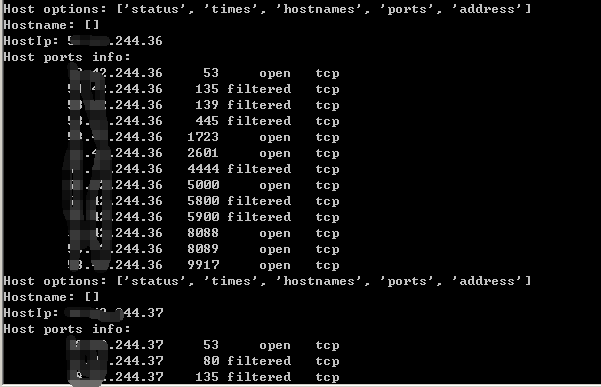
2.python-libnmap
安装:
pip install python-libnmap //copyright AnYun.ORG
Demo:
#!/usr/bin/env python

import argparse

from libnmap.process import NmapProcess

from libnmap.parser import NmapParser, NmapParserException

def parse_args():

    ''' Create the arguments '''

    parser = argparse.ArgumentParser()

    parser.add_argument("-x", "--nmapxml", help="Nmap XML file to parse")

    parser.add_argument("-l", "--hostlist", help="Host list file")

    return parser.parse_args()

def report_parser(report):

    ''' Parse the Nmap XML report '''

    for host in report.hosts:

        ip = host.address

        if host.is_up():

            hostname = 'N/A'

            # Get the first hostname (sometimes there can be multi)

            if len(host.hostnames) != 0:

                hostname = host.hostnames[0]

            print '[*] {0} - {1}'.format(ip, hostname)

            # Get the port and service

            # objects in host.services are NmapService objects

            for s in host.services:

                # Check if port is open

                if s.open():

                    serv = s.service

                    port = s.port

                    ban = s.banner

                    # Perform some action on the data

                    print_data(ip, port, serv, ban)

def print_data(ip, port, serv, ban):

    ''' Do something with the nmap data '''

    if ban != '':

        ban = ' -- {0}'.format(ban)

    print ip,port,serv,ban

    #print '    {0}: {1}{2}'.format(port, serv, ban)

    #print '    {0}: {1}{2}'.format(port, serv, ban)

def main():

    args = parse_args()

    report = NmapParser.parse_fromfile(args.nmapxml)

    report_parser(report)

main()
解析:
nmap-parser-dome.py -x *.xml
结果输出:
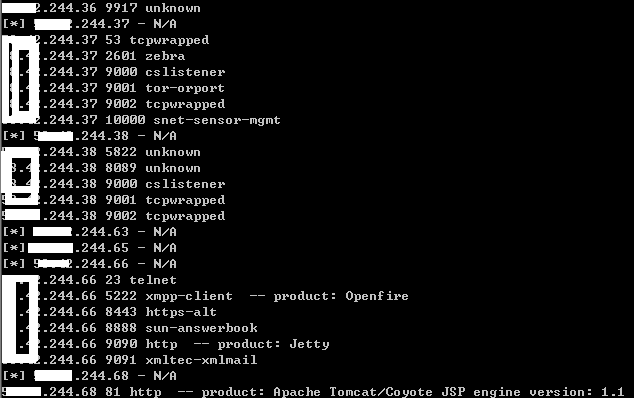
以上能基本解析了XML文件内容,若有其他需求,可参照修改偷懒
Nmap结果文件XML文件解析的更多相关文章
- Adobe AIR对本地文件(XML文件)的操作
引用:http://addiwang.blog.163.com/blog/static/118130772011221114230288/ Air的文件操做主要涉及两个类,FIle和FileStrea ...
- JAVA使用SAX解析XML文件
在我的另一篇文章(http://www.cnblogs.com/anivia/p/5849712.html)中,通过一个例子介绍了使用DOM来解析XML文件,那么本篇文章通过相同的XML文件介绍如何使 ...
- 利用oxygen编辑并生成xml文件,并使用JAVA的JAXB技术完成xml的解析
首先下载oxygen软件(Oxygen XML Editor),目前使用的是试用版(可以安装好软件以后get trial licence,获得免费使用30天的权限,当然这里鼓励大家用正版软件!!!) ...
- 使用DOM解析XML文件,、读取xml文件、保存xml、增加节点、修改节点属性、删除节点
使用的xml文件 <?xml version="1.0" encoding="GB2312" ?> <PhoneInfo> <Br ...
- python 常用包之xml文件处理
1,处理xml的包 from xml.etree import ElementTree as ET 2,如何写出xml文件 xml文件和html中的元素很像,有父级子集之说, root = ET.El ...
- xml文件读取到数据库
xml文件读取到数据库 第一步,导包 c3p0,dom4j,jaxen,MySQL-connector 第二步 xml文件,config文件 第三步 javabean 第四步 c3p0的工具类 ...
- python读写xml文件
python读取xml文件 xml文件是具有树状结构的,如果想要访问某个叶子结点,必须逐层获取其父结点,要读取某个叶子结点内容用text成员 使用前先加载xml工具包 try: import xml. ...
- Spring-Batch将CSV文件转为XML文件
1 介绍 用Spring Batch实现一个简单的需求,将csv文件转换成xml文件. csv文件如下:record.csv username, user_id, transaction_date, ...
- Android 解析XML文件和生成XML文件
解析XML文件 public static void initXML(Context context) { //can't create in /data/media/0 because permis ...
随机推荐
- JDBC连接数据库,结合DbUtil数据库连接工具类的使用
(以Mysql数据库为例) 第一步:在项目里配置数据库驱动 Build Path->configure Build Path ->Add Exteral JARs 将JDBC驱动包导 ...
- MySQL查询表的所有列名,用逗号拼接
问题场景 在MySQL中,需要以逗号拼接一个表的所有字段 sql语句 SELECT GROUP_CONCAT(COLUMN_NAME SEPARATOR ",") FROM inf ...
- cocos设置 相机矩阵和投影矩阵 源码浅析
在cocos中,最后设置视口大小,相机矩阵,裁剪矩阵是在setProjection方法中,源码如下: void Director::setProjection(Projection projectio ...
- solr 打分和排序机制(转载)
以下来自solr in action. 包含: 词项频次.查询词项出现在当前查询文档中的次数. 反向文档频次.查询词项出现在所有文档总的次数. 此项权重. 标准化因子: 字段规范: 文档权重. 字段权 ...
- shell脚本选择LOG里面特定的行,生成新文件并rsync上传
rsync.sh #!/bin/bash tool_path=$(cd `dirname $`; pwd) eval `cat ${tool_path}/conf.properties` rsync_ ...
- oracle常用加解密函数
md5 CREATE OR REPLACE FUNCTION MD5( passwd IN VARCHAR2) RETURN VARCHAR2 IS retval varchar2(32); BEGI ...
- java正则表达式替换空格和换行符
public class StringUtil { public static String getStringNoBlank(String str) { if(s ...
- Ajax总结一下
一.什么是Ajax Ajax(Asynchronous JavaScript and XML),可以理解为JavaScript执行异步网络请求.通俗的理解的话就是,如果没有Ajax技术,改变网页的一小 ...
- 运行vbs脚本
VBS是基于Visual Basic的脚本语言. VBS的全称是:Microsoft Visual Basic Script Edition.(微软公司可视化BASIC脚本版). 其语言类似Visua ...
- MySQL----ERROR 1071 (42000): Specified key was too long; max key length is 767 bytes
1.问题描述 在导入同事提供的一个sql文件时候,出现了一个1071错误,总结学习一下: 2.分析问题 错误的字面意思是说mysql字段设置的值太长了,不能大于767个字节,在网上找了一些资料后才知道 ...