
Nmap结果文件XML文件解析
对nmap扫描结果xml格式的文件进行解析,无需直接xml解析或读取,可直接使用模块:
1.nmapparser
安装:pip install nmapparser
Demo:
#!/usr/bin/env python
# Copyright (C) 2007 Guilherme Polo <ggpolo@gmail.com>
#
# This program is free software; you can redistribute it and/or modify
# it under the terms of the GNU General Public License as published by
# the Free Software Foundation; either version 2 of the License, or
# (at your option) any later version.
#
# This program is distributed in the hope that it will be useful,
# but WITHOUT ANY WARRANTY; without even the implied warranty of
# MERCHANTABILITY or FITNESS FOR A PARTICULAR PURPOSE. See the
# GNU General Public License for more details.
#
# You should have received a copy of the GNU General Public License
# along with this program; if not, write to the Free Software
# Foundation, Inc., 59 Temple Place, Suite 330, Boston, MA 02111-1307
# USA
"""
A demo script showing how to use nmapparser.
""" import sys
import re
from nmapparser import NmapParser def usage():
"""Show demo usage."""
print "Usage: %s xmlfile1.xml xmlfile2.xml ..." % __file__ def getaddress(str):
reg=u"addr': '(.*?)'}"
lister=re.compile(reg)
mylist=re.findall(lister,str)
#print mylist
return mylist[0] def main(args):
parser = NmapParser()
for xmlf in sys.argv[1:]:
print "%s\nParsing %s" % ('*' * 75, xmlf)
parser.parse(xmlf) if not parser.parsed:
continue print "Options:", parser.options
print "Finish time:", parser.runstats.finished.time h_stats = parser.runstats.hosts
print "Hosts -> total %s, up: %s, down: %s" % (
h_stats.total, h_stats.up, h_stats.down) for host in parser.host:
print "Host options:", host.options if 'extraports' in host.options:
print "Host extraports:", host.ports.extraports print "Hostname:", host.hostnames
print "HostIp:", getaddress(str(host.address)) if 'ports' not in host.options or \
'ports' not in host.ports.options:
continue if 'script' in host.ports.ports[0].options:
print host.ports.ports[0].script[0].output
print print "Host ports info:"
for p in host.ports.ports:
print "%20s%7s%9s%6s" % (getaddress(str(host.address)),p.portid, p.state, p.protocol) if __name__ == "__main__":
if len(sys.argv) < 2:
sys.exit(usage())
main(sys.argv)
解析:
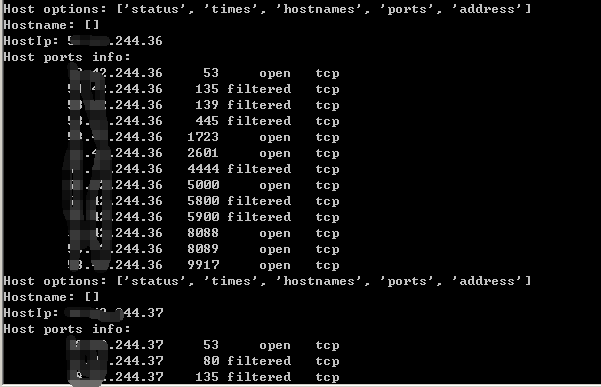
demo.py *.xml
结果输出:
2.python-libnmap
安装:
pip install python-libnmap //copyright AnYun.ORG
Demo:
#!/usr/bin/env python

import argparse

from libnmap.process import NmapProcess

from libnmap.parser import NmapParser, NmapParserException

def parse_args():

    ''' Create the arguments '''

    parser = argparse.ArgumentParser()

    parser.add_argument("-x", "--nmapxml", help="Nmap XML file to parse")

    parser.add_argument("-l", "--hostlist", help="Host list file")

    return parser.parse_args()

def report_parser(report):

    ''' Parse the Nmap XML report '''

    for host in report.hosts:

        ip = host.address

        if host.is_up():

            hostname = 'N/A'

            # Get the first hostname (sometimes there can be multi)

            if len(host.hostnames) != 0:

                hostname = host.hostnames[0]

            print '[*] {0} - {1}'.format(ip, hostname)

            # Get the port and service

            # objects in host.services are NmapService objects

            for s in host.services:

                # Check if port is open

                if s.open():

                    serv = s.service

                    port = s.port

                    ban = s.banner

                    # Perform some action on the data

                    print_data(ip, port, serv, ban)

def print_data(ip, port, serv, ban):

    ''' Do something with the nmap data '''

    if ban != '':

        ban = ' -- {0}'.format(ban)

    print ip,port,serv,ban

    #print '    {0}: {1}{2}'.format(port, serv, ban)

    #print '    {0}: {1}{2}'.format(port, serv, ban)

def main():

    args = parse_args()

    report = NmapParser.parse_fromfile(args.nmapxml)

    report_parser(report)

main()
解析:
nmap-parser-dome.py -x *.xml
结果输出:
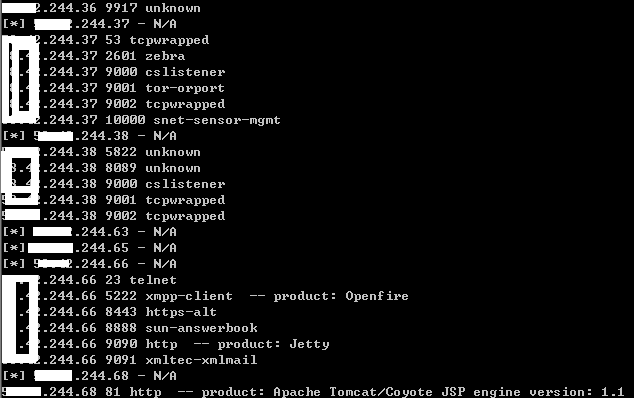
以上能基本解析了XML文件内容,若有其他需求,可参照修改偷懒
Nmap结果文件XML文件解析的更多相关文章
- Adobe AIR对本地文件(XML文件)的操作
引用:http://addiwang.blog.163.com/blog/static/118130772011221114230288/ Air的文件操做主要涉及两个类,FIle和FileStrea ...
- JAVA使用SAX解析XML文件
在我的另一篇文章(http://www.cnblogs.com/anivia/p/5849712.html)中,通过一个例子介绍了使用DOM来解析XML文件,那么本篇文章通过相同的XML文件介绍如何使 ...
- 利用oxygen编辑并生成xml文件,并使用JAVA的JAXB技术完成xml的解析
首先下载oxygen软件(Oxygen XML Editor),目前使用的是试用版(可以安装好软件以后get trial licence,获得免费使用30天的权限,当然这里鼓励大家用正版软件!!!) ...
- 使用DOM解析XML文件,、读取xml文件、保存xml、增加节点、修改节点属性、删除节点
使用的xml文件 <?xml version="1.0" encoding="GB2312" ?> <PhoneInfo> <Br ...
- python 常用包之xml文件处理
1,处理xml的包 from xml.etree import ElementTree as ET 2,如何写出xml文件 xml文件和html中的元素很像,有父级子集之说, root = ET.El ...
- xml文件读取到数据库
xml文件读取到数据库 第一步,导包 c3p0,dom4j,jaxen,MySQL-connector 第二步 xml文件,config文件 第三步 javabean 第四步 c3p0的工具类 ...
- python读写xml文件
python读取xml文件 xml文件是具有树状结构的,如果想要访问某个叶子结点,必须逐层获取其父结点,要读取某个叶子结点内容用text成员 使用前先加载xml工具包 try: import xml. ...
- Spring-Batch将CSV文件转为XML文件
1 介绍 用Spring Batch实现一个简单的需求,将csv文件转换成xml文件. csv文件如下:record.csv username, user_id, transaction_date, ...
- Android 解析XML文件和生成XML文件
解析XML文件 public static void initXML(Context context) { //can't create in /data/media/0 because permis ...
随机推荐
- lock和Monitor(锁对象)
Monitor对象 1.Monitor.Enter(object)方法是获取锁,Monitor.Exit(object)方法是释放锁,这就是Monitor最常用的两个方法,当然在使用过程中为了避免获取 ...
- 用最通俗的话解释AJAX是什么东西
直白地说,就是没用AJAX的网页,你点一个按钮就要刷新一下页面,尽管新页面上只有一行字和当前页面不一样,但你还是要无聊地等待页面刷新. 用了AJAX之后,你点击,然后页面上的一行字就变化了,页面本身不 ...
- 【Unix网络编程】chapter5TCP回射服务器程序
chapter5 5.1 概述 5.2 TCP回射服务器程序:main函数 int main(int argc, char **argv) { int listenfd,connfd; pid_t ...
- Tomcat+Nginx+Redis+MySQL实现反向代理、负载均衡、session共享
一.环境准备 时间同步 关闭防火墙 联通网络,配置yum源 软件包链接:https://pan.baidu.com/s/1qYbtpnQ 二.安装nginx 1.解决依赖关系 [root@nginx- ...
- python项目入门之 安装、创建
3年前接触python,那时候还是文本格式进行学习,但是由于一直没有项目实践,所以就搁浅了 今天,python如火如荼,适用于人工智能等多领域,已经成为了语言界的翘楚 python有非常多的优点,开源 ...
- Angularjs中的Controller
概念:一个应用(APP,本身也是一个大模块)是由若干个模块(module)组成的,每个模块实现一个功能.利于代码的复用. 书写格式: <!DOCTYPE html> <html ng ...
- 在linux环境下mongodb的安装和启动
安装 下载mongodb的版本,两点注意 根据业界规则,偶数为稳定版,如1.6.X,奇数为开发版,如1.7.X 32bit的mongodb最大只能存放2G的数据,64bit就没有限制 到官网,选择合适 ...
- ROS进阶学习笔记(10)- 搭建自己的Turtlebot(5) - Interactive Makers
用interactive_makers控制Turtlebot移动 interactive_makers 是Willow Garage公司开发的一个虚拟控制工具,可通过鼠标在虚拟环境中的操作,完成实际机 ...
- 解决Cell重用问题
在显示的过程中,出现了内容重叠的问题,其实就是UITableViewCell重用机制的问题. 解决方法一:对在cell中添加的控件设置tag的方法 在cell的contentView上需要添加控件,那 ...
- IDEA Maven项目 编译的问题
IDEA中,点击项目的maven插件的 compile: 出现: [INFO] ------------------------------------------------------------ ...