
sklearn6_生成分类数据
python机器学习-乳腺癌细胞挖掘(博主亲自录制视频)
https://study.163.com/course/introduction.htm?courseId=1005269003&utm_campaign=commission&utm_source=cp-400000000398149&utm_medium=share
生成2类数据
n_features :特征个数= n_informative() + n_redundant + n_repeated
n_informative:多信息特征的个数
n_redundant:冗余信息,informative特征的随机线性组合
n_repeated :重复信息,随机提取n_informative和n_redundant 特征
n_classes:分类类别
n_clusters_per_class :某一个类别是由几个cluster构成的
from sklearn import preprocessing

import numpy as np

#生成分类数据的分类器

from sklearn.datasets.samples_generator import make_classification

#自动生成训练数据和测试数据

from sklearn.cross_validation import train_test_split

#导入支持向量模型

from sklearn.svm import SVC

import matplotlib.pyplot as plt

x,y=make_classification(n_samples=300,n_features=2,n_redundant=0,n_informative=2,random_state=22,n_clusters_per_class=1,scale=100)

#c=y表示color为黄色

plt.scatter(x[:,0],x[:,1],c=y)

plt.show()

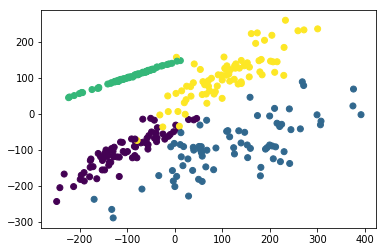
生成4类数据
# -*- coding: utf-8 -*-

"""

Created on Sun Jan  7 15:54:56 2018

@author: Administrator

"""

from sklearn import preprocessing

import numpy as np

#生成分类数据的分类器

from sklearn.datasets.samples_generator import make_classification

#自动生成训练数据和测试数据

from sklearn.cross_validation import train_test_split

#导入支持向量模型

from sklearn.svm import SVC

import matplotlib.pyplot as plt

#n_classes=4生成4类数据

x,y=make_classification(n_classes=4,n_samples=300,n_features=2,n_redundant=0,n_informative=2,random_state=22,n_clusters_per_class=1,scale=100)

#c=y表示color为黄色

plt.scatter(x[:,0],x[:,1],c=y)

plt.show()
# -*- coding: utf-8 -*-

"""

Created on Sun Jan  7 16:51:38 2018

@author: Administrator

"""

import matplotlib.pyplot as plt

from sklearn.datasets import make_classification

from sklearn.datasets import make_blobs

from sklearn.datasets import make_gaussian_quantiles

from sklearn.datasets import make_hastie_10_2

plt.figure(figsize=(8, 8))

plt.subplots_adjust(bottom=.05, top=.9, left=.05, right=.95)

plt.subplot(421)

plt.title("One informative feature, one cluster per class", fontsize='small')

X1, Y1 = make_classification(n_samples=1000,n_features=2, n_redundant=0, n_informative=1,

                             n_clusters_per_class=1)

plt.scatter(X1[:, 0], X1[:, 1], marker='o', c=Y1)

plt.subplot(422)

plt.title("Two informative features, one cluster per class", fontsize='small')

X1, Y1 = make_classification(n_samples=1000,n_features=2, n_redundant=0, n_informative=2,

                             n_clusters_per_class=1)

plt.scatter(X1[:, 0], X1[:, 1], marker='o', c=Y1)

plt.subplot(423)

plt.title("Two informative features, two clusters per class", fontsize='small')

X2, Y2 = make_classification(n_samples=1000,n_features=2, n_redundant=0, n_informative=2)

plt.scatter(X2[:, 0], X2[:, 1], marker='o', c=Y2)

plt.subplot(424)

plt.title("Multi-class, two informative features, one cluster",

          fontsize='small')

X1, Y1 = make_classification(n_samples=1000,n_features=2, n_redundant=0, n_informative=2,

                             n_clusters_per_class=1, n_classes=3)

plt.scatter(X1[:, 0], X1[:, 1], marker='o', c=Y1)

plt.subplot(425)

plt.title("Three blobs", fontsize='small')

X1, Y1 = make_blobs(n_samples=1000,n_features=2, centers=3)

plt.scatter(X1[:, 0], X1[:, 1], marker='o', c=Y1)

plt.subplot(426)

plt.title("Gaussian divided into four quantiles", fontsize='small')

X1, Y1 = make_gaussian_quantiles(n_samples=1000,n_features=2, n_classes=4)

plt.scatter(X1[:, 0], X1[:, 1], marker='o', c=Y1)

plt.subplot(427)

plt.title("hastie data ", fontsize='small')

X1, Y1 = make_hastie_10_2(n_samples=1000)

plt.scatter(X1[:, 0], X1[:, 1], marker='o', c=Y1)

plt.show()

# -*- coding: utf-8 -*-

"""

Created on Sun Jan  7 16:29:35 2018

@author: Administrator

"""

import matplotlib.pyplot as plt

from sklearn.datasets import make_classification

from sklearn.datasets import make_blobs

from sklearn.datasets import make_gaussian_quantiles

from sklearn.datasets import make_hastie_10_2

#画布的大小为长20cm高20cm

plt.figure(figsize=(15,10))

#标题,fontsize为标题字体大小

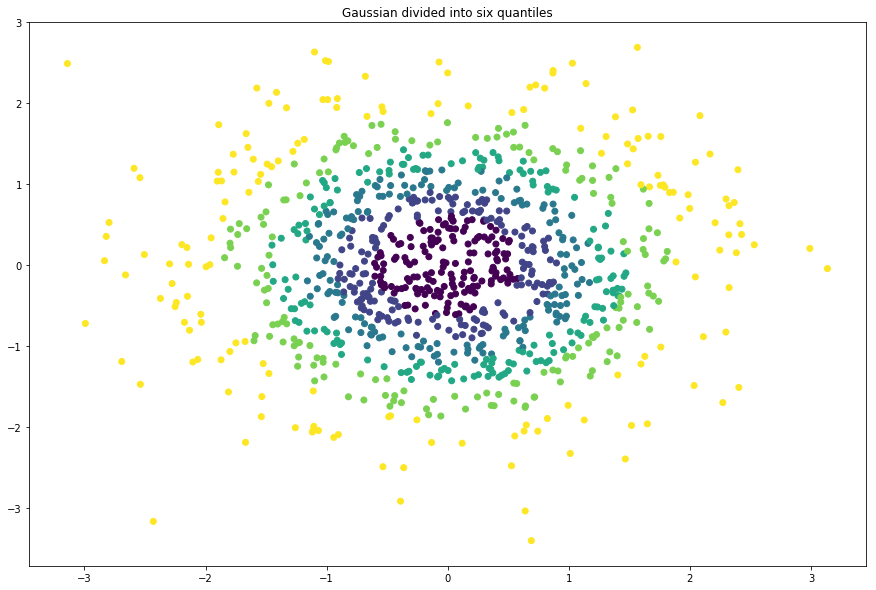
plt.title("Gaussian divided into six quantiles", fontsize='large')

X1, Y1 = make_gaussian_quantiles(n_samples=1000,n_features=2, n_classes=6)

#绘制点,X1[:, 0]为点的x列表值, X1[:, 1]为点的y列表值, c=Y1表示颜色,c为color缩写

plt.scatter(X1[:, 0], X1[:, 1], marker='o', c=Y1)
# -*- coding: utf-8 -*-

"""

Created on Sun Jan  7 16:51:38 2018

@author: Administrator

"""

from sklearn.datasets import make_circles

from sklearn.datasets import make_moons

import matplotlib.pyplot as plt

import numpy as np

#画布的大小为长20cm高20cm

plt.figure(figsize=(15,10))

fig=plt.figure(1)

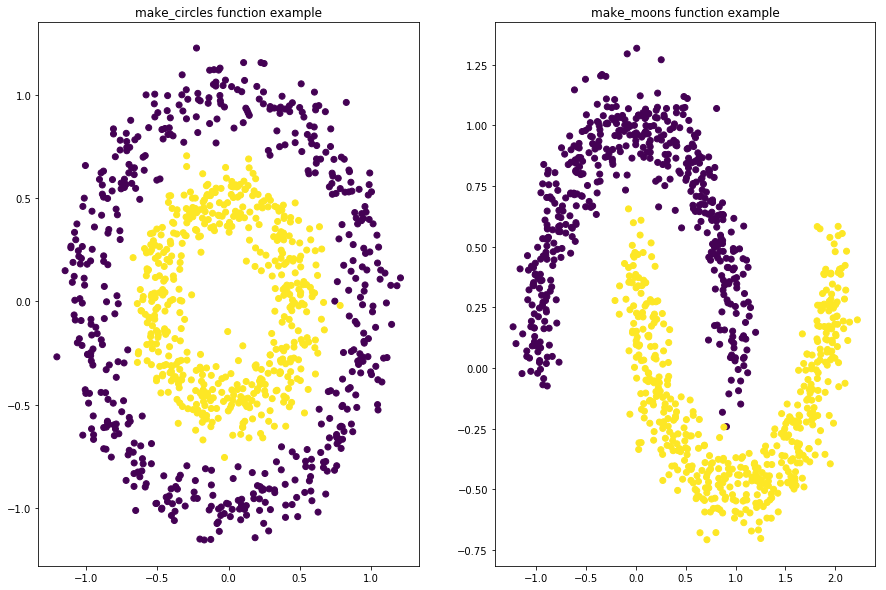
x1,y1=make_circles(n_samples=1000,factor=0.5,noise=0.1)

plt.subplot(121)

plt.title('make_circles function example')

plt.scatter(x1[:,0],x1[:,1],marker='o',c=y1)

plt.subplot(122)

x1,y1=make_moons(n_samples=1000,noise=0.1)

plt.title('make_moons function example')

plt.scatter(x1[:,0],x1[:,1],marker='o',c=y1)

plt.show()
https://study.163.com/provider/400000000398149/index.htm?share=2&shareId=400000000398149( 欢迎关注博主主页,学习python视频资源,还有大量免费python经典文章)
sklearn6_生成分类数据的更多相关文章
- Python之机器学习-sklearn生成随机数据
sklearn-生成随机数据 import numpy as np import pandas as pd import matplotlib.pyplot as plt from matplotli ...
- 无限级分类及生成json数据
第一步,先去数据库查询类别数据,然后交给生成json数据的函数处理,代码如下: /*生成类别JSON数据*/ public function wirteJson(){ $dataInfo = \thi ...
- SAP QA32 做使用决策系统报错:分类数据的不一致性=>交易终止
SAP QA32 做使用决策系统报错:分类数据的不一致性=>交易终止 QA32,对如下检验批做处理,系统报错, 试图使用MSC3N去显示这个批次主数据,同样报错, 原因在于批次的分类数据产生后, ...
- flask实战-个人博客-数据库-生成虚拟数据 --
3.生成虚拟数据 为了方便编写程序前台和后台功能,我们在创建数据库模型后就编写生成虚拟数据的函数. 1)管理员 用于生成虚拟管理员信息的fake_admin()函数如下所示: personalBlog ...
- Enterprise Solution 生成实体数据访问接口与实现类型 Code Smith 6.5 模板文件下载
数据库表定义为SalesOrder,用LLBL Gen Pro生成的实体定义是SalesOrderEntity,再用Code Smith生成的数据读写接口是ISalesOrderManager,最后是 ...
- 改用C++生成自动化数据表
改用C++生成自动化数据表 前面的文章中,我们讨论了使用一个基于.NET的第三方程序库来从程序中来生成数据表.在我看来,这整个思路是非常有用的,例如为显示测试结果.我经常会自己在博客中尝试各种像这样的 ...
- SQL Server中公用表表达式 CTE 递归的生成帮助数据,以及递归的典型应用
本文出处:http://www.cnblogs.com/wy123/p/5960825.html 我们在做开发的时候,有时候会需要一些帮助数据,必须需要连续的数字,连续间隔的时间点,连续的季度日期等等 ...
- 公用表表达式(CTE)递归的生成帮助数据
本文的作者辛苦了,版权问题特声明本文出处:http://www.cnblogs.com/wy123/p/5960825.html 工作有时候会需要一些帮助数据,必须需要连续的数字,连续间隔的时间点,连 ...
- TreeView递归绑定无限分类数据
TreeView递归绑定无限分类数据 实现一个动态绑定,无限级分类数据时,需要将数据绑定到TreeView控件,分类表的结构是这样的: 字段 类型 Id int ParentId int Name N ...
随机推荐
- VS Code使用Git管理代码
Visual Studio Code(简称VS Code)是一个轻量级且强大的代码编辑器,后台是微软,支持Windows.Mac和Linux操作系统,拥有丰富的插件生态系统,可通过安装插件来支持C++ ...
- 8、Dockerfile介绍和最佳实践
一.Dockerfile 概念 1.Dockerfile是什么 Docker 镜像是一个特殊的文件系统,除了提供容器运行时所需的程序.库.资源.配置等文件外,还包含了一些为运行时准备的一些配置参数(如 ...
- Json和Map互转,四个包(org.json/net.sf.json/com.google.gson/com.alibaba.fastjson)
目前使用的(org.json/net.sf.json/com.google.gson/com.alibaba.fastjson)这四种json-map互转,其他的以后在补充.............. ...
- unity纯粹物理驱动方式
首先见官方文档 In most cases you should not modify the velocity directly, as this can result in unrealistic ...
- sql注入语句整理
1.判断有无注入点; and 1=1 and 1=2 2.猜表一般的表的名称无非是admin adminuser user pass password 等..and 0<>(select ...
- 20135220谈愈敏Blog3_构造一个简单的Linux系统MenuOS
构造一个简单的Linux系统MenuOS 谈愈敏 原创作品转载请注明出处 <Linux内核分析>MOOC课程 http://mooc.study.163.com/course/USTC-1 ...
- 《Linux内核分析》第四周:扒开系统调用的三层皮
杨舒雯 原创作品转载请注明出处 <Linux内核分析>MOOC课程http://mooc.study.163.com/course/USTC-1000029000 " 一. 用户 ...
- Sprint计划会议内容
项目名称:蹭课神器 会议内容 首先我们讨论了项目的工作量及实施流程 一.工作认领 二.界面的总体规划 三.主要功能的设计 四.设计数据库 五.编写项目报告 六.软件测试和推广 然后我们进行了工作认领, ...
- JAVA面对对象(二)——继承、方法的覆写
1.继承就是基于已存在的类构造一个新类,继承已存在的类就能复用类的方法和属性,并且能够添加新的方法和属性.也就是子类和父类 2.一个父类可以拥有多个子类,一个子类只允许有一个父类 3.用extends ...
- ELK Stack (2) —— ELK + Redis收集Nginx日志
ELK Stack (2) -- ELK + Redis收集Nginx日志 摘要 使用Elasticsearch.Logstash.Kibana与Redis(作为缓冲区)对Nginx日志进行收集 版本 ...