
Getting started with C# and GDAL
Getting started with C# and GDAL
http://vipassanaandenvironmentalinformatics.blogspot.jp/2013/03/getting-started-with-c-and-gdal.html
转自。
http://www.gisremotesensing.com/2017/01/code-snippet-create-new-field-in-shape.html
http://www.gisremotesensing.com/2015/10/read-esri-file-gdodatabase-filegdb.html
http://www.gisremotesensing.com/2015/09/read-raster-block-by-block-using-gdal.html
http://www.gisremotesensing.com/2015/09/read-raster-file-into-array-using-c-and.html
http://www.gisremotesensing.com/2016/12/esri-featureclass-vs-feature-layer.html
http://www.gisremotesensing.com/2015/10/enable-esri-arcgis-extension-licence.html
http://www.gisremotesensing.com/2015/09/feature-to-raster-conversion-using-c.html
http://www.gisremotesensing.com/2015/09/vector-to-raster-conversion-using-gdal-c.html
http://www.gisremotesensing.com/2015/07/building-arcmaps-add-in-using-command.html
http://www.gisremotesensing.com/2015/09/vector-to-raster-conversion-using-gdal-c.html
- Download the latest version of the precompiled GDAL binaries from here. Choose the ones that suit your system (32bit or 64bit). Extract the contents from the zip file to a location on your hard disk e.g. C:\Program Files\GDAL (I ran into a number of AccessViolationExceptions when I used the binaries from FWTools 2.4.7).
- Include both the path to C:\Program Files\GDAL\bin\gdal\csharp as well as C:\Program Files\GDAL\bin in your PATH system variable.
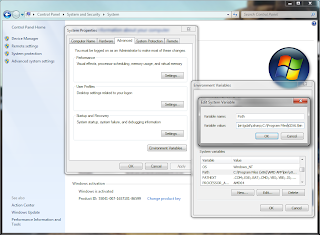 |
| Setting of the PATH variable |
- On http://svn.osgeo.org/gdal/trunk/gdal/swig/csharp/apps/ you will find sample C#-classes that use the GDAL-bindings. In the following I will use GDALInfo.cs as an example. Create a C# Console Application project that uses the file GDALInfo.cs.
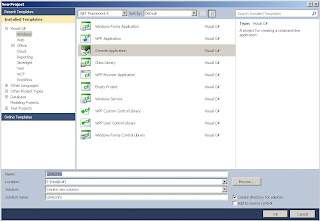 |
| Creating a Console Application (VS 2010) |
- Add four of.the dll-files that can can be found at C:\Program Files\GDAL\bin\gdal\csharp (or wherever your installation path of the current binaries is) to your project references: gdal_csharp.dll, gdalconst_csharp.dll,ogr_csharp.dll and osr_csharp.
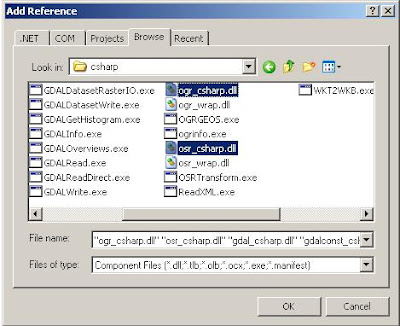 |
| Adding necessary references (VS 2010) |
- Build the solution. If you are on a 64bit system and you are using the 64bit GDAL binaries you have to make sure you actually build for 64bit (you will get errors otherwise when you try to run the program).
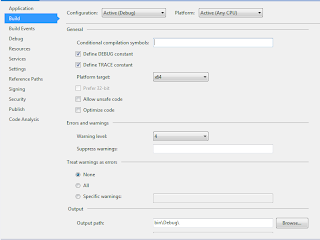 |
| Setting of the platform target for 64bit (VS 2012) |
- Now you can run the program with some data. Include a reference to one of the raster files in the Command line arguments field of your Debug options (in the properties of your GDALInfo project; don't forget to put the path inside double quotes of it includes blanks).
- Run the program (Ctrl-F5). It should show you something similar to the following:
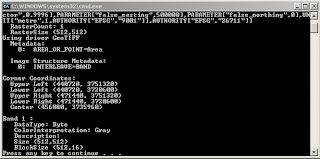 |
| Output of GDALInfo |
That's it. Now you can use the other example C#-programs to open, copy, manipulate raster data in variety of file formats. For some of the other example files it is necessary to add some additional references (e.g. System.Drawing).
Getting started with C# and GDAL的更多相关文章
- GDAL生成Erdas Imagine
GDAL原生支持超过100种栅格数据类型,涵盖所有主流GIS与RS数据格式,包括• ArcInfo grids, ArcSDE raster, Imagine, Idrisi, ENVI, GRAS ...
- QGis、Gdal本地中文路径问题
编译qgis完整项目后,由于Gdal库的原因,中文路径下通过添加矢量数据中数据库中是没有OGR的Oracle数据库功能的: 最开始打算通过重新编译gadl库从内部支持中文的(有成功的麻烦也请告诉我), ...
- VS2015下编译64位GDAL总结
使用VS2015编译最新的64位GDAL(最新gdal2.11),确实有一些问题,看来双方还是太新了,有点不兼容,特总结如下. 以前经常用的通过VisualStudio IDE进行编译的方式现在似乎不 ...
- VS2010和opencv-2.4.10、GDAL
系统环境:win10 64位 本文只限于学习交流,商业用途请支持正版! 转载请注明:转载请注明http://www.cnblogs.com/mxbs/p/6206060.html 2016 ...
- VS2012配置OpenCV、GDAL开发环境
VS2012和opencv-2.4.10 第一步:配置之前的准备工作. 完成VS2012的安装,以及opencv-2.4.10的下载和文件提取, 双击此文件,设置文件路径,即可得到提取文件,提取后的文 ...
- 编译带有PROJ4和GEOS模块的GDAL
1.下载三个软件的源代码(去各自官网下载即可) 2.将PROJ4和GEOS的源码放到GDAL目录下的supportlibs文件夹中. 3.修改GDAL的nmake.opt文件,部分内容如下: # Un ...
- Java 使用GDAL 读写 shapefile
读取shp文件,并把它转化为json import org.gdal.ogr.*; import org.gdal.ogr.Driver; import org.gdal.gdal.*; public ...
- GDAL C# 开发出现的异常
在使用开发C#下的GDAL时,编译时正确. 在执行 Gdal.AllRegister(); 出现异常:OSGeo.GDAL.GdalPINVOKE”的类型初始值设定项引发异常. 解决方案: 编译正常, ...
- GDAL关于读写图像的简明总结
读写影像可以说是图像处理最基础的一步.关于使用GDAL读写影像,平时也在网上查了很多资料,就想结合自己的使用心得,做做简单的总结. 在这里写一个例子:裁剪lena图像的某部分内容,将其放入到新创建的. ...
- Java maven安装GDAL
1. 使用编译好的安装jdal http://www.gisinternals.com/release.phpgdal-111-1800-x64-core.msi下载地址:http://downloa ...
随机推荐
- python 中的 metaclass
最遇到一个问题. class Meta(type): pass class M1(Meta): pass class M2(metaclass=M1): pass class Test(M2,meta ...
- PI接口无法使用.net4以上的解决方法:无法嵌入互操作类型“PISDKClass”。请改用适用的接口。
Interop type 'PISDKClass' cannot be embedded. Use the applicable interface instead. .net开发中,有时候在引用某些 ...
- ef 吐糟
方法:从dbcontext到objectcontext DbContext及其相关的API是EF4.1中一大新特性.简单说,DbContext就是之前EF的核心类ObjectContext的抽象封装. ...
- require的定义看不懂【2】
一段代码扔出来,前不着村后不着店的,各种全局变量 还有,现在还在纠结Id,url, 作者充其量也在写读书笔记,完全沿着自己思路走,也不管读者是否跟得上,这居然也能出书. 这一段,掌握源码,或者写过的人 ...
- maven使用配置
一.maven常用的命令 maven通过命令对工程进行编译.测试.打包.发布.运行(基本的顺序) mvn compile:编译 mvn clean:清理,将target下的class文件清理 mvn ...
- ghost之后仍然中病毒----与病毒的斗争
ghost之后仍然中病毒----与病毒的斗争我的电脑系统是XP,从来都没有安装任何杀毒软件,所有的软件都是安装在C盘的,感觉系统卡顿就用Windows一键还原(基于DOS下的ghost)还原一下,一直 ...
- 高CPU排查方法分享
1 软件性能较差,占用CPU较多,往往是由于某段代码逻辑算法不佳导致,那如何在数以千计的函数中找到问题函数呢?2 在使用!runaway命令比较不同时间各线程占用CPU时间,找到CPU时间增涨较多的线 ...
- 将字符串表示的IP地址转变为整形表示
当时面试上机的想法是,直接使用uint32_t变量来存ip地址,遍历字符串带".",然后去值,利用移位来将这个值填到uint32_t对应的位置上.这样的麻烦之处在于: 1,遍历字符 ...
- Js之事件循环(执行机制)
js的执行机制是事件循环 什么是事件循环? js引擎在执行代码时,首先会将同步代码加入到主线程中,异步代码会放到event table中注册回调函数, 当主线程空闲之后,event table中的回调 ...
- db2报错: [DB2/NT] SQL0952N 由于中断,处理被取消 SQLSTATE=57014
DB2被中断,报错: [DB2/NT] SQL0952N 由于中断,处理被取消 SQLSTATE=57014 在DB2的开发过程中,今日运行了一个执行时间较为长的sql语句.使用DB2服务端的控制台 ...