
MetaMask/Website
https://github.com/MetaMask/Website
将这个包下载下来之后运行npm install出现下面的问题
gyp: No Xcode or CLT version detected!
查解决方法是说更新npm版本有用,后面发现没有,但是中间有个问题记录一下
更新npm版本时 npm install npm@latest -g
npm ERR! Error: EACCES: permission denied, access '/usr/local/lib/node_modules/npm/node_modules/ansi-regex'
原因: 执行命令行命令时没有获得管理员权限
解决:前面加上sudo,即sudo npm install npm@latest -g
下面才是解决办法:
说明xcode的cli工具没有安装,即运行xcode-select --install
然后后面我就运行xcode-select --install 进行安装,然后就会跳出下面的页面:
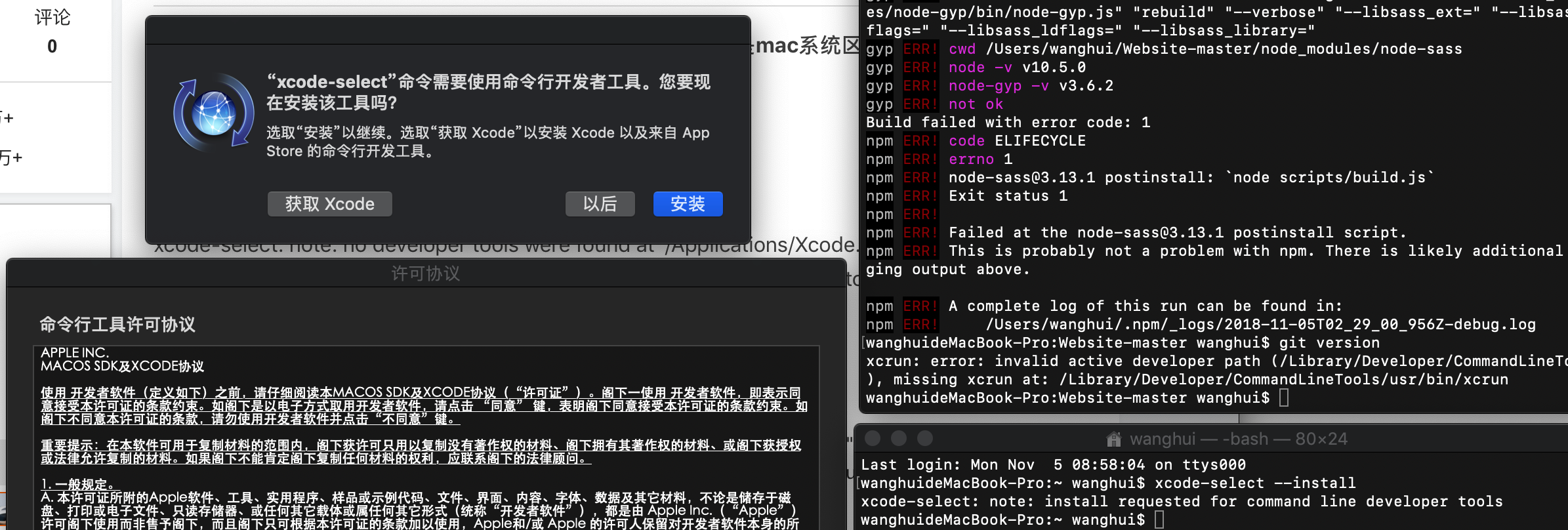
但是安装不成功,说是不能在软件更新处..找到软件,那就使用另一种安装方式
然后后面就去这个网址(需要登陆)去下载xcode进行安装,根据你的电脑版本自己选择:
https://developer.apple.com/download/more/
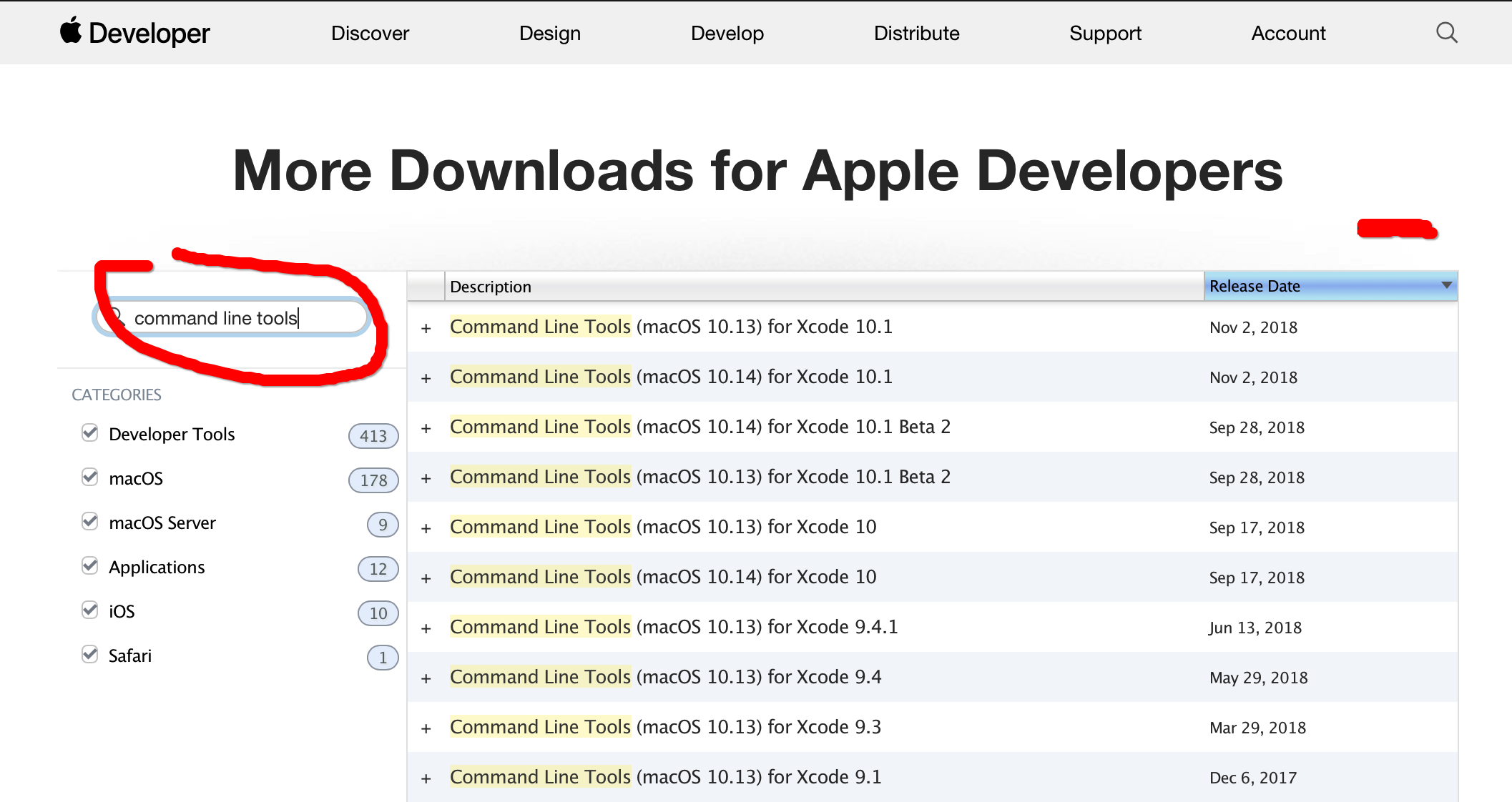
然后一步步根据其指示进行安装即可:
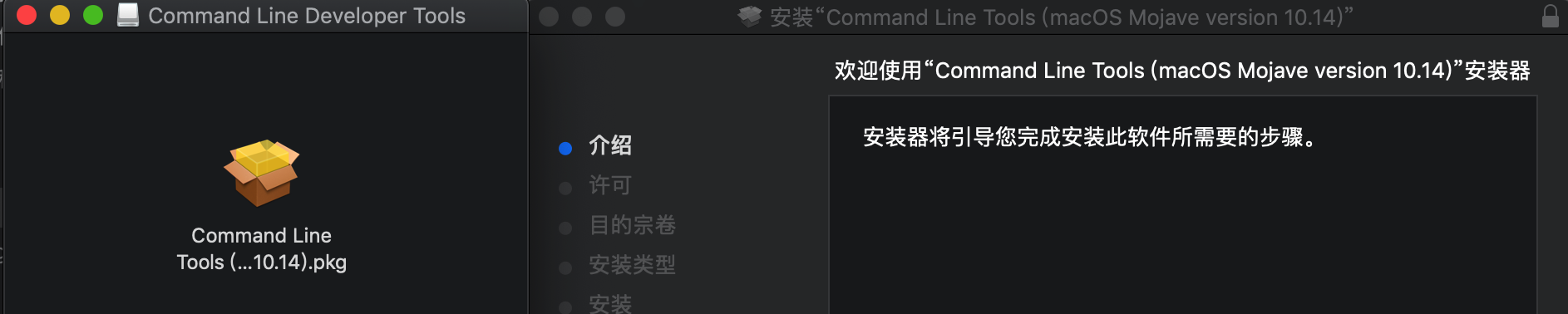
然后运行下面的指令,就能够看出xcode-select已经安装成功
Last login: Mon Nov  5 08:58:04 on ttys000

userdeMacBook-Pro:~ user$ xcode-select --install

xcode-select: note: install requested for command line developer tools

userdeMacBook-Pro:~ user$ xcode-select --install

xcode-select: error: command line tools are already installed, use "Software Update" to install updates
然后再npm install就发现还是有错误:
xcode-select: error: tool 'xcodebuild' requires Xcode, but active developer directory '/Library/Developer/CommandLineTools' is a command line tools instance

xcode-select: error: tool 'xcodebuild' requires Xcode, but active developer directory '/Library/Developer/CommandLineTools' is a command line tools instance
然后网上就有很多说要改path什么的,但是我发现自己的/Applications下面没有Xcode.app,不太知道怎么回事,我们先看一开始的path是:
userdeMacBook-Pro:~ user$ xcode-select --print-path

/Library/Developer/CommandLineTools
然后后面改会出现问题:
userdeMacBook-Pro:~ user$ xcodebuild -showsdks

xcode-select: error: tool 'xcodebuild' requires Xcode, but active developer directory '/Library/Developer/CommandLineTools' is a command line tools instance

userdeMacBook-Pro:~ user$ sudo xcode-select --switch /Applications/Xcode.app/Contents/Developer

Password:

xcode-select: error: invalid developer directory '/Applications/Xcode.app/Contents/Developer'
最后发现这么一改就好了:
sudo xcode-select --switch /Library/Developer/CommandLineTools
可能需要定义一下
然后继续进行下一步:
npm run build
然后又会出现下面的问题:
userdeMBP:Website-master user$ npm run build

> metamask-landing@0.0. build /Users/user/Website-master

> node build.js

internal/modules/cjs/loader.js:

    throw err;

    ^

Error: Cannot find module 'sass-css-stream'
这时候就将这个模块安装一下:
userdeMBP:Website-master user$ npm install sass-css-stream --save
然后就解决了之前npm install 的问题,因为这时候再运行npm install 就成功了
然后再运行一次npm run build,就成功了
最后就可以打开服务器 npm start
这时候到浏览器中去运行http://localhost:9000,又出现了问题:
userdeMBP:Website-master user$ npm start

> metamask-landing@0.0. start /Users/user/Website-master

> node server.js

Now listening on port

/Users/user/Website-master/node_modules/node-static/lib/node-static.js:

                      mime.lookup(files[]) ||

                           ^

TypeError: mime.lookup is not a function
这是因为mime 2.x.x 版本修改了函数名:
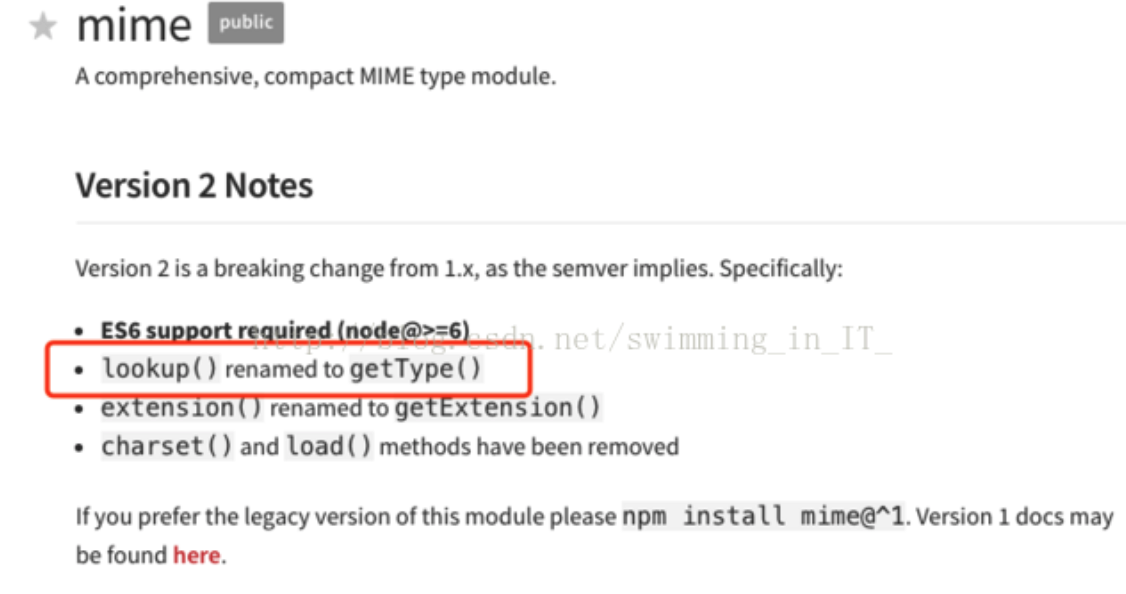
只要去文件/Users/user/Website-master/node_modules/node-static/lib/node-static.js下将lookup()函数名改成getType()即可
然后再运行npm start ,访问http://localhost:9000就能够成功:

MetaMask/Website的更多相关文章
- metamask源码学习-background.js
这个就是浏览器后台所进行操作的地方了,它就是页面也区块链进行交互的中间部分. metamask-background描述了为web扩展单例的文件app/scripts/background.js.该上 ...
- ethereum/EIPs-1102 Opt-in provider access metamask不再默认直接连入网页
eip title author discussions-to status type category created 1102 Opt-in provider access Paul Boucho ...
- Guide to Porting MetaMask to a New Environment
https://github.com/MetaMask/metamask-extension/blob/develop/docs/porting_to_new_environment.md MetaM ...
- metamask源码学习-ui/index.js
The UI-即上图左下角metamask-ui部分,即其图形化界面 The MetaMask UI is essentially just a website that can be configu ...
- 在公有云AZURE上部署私有云AZUREPACK以及WEBSITE CLOUD(六)
(六)在Website Cloud中添加site 1新建Website,并打开 使用前面创建的用户 newbee@waplab.com 登录租户Portal,新建一个website 新建完成后, 可以 ...
- 在公有云AZURE上部署私有云AZUREPACK以及WEBSITE CLOUD(五)
(五)注册Website Cloud 1 注册Website Cloud 添加Website Cloud 连接Website Cloud 注意, endpoint 是使用Management Se ...
- 在公有云AZURE上部署私有云AZUREPACK以及WEBSITE CLOUD(四)
(四)搭建Website Cloud环境 1安装CONTROLLER主机 在开始安装Web site Cloud之前,读者应该对该服务的拓扑结构有个大概了解. 如图: Controller是非常重要的 ...
- 在公有云AZURE上部署私有云AZUREPACK以及WEBSITE CLOUD(二)
前言 (二)建立虚拟网络环境,以及域控和DNS服务器 1搭建虚拟网络环境 在Azure上创建虚拟网络.本例选择的是东南亚数据中心.后面在创建虚机的时候,也选择这个数据中心. VNet Name: ...
- Microsoft Azure Web Sites应用与实践【1】—— 打造你的第一个Microsoft Azure Website
Microsoft Azure Web Sites应用与实践 系列: [1]—— 打造你的第一个Microsoft Azure Website [2]—— 通过本地IIS 远程管理Microsoft ...
随机推荐
- Cookies读写
/** * Minified by jsDelivr using Terser v3.14.1. * Original file: /npm/js-cookie@2.2.0/src/js.cookie ...
- Hadoop Mapreduce 参数 (一)
参考 hadoop权威指南 第六章,6.4节 背景 hadoop,mapreduce就如MVC,spring一样现在已经是烂大街了,虽然用过,但是说看过源码么,没有,调过参数么?调过,调到刚好能跑起来 ...
- C#将图片存放到SQL SERVER数据库中的方法
本文实例讲述了C#将图片存放到SQL SERVER数据库中的方法.分享给大家供大家参考.具体如下: 第一步: ? 1 2 3 4 5 6 7 8 9 10 //获取当前选择的图片 this.pictu ...
- python学习之老男孩python全栈第九期_day009之初始函数初窥
'''# len# 计算字符串的长度# s = '金老板小护士'# len(s)# 不能用 len 怎么办#low一点的方法# count = 0# for i in s:# count += 1# ...
- video 在移动端播放禁止全屏
<video src="" preload controls x5-playsinline="" playsinline="" web ...
- 地区picker 各选择器,优劣分析
移动端选择器picker有很多,各大ui组件都有自己的picker,比如light7,HUI,MUI,jqueryUI等等.但是,我发现他们都有各种各样的问题.这次的地区选择,需要地区的省份+市+经纬 ...
- HDFS 2.7.4中hdfs-site.xml参数未配置引发的一些异常
生产上部署了HDFS 2.7.4,最近遇到了一些异常,记录下来备忘: 一.dfs.datanode.directoryscan.throttle.limit.ms.per.sec DataNode运行 ...
- CentOS7+ApacheServer2.4+MariaDB10.0+PHP7.0+禅道项目管理软件8.0环境部署
CentOS7+ApacheServer2.4+MariaDB10.0+PHP7.0+禅道项目管理软件8.0环境部署 by:授客 QQ:1033553122 目录 一. 二. 三. 四. 五. 六. ...
- JavaScript数组转字符串,字符串转数组
//--------------------数组转字符串--------------------------- //需要将数组元素用某个字符连接成字符串 var a1, b1,c1; a1 = [&q ...
- 免费的局域网协作办公方式—onlyoffice文档协作
局域网内想享受协作办公的乐趣,请移步到这里按照步骤部署.https://blog.csdn.net/hotqin888/article/details/79337881 它是免费开源的,经过作者的一些 ...