
MariaDB数据表操作实例
1. MariaDB 数据库操作实例
MariaDB>create database class;  //创建class数据库

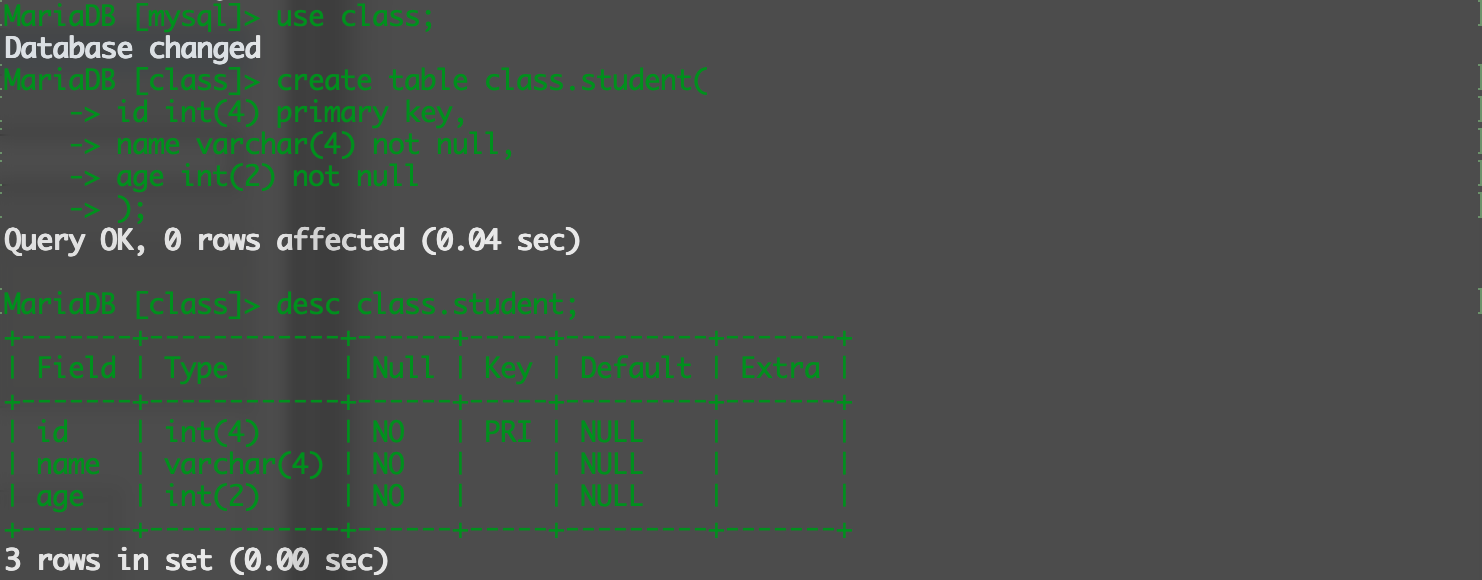
MariaDB>use class;

MariaDB>create table class.student(  //创建student表

              id int(4) primary key,

              name varchar(4) not null,

              age int(2) not null,

              );

MariaDB>desc student;
MariaDB>alter table student add address varchar(48);  //添加address字段

MariaDB>alter table student add gender enum("boy","girl") after age;  //在age字段后面添加gender字段

MariaDB>alter table student change gender

              sex ("boy","girl") not null;  //将gender字段名更改为sex

MariaDB>alert table student drop sex;  //删除sex字段

2. MariaDB 索引创建与删除
MariaDB 索引有普通索引、唯一索引、主键索引、自增主键索引.
MariaDB>create database erp;  //创建erp数据库

MariaDB>create table erp.product(            //创建product表

            id int(4) not null,

            name varchar(8) not null,

            type enum("usefull","bad") not null,

            instruction  char(8) not null,

            index(id),index(name)

            );

MariaDB>desc product;

MariaDB>drop index name on product;   //删除name字段的索引

MariaDB>create index shuoming on product(instruction);  //给指定字段创建索引

MariaDB>show inedx from erp.product\G;  //查看表的索引
MariaDB>create table price(              //建表时设置唯一索引

            id int(4),

            name varchar(4) not null,

            TTL int(4) not null,

            unique(id),unique(name),index(TTL)

            );

MariaDB>desc price;

MariaDB>drop index name on price;    //删除索引

MariaDB>create unique index name on price(name);    //指定字段创建唯一索引
建表时设置主键索引
如果表内没有主键字段, 则新设置的非空唯一索引字段相当于主键索引功能.
每个表的主键字段只能有一个.
MariaDB>create table test1(        //建表时指定主键字段

            id int(4) primary key,

            name varchar(8)

            );

MariaDB>create table test1(

            id int(4),

            name varchar(8),

            primary key(id)

            );

MariaDB>create table test2(          //自增主键

            id int(4) auto_incremnet,

            name varchar(8) not null,

            age int(2) not null,

            primary key(id)

            );

MariaDB>alter table test1 drop primary key;    //删除主键

MariaDB>alter table test2 modify id int(4) not null;    //test2中id字段有自增属性,必须先去掉自增属性才能删除主键

MariaDB>alter table test2 drop primary key;

MariaDB>alter table test2 add primary key(id);    //指定字段添加主键
3. 外键同步更新与删除
MariaDB>create table water(          //创建自增主键的表

            w_id int(4) auto_increment,

            name varchar(8) not null,

            primary key(id)

            );

MariaDB>create table river(              //river表中的r_id作为外键,water表中w_id作为参考键

            r_id int(4) not null,

            name varchar(8) not null,

            position float(7,2) not null default 0,

            index(name),

            foreign key(r_id) references water(w_id) on update cascade delete cascade

            );
MariaDB数据表操作实例的更多相关文章
- MySQL 数据表操作
MySQL 数据表操作 创建MySQL数据表需要以下信息: -表名: -表字段名: -定义每个表字段: 一.创建数据表 1)mysql> create table table_name (c ...
- mysql数据表操作&库操作
首先登陆mysql:mysql -uroot -proot -P3306 -h127.0.0.1 查看所有的库:show databases; 进入一个库:use database; 显示所在的库:s ...
- mysql 数据表操作 目录
mysql 数据表操作 存储引擎介绍 mysql 使用存储引擎 mysql 数据表的增删改查 mysql 数据类型 mysql 约束条件
- Mysql之数据表操作
数据表操作: 查看当前数据库中所有的表: show tables; 查看当前使用数据库: select database(); 使用数据表: use 表名; 创建数据表: create table 数 ...
- 孤荷凌寒自学python第四十九天继续研究跨不同类型数据库的通用数据表操作函数
孤荷凌寒自学python第四十九天继续研究跨不同类型数据库的通用数据表操作函数 (完整学习过程屏幕记录视频地址在文末,手写笔记在文末) 今天继续建构自感觉用起来顺手些的自定义模块和类的代码. 不同类型 ...
- MySQL5.7(三)数据表操作
概念在数据库中,数据表是数据库中最重要.最基本的操作对象,是数据存储的基本单位.数据表被定义为列的集合,数据在表中是按照行和列的格式来存储的.每一行代表一条唯一的记录,每一列代表记录中的一个域.1.创 ...
- Sql Server系列:数据表操作
表是用来存储数据和操作数据的逻辑结构,用来组织和存储数据,关系数据库中的所有数据都表现为表的形式,数据表由行和列组成.SQL Server中的数据表分为临时表和永久表,临时表存储在tempdb系统数据 ...
- MySQL数据表操作
创建数据表 打开数据库 USE 数据库名称 mysql> USE D1; Database changed 使用 USE D1:表示打开数据库D1,我们可以通过SELECT DATABASE() ...
- MySQL(5):数据表操作
表名的前缀: 两个student表,为了区分相同逻辑表名的不同应用,给逻辑表名,增加前缀 //学生管理 create table info_student ( name varchar(20), st ...
随机推荐
- springboot 入门
使用maven构建project项目, 配置aliyun仓库, 不赘述 springboot 版本需要: jdk1.7+, maven3.2+ , gradle2.9+ 配置文件 引入父包, 放在&l ...
- 用ECMAScript4 ( ActionScript3) 实现Unity的热更新 -- 热更新Live2D
live2D是一个很强大的2D动画组件.我们可以使用AS3脚本对它进行热更新. live2D在Unity中的使用请看这里: 如何获取Live2D 总得来说,我们可以先去live2D官网下载它的Unit ...
- [转]How to speed up Magento 2. Maximum Performance
本文转自:https://magedirect.co/how-to-speed-up-magento-2-maximum-performance/ Introduction In this artic ...
- ASP.NET MVC的ContentResult
ASP.NET MVC的ContentResult返回简单的纯文本内容,可通过ContentType属性指定应答文档类型,通过ContentEncoding属性指定应答文档的字符编码. 一个例子来演习 ...
- AssemblyInfo.cs 详解
前言 ? .net工程(包括Web和WinForm)的Properties文件夹下自动生成一个名为AssemblyInfo.cs的文件,一般情况下我们很少直接改动该文件.但我们实际上通过另一个形式操作 ...
- PetaPoco源代码学习--0.目录贴
2017年3季度后,以人力外包的形式派驻到甲方单位进行项目救急时,接触到了甲方单位的ASP.NET MVC项目的ORM框架,它以PetaPoco(2012年的老版本)进行改造升级的,当初就想学习一下这 ...
- 【转】.NET NPOI操作Excel常用函数
最近因项目接触了NPOI,感觉还是蛮不错的,网络上的教程普遍版本较老,本篇记录所常用操作,采用NPOI 2.0版本. 推荐: NPOI官方网站 NPOI 1.2.4/1.2.5 官方教程 新建Exce ...
- 【Java面试】2、面试题汇总
Java基础部分 面试题总汇--JAVA基础部分 http://www.cnblogs.com/hyhnet/p/5544817.html 115个Java面试题和答案——终极列表(上) http:/ ...
- 产生冠军(hdu2094)
产生冠军 Time Limit: 1000/1000 MS (Java/Others) Memory Limit: 32768/32768 K (Java/Others) Total Submi ...
- 悟空模式-java-建造者模式
[此是锻炼神冰铁,磨琢成工光皎洁.老君自己动钤锤,荧惑亲身添炭屑.五方五帝用心机,六丁六甲费周折.造成九齿玉垂牙,铸就双环金坠叶.身妆六曜排五星,体按四时依八节.短长上下定乾坤,左右阴阳分日月.六爻神 ...