
element-ui inputNumber、Card 、Breadcrumb组件源码分析整理笔记(三)
inputNumber组件
<template>

    <!--@dragstart.prevent禁止input中数字的拖动-->

  <div

    @dragstart.prevent

    :class="[

      'el-input-number',

      inputNumberSize ? 'el-input-number--' + inputNumberSize : '',

      { 'is-disabled': inputNumberDisabled },

      { 'is-without-controls': !controls },

      { 'is-controls-right': controlsAtRight }

    ]">

    <span

      class="el-input-number__decrease"

      role="button"

      v-if="controls"

      v-repeat-click="decrease"

      :class="{'is-disabled': minDisabled}"

      @keydown.enter="decrease">

      <i :class="`el-icon-${controlsAtRight ? 'arrow-down' : 'minus'}`"></i>

    </span>

    <span

      class="el-input-number__increase"

      role="button"

      v-if="controls"

      v-repeat-click="increase"

      :class="{'is-disabled': maxDisabled}"

      @keydown.enter="increase">

      <i :class="`el-icon-${controlsAtRight ? 'arrow-up' : 'plus'}`"></i>

    </span>

    <el-input

      ref="input"

      :value="currentInputValue"

      :placeholder="placeholder"

      :disabled="inputNumberDisabled"

      :size="inputNumberSize"

      :max="max"

      :min="min"

      :name="name"

      :label="label"

      @keydown.up.native.prevent="increase"

      @keydown.down.native.prevent="decrease"

      @blur="handleBlur"

      @focus="handleFocus"

      @change="handleInputChange">

    </el-input>

  </div>

</template>

<script>

  import ElInput from 'element-ui/packages/input';

  import Focus from 'element-ui/src/mixins/focus';

  //RepeatClick,用来控制左键按下时不断触发事件

  import RepeatClick from 'element-ui/src/directives/repeat-click';

  export default {

    name: 'ElInputNumber',

    mixins: [Focus('input')],

    inject: {

      elForm: {

        default: ''

      },

      elFormItem: {

        default: ''

      }

    },

    directives: {

      repeatClick: RepeatClick

    },

    components: {

      ElInput

    },

    props: {

      step: { //计数器步长

        type: Number,

        default: 1

      },

      max: { //设置计数器允许的最大值

        type: Number,

        default: Infinity

      },

      min: { //设置计数器允许的最小值

        type: Number,

        default: -Infinity

      },

      value: {}, //绑定值

      disabled: Boolean, //是否禁用计数器

      size: String, //计数器尺寸

      controls: { //是否使用控制按钮

        type: Boolean,

        default: true

      },

      controlsPosition: { //控制按钮位置

        type: String,

        default: ''

      },

      name: String, //原生属性

      label: String, //输入框关联的label文字

      placeholder: String, //输入框默认 placeholder

      precision: { //数值精度

        type: Number,

        validator(val) {

          return val >= 0 && val === parseInt(val, 10);

        }

      }

    },

    data() {

      return {

        currentValue: 0

      };

    },

    watch: {

      value: {

        //确认是否以当前的初始值执行handler的函数。

        immediate: true,

        handler(value) {

          //Number() 函数把对象的值转换为数字。

          let newVal = value === undefined ? value : Number(value);

          if (newVal !== undefined) {

            if (isNaN(newVal)) {

              return;

            }

            if (this.precision !== undefined) {

              //如果数值精度存在,将数字按精度转换

              newVal = this.toPrecision(newVal, this.precision);

            }

          }

          if (newVal >= this.max) newVal = this.max;

          if (newVal <= this.min) newVal = this.min;

          this.currentValue = newVal;

          this.$emit('input', newVal);

        }

      }

    },

    computed: {

      // 返回当前减号是否被禁用

      minDisabled() {

        // 当前值-计数器步长<最小值时,减号被禁用,不能再继续减

        return this._decrease(this.value, this.step) < this.min;

      },

      maxDisabled() {

        return this._increase(this.value, this.step) > this.max;

      },

      //返回数值的精度

      numPrecision() {

         // precision 的值必须是一个非负整数,并且不能小于 step 的小数位数。

        const { value, step, getPrecision, precision } = this;

        const stepPrecision = getPrecision(step);

        if (precision !== undefined) {

          //如果step 的小数位数大于数值精度时,控制台输出警告并返回数值精度

          if (stepPrecision > precision) {

            console.warn('[Element Warn][InputNumber]precision should not be less than the decimal places of step');

          }

          return precision;

        } else {

            //如果step 的小数位数小于数值精度时,再比较数值的精度和step的精度,取最大值

          return Math.max(getPrecision(value), stepPrecision);

        }

      },

      // 控制按钮的位置

      controlsAtRight() {

        //  当控制按钮存在,并且控制按钮的位置为right时,此处通过添加is-controls-right类来改变控制按钮的位置,使控制按钮在右边显示。

        return this.controls && this.controlsPosition === 'right';

      },

      _elFormItemSize() {

        return (this.elFormItem || {}).elFormItemSize;

      },

      //计数器的大小

      inputNumberSize() {

        return this.size || this._elFormItemSize || (this.$ELEMENT || {}).size;

      },

      // 是否禁用计数器

      inputNumberDisabled() {

        return this.disabled || (this.elForm || {}).disabled;

      },

      currentInputValue() {

        const currentValue = this.currentValue;

        if (typeof currentValue === 'number' && this.precision !== undefined) {

          return currentValue.toFixed(this.precision);

        } else {

          return currentValue;

        }

      }

    },

    methods: {

      //按精度转换数值

      toPrecision(num, precision) {

        if (precision === undefined) precision = this.numPrecision;

         //toFixed() 方法可把 Number 四舍五入为指定小数位数的数字,返回字符串;parseFloat()函数可解析一个字符串,并返回一个浮点数。

        return parseFloat(parseFloat(Number(num).toFixed(precision)));

      },

      //获取value的小数位数

      getPrecision(value) {

        if (value === undefined) return 0;

        const valueString = value.toString();

        const dotPosition = valueString.indexOf('.');

        let precision = 0;

        if (dotPosition !== -1) {

          //valueString.length减去小数点前面的位数,剩下的就是小数点后面的位数

          precision = valueString.length - dotPosition - 1;

        }

        return precision;

      },

      _increase(val, step) {

        if (typeof val !== 'number' && val !== undefined) return this.currentValue;

        const precisionFactor = Math.pow(10, this.numPrecision);

        return this.toPrecision((precisionFactor * val + precisionFactor * step) / precisionFactor);

      },

      //返回value减去step后的值

      _decrease(val, step) {

        if (typeof val !== 'number' && val !== undefined) return this.currentValue;

        //Math.pow()计算10的this.numPrecision次方

        const precisionFactor = Math.pow(10, this.numPrecision);

        //这里主要是为了减少误差

        return this.toPrecision((precisionFactor * val - precisionFactor * step) / precisionFactor);

      },

      increase() {

        if (this.inputNumberDisabled || this.maxDisabled) return;

        const value = this.value || 0;

        const newVal = this._increase(value, this.step);

        this.setCurrentValue(newVal);

      },

       //点击减号时触发的事件

      decrease() {

        if (this.inputNumberDisabled || this.minDisabled) return;

        const value = this.value || 0;

        const newVal = this._decrease(value, this.step);

        this.setCurrentValue(newVal);

      },

      handleBlur(event) {

        this.$emit('blur', event);

        this.$refs.input.setCurrentValue(this.currentInputValue);

      },

      handleFocus(event) {

        this.$emit('focus', event);

      },

      setCurrentValue(newVal) {

        const oldVal = this.currentValue;

        if (typeof newVal === 'number' && this.precision !== undefined) {

          newVal = this.toPrecision(newVal, this.precision);

        }

        if (newVal >= this.max) newVal = this.max;

        if (newVal <= this.min) newVal = this.min;

        if (oldVal === newVal) {

          //改变input的当前值

          this.$refs.input.setCurrentValue(this.currentInputValue);

          return;

        }

        this.$emit('input', newVal);

        this.$emit('change', newVal, oldVal);

        this.currentValue = newVal;

      },

      handleInputChange(value) {

        const newVal = value === '' ? undefined : Number(value);

        if (!isNaN(newVal) || value === '') {

          this.setCurrentValue(newVal);

        }

      },

      select() {

        this.$refs.input.select();

      }

    },

    mounted() {

      let innerInput = this.$refs.input.$refs.input;

      innerInput.setAttribute('role', 'spinbutton');

      innerInput.setAttribute('aria-valuemax', this.max);

      innerInput.setAttribute('aria-valuemin', this.min);

      innerInput.setAttribute('aria-valuenow', this.currentValue);

      innerInput.setAttribute('aria-disabled', this.inputNumberDisabled);

    },

    updated() {

      if (!this.$refs || !this.$refs.input) return;

      const innerInput = this.$refs.input.$refs.input;

      innerInput.setAttribute('aria-valuenow', this.currentValue);

    }

  };

</script>
解析:
(1)先看下html结构
 <div class="el-input-number">

        <!--左边的减号-->

       <span class="el-input-number__decrease">

           <i class="el-icon-minus"></i>

       </span>

        <!--右边的加号-->

       <span class="el-input-number__increase">

          <i class="el-icon-plus"></i>

       </span>

        <!--中间的输入框-->

       <el-input ref="input"></el-input>

</div>
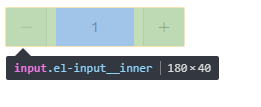
左边的减号和右边的加号是通过绝对定位,设置在input左右的padding位置的,input的css代码如下:
.el-input-number .el-input__inner {

    -webkit-appearance: none;

    padding-left: 50px;

    padding-right: 50px;

    text-align: center;

}
这个inputNumber源码还算简单,多看几遍就懂了
Card 组件
<template>

  <div class="el-card" :class="shadow ? 'is-' + shadow + '-shadow' : 'is-always-shadow'">

      <!--头部:设置 header,也可以通过 slot#header 传入 DOM-->

    <div class="el-card__header" v-if="$slots.header || header">

      <slot name="header">{{ header }}</slot>

    </div>

      <!--内容部分-->

    <div class="el-card__body" :style="bodyStyle">

      <slot></slot>

    </div>

  </div>

</template>

<script>

  export default {

    name: 'ElCard',

    props: {

      header: {}, //设置 header,也可以通过 slot#header 传入DOM

      bodyStyle: {}, //设置 body 的样式

      shadow: {  //设置阴影显示时机

        type: String

      }

    }

  };

</script>
Breadcrumb组件
<template>

  <span class="el-breadcrumb__item">

    <span

      :class="['el-breadcrumb__inner', to ? 'is-link' : '']"

      ref="link"

      role="link">

      <!--插入文字-->

      <slot></slot>

    </span>

      <!--图标分隔符-->

    <i v-if="separatorClass" class="el-breadcrumb__separator" :class="separatorClass"></i>

      <!--分隔符-->

    <span v-else class="el-breadcrumb__separator" role="presentation">{{separator}}</span>

  </span>

</template>

<script>

  export default {

    name: 'ElBreadcrumbItem',

    props: {

      to: {}, //路由跳转对象,同 vue-router 的 to

      replace: Boolean //在使用 to 进行路由跳转时,启用 replace 将不会向 history 添加新记录

    },

    data() {

      return {

        separator: '',

        separatorClass: ''

      };

    },

    inject: ['elBreadcrumb'],

    mounted() {

      //获取父组件的separator

      this.separator = this.elBreadcrumb.separator;

      //获取父组件的separatorClass

      this.separatorClass = this.elBreadcrumb.separatorClass;

      const link = this.$refs.link;

      link.setAttribute('role', 'link');

      //添加点击事件

      link.addEventListener('click', _ => {

        const { to, $router } = this;

        if (!to || !$router) return;

        //根据replace的值确定是replace还是push,replace 将不会向 history 添加新记录

        this.replace ? $router.replace(to) : $router.push(to);

      });

    }

  };

</script>
element-ui inputNumber、Card 、Breadcrumb组件源码分析整理笔记(三)的更多相关文章
- element-ui 组件源码分析整理笔记目录
element-ui button组件 radio组件源码分析整理笔记(一) element-ui switch组件源码分析整理笔记(二) element-ui inputNumber.Card .B ...
- element-ui button组件 radio组件源码分析整理笔记(一)
Button组件 button.vue <template> <button class="el-button" @click="handleClick ...
- element-ui input组件源码分析整理笔记(六)
input 输入框组件 源码: <template> <div :class="[ type === 'textarea' ? 'el-textarea' : 'el-in ...
- element-ui Message组件源码分析整理笔记(八)
Message组件源码: main.js import Vue from 'vue'; import Main from './main.vue'; import { PopupManager } f ...
- element-ui Steps步骤条组件源码分析整理笔记(九)
Steps步骤条组件源码: steps.vue <template> <!--设置 simple 可应用简洁风格,该条件下 align-center / description / ...
- element-ui Rate组件源码分析整理笔记(十三)
Rate组件源码比较简单,有添加部分注释 main.vue <template> <!--valuenow当前的评分 valuetext当前显示的文本--> <div c ...
- element-ui MessageBox组件源码分析整理笔记(十二)
MessageBox组件源码,有添加部分注释 main.vue <template> <transition name="msgbox-fade"> < ...
- element-ui Upload 上传组件源码分析整理笔记(十四)
简单写了部分注释,upload-dragger.vue(拖拽上传时显示此组件).upload-list.vue(已上传文件列表)源码暂未添加多少注释,等有空再补充,先记下来... index.vue ...
- element-ui switch组件源码分析整理笔记(二)
源码如下: <template> <div class="el-switch" :class="{ 'is-disabled': switchDisab ...
随机推荐
- ThinkPHP5代码执行的简单分析
漏洞影响版本: ThinkPHP 5.0.5-5.0.22 ThinkPHP 5.1.0-5.1.30 漏洞复现: 一.mac的debug环境搭建. 一键化环境搭建工具: mamp pro ,调试工具 ...
- Oracle数据库导入报ORA-39083处理
------故障描述--------------------报错信息:ORA-39083: 对象类型 DEFAULT_ROLE 创建失败, 出现错误:ORA-01919: 角色 'ROLE_EMSP' ...
- freerdp服务器共享屏幕,skype lync终端显示黑屏的原因分析
问题描述:freerdp支持远程桌面共享协议rdp,使用freerdp与skype终端进行远程桌面共享时.发送1080p 视频数据时 skype终端显示黑屏 经过分析,发现rdp协商参数大于一定值时, ...
- IdentityServer-Setup and Overview
设置和概述 有两种方式创建一个IdentityServer 项目: 从零开始 使用Visual Studio的ASP.NET Identity模板 如果是从零开始,我们提供一序列的帮助及内存存储,所以 ...
- IE中透明度的读写
一.获取透明度 ele.filters.alpha 返回元素所有滤镜的对象,可在此基础上获取opacity即可. 但是似乎ele.filters只能存储第一个滤镜,而当我们把alpha放在第二位时,就 ...
- 【Java初探02】——Java语言基础
本篇博文就Java语言的一些基本元素进行一些记录和阐述,主要讲解一下Java语言的一些基本构成元素和Java的主类结构. Java语言基础的大致组成 java主类结构 基本的数据类型 变量与常量 运算 ...
- paxos协议
两将军问题 有两支军队,它们分别有一位将军领导,现在准备攻击一座修筑了防御工事的城市. 这两支军队都驻扎在那座城市的附近,分占一座山头. 一道山谷把两座山分隔开来,并且两位将军唯一的通信方式就是派各自 ...
- JavaWeb 简单实现客户信息管理系统
项目介绍 本项目使用Jsp+Servlet+MySQL实现 功能介绍 查询客户信息:查询数据库中所有客户信息,分页展示 添加客户信息:创建新客户并添加到数据库中 搜索客户信息:根据用户的输入查询客户信 ...
- 【IT笔试面试题整理】二叉搜索树转换为双向链表
[试题描述] 将二叉搜索树转换为双向链表 对于二叉搜索树,可以将其转换为双向链表,其中,节点的左子树指针在链表中指向前一个节点,右子树指针在链表中指向后一个节点. 思路一: 采用递归思想,对于二叉搜索 ...
- CRM项目hellokitty部分交互界面
登录界面 实现密码的不显示,验证码的跟换 员工管理界面 完成所有的功能 学校统计界面 完成所有的功能 班级管理 差一个手风琴组件 其他功能也完成了