
Python学习--打码平台
打码平台介绍
作用:可以通过第三方平台进行智能识别或者人工识别图片。
优点:1. 价格便宜; 2. 使用简单; 3. 识别率高
平台介绍:
- 云打码(推荐) [http://www.yundama.com/]
- 极验验证码智能识别辅助 [http://jiyandoc.c2567.com/]
- 超级鹰
- 打码兔
- 若快打码
- 等等
流程图:
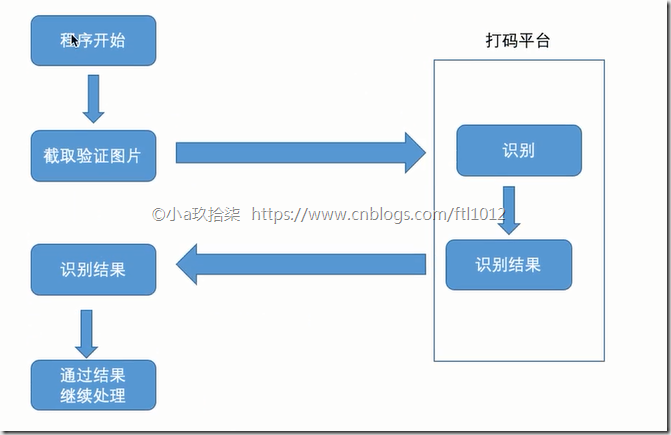
云打码需要注册开发者账号和用户账号,注册地址:[http://www.yundama.com/]
开发者账号用于,下载DEMO,调试自己的软件
用户账号用于登录,充值,平台是收费的(1元=1000分)
【开发者】
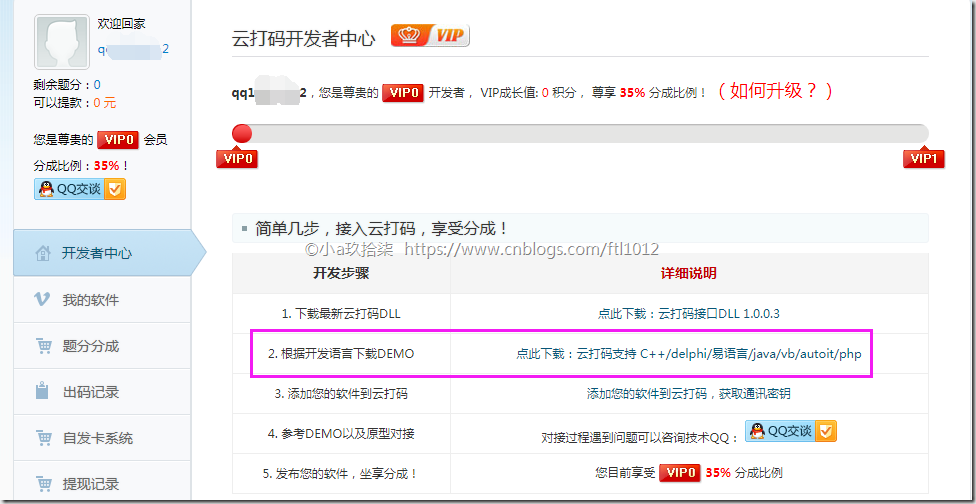
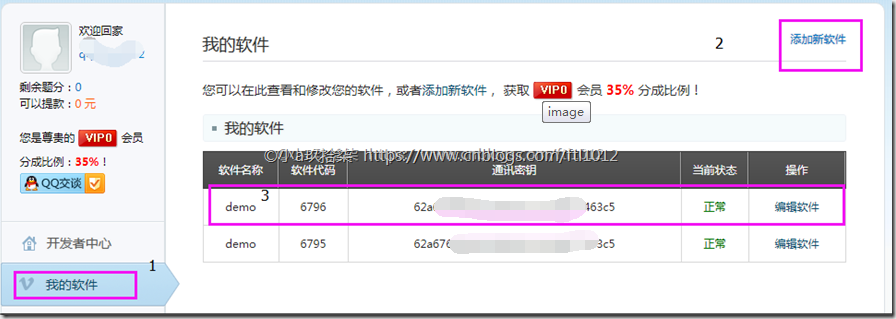
添加我的软件,获取通信秘钥
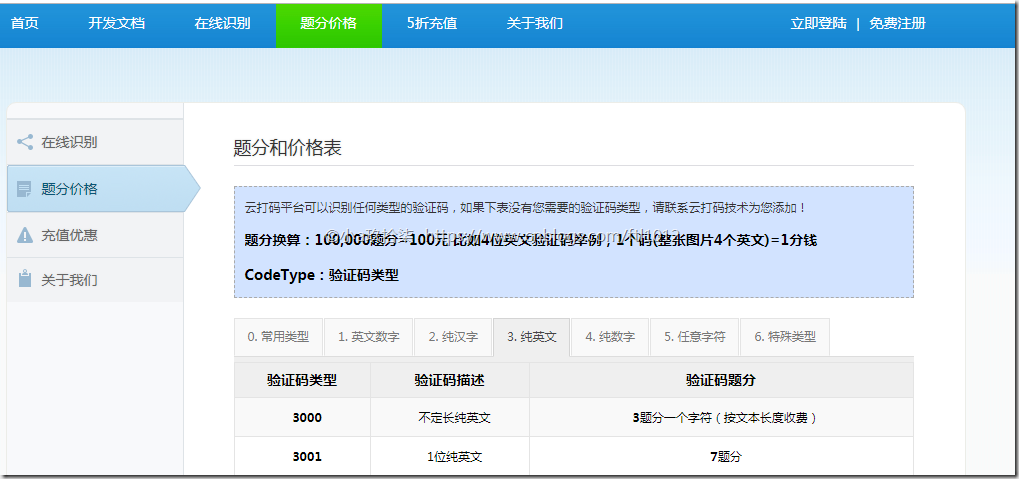
查看验证码类型:
http://www.yundama.com/price.html
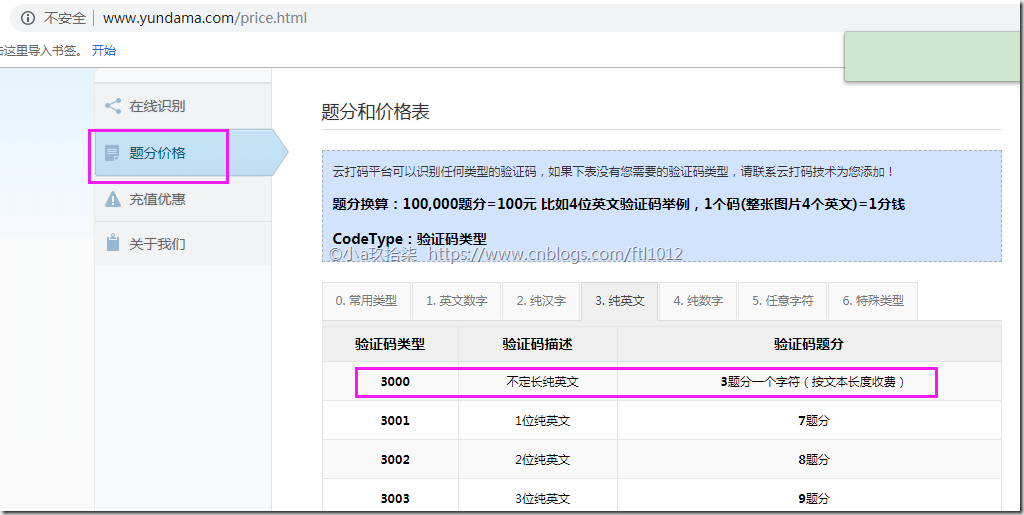
题分价格:
【用户】
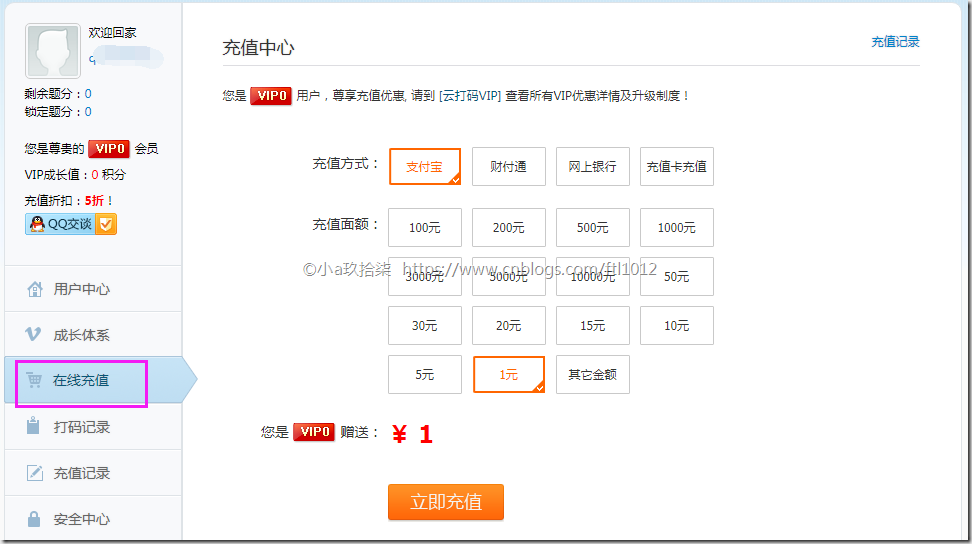
充值
12306的验证码Demo
import http.client, mimetypes, urllib, json, time, requests

######################################################################

class YDMHttp:

    apiurl = 'http://api.yundama.com/api.php'

    username = ''

    password = ''

    appid = ''

    appkey = ''

    def __init__(self, username, password, appid, appkey):

        self.username = username

        self.password = password

        self.appid = str(appid)

        self.appkey = appkey

    def request(self, fields, files=[]):

        response = self.post_url(self.apiurl, fields, files)

        response = json.loads(response)

        return response

    def balance(self):

        data = {'method': 'balance', 'username': self.username, 'password': self.password, 'appid': self.appid,

                'appkey': self.appkey}

        response = self.request(data)

        if (response):

            if (response['ret'] and response['ret'] < 0):

                return response['ret']

            else:

                return response['balance']

        else:

            return -9001

    def login(self):

        data = {'method': 'login', 'username': self.username, 'password': self.password, 'appid': self.appid,

                'appkey': self.appkey}

        response = self.request(data)

        if (response):

            if (response['ret'] and response['ret'] < 0):

                return response['ret']

            else:

                return response['uid']

        else:

            return -9001

    def upload(self, filename, codetype, timeout):

        data = {'method': 'upload', 'username': self.username, 'password': self.password, 'appid': self.appid,

                'appkey': self.appkey, 'codetype': str(codetype), 'timeout': str(timeout)}

        file = {'file': filename}

        response = self.request(data, file)

        if (response):

            if (response['ret'] and response['ret'] < 0):

                return response['ret']

            else:

                return response['cid']

        else:

            return -9001

    def result(self, cid):

        data = {'method': 'result', 'username': self.username, 'password': self.password, 'appid': self.appid,

                'appkey': self.appkey, 'cid': str(cid)}

        response = self.request(data)

        return response and response['text'] or ''

    def decode(self, filename, codetype, timeout):

        cid = self.upload(filename, codetype, timeout)

        if (cid > 0):

            for i in range(0, timeout):

                result = self.result(cid)

                if (result != ''):

                    return cid, result

                else:

                    time.sleep(1)

            return -3003, ''

        else:

            return cid, ''

    def report(self, cid):

        data = {'method': 'report', 'username': self.username, 'password': self.password, 'appid': self.appid,

                'appkey': self.appkey, 'cid': str(cid), 'flag': '0'}

        response = self.request(data)

        if (response):

            return response['ret']

        else:

            return -9001

    def post_url(self, url, fields, files=[]):

        for key in files:

            files[key] = open(files[key], 'rb');

        res = requests.post(url, files=files, data=fields)

        return res.text

######################################################################

# 用户名

username = 'username '

# 密码

password = 'password'

# 软件ID,开发者分成必要参数。登录开发者后台【我的软件】获得!

appid = 6795

# 软件密钥,开发者分成必要参数。登录开发者后台【我的软件】获得!

appkey = '62a672323232323218be141d9a77463c5'

# 图片文件,上传12306的图片

filename = 'dignshuji.jpg'

# 验证码类型,# 例:1004表示4位字母数字,不同类型收费不同。请准确填写,否则影响识别率。

# 在此查询所有类型 http://www.yundama.com/price.html

# 12306的验证码类型是6701

codetype = 6701

# 超时时间,秒

timeout = 60

# 检查

if (username == 'username'):

    print('请设置好相关参数再测试')

else:

    # 初始化

    yundama = YDMHttp(username, password, appid, appkey)

    # 登陆云打码

    uid = yundama.login();

    print('uid: %s' % uid)

    # 查询余额

    balance = yundama.balance();

    print('balance: %s' % balance)

    # 开始识别,图片路径,验证码类型ID,超时时间(秒),识别结果

    cid, result = yundama.decode(filename, codetype, timeout);

    print('cid: %s, result: %s' % (cid, result))

######################################################################
12306图片
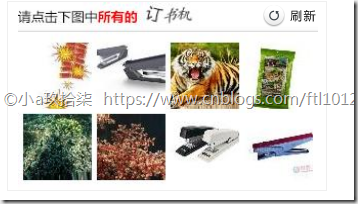
返回结果表示: 第2,7,8张图是订书机

Python学习--打码平台的更多相关文章
- Python 通过打码平台实现验证码
在爬虫时,经常遇到登录需要验证码的情况,简单的验证码可以自己解决,复制的验证码需要借助机器学习,有一定的难度.还有一个简单的方案就是采用付费的打码平台. 比如R若快(http://www.ruokua ...
- python 学习源码练习(1)
#编译方式,python3 文件名 #!/usr/bin/python3#print('hello world') mystring = 'hello world'print (mystring) # ...
- python学习Day06--编码
[主要内容] 1. is 和 == 区别 id()函数 == 判断两边的值 is 判断内存地址回顾编码: 1. ASCII: 英文, 特殊字符, 数字, 8bit, 1byte 2. GBK: 中文 ...
- python 学习源码练习(2)——简单文件读取
#文件创建 #!/usr/bin/python3 'makeTextFile.py--create text file' import os ls = os.linesep #get filename ...
- Python学习--Selenium模块
1. Python学习--Selenium模块介绍(1) 2.Python学习--Selenium模块学习(2) 其他: 1. Python学习--打码平台
- 若快打码平台python开发文档修改版
一.打码的作用 在进行爬虫过程中,部分网站的登录验证码是比较简单的,例如四个英文数字随机组合而成的验证码,有的是全数字随机组成的验证码,有的是全中文随机组成的验证码.为了爬虫进行自动化,需要解决自动登 ...
- python面试题之如何解决验证码的问题,用什么模块,听过哪些人工打码平台?
如何解决验证码的问题,用什么模块,听过哪些人工打码平台? PIL.pytesser.tesseract模块 平台的话有:(打码平台特殊,不保证时效性) 云打码 挣码 斐斐打码 若快打码 超级鹰 本文首 ...
- Python 自动登录哔哩哔哩(2captcha打码平台)
前言 研究爬虫的各位小伙伴都知道,需要登录才能获取信息的网站,是比较难爬的,原因就是在于,现在各大网站为了反爬,都加入了图片验证码,滑动验证码之类的干扰 本篇就针对哔哩哔哩的滑动验证码进行讲解和破解 ...
- python爬虫之selenium+打码平台识别验证码
1.常用的打码平台:超级鹰.打码兔等 2.打码平台在识别图形验证码和点触验证码上比较好用 (1)12306点触验证码 from selenium import webdriver from selen ...
随机推荐
- linux编译找不到aprt apr-util
Linux很多地方编译的时候都会用到apr 如果找不到apr就会报错 configure: WARNING: APR not found The Apache Portable Runtime (AP ...
- BIO与NIO、AIO的区别(这个容易理解)
转自:http://blog.csdn.net/skiof007/article/details/52873421 BIO与NIO.AIO的区别(这个容易理解) IO的方式通常分为几种,同步阻塞的BI ...
- Spring配置文件引入xml文件: <import resource=" " />标签使用总结
引入其他模块XML 在Spring的配置文件,有时候为了分模块的更加清晰的进行相关实体类的配置. 比如现在有一个job-timer.xml的配置 <?xml version="1.0& ...
- AWK工具的用法
基本格式 awk '{commands}' filename 或者 stdin | awk '{commands}' 以下,均简写为awk '{commands}'的形式 commands的用法 co ...
- Visual Studio 命令提示符
Visual Studio 命令提示和 SDK 命令提示会自动设置环境变量,使您能够轻松使用 .NET Framework 工具. 在 .NET Framework 4 版 和更高版本中,应使用 Vi ...
- 【JavaFx教程】第四部分:CSS 样式
第4部分主题 CSS样式表 添加应用程序图标 CSS样式表 在JavaFX中,你能使用层叠样式表修饰你的用户接口.这非常好!自定义Java应用界面从来不是件简单的事情. 在本教程中,我们将创建一个*D ...
- C#里面的事物回滚,解决同步数据插入时出现重复数据
什么是事物回滚: 举个栗子,你在你家的银行分行取钱,取完钱数据要同步,而且可能每个分行都有一个存储这些数据的数据库,分行的这些 存取的记录都需要实时同步,如果你取完500刚好断电了,好嘛,分行可能刚记 ...
- SpringBoot启动加载类ApplicationRunner
SpringBoot启动加载类ApplicationRunner 有时希望项目在启动的时候加载一些系统参数,就要用到ApplicationRunner ApplicationRunner是一个接口,我 ...
- mongodb命令(持续更新)
$lt $lte $gt $gte< . <= . > . >= 1.分组求和db.collection.aggregate([{$group : {_id : null, s ...
- Linux常用基本命令[find]用法(1)
find是个很强大的命令,用法很多. 作用:查找目录下的文件,同时也可以调用其他命令执行相应的操作 用法: find [选项] [路径][操作语句] find [-H] [-L] [-P] [-D d ...