
C#在二维码中添加圆角logo
 public class QRCodeHelper

    {

        #region 合并用户QR图片和用户头像

        /// <summary>

        /// 合并用户QR图片和用户头像

        /// </summary>

        /// <param name="qrImg">QR图片</param>

        /// <param name="headerImg">用户头像</param>

        /// <param name="n">缩放比例</param>

        /// <returns></returns>

        public Bitmap MergeQrImg(Bitmap qrImg, Bitmap headerImg, double n = 0.23)

        {

            int margin = ;

            float dpix = qrImg.HorizontalResolution;

            float dpiy = qrImg.VerticalResolution;

            var _newWidth = ( * qrImg.Width -  * margin) * 1.0f / ;

            var _headerImg = ZoomPic(headerImg, _newWidth / headerImg.Width);

            //处理头像

            int newImgWidth = _headerImg.Width + margin;

            Bitmap headerBgImg = new Bitmap(newImgWidth, newImgWidth);

            headerBgImg.MakeTransparent();

            Graphics g = Graphics.FromImage(headerBgImg);

            g.InterpolationMode = System.Drawing.Drawing2D.InterpolationMode.HighQualityBicubic;

            g.SmoothingMode = System.Drawing.Drawing2D.SmoothingMode.HighQuality;

            g.Clear(Color.Transparent);

            Pen p = new Pen(new SolidBrush(Color.White));

            Rectangle rect = new Rectangle(, , newImgWidth - , newImgWidth - );

            using (GraphicsPath path = CreateRoundedRectanglePath(rect, ))

            {

                g.DrawPath(p, path);

                g.FillPath(new SolidBrush(Color.White), path);

            }

            //画头像

            Bitmap img1 = new Bitmap(_headerImg.Width, _headerImg.Width);

            Graphics g1 = Graphics.FromImage(img1);

            g1.InterpolationMode = System.Drawing.Drawing2D.InterpolationMode.HighQualityBicubic;

            g1.SmoothingMode = System.Drawing.Drawing2D.SmoothingMode.HighQuality;

            g1.Clear(Color.Transparent);

            Pen p1 = new Pen(new SolidBrush(Color.Gray));

            Rectangle rect1 = new Rectangle(, , _headerImg.Width - , _headerImg.Width - );

            using (GraphicsPath path1 = CreateRoundedRectanglePath(rect1, ))

            {

                g1.DrawPath(p1, path1);

                TextureBrush brush = new TextureBrush(_headerImg);

                g1.FillPath(brush, path1);

            }

            g1.Dispose();

            PointF center = new PointF((newImgWidth - _headerImg.Width) / , (newImgWidth - _headerImg.Height) / );

            g.DrawImage(img1, center.X, center.Y, _headerImg.Width, _headerImg.Height);

            g.Dispose();

            Bitmap backgroudImg = new Bitmap(qrImg.Width, qrImg.Height);

            backgroudImg.MakeTransparent();

            backgroudImg.SetResolution(dpix, dpiy);

            headerBgImg.SetResolution(dpix, dpiy);

            Graphics g2 = Graphics.FromImage(backgroudImg);

            g2.Clear(Color.Transparent);

            g2.DrawImage(qrImg, , );

            PointF center2 = new PointF((qrImg.Width - headerBgImg.Width) / , (qrImg.Height - headerBgImg.Height) / );

            g2.DrawImage(headerBgImg, center2);

            g2.Dispose();

            return backgroudImg;

        }

        #endregion

        #region 图形处理

        /// <summary>

        /// 创建圆角矩形

        /// </summary>

        /// <param name="rect">区域</param>

        /// <param name="cornerRadius">圆角角度</param>

        /// <returns></returns>

        private GraphicsPath CreateRoundedRectanglePath(Rectangle rect, int cornerRadius)

        {

            //下午重新整理下,圆角矩形

            GraphicsPath roundedRect = new GraphicsPath();

            roundedRect.AddArc(rect.X, rect.Y, cornerRadius * , cornerRadius * , , );

            roundedRect.AddLine(rect.X + cornerRadius, rect.Y, rect.Right - cornerRadius * , rect.Y);

            roundedRect.AddArc(rect.X + rect.Width - cornerRadius * , rect.Y, cornerRadius * , cornerRadius * , , );

            roundedRect.AddLine(rect.Right, rect.Y + cornerRadius * , rect.Right, rect.Y + rect.Height - cornerRadius * );

            roundedRect.AddArc(rect.X + rect.Width - cornerRadius * , rect.Y + rect.Height - cornerRadius * , cornerRadius * , cornerRadius * , , );

            roundedRect.AddLine(rect.Right - cornerRadius * , rect.Bottom, rect.X + cornerRadius * , rect.Bottom);

            roundedRect.AddArc(rect.X, rect.Bottom - cornerRadius * , cornerRadius * , cornerRadius * , , );

            roundedRect.AddLine(rect.X, rect.Bottom - cornerRadius * , rect.X, rect.Y + cornerRadius * );

            roundedRect.CloseFigure();

            return roundedRect;

        }

        /// <summary>

        /// 图片按比例缩放

        /// </summary>

        private Image ZoomPic(Image initImage, double n)

        {

            //缩略图宽、高计算

            double newWidth = initImage.Width;

            double newHeight = initImage.Height;

            newWidth = n * initImage.Width;

            newHeight = n * initImage.Height;

            //生成新图

            //新建一个bmp图片

            System.Drawing.Image newImage = new System.Drawing.Bitmap((int)newWidth, (int)newHeight);

            //新建一个画板

            System.Drawing.Graphics newG = System.Drawing.Graphics.FromImage(newImage);

            //设置质量

            newG.InterpolationMode = System.Drawing.Drawing2D.InterpolationMode.HighQualityBicubic;

            newG.SmoothingMode = System.Drawing.Drawing2D.SmoothingMode.HighQuality;

            //置背景色

            newG.Clear(Color.Transparent);

            //画图

            newG.DrawImage(initImage, new System.Drawing.Rectangle(, , newImage.Width, newImage.Height), new System.Drawing.Rectangle(, , initImage.Width, initImage.Height), System.Drawing.GraphicsUnit.Pixel);

            newG.Dispose();

            return newImage;

        }

        #endregion

    }
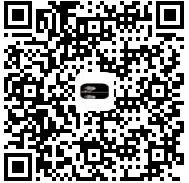
效果图如下
C#在二维码中添加圆角logo的更多相关文章
- QRCode二维码生成方案及其在带LOGO型二维码中的应用(1)
原文:QRCode二维码生成方案及其在带LOGO型二维码中的应用(1) 提要:很多公司为商业宣传之需,常将企业LOGO加入二维码中,但如果LOGO遮挡区域足够地大,二维码就变得无法识别.那么,有没有一 ...
- QRCode二维码生成方案及其在带LOGO型二维码中的应用(2)
原文:QRCode二维码生成方案及其在带LOGO型二维码中的应用(2) 续前:QRCode二维码生成方案及其在带LOGO型二维码中的应用(1) http://blog.csdn.net/johnsu ...
- C# ZXing.Net生成二维码、识别二维码、生成带Logo的二维码(二)
1.使用ZXint.Net生成带logo的二维码 /// <summary> /// 生成带Logo的二维码 /// </summary> /// <param name ...
- 关于JAVA实现二维码以及添加二维码LOGO
今天在公司,完成了之前的任务,没有什么事做,就想鼓捣一下二维码,因为之前没有接触过,我就去翻看了几本书,也基本完成了二维码的实现,以及添加二维码的LOGO. 现在绘制二维码一般都使用的是谷歌的zxin ...
- java 生成二维码、可带LOGO、可去白边
1.准备工作 所需jar包: JDK 1.6: commons-codec-1.11.jar core-2.2.jar javase-2.2.jar JDK 1.7: commons-codec- ...
- 微信创建带参数二维码,并加上logo
现在需要创建一个场景二维码,除了基础的微信接口创建外,需要加上小logo,思路如下: 1. 首先根据微信的开发文档创建二维码,获取二维码的url,没啥可说的,按照文档来就好了 获取到的二维码就是这么素 ...
- Android:使用ZXing生成二维码(支持加入Logo图案)
ZXing是谷歌的一个开源库.能够用来生成二维码.扫描二维码.本文所介绍的是第一部分. 首先上效果图: ZXing相关各种文件官方下载地址:https://github.com/zxing/zxing ...
- 生成二维码 打上自定义logo
private void RenderQrCode(string Code) { try { string level = "Q"; string url = ZConfig.Ge ...
- 【VB.NET】利用 ZXing.Net 生成二维码(支持自定义LOGO)
有任何疑问请去我的新博客提出 https://blog.clso.fun/posts/2019-03-03/vb-net-zxing-net-qr-maker.html ZXing .NET 的项目主 ...
随机推荐
- tensorflow学习笔记二:入门基础
TensorFlow用张量这种数据结构来表示所有的数据.用一阶张量来表示向量,如:v = [1.2, 2.3, 3.5] ,如二阶张量表示矩阵,如:m = [[1, 2, 3], [4, 5, 6], ...
- ASP.NET-DataList控件-DataList嵌套
DataList是ASP.NET的数据控件之一,在使用时要对其进行数据绑定.但是使用过程中难免会出现需要根据已绑定表中的某列数据来作进一步的查询和显示,就需要使用DataList嵌套来解决此类问题. ...
- uva10635 LIS
Prince and PrincessInput: Standard Input Output: Standard Output Time Limit: 3 Seconds In an n x n c ...
- javascript中正则实现读取当前url中指定参数值方法。
getQueryString:function(name) { var reg = new RegExp("(^|&)"+ name +"=([^&]*) ...
- Sublime插件:
p.p1 { margin: 0.0px 0.0px 0.0px 0.0px; font: 12.0px "Helvetica Neue"; color: #e4af0a } ht ...
- bootstrap 日期控件 bootstrap-datepicker
http://www.bootcss.com/p/bootstrap-datetimepicker/
- HDU 3669 Cross the Wall
题目大意 给定 \(N\) 个矩形的宽和高, \((h_1, w_1), (h_2, w_2), \dots, (h_n w_n)\) . 现需要确定 \(k\) (\(k \le K\), \(K\ ...
- iOS - 跳到系统App内部设置
从App中跳转到手机设置中此App内的设置授权界面: NSURL *url = [NSURL URLWithString:UIApplicationOpenSettingsURLString]; if ...
- 关于BFC的初步了解以及常见使用
在学习CSS的过程中,掌握一些常用方法或效果实现的原理对于我们的学习来说是很有帮助的.如最常见的清除浮动和取消外边距塌陷时使用overflow:hidden;,在学习初期往往只知道有这种用法,且使用时 ...
- UITextField的placeholder文字的位置,颜色等的自定义设置
//控制placeHolder的位置,左右缩20 -(CGRect)placeholderRectForBounds:(CGRect)bounds { CGRect inset = CGRectMak ...