
JAVA -JSON-XML-MAP转换
//定义一个MAP对象,将对象传给后端接口接收
Map a = ["api": '11', ZGUID: "1231",BESKZ: "1231",MATNR: "1231",TXTMI: "1231",ZZYSJ: "1231", format: 'xml']

print WebServiceUtils.invoke2(wsdlUrl, ns, 'StandardPortService', 'StandardPortSoap11', 'skuRequest', a)
 public SkuResponse inbound(@RequestPayload SkuRequest request) {

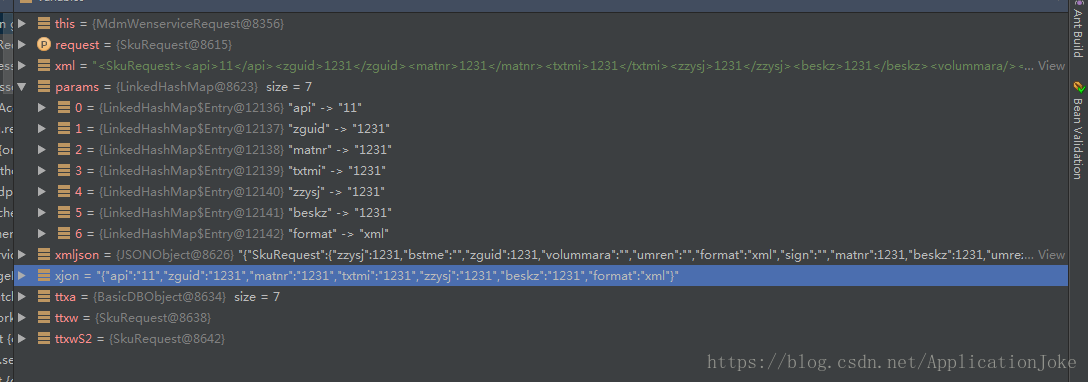
        String xml = ObjectMapperFactory.XML.writeValueAsString(request)//将一个java bean转换成一个String xml

        Map params = ObjectMapperFactory.INSTANCE.convertValue(request, Map.class)//将一个java bean转换成一个Map

        org.json.JSONObject xmljson= XML.toJSONObject(xml)//将一个String XML转换成一个jsonObject

        Object xjon = ObjectMapperFactory.JSON.writeValueAsString(request)//将一个java bean转换成一个json,得到的是一个String,虽然这里定义的是Object的类型,实际上得到的还是一个String

//

        //Map ttx = ObjectMapperFactory.INSTANCE.convertValue(xjon, Map.class)

        Map ttxa = JSON.parse(xjon)//将一个Object对象转换成一个map

        SkuRequest ttxw = ObjectMapperFactory.INSTANCE.convertValue(params, SkuRequest.class)//将一个java bean 转换的map转换成一个java bean的对象

       // SkuRequest ttxwS = ObjectMapperFactory.INSTANCE.convertValue(xmljson, SkuRequest.class)

        //SkuRequest ttxwS1= ObjectMapperFactory.INSTANCE.convertValue(xjon, SkuRequest.class)

        SkuRequest ttxwS2 = ObjectMapperFactory.INSTANCE.convertValue(ttxa, SkuRequest.class)//将一个json转换得到的map,转换成一个java bean对象

        //String xml=skuXml(request)

        ResponseMessage rsp = erpSvc.sendWms(request.api, xml, request.format, request.customerId, params, '')

        SkuResponse response = new SkuResponse(code: rsp.code, msg: rsp.msg, data: erpSvc.convertToStr(rsp.data))

        return response

    }
//将一个String的Json转为Object对象
Object datas= convertToObject(datax,Object.class)
//将对象转为一个List
List<Map> dataList=datas as List
/////////////////////////////////以下是skuRequest的实体类对象
//

// Source code recreated from a .class file by IntelliJ IDEA

// (powered by Fernflower decompiler)

//

package com.ittx.edi.erp.standard.domain;

import javax.xml.bind.annotation.XmlAccessType;

import javax.xml.bind.annotation.XmlAccessorType;

import javax.xml.bind.annotation.XmlElement;

import javax.xml.bind.annotation.XmlRootElement;

import javax.xml.bind.annotation.XmlType;

@XmlAccessorType(XmlAccessType.FIELD)

@XmlType(

    name = "",

    propOrder = {"api", "zguid", "matnr", "txtmi", "zzysj", "beskz", "volummara", "meins", "bstme", "ausme", "qteunit", "umren", "umrez", "zzthgx", "zzthwl", "ekgrp", "sobsl", "plifz", "webaz", "format", "customerId", "sign"}

)

@XmlRootElement(

    name = "skuRequest"

)

public class SkuRequest {

    @XmlElement(

        required = true

    )

    protected String api;

    @XmlElement(

        name = "ZGUID",

        required = true

    )

    protected String zguid;

    @XmlElement(

        name = "MATNR",

        required = true

    )

    protected String matnr;

    @XmlElement(

        name = "TXTMI",

        required = true

    )

    protected String txtmi;

    @XmlElement(

        name = "ZZYSJ",

        required = true

    )

    protected String zzysj;

    @XmlElement(

        name = "BESKZ",

        required = true

    )

    protected String beskz;

    @XmlElement(

        name = "VOLUMMARA",

        required = true

    )

    protected String volummara;

    @XmlElement(

        name = "MEINS",

        required = true

    )

    protected String meins;

    @XmlElement(

        name = "BSTME",

        required = true

    )

    protected String bstme;

    @XmlElement(

        name = "AUSME",

        required = true

    )

    protected String ausme;

    @XmlElement(

        name = "QTEUNIT",

        required = true

    )

    protected String qteunit;

    @XmlElement(

        name = "UMREN",

        required = true

    )

    protected String umren;

    @XmlElement(

        name = "UMREZ",

        required = true

    )

    protected String umrez;

    @XmlElement(

        name = "ZZTHGX",

        required = true

    )

    protected String zzthgx;

    @XmlElement(

        name = "ZZTHWL",

        required = true

    )

    protected String zzthwl;

    @XmlElement(

        name = "EKGRP",

        required = true

    )

    protected String ekgrp;

    @XmlElement(

        name = "SOBSL",

        required = true

    )

    protected String sobsl;

    @XmlElement(

        name = "PLIFZ",

        required = true

    )

    protected String plifz;

    @XmlElement(

        name = "WEBAZ",

        required = true

    )

    protected String webaz;

    @XmlElement(

        required = true

    )

    protected String format;

    @XmlElement(

        required = true

    )

    protected String customerId;

    @XmlElement(

        required = true

    )

    protected String sign;

    public SkuRequest() {

    }

    public String getApi() {

        return this.api;

    }

    public void setApi(String value) {

        this.api = value;

    }

    public String getZGUID() {

        return this.zguid;

    }

    public void setZGUID(String value) {

        this.zguid = value;

    }

    public String getMATNR() {

        return this.matnr;

    }

    public void setMATNR(String value) {

        this.matnr = value;

    }

    public String getTXTMI() {

        return this.txtmi;

    }

    public void setTXTMI(String value) {

        this.txtmi = value;

    }

    public String getZZYSJ() {

        return this.zzysj;

    }

    public void setZZYSJ(String value) {

        this.zzysj = value;

    }

    public String getBESKZ() {

        return this.beskz;

    }

    public void setBESKZ(String value) {

        this.beskz = value;

    }

    public String getVOLUMMARA() {

        return this.volummara;

    }

    public void setVOLUMMARA(String value) {

        this.volummara = value;

    }

    public String getMEINS() {

        return this.meins;

    }

    public void setMEINS(String value) {

        this.meins = value;

    }

    public String getBSTME() {

        return this.bstme;

    }

    public void setBSTME(String value) {

        this.bstme = value;

    }

    public String getAUSME() {

        return this.ausme;

    }

    public void setAUSME(String value) {

        this.ausme = value;

    }

    public String getQTEUNIT() {

        return this.qteunit;

    }

    public void setQTEUNIT(String value) {

        this.qteunit = value;

    }

    public String getUMREN() {

        return this.umren;

    }

    public void setUMREN(String value) {

        this.umren = value;

    }

    public String getUMREZ() {

        return this.umrez;

    }

    public void setUMREZ(String value) {

        this.umrez = value;

    }

    public String getZZTHGX() {

        return this.zzthgx;

    }

    public void setZZTHGX(String value) {

        this.zzthgx = value;

    }

    public String getZZTHWL() {

        return this.zzthwl;

    }

    public void setZZTHWL(String value) {

        this.zzthwl = value;

    }

    public String getEKGRP() {

        return this.ekgrp;

    }

    public void setEKGRP(String value) {

        this.ekgrp = value;

    }

    public String getSOBSL() {

        return this.sobsl;

    }

    public void setSOBSL(String value) {

        this.sobsl = value;

    }

    public String getPLIFZ() {

        return this.plifz;

    }

    public void setPLIFZ(String value) {

        this.plifz = value;

    }

    public String getWEBAZ() {

        return this.webaz;

    }

    public void setWEBAZ(String value) {

        this.webaz = value;

    }

    public String getFormat() {

        return this.format;

    }

    public void setFormat(String value) {

        this.format = value;

    }

    public String getCustomerId() {

        return this.customerId;

    }

    public void setCustomerId(String value) {

        this.customerId = value;

    }

    public String getSign() {

        return this.sign;

    }

    public void setSign(String value) {

        this.sign = value;

    }

}
JAVA -JSON-XML-MAP转换的更多相关文章
- java json与map互相转换(二)
java json与map互相转换(二) CreationTime--2018年7月16日15点09分 Author:Marydon 1.准备工作 所需jar包: commons-beanutil ...
- java json与map互相转换(一)
java json与map互相转换(一) CreationTime--2018年7月16日 Author:Marydon 1.准备工作 所需jar包:json-20180130.jar impor ...
- Java:JSON和Map相互转换
Java:JSON与Map相互转换 需要jar包:jackson-core-2.6.0.jar,jackson-databind-2.6.0.jar,jackson-annotations-2.6.0 ...
- Java基础学习总结(54)——JSON和Map转换的工具类
在pom.xml文件中引入如下jar <dependency> <groupId>commons-lang</groupId> <artifactId> ...
- REST easy with kbmMW #24 使用kbmMW实现JSON/XML/YAML转换成对象
你想过没有,把一个给定的xml或json生成一个Delphi类,并通过这个类完成对xml或json的读写操作吗? 不管有没有,现在kbmMW为我们实现了,看下面这行代码: var s:string; ...
- 使用js json/xml互相转换
<html> <head> <title>json与xml互转</title> <script type="text/javascrip ...
- SpringMVC源码阅读:Json,Xml自动转换
1.前言 SpringMVC是目前J2EE平台的主流Web框架,不熟悉的园友可以看SpringMVC源码阅读入门,它交代了SpringMVC的基础知识和源码阅读的技巧 本文将通过源码(基于Spring ...
- Java处理JSON的工具类(List、Map和JSON之间的转换)——依赖jsonlib支持Map嵌套
原文链接:http://www.itjhwd.com/java_json/ 代码 package com.itjh.mmp.util; import java.io.BufferedReader; i ...
- java下XML与JSON互相转换的Utils类
原文:http://heipark.iteye.com/blog/1394844 需要json-lib-2.1-jdk15.jar和xom-1.2.5.jar,maven pom.xml如下: < ...
- 将java中Map对象转为有相同属性的类对象(json作为中间转换)
java中Map对象转为有相同属性的类对象(json作为中间转换) 准备好json转换工具类 public class JsonUtil { private static ObjectMapper o ...
随机推荐
- Codeforces Round #654 (Div. 2) D. Grid-00100 (构造)
题意:构造一个\(n\)x\(n\)只含\(0\)和\(k\)个\(1\)的矩阵,统计每一行每一列\(1\)的sum,然后构造一个权值最大行和最小行的差的平方加权值最大列和最小列的差的平方的最小和(\ ...
- python-gen
- 在kubernetes集群里集成Apollo配置中心(1)之交付Apollo-configservice至Kubernetes集群
1.Apollo简介 Apollo(阿波罗)是携程框架部门研发的分布式配置中心,能够集中化管理应用不同环境.不同集群的配置,配置修改后能够实时推送到应用端,并且具备规范的权限.流程治理等特性,适用于微 ...
- Linux-字符处理命令
目录 1.sort(排序) 2.uniq(不相邻的两行重复不会去除) 3.cut(取列,截取字段) 4.wc(统计行.单词.字符数) 1.sort(排序) 选项: -t # 指定分隔符 -k # 指定 ...
- Kubernets二进制安装(2)之Bind9安装
1.修改主机名 hostnamectl set-hostname mfyxw10 hostnamectl set-hostname mfyxw20 hostnamectl set-hostname m ...
- SPOJ - LCS2 Longest Common Substring II(后缀自动机)题解
题意: 求\(n\)个串的最大\(LCS\). 思路: 把第一个串建后缀自动机,然后枚举所有串.对于每个串,求出这个串在\(i\)节点的最大匹配为\(temp[i]\)(当前串在这个节点最多取多少), ...
- Os-hackNos-1(drupal7+suid提权)
一.信息收集 得到 ip是 192.168.56.101 , 端口开启了22和80,扫目录发现drupal 7 访问一下呢 在exploit-db上面搜索到存在相关的漏洞,而且是用直接上msf 使用第 ...
- 使用 Promise 实现请求自动重试
使用 Promise 实现请求自动重试 "use strict"; /** * * @author xgqfrms * @license MIT * @copyright xgqf ...
- Matthew Effect
Matthew Effect 马太效应 / 马修效应 马太效应(Matthew Effect),是指好的愈好,坏的愈坏,多的愈多,少的愈少的一种现象, 即两极分化现象. 来自于圣经<新约•马太福 ...
- 如何实现 React 模块动态导入
如何实现 React 模块动态导入 React 模块动态导入 代码分割 webpack & code splitting https://reactjs.org/docs/code-split ...