
JAVA -JSON-XML-MAP转换
//定义一个MAP对象,将对象传给后端接口接收
Map a = ["api": '11', ZGUID: "1231",BESKZ: "1231",MATNR: "1231",TXTMI: "1231",ZZYSJ: "1231", format: 'xml']

print WebServiceUtils.invoke2(wsdlUrl, ns, 'StandardPortService', 'StandardPortSoap11', 'skuRequest', a)
 public SkuResponse inbound(@RequestPayload SkuRequest request) {

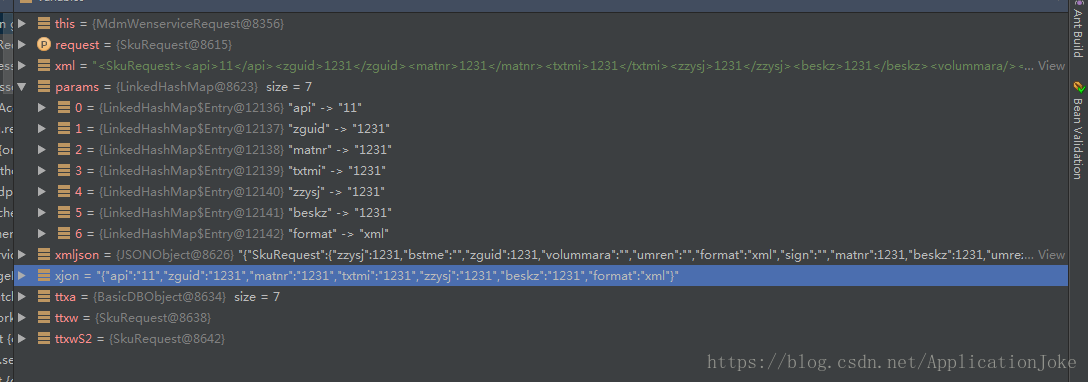
        String xml = ObjectMapperFactory.XML.writeValueAsString(request)//将一个java bean转换成一个String xml

        Map params = ObjectMapperFactory.INSTANCE.convertValue(request, Map.class)//将一个java bean转换成一个Map

        org.json.JSONObject xmljson= XML.toJSONObject(xml)//将一个String XML转换成一个jsonObject

        Object xjon = ObjectMapperFactory.JSON.writeValueAsString(request)//将一个java bean转换成一个json,得到的是一个String,虽然这里定义的是Object的类型,实际上得到的还是一个String

//

        //Map ttx = ObjectMapperFactory.INSTANCE.convertValue(xjon, Map.class)

        Map ttxa = JSON.parse(xjon)//将一个Object对象转换成一个map

        SkuRequest ttxw = ObjectMapperFactory.INSTANCE.convertValue(params, SkuRequest.class)//将一个java bean 转换的map转换成一个java bean的对象

       // SkuRequest ttxwS = ObjectMapperFactory.INSTANCE.convertValue(xmljson, SkuRequest.class)

        //SkuRequest ttxwS1= ObjectMapperFactory.INSTANCE.convertValue(xjon, SkuRequest.class)

        SkuRequest ttxwS2 = ObjectMapperFactory.INSTANCE.convertValue(ttxa, SkuRequest.class)//将一个json转换得到的map,转换成一个java bean对象

        //String xml=skuXml(request)

        ResponseMessage rsp = erpSvc.sendWms(request.api, xml, request.format, request.customerId, params, '')

        SkuResponse response = new SkuResponse(code: rsp.code, msg: rsp.msg, data: erpSvc.convertToStr(rsp.data))

        return response

    }
//将一个String的Json转为Object对象
Object datas= convertToObject(datax,Object.class)
//将对象转为一个List
List<Map> dataList=datas as List
/////////////////////////////////以下是skuRequest的实体类对象
//

// Source code recreated from a .class file by IntelliJ IDEA

// (powered by Fernflower decompiler)

//

package com.ittx.edi.erp.standard.domain;

import javax.xml.bind.annotation.XmlAccessType;

import javax.xml.bind.annotation.XmlAccessorType;

import javax.xml.bind.annotation.XmlElement;

import javax.xml.bind.annotation.XmlRootElement;

import javax.xml.bind.annotation.XmlType;

@XmlAccessorType(XmlAccessType.FIELD)

@XmlType(

    name = "",

    propOrder = {"api", "zguid", "matnr", "txtmi", "zzysj", "beskz", "volummara", "meins", "bstme", "ausme", "qteunit", "umren", "umrez", "zzthgx", "zzthwl", "ekgrp", "sobsl", "plifz", "webaz", "format", "customerId", "sign"}

)

@XmlRootElement(

    name = "skuRequest"

)

public class SkuRequest {

    @XmlElement(

        required = true

    )

    protected String api;

    @XmlElement(

        name = "ZGUID",

        required = true

    )

    protected String zguid;

    @XmlElement(

        name = "MATNR",

        required = true

    )

    protected String matnr;

    @XmlElement(

        name = "TXTMI",

        required = true

    )

    protected String txtmi;

    @XmlElement(

        name = "ZZYSJ",

        required = true

    )

    protected String zzysj;

    @XmlElement(

        name = "BESKZ",

        required = true

    )

    protected String beskz;

    @XmlElement(

        name = "VOLUMMARA",

        required = true

    )

    protected String volummara;

    @XmlElement(

        name = "MEINS",

        required = true

    )

    protected String meins;

    @XmlElement(

        name = "BSTME",

        required = true

    )

    protected String bstme;

    @XmlElement(

        name = "AUSME",

        required = true

    )

    protected String ausme;

    @XmlElement(

        name = "QTEUNIT",

        required = true

    )

    protected String qteunit;

    @XmlElement(

        name = "UMREN",

        required = true

    )

    protected String umren;

    @XmlElement(

        name = "UMREZ",

        required = true

    )

    protected String umrez;

    @XmlElement(

        name = "ZZTHGX",

        required = true

    )

    protected String zzthgx;

    @XmlElement(

        name = "ZZTHWL",

        required = true

    )

    protected String zzthwl;

    @XmlElement(

        name = "EKGRP",

        required = true

    )

    protected String ekgrp;

    @XmlElement(

        name = "SOBSL",

        required = true

    )

    protected String sobsl;

    @XmlElement(

        name = "PLIFZ",

        required = true

    )

    protected String plifz;

    @XmlElement(

        name = "WEBAZ",

        required = true

    )

    protected String webaz;

    @XmlElement(

        required = true

    )

    protected String format;

    @XmlElement(

        required = true

    )

    protected String customerId;

    @XmlElement(

        required = true

    )

    protected String sign;

    public SkuRequest() {

    }

    public String getApi() {

        return this.api;

    }

    public void setApi(String value) {

        this.api = value;

    }

    public String getZGUID() {

        return this.zguid;

    }

    public void setZGUID(String value) {

        this.zguid = value;

    }

    public String getMATNR() {

        return this.matnr;

    }

    public void setMATNR(String value) {

        this.matnr = value;

    }

    public String getTXTMI() {

        return this.txtmi;

    }

    public void setTXTMI(String value) {

        this.txtmi = value;

    }

    public String getZZYSJ() {

        return this.zzysj;

    }

    public void setZZYSJ(String value) {

        this.zzysj = value;

    }

    public String getBESKZ() {

        return this.beskz;

    }

    public void setBESKZ(String value) {

        this.beskz = value;

    }

    public String getVOLUMMARA() {

        return this.volummara;

    }

    public void setVOLUMMARA(String value) {

        this.volummara = value;

    }

    public String getMEINS() {

        return this.meins;

    }

    public void setMEINS(String value) {

        this.meins = value;

    }

    public String getBSTME() {

        return this.bstme;

    }

    public void setBSTME(String value) {

        this.bstme = value;

    }

    public String getAUSME() {

        return this.ausme;

    }

    public void setAUSME(String value) {

        this.ausme = value;

    }

    public String getQTEUNIT() {

        return this.qteunit;

    }

    public void setQTEUNIT(String value) {

        this.qteunit = value;

    }

    public String getUMREN() {

        return this.umren;

    }

    public void setUMREN(String value) {

        this.umren = value;

    }

    public String getUMREZ() {

        return this.umrez;

    }

    public void setUMREZ(String value) {

        this.umrez = value;

    }

    public String getZZTHGX() {

        return this.zzthgx;

    }

    public void setZZTHGX(String value) {

        this.zzthgx = value;

    }

    public String getZZTHWL() {

        return this.zzthwl;

    }

    public void setZZTHWL(String value) {

        this.zzthwl = value;

    }

    public String getEKGRP() {

        return this.ekgrp;

    }

    public void setEKGRP(String value) {

        this.ekgrp = value;

    }

    public String getSOBSL() {

        return this.sobsl;

    }

    public void setSOBSL(String value) {

        this.sobsl = value;

    }

    public String getPLIFZ() {

        return this.plifz;

    }

    public void setPLIFZ(String value) {

        this.plifz = value;

    }

    public String getWEBAZ() {

        return this.webaz;

    }

    public void setWEBAZ(String value) {

        this.webaz = value;

    }

    public String getFormat() {

        return this.format;

    }

    public void setFormat(String value) {

        this.format = value;

    }

    public String getCustomerId() {

        return this.customerId;

    }

    public void setCustomerId(String value) {

        this.customerId = value;

    }

    public String getSign() {

        return this.sign;

    }

    public void setSign(String value) {

        this.sign = value;

    }

}
JAVA -JSON-XML-MAP转换的更多相关文章
- java json与map互相转换(二)
java json与map互相转换(二) CreationTime--2018年7月16日15点09分 Author:Marydon 1.准备工作 所需jar包: commons-beanutil ...
- java json与map互相转换(一)
java json与map互相转换(一) CreationTime--2018年7月16日 Author:Marydon 1.准备工作 所需jar包:json-20180130.jar impor ...
- Java:JSON和Map相互转换
Java:JSON与Map相互转换 需要jar包:jackson-core-2.6.0.jar,jackson-databind-2.6.0.jar,jackson-annotations-2.6.0 ...
- Java基础学习总结(54)——JSON和Map转换的工具类
在pom.xml文件中引入如下jar <dependency> <groupId>commons-lang</groupId> <artifactId> ...
- REST easy with kbmMW #24 使用kbmMW实现JSON/XML/YAML转换成对象
你想过没有,把一个给定的xml或json生成一个Delphi类,并通过这个类完成对xml或json的读写操作吗? 不管有没有,现在kbmMW为我们实现了,看下面这行代码: var s:string; ...
- 使用js json/xml互相转换
<html> <head> <title>json与xml互转</title> <script type="text/javascrip ...
- SpringMVC源码阅读:Json,Xml自动转换
1.前言 SpringMVC是目前J2EE平台的主流Web框架,不熟悉的园友可以看SpringMVC源码阅读入门,它交代了SpringMVC的基础知识和源码阅读的技巧 本文将通过源码(基于Spring ...
- Java处理JSON的工具类(List、Map和JSON之间的转换)——依赖jsonlib支持Map嵌套
原文链接:http://www.itjhwd.com/java_json/ 代码 package com.itjh.mmp.util; import java.io.BufferedReader; i ...
- java下XML与JSON互相转换的Utils类
原文:http://heipark.iteye.com/blog/1394844 需要json-lib-2.1-jdk15.jar和xom-1.2.5.jar,maven pom.xml如下: < ...
- 将java中Map对象转为有相同属性的类对象(json作为中间转换)
java中Map对象转为有相同属性的类对象(json作为中间转换) 准备好json转换工具类 public class JsonUtil { private static ObjectMapper o ...
随机推荐
- C# 程序运行时间计算
https://www.cnblogs.com/dearzhoubi/p/9842452.html
- 导出Excel的异常处理
问题: 提示:"类 Range 的 Select 方法无效" 处理方法: 设置当前工作表 this.worksheet.Activate();
- Leetcode(14)-最长公共前缀
编写一个函数来查找字符串数组中的最长公共前缀. 如果不存在公共前缀,返回空字符串 "". 示例 1: 输入: ["flower","flow" ...
- 【rocketmq学习笔记】rocketmq入门学习
基本介绍 rocketmq是阿里巴巴团队使用java语言开发的一款基于发布订阅模型的分布式消息队列中间件,是一款低延迟,高可用,拥有海量消息堆积能力和灵活拓展性的消息队列. 特点 可以实现集群无单点故 ...
- github gist 无法访问
转自这里 以管理员身份在hosts文件: Windows: C:\Windows\System32\drivers\etc Ubuntu: /etc/hosts 添加: 192.30.253.118 ...
- Programming Interview Questions Websites All In One
Programming Interview Questions Websites All In One 编程面试刷题网站 http://highscalability.com/ https://tri ...
- Flutter & release an iOS app
Flutter & release an iOS app https://flutter.dev/docs/deployment/ios .ipa https://en.wikipedia.o ...
- HTTP cache in depth
HTTP cache in depth HTTP 缓存 https://developers.google.com/web/fundamentals/performance/optimizing-co ...
- xcode upgrade & git bug
xcode upgrade & git bug ➜ op-static git checkout feature/select-seat-system Agreeing to the Xcod ...
- NGK DeFi项目即将上线,打造去中心化闭环金融生态!
据最新官方消息称:NGK已于近日宣布将进军DeFi领域,NGK此次的DeFi的项目将会是一个去中心的交易平台,其最大的功能是进行数字货币的交换.在用户选择了需要支付的数字货币和想购买的数字货币后,系统 ...