
session + cookie 实现登录功能
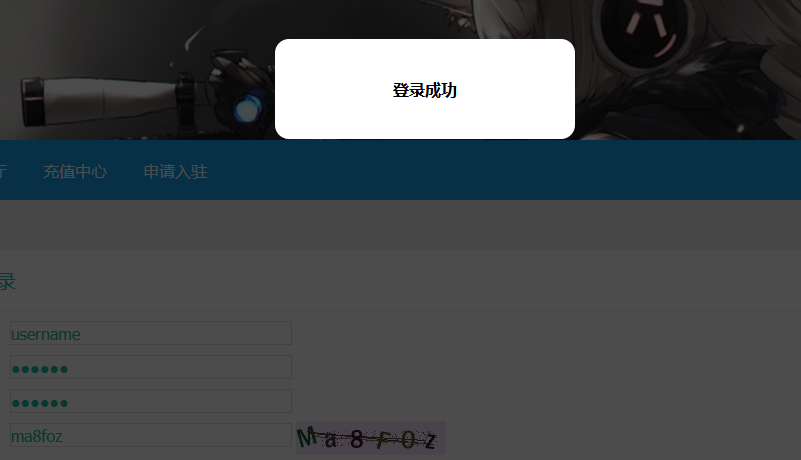
前端部分代码实现
 <div id="mainCp">

         <div class="postForm">

           <p>

             <label>用户账号:</label>

             <input name="oldpwd" type="text" id="username" class="intxt" />

           </p>

           <p class="cellBg">

             <label>用户密码:</label>

             <input name="userpwd" type="password" id="userpwd" class="intxt" />

             <span id="_userpwdok"></span>

           </p>

           <p class="cellBg">

             <label>重复密码:</label>

             <input name="userpwd" type="password" id="reuserpwd" class="intxt" />

             <span id="_userpwdok"></span>

           </p>

           <p class="cellBg">

             <label>验证码号:</label>

                   <input name="vdcode" type="text" id="vdcode" class="intxt" />

            <img id="code" src="" align="absmiddle" alt="看不清?点击更换" style="cursor:pointer;" onclick="getCode()">

           </p>

           <p>

             <button class="button2" type="button" id="login">登录账号</button>

             <button class="button2 ml10" type="reset">重新填写</button>

           </p>

         </div>

       </div>
 <style>

   #out{

     position: fixed;

     top:0;

     left:0;

     z-index: 10000;

     background: rgba(0,0,0,0.7);

     display:flex;

     align-items: center;

     justify-content: center;

     overflow: hidden;

     width:0px;

     height:0px;

   }

   #in{

     margin: 200px auto;

     width:300px;

     height:100px;

     display:flex;

     align-items: center;

     justify-content: center;

     background:#fff;

     border-radius: 14px;

     font-size: 16px;

     font-weight: bold;

   }

 </style>

 <div id="out">

   <div id="in"></div>

 </div>

 <script src="http://libs.baidu.com/jquery/2.1.1/jquery.min.js"></script>

     <script src="/public/static/js/StrPlay.class.js"></script>

     <script src="/public/static/js/Ele.class.js"></script>

     <script src="/public/static/js/loginCheck.js"></script>

     <script>

       // ------ 获取验证码

       function getCode() {

         var imgCode = find('#code');

         imgCode.src = 'http://0609.cn/Config/image/imgcode.php?num=6&y=34&x=150' + "&time=" + new Date().getTime();

       }

       // ------ 初始化

       function init() {

         loop("input",function(item) {

           item.value = "";

         })

       }

       // ------ 遍历输入框

       function loop(str,fn) {

         find(str).forEach((item,index)=> {

           fn(item);

         });

       }

       // ------ 代码运行时长

       function runLen(fn) {

         window.addEventListener('load',function(){

             console.group("程序运行时长:");

             console.time();

             fn();

             console.timeEnd();

             console.groupEnd();

         });

       }

       // ------ 输入检测

       function inputCheck(e) {

         e.username('username');

         e.password('userpwd');

         e.repassword('reuserpwd','userpwd');

       }

       // ------ 点击登录,获取表单信息,检查数据是否合格,请求服务端检测程序

       function goLogin() {

         show("正在处理,请稍后 . . . .");

         var param = {};

         param.username = find('#username').value;

         param.password = find('#userpwd').value;

         param.code = find('#vdcode').value;

         $.post('http://0609.cn/public/index.php/check',param,function(data) {

             data = data.split(",").map(item => {

               return item.split("=>");

             })

             let mdata = new Map(data);

             find('#in').innerHTML = mdata.get('login');

         });

       }

       // ------ DOM效果展示

       function show(tip) {

         var pageWidth = window.innerWidth;

         var pageHeight = window.innerHeight;

         if (typeof pageWidth != "number"){

             if (document.compatMode == "CSS1Compat"){

                   pageWidth = document.documentElement.clientWidth;

                   pageHeight = document.documentElement.clientHeight;

             } else {

                   pageWidth = document.body.clientWidth;

                   pageHeight = document.body.clientHeight;

             }

         }

         find('#out').style.cssText = "display:block;width:" + pageWidth + "px;height:" + pageHeight +"px";

         find('#in').innerHTML = tip;

         find('#out').addEventListener("click",function(){

           find('#out').style.cssText = "display:none;";

         },true);

       }

       // ------ 通过选择器,获取DOM元素

       function find(str) {

         return str.charAt(0) === "#" ?

         document.querySelector(str) : document.querySelectorAll(str);

       }

       // ------ 错误异常检测

       function errorCheck() {

         window.addEventListener('error',function(error){

                 if(error.filename){return false;}else{

                     console.log(error.target+"资源加载失败"+":");

                     console.log(error.target);}

             },true);

         window.onerror = function(message, source, lineno, colno, error) {

                 console.log("程序运行出错:"+message+" at "+lineno+":"+colno);

                 return true;

             }

         window.addEventListener('unhandledrejection',function(event){

             event && event.preventDefault();

             console.log("数据接口请求失败");

         },true);

       }

       // ------ 开始运行程序

       runLen(function() {

         var e = new Check();

         init();

         inputCheck(e);

         getCode();

         loop("input",function(item){

           item.addEventListener('blur',function() {

             if(!Object.values(e.fit).includes(false)){

               find('#login').addEventListener('click',goLogin,true);

             }else{

               find('#login').removeEventListener('click',goLogin,true);

             }

           },true);

         });

         errorCheck();

       });

     </script>
服务端代码实现
 namespace app\index\controller;

 use app\index\model\Data as MD;

 class Checklogin

 {

     public function __construct()

     {

         // parent::__construct();

     }

     public function check()

     {

         header('Content-type:text/html;charset=utf-8;');

         $code=strtolower($this->checkcode());

         $username=$this->userlist()->username;

         $password=$this->userlist()->password;

         sleep(3);

         if($_REQUEST['code'] != $code)

         {

             echo "login=>验证码错误";

             exit;

         }

         if($_REQUEST['username'] != $username)

         {

             echo "login=>用户名或密码错误";

             exit;

         }

         if($_REQUEST['password'] != $password)

         {

             echo "login=>用户名或密码错误";

             exit;

         }

         $str="";

         foreach($this->userlist() as $k=>$v){

             $str .= $k."=>".$v.",";

         }

         echo $str."login=>登录成功";

         exit;

     }

     public function checkcode(){

         session_start();

         return $_SESSION['code'];

     }

     public function userlist(){

         $user = new \stdClass();

         $user->username = "username";

         $user->password = "123456";

         $user->name = "Tom json";

         $user->age = "50";

         $user->sex = "man";

         $user->vip = "是";

         return $user;

     }

 }
session + cookie 实现登录功能的更多相关文章
- Django框架之cookie和session及开发登录功能
1.cookie是什么? Web应用程序是使用HTTP协议传输数据的.HTTP协议是无状态的协议.一旦数据交换完毕,客户端与服务器端的连接就会关闭,再次交换数据需要建立新的连接.这就意味着服务器无法从 ...
- 步步为营-76-用户登录(Session+Cookie)
说明:cookie是保存在浏览器的.Session是存储在服务器的 1 同样UI页面还是web前端提供 1.1 首先,经过验证码校验:将系统产生的验证码放入到Session中,然后取Session值注 ...
- session、cookie 记住登录状态的实现
Cookie的机制 Cookie是浏览器(User Agent)访问一些网站后,这些网站存放在客户端的一组数据,用于使网站等跟踪用户,实现用户自定义功能. Cookie的Domain和Path属性标识 ...
- 自己Cookie写的自动登录功能 包含BASE64 和MD5的使用
sql表 username password字段 User类 有 id username password等字段 Service有一函数 @Override public User findUser ...
- cookie理解与实践【实现简单登录以及自动登录功能】
cookie理解 Cookie是由W3C组织提出,最早由netscape社区发展的一种机制 http是无状态协议.当某次连接中数据提交完,连接会关闭,再次访问时,浏览器与服务器需要重新建立新的连接: ...
- 在基于vue的webpack脚手架开发中使用了代理转发,结果浏览器发出的请求中不带cookie导致登录时总是session失效怎么办?
环境: 有2个业务接口需要转发到82的服务器上: ../user/getCode.do ../user/doLogin.do 现象: 使用上述的 ...
- 使用COOKIE实现登录 VS 使用SESSION实现登录
注:本文使用的代码基于PHP,其他语言逻辑同理. 一:使用COOKIE实现登录验证 使用cookie实现登录的方式,主要通过一些单向的加密信息进行验证.比如admin用户登录了之后,服务端生成一个co ...
- 完成登录功能,用session记住用户名
登录功能完成: js:设置return html:设置 form input py: @app.route设置methods GET POST 读取表单数据 查询数据库 用户名密码对: 记住用户名 跳 ...
- 通过jquery.cookie.js实现记住用户名、密码登录功能
Cookies 定义:让网站服务器把少量数据储存到客户端的硬盘或内存,从客户端的硬盘读取数据的一种技术: 下载与引入:jquery.cookie.js基于jquery:先引入jquery,再引入:jq ...
随机推荐
- ubuntu12.04 跳过grub选择
1.修改/etc/grub.d/00_head文件. set timeout=-1 修改成 set timeout = ${GRUB_RECORDFAIL_TIMEOUT:--1} 2.修改/etc/ ...
- 迷宫城堡+算法讲解【tarjian算法】
Tarjan 算法 参考博客:https://www.cnblogs.com/shadowland/p/5872257.html 算法讲解 Tarjan 算法一种由Robert Tarjan提出的求解 ...
- MFC中窗口启动后,CEdit编辑框默认光标位置设置,顺序的调节方法
MFC中窗口启动后,CEdit编辑框默认光标位设置,顺序的调节方法 在编辑界面按下ctrl+D键,就会出现所有控件的Tab键顺序,按照自己想要的顺序依次点击控件,就可以重新安排顺序.数值1就是默认停留 ...
- .Net Core微服务入门全纪录(五)——Ocelot-API网关(下)
前言 上一篇[.Net Core微服务入门全纪录(四)--Ocelot-API网关(上)]已经完成了Ocelot网关的基本搭建,实现了服务入口的统一.当然,这只是API网关的一个最基本功能,它的进阶功 ...
- 使用addEventListener绑定事件是关于this和event记录
DOM元素使用addEventListener绑定事件的时候经常会碰到想把当前作用域传到函数内部,可以使用以下两种放下: var bindAsEventListener=function (objec ...
- Day7-微信小程序实战-交友小程序首页UI
一般都是直接用微信提供的组件来进行布局的 在小程序中最好少用id,尽量用class 轮播图就是直接用swiper 直接在微信开发者文档里面->组件->swiper->示例代码 < ...
- selenium(3)-针对鼠标的操作
背景 用selenium做自动化,有时候会遇到需要模拟鼠标操作才能进行的情况,比如单击.双击.点击鼠标右键.拖拽等等. 而selenium给我们提供了一个类来处理这类事件-----------Acti ...
- 绕过PowerShell执行策略方法总结
默认情况下,PowerShell配置为阻止Windows系统上执行PowerShell脚本.对于渗透测试人员,系统管理员和开发人员而言,这可能是一个障碍,但并非必须如此. 什么是PowerShell执 ...
- 一文搞懂:Adaboost及手推算法案例
boosting Boosting 算法的特点在于:将表现一般的弱分类器通过组合变成更好的模型.代表自然就是我们的随即森林了. GBDT和Adaboost是boost算法中比较常见的两种,这里主要讲解 ...
- 设计模式系列之装饰模式(Decorator Pattern)——扩展系统功能
说明:设计模式系列文章是读刘伟所著<设计模式的艺术之道(软件开发人员内功修炼之道)>一书的阅读笔记.个人感觉这本书讲的不错,有兴趣推荐读一读.详细内容也可以看看此书作者的博客https:/ ...