
用OkHttpGo和FastJson获取OneNET云平台数据(解析嵌套数组)
JSON数据格式有两种,一种是 { } 大括号表示的JSON对象,一种是 [ ] 中括号表示的JSON数组。从OneNET获取到的数组是这样的,并用Json解析网址查看https://jsonformatter.curiousconcept.com/#(图1)。可以看到这是一个对象包含了数组又包含对象的JSON数据。比如我现在要获取id号为3300_1_5700时间为2020-12-09 20:19:30.624的数据(图1唯一展开的datastreams数组元素)它是一个JSON对象(因为它是被一个大括号包者的),所以datastreams[0]这个JSON对象时包含了datapoints和id,前者又是一个JSON数组(中括号包者),后者则是一个普通的字符串。综上,要获取图1的value值,我要通过一开始返回到的JSON数据 找到 dataJSON对象 找到 datastreamsJSON数组 找到 datapointsJSON数组 中的value字符串。
```
{ "errno": 0, "data": { "count": 10, "datastreams": [ { "datapoints": [ { "at": "2020-12-09 20:19:30.624", "value": 0 } ], "id": "3300_1_5700" }, { "datapoints": [ { "at": "2019-07-30 21:38:03.729", "value": 0 } ], "id": "3327_0_5700" }, { "datapoints": [ { "at": "2019-12-26 21:27:14.700", "value": "\u0000\u0000\u0000\u0000\u0000\u0000\u0000\u0000" } ], "id": "3336_0_5514" }, { "datapoints": [ { "at": "2019-12-26 21:27:14.700", "value": "\u0000\u0000\u0000\u0000\u0000\u0000\u0000\u0000" } ], "id": "3336_0_5515" }, { "datapoints": [ { "at": "2020-12-09 20:19:30.624", "value": 0 } ], "id": "3303_0_5700" }, { "datapoints": [ { "at": "2019-04-21 14:35:11.158", "value": 29.8 } ], "id": "3304_0_5700" }, { "datapoints": [ { "at": "2020-12-09 20:19:31.980", "value": 0 } ], "id": "3326_0_5700" }, { "datapoints": [ { "at": "2019-12-26 19:23:09.191", "value": false } ], "id": "3338_0_5850" }, { "datapoints": [ { "at": "2020-12-09 20:19:29.412", "value": 0 } ], "id": "3300_0_5700" }, { "datapoints": [ { "at": "2019-05-17 09:09:13.681", "value": false } ], "id": "3311_0_5850" } ] }, "error": "succ" }
```
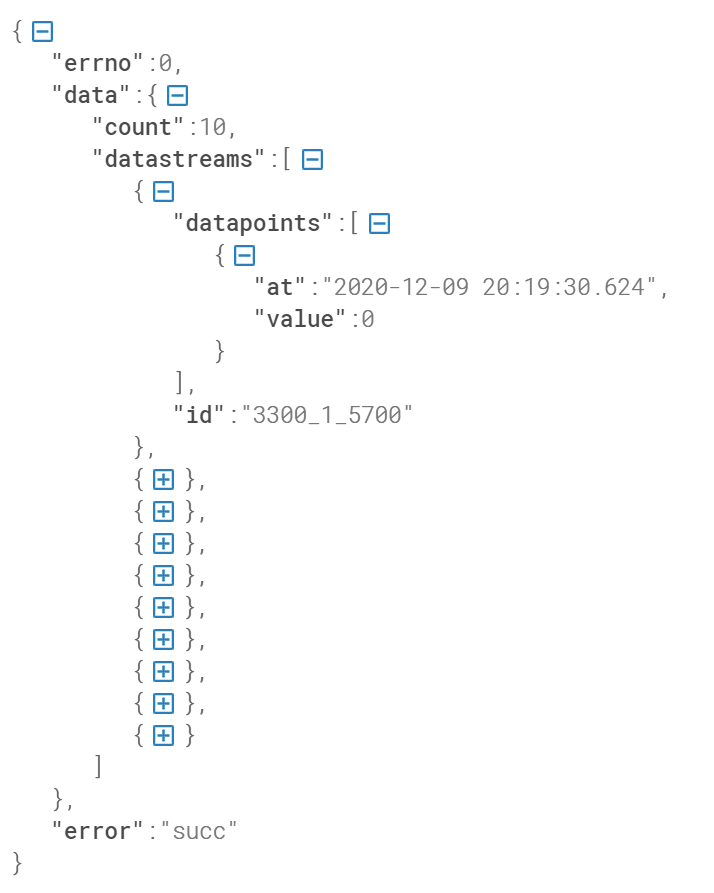
(图1)
执行过程是,当获取到data JSON对象时,获取count字符串,这是OneNET平台给我返回的数值,功能时告诉我datastreams中一共有多少个元素,所以用遍历datastreams数组,进入datastreams后,获取id号,id号是用单片机根据NB-IoT文档(OneNET官网文档)上传到云平台的,根据这一id号来确认到底是哪一个传感器。总之什么时候用getJSONObject或getJSONaRRAY一定要看自己返回的数据是什么,是大括号还是中括号,如果都不是只是一个普通的字符串就用getString方法获取字符串,getString("value")中""写的是元素名,拿的是元素值,比如"value":0这一行,拿的就是0这个元素值。
  1 package com.example.helloworld.learnokhttp;

  2

  3 import android.bluetooth.BluetoothClass;

  4 import android.os.Bundle;

  5 import android.view.View;

  6 import android.widget.Button;

  7 import android.widget.TextView;

  8 import android.widget.Toast;

  9

 10 import androidx.annotation.Nullable;

 11 import androidx.appcompat.app.AppCompatActivity;

 12

 13 import com.alibaba.fastjson.JSON;

 14 import com.alibaba.fastjson.JSONArray;

 15 import com.alibaba.fastjson.JSONObject;

 16 import com.example.helloworld.R;

 17 import com.example.helloworld.learnokhttp.javabean.Data;

 18 import com.example.helloworld.learnokhttp.javabean.Datapoints;

 19 import com.example.helloworld.learnokhttp.javabean.Datastreams;

 20 import com.example.helloworld.learnokhttp.javabean.JsonRootBean;

 21 import com.lzy.okgo.OkGo;

 22 import com.lzy.okgo.adapter.Call;

 23 import com.lzy.okgo.cache.CacheMode;

 24 import com.lzy.okgo.callback.StringCallback;

 25 import com.lzy.okgo.model.Response;

 26

 27 import org.w3c.dom.Text;

 28

 29 import java.util.Iterator;

 30 import java.util.List;

 31

 32 public class OkHttpGoActivity extends AppCompatActivity implements View.OnClickListener {

 33

 34     private String url = "https://api.heclouds.com/devices/523698851/datapoints";//

 35     private Button btn_get,btn_resolvebyfastjson;

 36     private TextView tv_result,tv_wendu,tv_do,tv_ph,tv_tds,tv_zhuodu;

 37

 38     @Override

 39     protected void onCreate(@Nullable Bundle savedInstanceState) {

 40         super.onCreate(savedInstanceState);

 41         setContentView(R.layout.activity_okhttpgo);

 42

 43         setTitle("用封装的方法获取数据");

 44

 45         btn_get = findViewById(R.id.btn_get);

 46         btn_resolvebyfastjson = findViewById(R.id.btn_resolvebyfastjson);

 47         tv_result = findViewById(R.id.tv_result);

 48         tv_wendu = findViewById(R.id.tv_wendu);

 49         tv_do = findViewById(R.id.tv_do);

 50         tv_ph = findViewById(R.id.tv_ph);

 51         tv_tds = findViewById(R.id.tv_tds);

 52         tv_zhuodu = findViewById(R.id.tv_zhuodu);

 53         btn_get.setOnClickListener(this);

 54         btn_resolvebyfastjson.setOnClickListener(this);

 55     }

 56

 57     @Override

 58     protected void onDestroy() {

 59         super.onDestroy();

 60         //Activity销毁时,取消网络请求

 61         OkGo.getInstance().cancelTag(this);

 62     }

 63

 64     /**

 65      *先用okhttpgo拿一次数据

 66      *@author home

 67      *@time 2021/2/24 10:23

 68     */

 69     private void getByOkGo() {

 70         OkGo.<String>get(url)//文档说的第一行泛型一定要添加是指这里

 71                 .headers("api-key", "4VdbaFeRQZRwaSTWNhWxb2UEHaw=")//设备的api-key

 72                 .headers("Content-Type","application/json")

 73                 .tag(this)

 74                 .execute(new StringCallback() {

 75                     @Override

 76                     public void onSuccess(Response<String> response) {//请求成功回调onSuccess方法

 77                         tv_result.setText(response.body());//文档中有说明,body是返回的数据

 78                     }

 79

 80                     @Override

 81                     public void onError(Response<String> response) {

 82                         Toast.makeText(getApplicationContext(), "接口请求错误!", Toast.LENGTH_LONG).show();

 83                     }

 84                 });

 85     }

 86

 87     /**

 88      *OkHttpGo与FastJson结合,并显示到界面

 89      *@author home

 90      *@time 2021/2/24 10:25

 91     */

 92     private void jsonToJavaListByFastJson() {

 93         OkGo.<String>get(url)//文档说的第一行泛型一定要添加是指这里

 94                 .headers("api-key", "4VdbaFeRQZRwaSTWNhWxb2UEHaw=")//设备的api-key

 95                 .headers("Content-Type","application/json")

 96                 .tag(this)

 97                 .execute(new StringCallback() {

 98                     @Override

 99                     public void onSuccess(Response<String> response) {//请求成功回调onSuccess方法

100

101                         String value = "", id = "";

102                         int count = 0;

103

104                         JSONObject jsonObjectData = JSONObject.parseObject(response.body()).getJSONObject("data");//获取json对象后再获取json对象,即第二层data

105                         count = jsonObjectData.getIntValue("count");//count是Datastreams数组的下标值

106                         JSONArray jsonArrayDatastreams = jsonObjectData.getJSONArray("datastreams");//获取json数组即datastearms

107

108                         for(int j = 0; j < count; j++) {//遍历Datastreams数组

109                             JSONObject jsonObjectIndex = jsonArrayDatastreams.getJSONObject(j);

110                             id = jsonObjectIndex.getString("id");

111                             JSONArray jsonArrayDatapoints = jsonObjectIndex.getJSONArray("datapoints");

112                             JSONObject jsonObjectValue = jsonArrayDatapoints.getJSONObject(0);//Datapoints数组只有一个元素(对象),所以下标是1

113                             value = jsonObjectValue.getString("value");

114                             switch (id) {

115                                 case "3303_0_5700":    //温度

116                                     //System.out.println("温度" + value + id);

117                                     tv_wendu.setText("温度" + value + "\t设备号" + id);

118                                     break;

119                                 case "3300_0_5700":     //溶解氧

120                                     //System.out.println("DO" + value + id);

121                                     tv_do.setText("溶解氧" + value + "\t设备号" + id);

122                                     break;

123                                 case "3327_0_5700":     //电导率

124                                     //System.out.println("电导率" + value + id);

125                                     tv_tds.setText("TDS" + value + "\t设备号" + id);

126                                     break;

127                                 case "3326_0_5700":     //ph

128                                     //System.out.println("ph" + value + id);

129                                     tv_ph.setText("PH" + value + "\t设备号" + id);

130                                     break;

131                                 case "3300_1_5700":     //浊度

132                                     //System.out.println("浊度" + value + id);

133                                     tv_zhuodu.setText("浊度" + value + "\t设备号" + id);

134                                     break;

135                             }

136                         }

137                     }

138

139                     @Override

140                     public void onError(Response<String> response) {

141                         Toast.makeText(getApplicationContext(), "接口请求错误!", Toast.LENGTH_LONG).show();

142                     }

143                 });

144

145     }

146

147     @Override

148     public void onClick(View view) {

149         switch (view.getId()) {

150             case R.id.btn_get: //使用原生的okhttp请求网络数据

151                 getByOkGo();//用okgo方法获取数据

152                 break;

153             case R.id.btn_resolvebyfastjson:

154                 jsonToJavaListByFastJson();

155                 break;

156         }

157     }

158

159

160 }
布局文件
 1 <?xml version="1.0" encoding="utf-8"?>

 2 <LinearLayout xmlns:android="http://schemas.android.com/apk/res/android"

 3     android:orientation="vertical" android:layout_width="match_parent"

 4     android:layout_height="match_parent">

 5

 6     <Button

 7         android:id="@+id/btn_get"

 8         android:layout_width="match_parent"

 9         android:layout_height="wrap_content"

10         android:text="get方法获取数据"

11         android:textAllCaps="false"/>

12

13     <Button

14         android:id="@+id/btn_resolvebyfastjson"

15         android:layout_width="match_parent"

16         android:layout_height="wrap_content"

17         android:text="通过fastjson解析"

18         android:textAllCaps="false"/>

19

20     <TextView

21         android:id="@+id/tv_result"

22         android:layout_width="match_parent"

23         android:layout_height="wrap_content"/>

24

25

26     <TextView

27         android:id="@+id/tv_wendu"

28         android:layout_width="match_parent"

29         android:layout_height="wrap_content"/>

30

31     <TextView

32         android:id="@+id/tv_do"

33         android:layout_width="match_parent"

34         android:layout_height="wrap_content"/>

35

36     <TextView

37         android:id="@+id/tv_ph"

38         android:layout_width="match_parent"

39         android:layout_height="wrap_content"/>

40

41     <TextView

42         android:id="@+id/tv_tds"

43         android:layout_width="match_parent"

44         android:layout_height="wrap_content"/>

45

46     <TextView

47         android:id="@+id/tv_zhuodu"

48         android:layout_width="match_parent"

49         android:layout_height="wrap_content"/>

50

51 </LinearLayout>
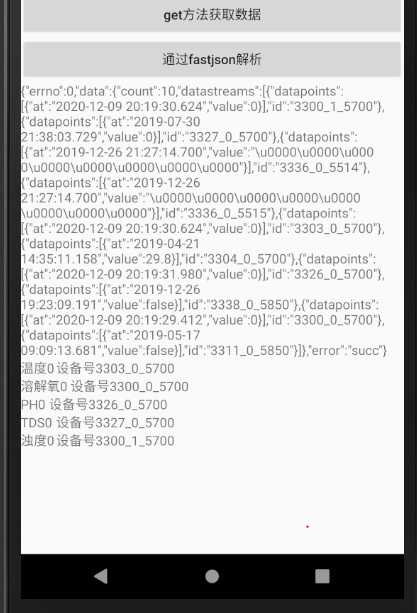
最后的效果(图2)
(图2)
用OkHttpGo和FastJson获取OneNET云平台数据(解析嵌套数组)的更多相关文章
- Android获取OneNET云平台数据
尝试HttpURLConnection "get"方式获取了www.baidu.com的数据后,试着获取OneNET云平台的设备数据(设备数据已成功上传至云平台) .java文件 ...
- 使用OkHttp和OkHttpGo获取OneNET云平台数据
图1是OneNET官网关于NB-IoT文档关于批量查询设备最新数据的介绍,可以看到GET方法的URL地址和两个头部信息(图2是Htto请求消息结构).所以在写url时,还要添加两行头部字段名,不然获取 ...
- [Micropython][ESP8266] TPYBoard V202 之MQTT协议接入OneNET云平台
随着移动互联网的发展,MQTT由于开放源代码,耗电量小等特点,将会在移动消息推送领域会有更多的贡献,在物联网领域,传感器与服务器的通信,信息的收集,MQTT都可以作为考虑的方案之一.在未来MQTT会进 ...
- 万物云平台数据转发 c# 控制台程序
using System; using System.Collections.Generic; using System.Linq; using System.Text; using System.N ...
- FastJson和Gson和Json数据解析分析和用法
首先分析下目前号称最快的FastJson,这个是所有人都验证过的,解析速度确实比较快,不过也需要根据数据量来看,数据量小的时候,Gson性能要稍微优于FastJson,但在数据量大解析的情况下,Fas ...
- HttpClient 模拟发送Post和Get请求 并用fastjson对返回json字符串数据解析,和HttpClient一些参数方法的deprecated(弃用)的综合总结
最近在做一个接口调用的时候用到Apache的httpclient时候,发现引入最新版本4.5,DefaultHttpClient等老版本常用的类已经过时了,不推荐使用了:去官网看了一下在4.3之后就抛 ...
- html中通过js获取接口JSON格式数据解析以及跨域问题
前言:本人自学前端开发,一直想研究下js获取接口数据在html的实现,顺利地找到了获取数据的方法,但是有部分接口在调用中出现无法展示数据.经查,发现时跨域的问题,花费了一通时间,随笔记录下过程,以方便 ...
- 玩转OneNET物联网平台之MQTT服务④ —— 远程控制LED(设备自注册)+ Android App控制
授人以鱼不如授人以渔,目的不是为了教会你具体项目开发,而是学会学习的能力.希望大家分享给你周边需要的朋友或者同学,说不定大神成长之路有博哥的奠基石... QQ技术互动交流群:ESP8266&3 ...
- 玩转OneNET物联网平台之MQTT服务③ —— 远程控制LED(设备自注册)
授人以鱼不如授人以渔,目的不是为了教会你具体项目开发,而是学会学习的能力.希望大家分享给你周边需要的朋友或者同学,说不定大神成长之路有博哥的奠基石... QQ技术互动交流群:ESP8266&3 ...
随机推荐
- (4)Linux常用的运维平台和工具
运维工程师使用的运维平台和工具包括: Web服务器:apache.tomcat.nginx.lighttpd 监控:nagios.ganglia.cacti.zabbix 自动部署:ansible.s ...
- burpsuite是用教程
1.下载burp suite工具 首先要明确,需要java环境,并且配置java环境变量 可以通过吾爱破解下载工具 工具: 双击打开后直接点next --> start burpsuite: 3 ...
- [译]Rxjs&Angular-退订可观察对象的n中方式
原文/出处: RxJS & Angular - Unsubscribe Like a Pro 在angular项目中我们不可避免的要使用RxJS可观察对象(Observables)来进行订阅( ...
- hdu4686 Arc of Dream
Time Limit: 2000/2000 MS (Java/Others) Memory Limit: 65535/65535 K (Java/Others) Total Submission ...
- 牛客练习赛70 B.拼凑 (序列自动机)
题意:有一个模板串,有\(T\)个字符串,从字符串中找到某个子串,使得这个子串中的子序列包含模板串,求最短的子串的长度. 题解:找子序列,很容易想到序列自动机,根据序列自动机的原理,我们一定可以确保除 ...
- Pyqt5 安装
window 安装PyQt5 pip install pyqt5 pip install pyqt5-tools (安装常用的Qt工具) 添加环境变量 变量名: QT_QPA_PLATFORM_PL ...
- 国产网络测试仪MiniSMB - 利用Ctrl+c/Ctrl+v/Ctrl+a快速编辑数据流
国产网络测试仪MiniSMB(www.minismb.com)是复刻smartbits的IP网络性能测试工具,是一款专门用于测试智能路由器,网络交换机的性能和稳定性的软硬件相结合的工具.可以通过此以太 ...
- [Golang]-1 Slice与数组的区别
目录 数组 1.创建数组: 2.数组是值拷贝传递: 切片(slice) 1.首先看看slice的源码结构: 2.slice的创建: 3.slice使用make创建 4.切片作为参数传递 5.Golan ...
- 4.安装fluentd用于收集集群内部应用日志
作者 微信:tangy8080 电子邮箱:914661180@qq.com 更新时间:2019-06-13 11:02:14 星期四 欢迎您订阅和分享我的订阅号,订阅号内会不定期分享一些我自己学习过程 ...
- canvas实现简易时钟效果
代码 <!DOCTYPE html> <html lang="en"> <head> <meta charset="UTF-8& ...