
SpringBoot2.x整合JavaMail以qq邮箱发送邮件
本文参考spring官网email接口文档所写。
spring-email官方网址:https://docs.spring.io/spring/docs/5.1.8.RELEASE/spring-framework-reference/integration.html#mail
1:相关依赖
        <!-- https://mvnrepository.com/artifact/org.springframework.boot/spring-boot-starter-mail -->

        <dependency>

            <groupId>org.springframework.boot</groupId>

            <artifactId>spring-boot-starter-mail</artifactId>

            <version>2.1.6.RELEASE</version>

        </dependency>
2:邮箱收件人model
package com.dev.model.email;

import java.io.Serializable;

/**

 * Created on 2019-08-02 16:16.

 *

 * @author zgq7

 */

public class EmailModel implements Serializable {

    /**

     * 收件人姓名

     **/

    private String recieverName;

    /**

     * 收件人邮箱地址

     **/

    private String recieverEmailAddress;

    /**

     * 邮件主题

     **/

    private String emailTheme;

    /**

     * 邮件内容

     **/

    private String emailContent;

    public String getRecieverName() {

        return recieverName;

    }

    public void setRecieverName(String recieverName) {

        this.recieverName = recieverName;

    }

    public String getRecieverEmailAddress() {

        return recieverEmailAddress;

    }

    public void setRecieverEmailAddress(String recieverEmailAddress) {

        this.recieverEmailAddress = recieverEmailAddress;

    }

    public String getEmailTheme() {

        return emailTheme;

    }

    public void setEmailTheme(String emailTheme) {

        this.emailTheme = emailTheme;

    }

    public String getEmailContent() {

        return emailContent;

    }

    public void setEmailContent(String emailContent) {

        this.emailContent = emailContent;

    }

}
3:邮箱工具类
package com.dev.utils.email;

import com.dev.model.email.EmailModel;

import org.jetbrains.annotations.NotNull;

import org.slf4j.Logger;

import org.slf4j.LoggerFactory;

import org.springframework.beans.factory.annotation.Autowired;

import org.springframework.beans.factory.annotation.Value;

import org.springframework.mail.MailException;

import org.springframework.mail.javamail.JavaMailSender;

import org.springframework.mail.javamail.JavaMailSenderImpl;

import org.springframework.mail.javamail.MimeMessageHelper;

import org.springframework.mail.javamail.MimeMessagePreparator;

import javax.mail.Message;

import javax.mail.MessagingException;

import javax.mail.internet.MimeMessage;

import java.time.LocalDateTime;

import java.time.format.DateTimeFormatter;

/**

 * Created on 2019-08-02 16:06.

 *

 * @author zgq7

 */

public class MailSendUtils {

    private static final Logger logger = LoggerFactory.getLogger(MailSendUtils.class);

    /**

     * 发送者地址

     **/

    private static String posterAdress = "xxx@qq.com";

    /**

     * 发送者姓名

     **/

    private static final String posterName = "xxx";

    @Autowired

    private JavaMailSender javaMailSender;

    @Autowired

    private JavaMailSenderImpl javaMailSenderImpl;

    /**

     * 文本发送

     **/

    public void sendEmailAsText(final EmailModel emailModel) {

        MimeMessagePreparator mimeMessagePreparator = mimeMessage -> {

            mimeMessage.setFrom(posterAdress);

            mimeMessage.setRecipients(Message.RecipientType.TO, emailModel.getRecieverEmailAddress());

            mimeMessage.setText("<html><body>"

                    + "hello:" + emailModel.getRecieverName()

                    + "<br>" + "msg:" + emailModel.getEmailContent()

                    + "<br>" + "from :" + posterName

                    + "</body></html>");

        };

        try {

            this.javaMailSender.send(mimeMessagePreparator);

            logger.info("邮箱已返送至[{}]邮箱!", emailModel.getRecieverName());

        } catch (MailException e) {

            logger.error("邮箱异常:{}", e);

        }

    }

    /**

     * html 网页发送

     * 该方法为同步方法

     **/

    public void sendEmailAsSysExceptionHtml(final EmailModel emailModel) {

        MimeMessage mimeMessage = javaMailSenderImpl.createMimeMessage();

        MimeMessageHelper mimeMessageHelper;

        try {

            mimeMessageHelper = new MimeMessageHelper(mimeMessage, true);

            mimeMessageHelper.setFrom(posterAdress);

            mimeMessageHelper.setTo(emailModel.getRecieverEmailAddress());

            mimeMessageHelper.setText("<!DOCTYPE html>\n" +

                            "<html>\n" +

                            "\t<head>\n" +

                            "\t\t<meta charset=\"UTF-8\">\n" +

                            "\t\t<title></title>\n" +

                            "\t</head>\n" +

                            "\t<style>\n" +

                            "\t\tbody,\n" +

                            "\t\ttable,\n" +

                            "\t\ttbody,\n" +

                            "\t\ttr {\n" +

                            "\t\t\tbackground-color: aquamarine;\n" +

                            "\t\t\tbackground-size: 100%;\n" +

                            "\t\t}\n" +

                            "\t</style>\n" +

                            "\n" +

                            "\t<body>\n" +

                            "\t\t<table border=\"solid 2 px\" align=\"center\" style=\"text-align: center;\">\n" +

                            "\t\t\t<tbody>\n" +

                            "\t\t\t\t<tr>\n" +

                            "\t\t\t\t\t<td width=\"200px\" bgcolor=\"coral\">时间</td>\n" +

                            "\t\t\t\t\t<td width=\"80%\" bgcolor=\"azure\">" + LocalDateTime.now().format(DateTimeFormatter.ofPattern("yyyy-MM-dd HH:mm:ss")) + "</td>\n" +

                            "\t\t\t\t</tr>\n" +

                            "\t\t\t\t<tr>\n" +

                            "\t\t\t\t\t<td width=\"200px\" bgcolor=\"coral\">信息</td>\n" +

                            "\t\t\t\t\t<td width=\"80%\" bgcolor=\"azure\">" + "测试" + "</td>\n" +

                            "\t\t\t\t</tr>\n" +

                            "\t\t\t\t<tr>\n" +

                            "\t\t\t\t\t<td width=\"200px\" bgcolor=\"coral\">堆栈</td>\n" +

                            "\t\t\t\t\t<td width=\"80%\" bgcolor=\"azure\" style=\"text-align: left;\">" + emailModel.getEmailContent() + "</td>\n" +

                            "\t\t\t\t</tr>\n" +

                            "\t\t\t</tbody>\n" +

                            "\t\t</table>\n" +

                            "\t</body>\n" +

                            "\n" +

                            "</html>"

                    , true);

            this.javaMailSender.send(mimeMessage);

            logger.info("邮箱已返送至[{}]邮箱!", emailModel.getRecieverName());

        } catch (MessagingException e) {

            e.printStackTrace();

        } catch (MailException e) {

            logger.error("邮箱异常:{}", e);

        }

    }

}
notice3.1:可自行设置文本发送api、html发送api、图片发送api等。我的工具包中只写了文本发送和html发送两种格式的api。
4:注册EmailUtils的bean
package com.dev.config;

import com.dev.utils.email.MailSendUtils;

/**

 * Created by zgq7 on 2019/6/6.

 * 注册一些bean进入ioc

 *

 */

@Configuration

public class BeanRegistryCenterConfig {


    /**

     * 邮箱工具类 bean 注册

     **/

    @Bean

    public MailSendUtils mailSendUtils() {

        return new MailSendUtils();

    }

}
5:Application.properties配置
spring.mail.host=smtp.qq.com

spring.mail.port=587

spring.mail.username=你的qq@qq.com

spring.mail.password=xxxxx

spring.mail.protocol=smtp

spring.mail.default-encoding=UTF-8
notice1:spring.mail.usernam,是你的qq邮箱地址
notice2:spring.mail.password,不要用真正的qq邮箱密码,而是qq邮箱第三方服务授权码
下面是获取qq邮箱第三方服务授权码的操步骤:
5.1:登录qq邮箱,进入首页,点击设置按钮

5.2:点击账户设置

并拉到最下面点击我圈中的开启按钮
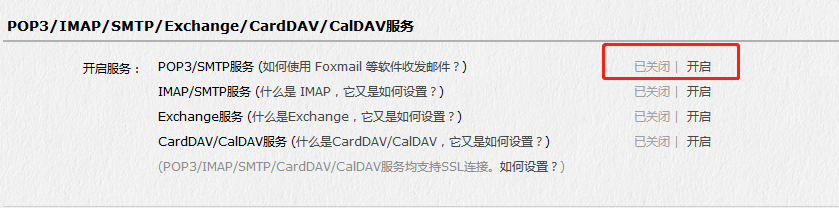
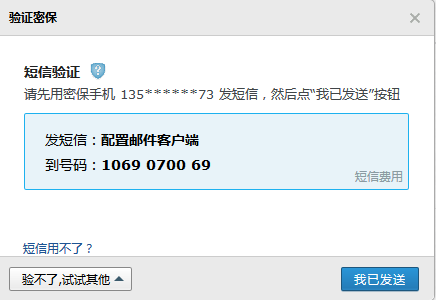
然后会弹出一个小框提示你发信息,发就行了,发送之后点击验证会收到授权码
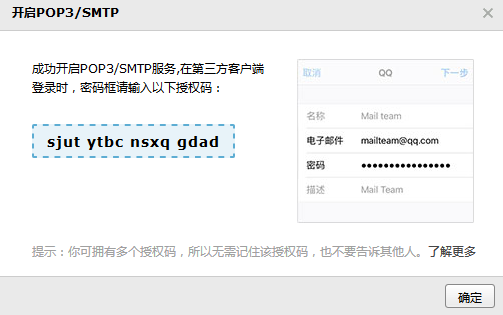
除了spring.mail.username、spring.mail.password 两项要换成自己的 ,其他的和我一样就行;
6:邮件发送测试
6.1:文本发送测试
    /**

     * Java Mail 文本发送

     **/

    @Test

    public void EmaiTest() {

        EmailModel emailModel = new EmailModel();

        emailModel.setEmailTheme("测试");

        emailModel.setRecieverName("测试");

        emailModel.setEmailContent("测试");

        emailModel.setRecieverEmailAddress("xxx@qq.com");

        mailSendUtils.sendEmailAsText(emailModel);

    }
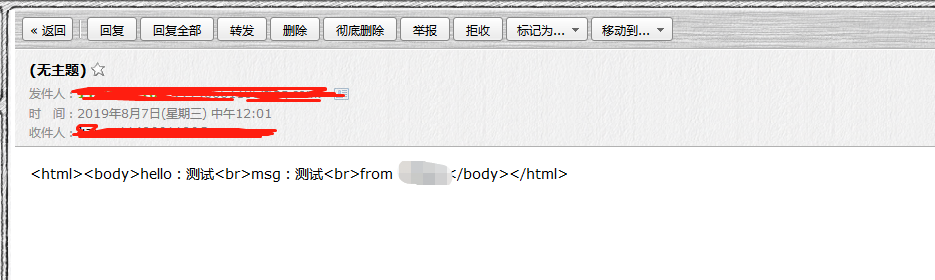
发送成功后:
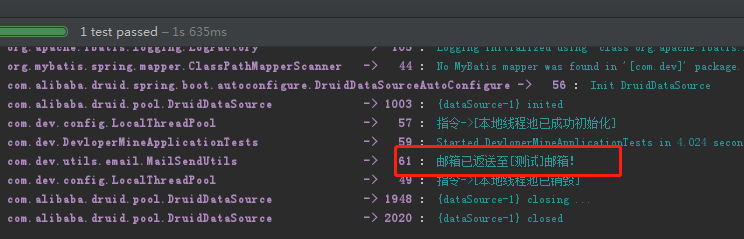
目标邮箱收到的邮件:
6.2:html发送测试
    /**

     * Java Mail 网页发送

     **/

    @Test

    public void EmailTest2() throws MessagingException, InterruptedException {

        EmailModel emailModel = new EmailModel();

        emailModel.setEmailTheme("测试");

        emailModel.setRecieverName("测试");

        emailModel.setEmailContent("测试");

        emailModel.setRecieverEmailAddress("xxx@qq.com");

        mailSendUtils.sendEmailAsSysExceptionHtml(emailModel);

    }
目标邮箱收到的邮件:
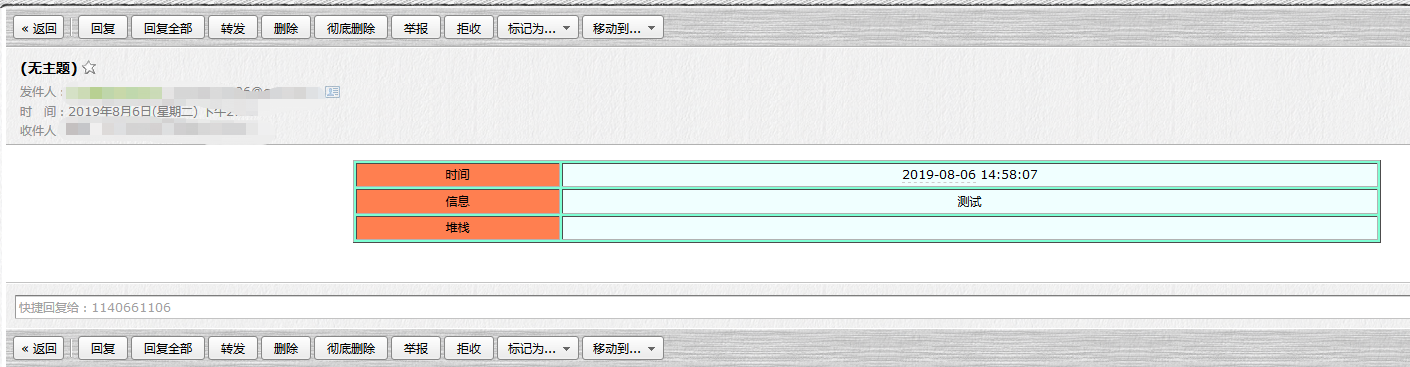
这个展示效果可以自己设置。
7:注意点
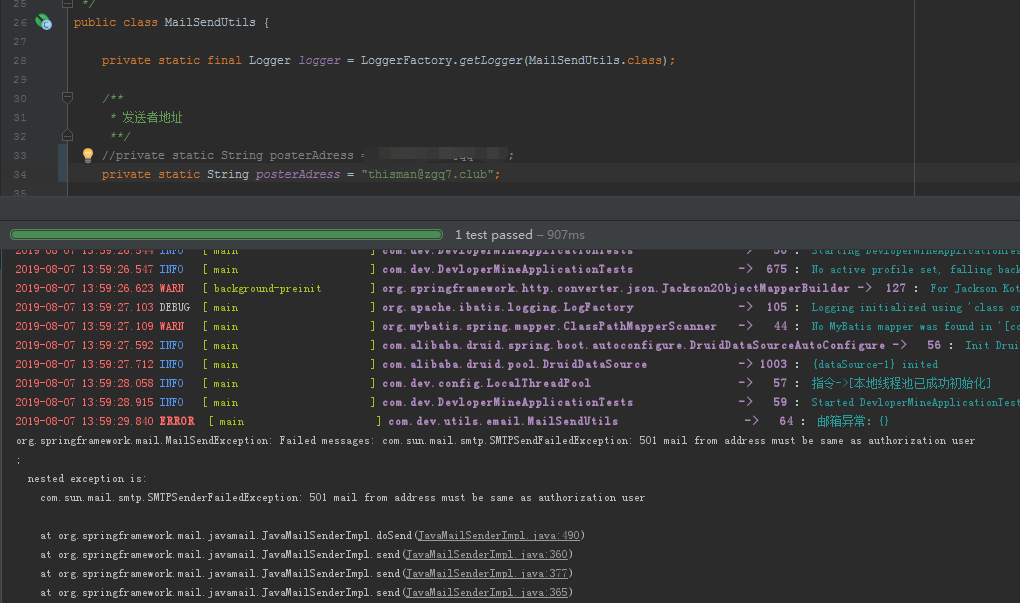
发送邮件者的邮箱地址为qq邮箱,否则会QQ邮箱认证报错。而接收者邮箱可以为其他的邮箱,如企业邮箱、网易邮箱等。
SpringBoot2.x整合JavaMail以qq邮箱发送邮件的更多相关文章
- 基于java mail实现简单的QQ邮箱发送邮件
刚学习到java邮件相关的知识,先写下这篇博客,方便以后翻阅学习. -----------------------------第一步 开启SMTP服务 在 QQ 邮箱里的 设置->账户里开启 S ...
- 杂项之使用qq邮箱发送邮件
杂项之使用qq邮箱发送邮件 本节内容 特殊设置 测试代码 1. 特殊设置 之前QQ邮箱直接可以通过smtp协议发送邮件,不需要进行一些特殊的设置,但是最近使用QQ邮箱测试的时候发现以前使用的办法无法奏 ...
- ecshop QQ邮箱发送邮件服务器配置
ecshop QQ邮箱发送邮件服务器配置 1.邮件服务:采用其他的SMTP服务 2.邮件服务器是否要求加密连接(SSL): 是 此项设置需要php支持openSSL模块 开启方法: a.php.ini ...
- SpringBoot使用qq邮箱发送邮件
最近公司要做一个邮箱注册和重置密码的功能,因为之前就做过,但是不是Springboot项目,所以相对来说还是比较容易的,在这里记录一下. 一.引用Maven依赖 这里使用spring自带的邮件jar包 ...
- python qq邮箱发送邮件
使用qq发送邮件 # coding=utf8 """ qq邮箱发送邮件 """ import sys reload(sys) sys.set ...
- python3通过qq邮箱发送邮件
python3通过qq邮箱发送邮件 0.了解qq邮箱的SMTP QQ邮箱 POP3 和 SMTP 服务器地址设置如下: 邮箱 POP3服务器(端口995) SMTP服务器(端口465或587) qq. ...
- 使用 QQ 邮箱发送邮件报错:java.net.SocketTimeoutException: Read timed out. Failed messages: javax.mail.MessagingException: Exception reading response
使用 QQ 邮箱发送邮件报错:java.net.SocketTimeoutException: Read timed out. Failed messages: javax.mail.Messagin ...
- legend3---lavarel中使用qq邮箱发送邮件
legend3---lavarel中使用qq邮箱发送邮件 一.总结 一句话总结: 第一步:配置邮箱做服务器,比如qq邮箱,网易163邮箱 第二步:配置lavarel的配置文件 第三部:写邮件发送代码就 ...
- 用JavaMail通过QQ邮箱来发送邮件(第一篇博客,备忘)
1.先启用QQ邮箱里POP3/STMP服务:生成授权码 2.导入mail.jar包(不要用太古董的技术,你懂得) 3.注意要在代码里加上开启SSL加密的代码 4.直接上代码 import java.u ...
随机推荐
- MySQL安全审计(init_connect)
1.常规安全 在说审计之前我们先提一点一般我们常用的MySQL的安全注意事项. 指定完善的MySQL安全流程 用户授权邮件备注 每个人对应权限均需留底 所有用户非管理员及特殊账户,均精细化授权 2.s ...
- 织梦(DedeCms)的安全问题解决办法
网上大家也看到DEDECMS这套程序,虽然便捷草根站长的快速建站,但安全问题也是非常多的.DEDE官方也在很久之前就已经不再对这套系统进行什么版本升级了,最多就是一些补丁修复: 好,废话不多说,下面整 ...
- ArrayList源码分析(JDK1.8)
概述 ArrayList底层是基于数组实现的,并且支持动态扩容的动态数组(变长的集合类).ArrayList允许空值和重复的元素,当向ArrayList中添加元素数量大于其底层数组容量时,会通过扩容机 ...
- C语言实现--静态链表的操作
1,我们研究数据结构的操作,第一要弄懂它的结构体表示(也就是结构体特点).第二要清楚它的初始化和撤销过程.对于静态链表首先分析它的特点:一是采用静态存储方式,二是没有指针.静态链表就是不用指针来表示链 ...
- Codeforces Round #644 (Div. 3)
比赛链接:https://codeforces.com/contest/1360 A - Minimal Square 题意 计算能包含两个 $a \times b$ 矩形的最小正方形的面积. 题解 ...
- Network UVA - 315 无向图找割点
题意: 给你一个无向图,你需要找出来其中有几个割点 割点/割项: 1.u不为搜索起点,low[v]>=dfn[u] 2.u为搜索起点,size[ch]>=2 3.一般情况下,不建议在tar ...
- EGADS介绍(二)--时序模型和异常检测模型算法的核心思想
EDADS系统包含了众多的时序模型和异常检测模型,这些模型的处理会输入很多参数,若仅使用默认的参数,那么时序模型预测的准确率将无法提高,异常检测模型的误报率也无法降低,甚至针对某些时间序列这些模型将无 ...
- 2019牛客多校第五场C generator 2(BSGS)题解
题意: 传送门 已知递推公式\(x_i = a*x_{i - 1} + b\mod p\),\(p\)是素数,已知\(x_0,a,b,p\),给出一个\(n\)和\(v\),问你满足\(x_i = v ...
- 还傻傻分不清楚equals和==的区别吗?看完就明白了
解决一个问题的最好方法就是发现一个问题产生的根源,即发现最本质的东西,再去解决它. Java语言里面的equals()方法是交给开发者们自己去覆盖重写编写功能的,即让开发者去定义当满足什么条件时,两个 ...
- volatile的内存屏障的坑
请看下面的代码并尝试猜测输出: 可能一看下面的代码你可能会放弃继续看了,但如果你想要彻底弄明白volatile,你需要耐心,下面的代码很简单! 在下面的代码中,我们定义了4个字段x,y,a和b,它们被 ...