
Android Studio--Activity实现跳转功能
首先,完成一个布局文件,名字就叫做activity_text_view.xml
<?xml version="1.0" encoding="utf-8"?>

<LinearLayout xmlns:android="http://schemas.android.com/apk/res/android"

    android:layout_width="match_parent"

    android:layout_height="match_parent"

    android:orientation="vertical"

    >

    <TextView

        android:id="@+id/ttv1"

        android:layout_width="match_parent"

        android:layout_height="wrap_content"

        android:text="This is a test"

        android:textColor="#5500FF"

        android:textSize="32sp"

        android:padding="10dp"

        />

</LinearLayout>
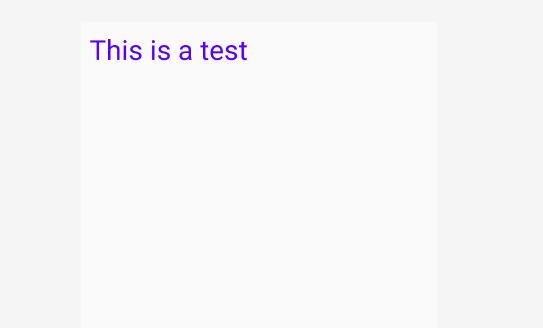
下面来新建一个TestTextViewActivity.java文件
package com.example.test;

import android.graphics.Paint;

import android.os.Bundle;

import android.widget.TextView;

import androidx.appcompat.app.AppCompatActivity;

public class TestTextViewActivity extends AppCompatActivity {

    private TextView mtv1;

    @Override

    protected void onCreate(Bundle savedInstanceState) {

        super.onCreate(savedInstanceState);

        setContentView(R.layout.activity_text_view);

        mtv1 = findViewById(R.id.ttv1);

        mtv1.getPaint().setFlags(Paint.STRIKE_THRU_TEXT_FLAG); // set strike through style in the text

        mtv1.getPaint().setAntiAlias(true); // get rid of the zigzag effect

    }

}
在MainActivity.java文件里加入以下代码:
package com.example.test;

import android.content.Intent;

import android.os.Bundle;

import android.view.View;

import android.widget.Button;

import androidx.appcompat.app.AppCompatActivity;

public class MainActivity extends AppCompatActivity {

    private Button mBtnTextView;  // define a text view button

    @Override

    protected void onCreate(Bundle savedInstanceState) {

        super.onCreate(savedInstanceState);

        setContentView(R.layout.activity_main);

        mBtnTextView = findViewById(R.id.btnTextView1);  // get the button, it is in activity_main.xml

        mBtnTextView.setOnClickListener(new View.OnClickListener() {

            public void onClick(View view) {

                Intent intent = new Intent(MainActivity.this, TestTextViewActivity.class);

                startActivity(intent);

            }

        });

    };

}
activity_main.xml
<?xml version="1.0" encoding="utf-8"?>

<LinearLayout xmlns:android="http://schemas.android.com/apk/res/android"

    android:layout_width="match_parent"

    android:layout_height="match_parent"

    android:orientation="vertical"

    >

    <Button

        android:id="@+id/btnTextView1"

        android:layout_width="match_parent"

        android:layout_height="wrap_content"

        android:text="TestTextView"

        />

</LinearLayout>
注意:在AndroidMainifest.xml里面加入activity
<activity android:name=".TestTextViewActivity"/>
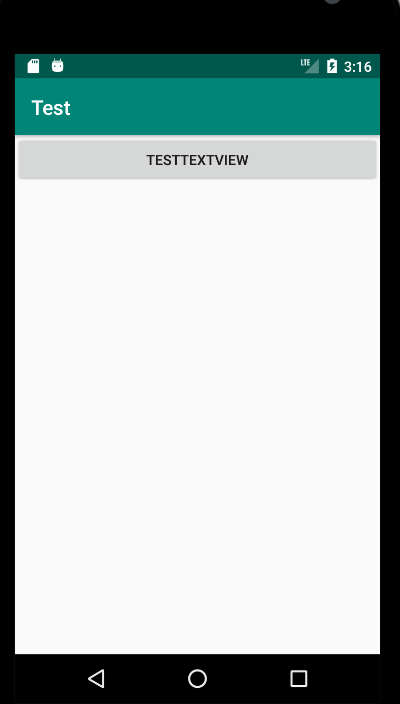
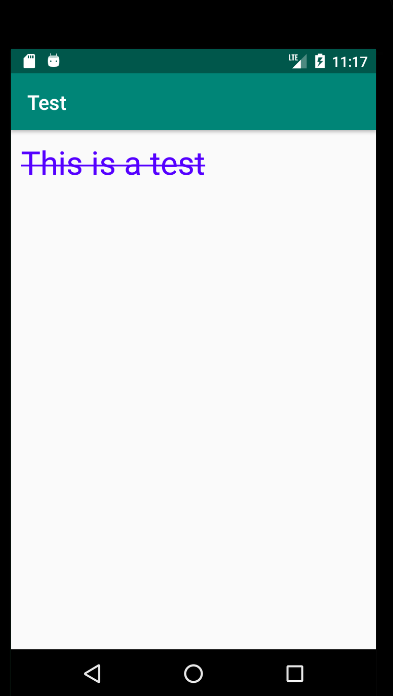
效果图如下:
Android Studio--Activity实现跳转功能的更多相关文章
- Android Studio 代码页跳界面 /java和XML快速切换技巧
https://www.cnblogs.com/simadi/p/6698666.html?utm_source=itdadao&utm_medium=referral 今天又发现了一个And ...
- android studio Activity标题栏研究
第一次研究时间:2016/7/30,以下研究主要存在于当前最新版本的android studio上.eclipse请参考 一.头部标题取消 当前版本新建工程在 application中默认主题为 an ...
- [Android] android studio 2.0即时运行功能探秘
即时运行instant Run是android studio 2中,开发人员最关心的特性之一 在google发布studio 2.0之后,马上更新体验了一把,然而发现,并没快多少,说好的即时运行呢? ...
- Android之Activity之间跳转
本人自学Android,想到什么就写点什么.主要是怕忘了,哈哈~请观者不要建议~ 今天写点Android窗口之间的跳转以及自己理解: 1.Android中窗口之间的跳转,就是Activity之间的跳转 ...
- Android课程---Activity的跳转与传值(转自网上)
Activity跳转与传值,主要是通过Intent类来连接多个Activity,以及传递数据. Intent是Android一个很重要的类.Intent直译是“意图”,什么是意图呢?比如你想从这个 ...
- Android Studio实现页面跳转(新页面或者网站)
一,跳转到另一个页面 百度了好久,好像好多种方法,从中挑选了一中比较方便的一中方法 利用Intent类进行实现 1,首先在firstActivity中添加相应的跳转命令代码 例如一下示例代码 if ( ...
- Android:Activity之间跳转和参数传递
一个activity就好比一个网页,此文章讲解怎样创建一个activity并且实现跳转! 一.学习创建Activity 1.新建一个java类,右击src目录,选择new-->class,新的a ...
- 3、Android中Activity的跳转
1.创建project file->new->android application 依次填入应用名称.project名.包名 在project文件夹下找到src/com. ...
- Android实现Activity页面跳转切换动画特效
了解Android程序设计的人应该知道,在Android 2.0之后有了overridePendingTransition(),其中里面两个参数,一个是前一个activity的退出,另一个activi ...
- Android Studio Activity Intent 闪退崩溃 Toolbar
今天写登录注册页面,点击登录页面的“注册”按钮后软件突然崩溃,直接闪退,因为是新手,只能去网上搜.虽然网上解决方法众多,但也没找到可行的.想起来可以看Logcat,马上重新运行应用,查看崩溃时的日志, ...
随机推荐
- python 面向对象专题(四):封装、多态、鸭子类型、类的约束、super
https://www.cnblogs.com/liubing8/p/11321099.html 目录 Python面向对象04 /封装.多态.鸭子类型.类的约束.super 1. 封装 2. 多态 ...
- hihoCoder 1037 数字三角形 最详细的解题报告
题目来源:hihoCoder 1037 数字三角形 解题思路:请好好看看 提示一.提示二.提示三 具体算法(java版,可以直接AC) import java.util.Scanner; public ...
- C#数据结构与算法系列(二十二):快速排序算法(QuickSort)
1.介绍 快速排序(QuickSort)是对冒泡排序的一种改进,基本思想是:通过一趟排序将要排序的数据分割成独立的两部分, 其中一部分的所有数据都比另一部分的所有数据都要小,然后再按此方法对这两部分数 ...
- GPO - Disabling Task Manager Access
Create a GPO to disable Task Manager Access to normal users. Add an exception to Domain Admins.
- P4554 小明的游戏 (洛谷) 双端队列BFS
最近没有更新博客,全是因为英语,英语太难了QWQ 洛谷春令营的作业我也不会(我是弱鸡),随机跳了2个题,难度不高,还是讲讲吧,学学新算法也好(可以拿来水博客) 第一题就是这个小明的游戏 小明最近喜欢玩 ...
- Java Properties集合基础解析
Java Properties集合基础解析 本期学习的properties集合是项目中经常用到的操作 什么是Properties集合? java.util.Properties集合继承于Hashtab ...
- k8s教程:Kubernetes集群使用网络存储NFS
NFS存储 NFS即网络文件系统Network File System,它是一种分布式文件系统协议,最初是由Sun MicroSystems公司开发的类Unix操作系统之上的一款经典网络存储方案,其功 ...
- 数据治理工具调研之DataHub
1.项目简介 Apache Atlas是Hadoop社区为解决Hadoop生态系统的元数据治理问题而产生的开源项目,它为Hadoop集群提供了包括数据分类.集中策略引擎.数据血缘.安全和生命周期管理在 ...
- python爬虫入门(4)----- selenium
selenium 简介 selenium使用JavaScript模拟真实用户对浏览器进行操作.测试脚本执行时,浏览器自动按照脚本代码做出点击,输入,打开,验证等操作,就像真实用户所做的一样,从终端用户 ...
- Monster Audio 使用教程 (七) 防止声音过大,出现爆音
有用户反映,如果音乐音量过大,会出现爆音. 这其实是音频信号过载了.只要最后输出的音量超过0db,就会出现爆音,这是数字音频都应该注意的问题. 所以,为了解决这个问题,限制器就出现了,它能把音频信号压 ...