
9.PowerShell DSC之Pull
前言
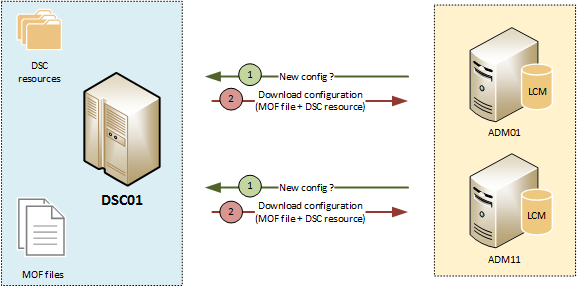
一般生产环境都使用Pull模式
配置Pull Server
配置Pull Server需要安装两个WindowsFeture:IIS、windows DSC,这两都可以通过UI界面化引导安装,也可以通过前面讲过的配置方式安装。
安装好之后,需要在IIS上部署一个用于和各Node交互的服务,指定后续的配置存放位置、资源存放位置等信息,具体配置如下:
configuration CreatePullServer

{

	param

	(

		[string[]]$ComputerName = 'localhost'

	)

Import-DSCResource -ModuleName xPSDesiredStateConfiguration

Node $ComputerName

{

	WindowsFeature DSCServiceFeature

	{

		Ensure = "Present"

		Name   = "DSC-Service"

	}

	xDscWebService PSDSCPullServer

	{

		Ensure = "Present"

		EndpointName = "PSDSCPullServer"

            	Port = 8080

            	PhysicalPath = "$env:SystemDrive\inetpub\wwwroot\PSDSCPullServer"

            	CertificateThumbPrint = "AllowUnencryptedTraffic"

            	ModulePath = "$env:PROGRAMFILES\WindowsPowerShell\DscService\Modules"

            	ConfigurationPath = "$env:PROGRAMFILES\WindowsPowerShell\DscService\Configuration"

            	State = "Started"

            	DependsOn = "[WindowsFeature]DSCServiceFeature"

        }

    }

}

CreatePullServer
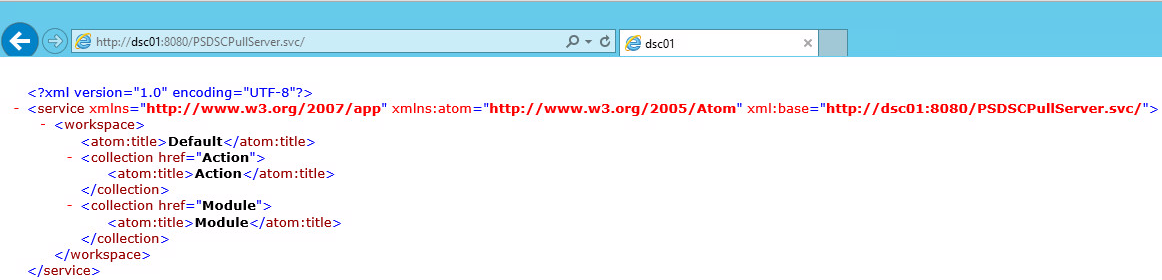
配置完之后,在IIS上会出现一个Site,可在浏览器访问,测试是否配置成功
配置各个Node
各Node主要是LCM发挥作用,所以主要是配置LCM:
[DSCLocalConfigurationManager()]

configuration LCMConfig

{

    Node localhost

    {

        Settings

        {

            RefreshMode = 'Pull'

            #方式1:通过ConfigurationID

            #注意:此方式RegistrationKey不是必须设置

            ConfigurationID = '1d545e3b-60c3-47a0-bf65-5afc05182fd0'

        }

    }

    #定义节点请求配置文件

    ConfigurationRepositoryWeb CONTOSO-PullSrv

    {

        ServerURL = 'https://CONTOSO-PullSrv:8080/PSDSCPullServer.svc'

        RegistrationKey = '140a952b-b9d6-406b-b416-e0f759c9c0e4'

         #方式2:通过ConfigurationNames

         #注意:此方式RegistrationKey必须要设置

        ConfigurationNames = @('ClientConfig')

    }

    #定义节点请求资源文件

    ConfigurationRepositoryWeb CONTOSO-PullSrv

    {

        ServerURL = 'https://CONTOSO-PullSrv:8080/PSDSCPullServer.svc'

        RegistrationKey = '140a952b-b9d6-406b-b416-e0f759c9c0e4'

    }

    #定义节点汇报执行情况给PullServer

    #PullServer默认会使用access数据库

    #数据库可以修改为SQLServer

    ReportServerWeb CONTOSO-PullSrv

    {

        ServerURL = 'https://CONTOSO-PullSrv:8080/PSDSCPullServer.svc'

        RegistrationKey = 'fbc6ef09-ad98-4aad-a062-92b0e0327562'

    }

}
生成mof文件(xxx.meta.mof)并应用即可
Set-DSCLocalConfigurationManager –ComputerName localhost –Path 'mof floder' –Verbose.
可以使用以下命令进行验证配置是否成功
Get-DSCLocalConfigurationManager
发布配置到Pull Server
以上服务器配置完成后,就需要进行交互工作了。我们根据业务写配置,编译,放到指定位置,等待Node到Pull Server上拉取,然后到Node中执行应用。
指定的位置是哪里?
上面我们配置Pull Server的时候,设置 ModulePath、ConfigurationPath,就分别是资源和配置要放置的地方。
需要强调的是资源和配置,都需要为其生成checksum文件,这样Node每次来拉取如果发现文件的checksum无变化,则不拉取。
所以配置文件夹下大概是这样的:
a.mof

a.mof.checksum

b.mof

b.mof.checksum

...
资源文件夹下面大概是这样的:
a_1.0.zip

a_1.0.zip.checksum

b_2.0.zip

b_2.0.zip.checksum

...
注意:资源文件命名必须要资源名称_版本号.zip
参考
Pull Server配置:https://docs.microsoft.com/en-us/powershell/dsc/pull-server/pullserver
LCM配置:https://docs.microsoft.com/en-us/powershell/dsc/managing-nodes/metaconfig
注册Node到PulServer:
https://docs.microsoft.com/en-us/powershell/dsc/pull-server/pullclientconfignames
https://docs.microsoft.com/en-us/powershell/dsc/pull-server/pullclientconfigid
9.PowerShell DSC之Pull的更多相关文章
- 10.PowerShell DSC之细节
mof文件到各Node放在哪里了? 在C:\Windows\System32\Configurtion文件夹下: 你可能会注意到mof的文件名称和Pull Server上的不一致,并且多出了几个.不用 ...
- 8.PowerShell DSC之Push
前言 LCM的默认mode就是push,所以对于push模式,我们直接就三步走 以下是示例: 1.编写配置 Authoring Configuration WebsiteTest { # Import ...
- 6.PowerShell DSC核心概念之LCM
什么是LCM? 本地配置管理器 (LCM) 是DSC的引擎. LCM 在每个目标节点上运行,负责分析和执行发送到节点的配置. 它还负责 DSC 的许多方面,包括以下各方面. 确定刷新模式(推送或请求) ...
- 5.PowerShell DSC核心概念之资源
什么是资源? 资源为 DSC 配置提供构建基块. 资源公开可配置的属性,并包含本地配置管理器 (LCM) 调用以"使其如此"的 PowerShell 脚本函数. 系统内置资源 可在 ...
- 4.PowerShell DSC核心概念之配置
什么是配置 DSC 配置是定义某一特殊类型函数的 PowerShell 脚本. 配置的语法 Configuration MyDscConfiguration { #配置块 Import-DscReso ...
- 3.PowerShell DSC核心概念
PowerShell DSC有三个核心概念 配置 配置是声明性的PowerShell 脚本,用于定义和配置资源实例. DSC 配置是幂等的. 资源 资源是 DSC 的"实现器"部分 ...
- 1.PowerShell DSC概述
什么是PowerShell DSC DSC 是一个声明性平台,用于配置.部署和管理系统. PowerShell PowerShell 是构建于 .NET 上基于任务的命令行 shell 和脚本语言. ...
- PowerShell DSC学习资料
官网 https://docs.microsoft.com/zh-cn/powershell/dsc/overview/overview CSDN中文博客(专题,32篇) https://blog.c ...
- 7.PowerShell DSC之模式
DSC两种模式 DSC有两种模式,Push模式和Pull模式 Push模式 基本流程 写配置--编译生成mof--推送到目标服务器,由目标服务器LCM执行mof并进行指定的配置 优点 架构简单.成本低 ...
随机推荐
- pandas 写csv 操作
pandas 写csv 操作 def show_history(self): df = pd.DataFrame() df['Time'] = pd.Series(self.time_hist) df ...
- 如何使用github搜索需要的开源项目
按照项目名/仓库名搜索(大小写不敏感)in:name xxx按照README搜索(大小写不敏感)in:readme xxx按照description搜索(大小写不敏感)in:description x ...
- 史上最全postgreSQL体系结构(转)
原文链接:https://cloud.tencent.com/developer/article/1469101 墨墨导读:本文主要从日志文件.参数文件.控制文件.数据文件.redo日志(WAL).后 ...
- Genymotion虚拟机用键盘输入中文
genymotion我用的版本是3.0.4,安卓内核版本从4到9都进行了尝试,尤其是教新的版本原生是不带中文输入法的. 前提:安装Genymotion以后,想要随意安装app,需要先安装Genymot ...
- 4、python+selenium实现12306模拟登录
简介: 这里是利用了selenium+图片识别验证,来实现12306的模拟登录,中间也参考了好几个项目,实现了这个小demo,中间也遇到了很多的坑,主要难点在于图片识别和滑动验证这两个方面,图片识别是 ...
- ECharts特效-折线图上一个光点来回移动
参考地址:https://www.makeapie.com/editor.html?c=xxxcG6NGk0 效果图打开上面的网址就可以看到. 核心代码如下,该效果实现的难点是数据的封装,还有eval ...
- Windows下的python虚拟环境设置
Windows下的python虚拟环境设置: virtualenv 在python开发中,我们可能会遇到一种情况:就是当前的项目依赖的是某一个版本,但是另一个项目依赖的是另一个版本,这样就会造成依赖冲 ...
- Android LocationManagerService启动(一)
Location服务是系统中很重要的一个服务,几乎当前所有的App都会用到这个服务. 首先看代码在Android源码的位置 Android API frameworks/base/location L ...
- xss靶场详解
一个XSS靶场练习记录 https://blog.csdn.net/qq_41500251/article/details/101116697 001.level 1 反射型 1.观察源码 <s ...
- Prometheus+Grafana+kafka_exporter监控kafka
Prometheus+Grafana+kafka_exporter搭建监控系统监控kafka 一.Prometheus+Grafana+kafka_exporter搭建监控系统监控kafka 1.1K ...