
使用RestTemplate,显示请求信息,响应信息
使用RestTemplate,显示请求信息,响应信息
这里不讲怎么用RestTemplate具体细节用法,就是一个学习中的过程记录
一个简单的例子
public class App {

    public static void main(String[] args) {

        String url = "https://api.uixsj.cn/hitokoto/get";

        RestTemplate restTemplate = new RestTemplate();

        String body = restTemplate.getForObject(url, String.class);

        System.out.println(body);

    }

}
运行结果:

:现在我想看看他的请求头,请求参数,响应头,响应体的详细信息是怎么样子的,这样也方便以后检查请求参数是否完整,响应正确与否。
经过搜集资料发现ClientHttpRequestInterceptor满足需求,于是就有了下面的代码
打印请求头/响应头
public class App {

    public static void main(String[] args) {

        String url = "https://api.uixsj.cn/hitokoto/get";

        RestTemplate restTemplate = new RestTemplate();

        // 加上拦截器打印将请求请求,响应信息打印出来

        restTemplate.setInterceptors(Collections.singletonList(new LoggingInterceptor()));

        String body = restTemplate.getForObject(url, String.class);

        System.out.println(body);

    }

}

@Slf4j

class LoggingInterceptor implements ClientHttpRequestInterceptor {

    @Override

    public ClientHttpResponse intercept(HttpRequest request, byte[] body, ClientHttpRequestExecution execution) throws IOException {

        displayRequest(request, body);

        ClientHttpResponse response = execution.execute(request, body);

        displayResponse(response);

        return response;

    }

    /**

     * 显示请求相关信息

     * @param request

     * @param body

     */

    private void displayRequest(HttpRequest request, byte[] body) {

        log.debug("====request info====");

        log.debug("URI         : {}", request.getURI());

        log.debug("Method      : {}", request.getMethod());

        log.debug("Req Headers : {}", this.headersToString(request.getHeaders()));

        log.debug("Request body: {}", body == null ? "" : new String(body, StandardCharsets.UTF_8));

    }

    /**

     * 显示响应相关信息

     * @param response

     * @throws IOException

     */

    private void displayResponse(ClientHttpResponse response) throws IOException {

        StringBuilder inputStringBuilder = new StringBuilder();

        try (BufferedReader bufferedReader = new BufferedReader(new InputStreamReader(response.getBody(), StandardCharsets.UTF_8))) {

            String line = bufferedReader.readLine();

            while (line != null) {

                inputStringBuilder.append(line);

                inputStringBuilder.append('\n');

                line = bufferedReader.readLine();

            }

        }

        log.debug("====response info====");

        log.debug("Status code  : {}", response.getStatusCode());

        log.debug("Status text  : {}", response.getStatusText());

        log.debug("Resp Headers : {}", headersToString(response.getHeaders()));

        log.debug("Response body: {}", inputStringBuilder.toString());

    }

    /**

     * 将Http头信息格式化处理

     * @param httpHeaders

     * @return

     */

    private String headersToString(HttpHeaders httpHeaders) {

        if (Objects.isNull(httpHeaders)) {

            return "[]";

        }

        return httpHeaders.entrySet().stream()

                .map(entry -> {

                    List<String> values = entry.getValue();

                    return "\t" + entry.getKey() + ":" + (values.size() == 1 ?

                            "\"" + values.get(0) + "\"" :

                            values.stream().map(s -> "\"" + s + "\"").collect(Collectors.joining(", ")));

                })

                .collect(Collectors.joining(", \n", "\n[\n", "\n]\n"));

    }

}
运行结果:
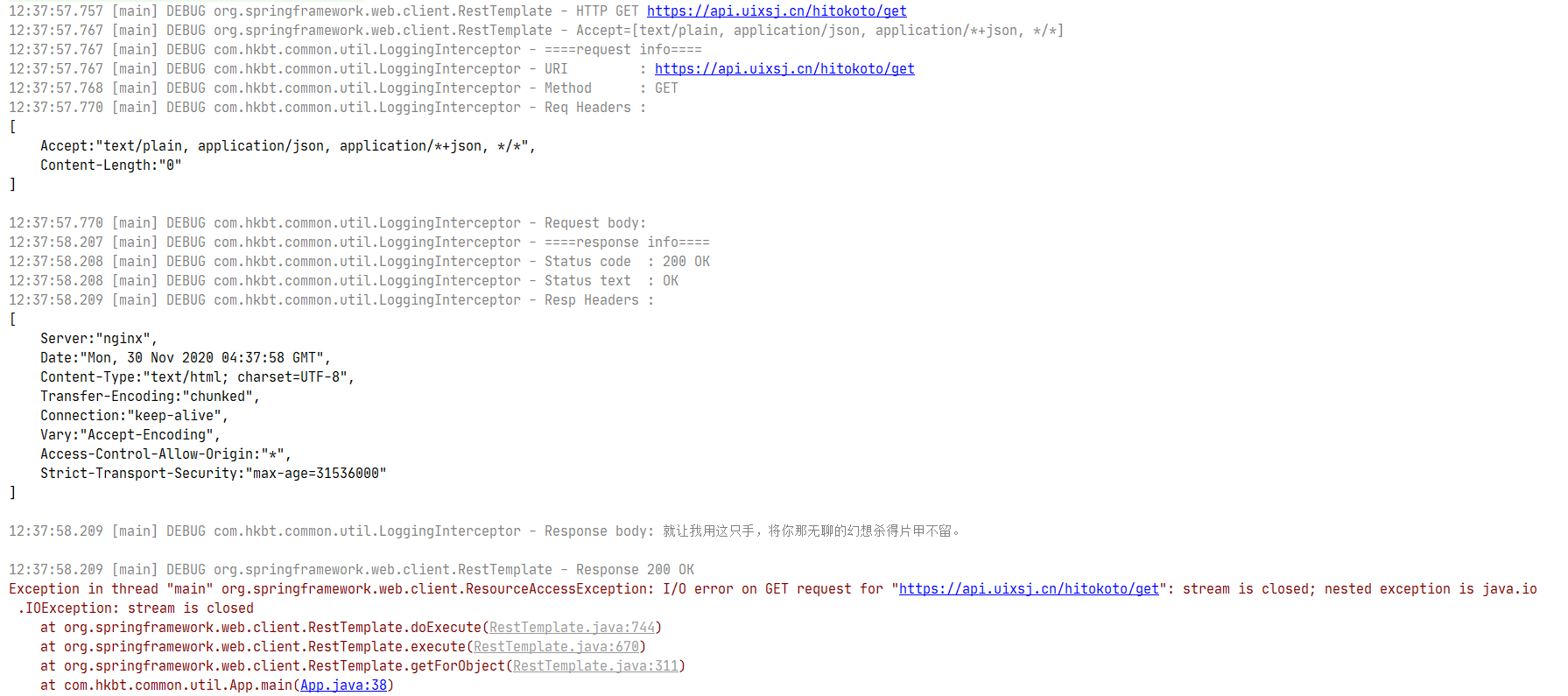
执行过程中会报错,具体错误信息是
Exception in thread "main" org.springframework.web.client.ResourceAccessException: I/O error on GET request for "https://api.uixsj.cn/hitokoto/get": stream is closed; nested exception is java.io.IOException: stream is closed
这里报错信息是流已关闭,报错是在添加LoggingInterceptor后出现的,那就是新加代码引起的。在看看LoggingInterceptor的实现,什么地方操作了流,并且关闭了流。
LoggingInterceptor.displayResponse这个方法里面,为了读取响应体操作了流response.getBody(),
try (...) {

}

// 这个try块结束后就把流给关了
注释掉代码中流操作相关代码,再次运行没有错误信息。因该是在拦截器后,RestTemplate也需要操作了response.getBody()的流(废话)。
Response body 不能读第二次这个很要命呀
问题找到了,初步的想到了几种解决
- 改写代码,不
close流,读取完之后再reset流 - 代理一下
ClientHttpResponse每次调用getBody都返回一个新的输入流
解决不能重复读Response body
方法一:读取完后不关闭流
// 略...

InputStream responseBody = response.getBody();

BufferedReader bufferedReader = new BufferedReader(new InputStreamReader(responseBody, StandardCharsets.UTF_8));

String line = bufferedReader.readLine();

while (line != null) {

    inputStringBuilder.append(line);

    inputStringBuilder.append('\n');

    line = bufferedReader.readLine();

}

responseBody.reset();

// 略...
很遗憾,执行后依旧有错误
Exception in thread "main" org.springframework.web.client.ResourceAccessException: I/O error on GET request for "https://api.uixsj.cn/hitokoto/get": mark/reset not supported; nested exception is java.io.IOException: mark/reset not supported
说的很清楚,不支持mark/reset方法。很明显了它不允许随意修改读取定位。没办法只转为第二种方法了。
方法二:代理,每次都返回一个新的流
- 静态代理实现
ClientHttpResponse接口,好在ClientHttpResponse实现的接口数量不多,实现的代码如下。
@Slf4j

class LoggingInterceptor implements ClientHttpRequestInterceptor {

    @Override

    public ClientHttpResponse intercept(HttpRequest request, byte[] body, ClientHttpRequestExecution execution) throws IOException {

        displayRequest(request, body);

        ClientHttpResponse response = execution.execute(request, body);

        // 包装代理一下

        response = new ClientHttpResponseWrapper(response);

        displayResponse(response);

        return response;

    }

    /**

     * 显示请求相关信息

     * @param request

     * @param body

     */

    private void displayRequest(HttpRequest request, byte[] body) {

        // 略...

    }

    /**

     * 显示响应相关信息

     * @param response

     * @throws IOException

     */

    private void displayResponse(ClientHttpResponse response) throws IOException {

        StringBuilder inputStringBuilder = new StringBuilder();

        try (BufferedReader bufferedReader = new BufferedReader(new InputStreamReader(response.getBody(), StandardCharsets.UTF_8))) {

            String line = bufferedReader.readLine();

            while (line != null) {

                inputStringBuilder.append(line);

                inputStringBuilder.append('\n');

                line = bufferedReader.readLine();

            }

        }

        // 略...

    }

    /**

     * 将Http头信息格式化处理

     * @param httpHeaders

     * @return

     */

    private String headersToString(HttpHeaders httpHeaders) {

        // 略...

    }

    private class ClientHttpResponseWrapper implements ClientHttpResponse {

        private ClientHttpResponse clientHttpResponse;

        private byte[] body;

        public ClientHttpResponseWrapper(ClientHttpResponse clientHttpResponse) {

            this.clientHttpResponse = clientHttpResponse;

        }

        @Override

        public HttpStatus getStatusCode() throws IOException {

            return this.clientHttpResponse.getStatusCode();

        }

        @Override

        public int getRawStatusCode() throws IOException {

            return this.clientHttpResponse.getRawStatusCode();

        }

        @Override

        public String getStatusText() throws IOException {

            return this.clientHttpResponse.getStatusText();

        }

        @Override

        public void close() {

            this.clientHttpResponse.close();

        }

        /**

         * 缓存body每次返回一个新的输入流

         * @return

         * @throws IOException

         */

        @Override

        public InputStream getBody() throws IOException {

            if (Objects.isNull(this.body)) {

                this.body = StreamUtils.copyToByteArray(this.clientHttpResponse.getBody());

            }

            return new ByteArrayInputStream(this.body == null ? new byte[0] : this.body);

        }

        @Override

        public HttpHeaders getHeaders() {

            return this.clientHttpResponse.getHeaders();

        }

    }

}
运行效果:
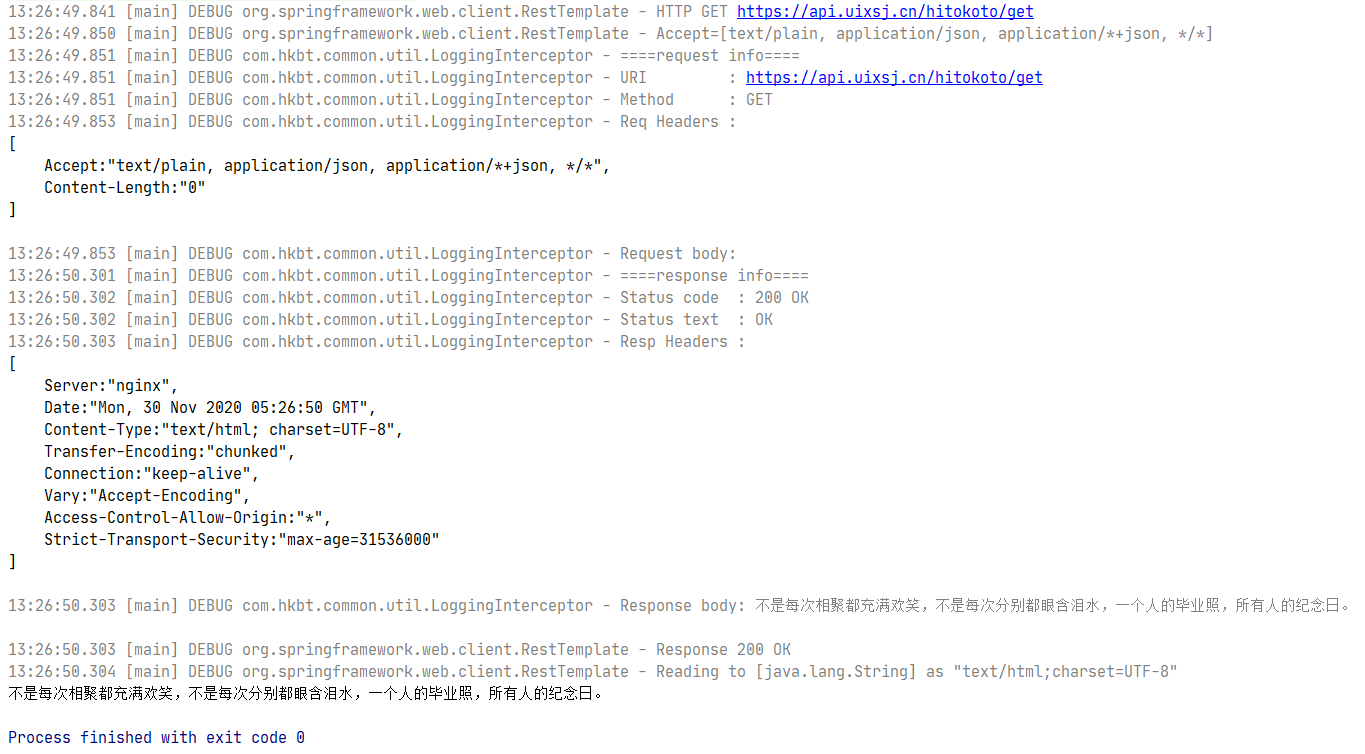
代码运行没问题,但是总感觉代码写出来笨笨的,要重写这么多用不着的方法,看着不舒服,换个写法。
- 动态代理
public class App {

    public static void main(String[] args) {

        String url = "https://api.uixsj.cn/hitokoto/get";

        RestTemplate restTemplate = new RestTemplate();

        restTemplate.setInterceptors(Collections.singletonList(new LoggingInterceptor()));

        String body = restTemplate.getForObject(url, String.class);

        System.out.println(body);

    }

}

@Slf4j

class LoggingInterceptor implements ClientHttpRequestInterceptor {

    @Override

    public ClientHttpResponse intercept(HttpRequest request, byte[] body, ClientHttpRequestExecution execution) throws IOException {

        displayRequest(request, body);

        ClientHttpResponse response = execution.execute(request, body);

        // 包装代理一下

        response = (ClientHttpResponse) Proxy.newProxyInstance(response.getClass().getClassLoader(), new Class[]{ClientHttpResponse.class}, new ClientHttpResponseHandler(response));

        displayResponse(response);

        return response;

    }

    /**

     * 显示请求相关信息

     * @param request

     * @param body

     */

    private void displayRequest(HttpRequest request, byte[] body) {

        // 略......

    }

    /**

     * 显示响应相关信息

     * @param response

     * @throws IOException

     */

    private void displayResponse(ClientHttpResponse response) throws IOException {

        StringBuilder inputStringBuilder = new StringBuilder();

        try (BufferedReader bufferedReader = new BufferedReader(new InputStreamReader(response.getBody(), StandardCharsets.UTF_8))) {

            String line = bufferedReader.readLine();

            while (line != null) {

                inputStringBuilder.append(line);

                inputStringBuilder.append('\n');

                line = bufferedReader.readLine();

            }

        }

        // 略......

    }

    /**

     * 将Http头信息格式化处理

     * @param httpHeaders

     * @return

     */

    private String headersToString(HttpHeaders httpHeaders) {

        // 略......

    }

    private static class ClientHttpResponseHandler implements InvocationHandler {

        private static final String methodName = "getBody";

        private ClientHttpResponse clientHttpResponse;

        private byte[] body;

        ClientHttpResponseHandler(ClientHttpResponse clientHttpResponse) {

            this.clientHttpResponse = clientHttpResponse;

        }

        @Override

        public Object invoke(Object proxy, Method method, Object[] args) throws Throwable {

            if (StringUtils.equals(methodName, method.getName())) {

                if (Objects.isNull(this.body)) {

                    this.body = StreamUtils.copyToByteArray(this.clientHttpResponse.getBody());

                }

                return new ByteArrayInputStream(this.body == null ? new byte[0] : this.body);

            }

            return method.invoke(this.clientHttpResponse, args);

        }

    }

}
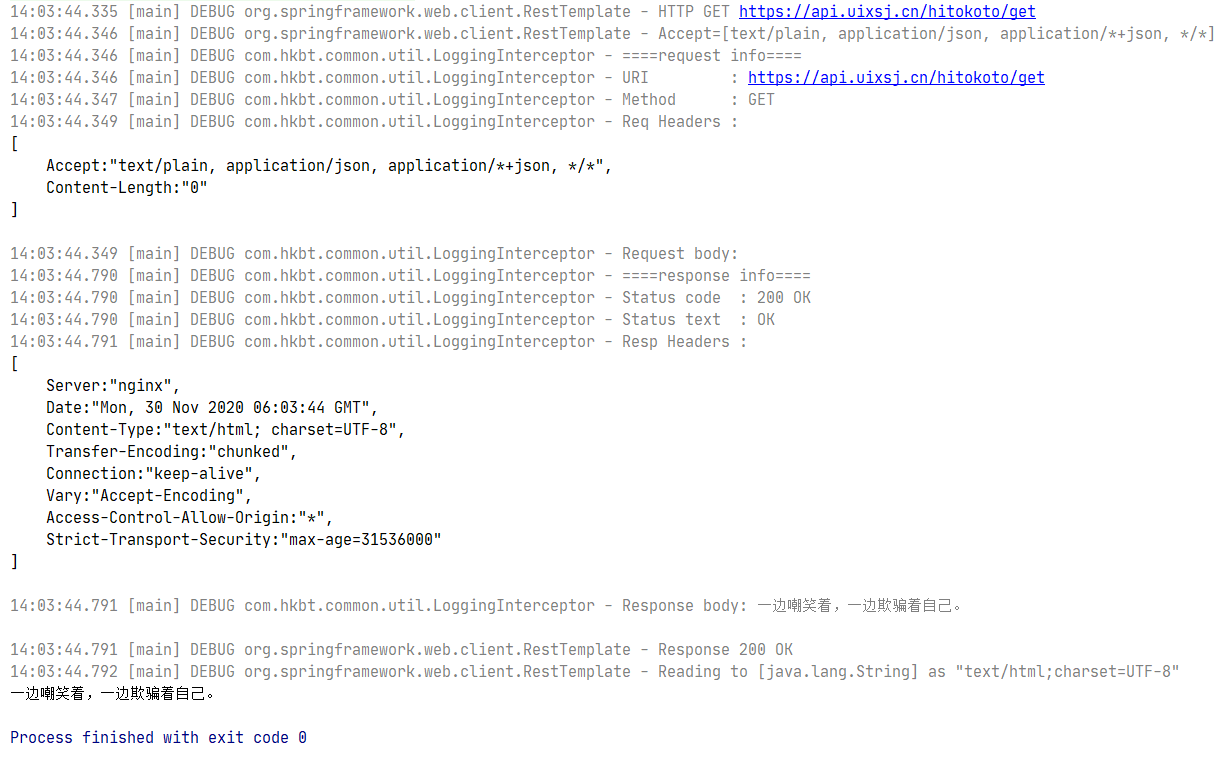
运行结果:
总结
- 使用RestTemplate想要显示详细请求信息,和响应信息
- 添加拦截器
- 拦截器中操作InputSteam导致流关闭,不能重复读Response body
- 尝试不关闭流,重置流的方案失败
- 使用代理解决 Response body 不能读第二次读的问题
- 静态代理(可以重复读Response body了)
- 动态代理(可以重复读Response body了)
- 静态代理的代码有点啰嗦,动态代理又有点不够味,看来『茴』字不好写呀
使用RestTemplate,显示请求信息,响应信息的更多相关文章
- springboot+aop切点记录请求和响应信息
本篇主要分享的是springboot中结合aop方式来记录请求参数和响应的数据信息:这里主要讲解两种切入点方式,一种方法切入,一种注解切入:首先创建个springboot测试工程并通过maven添加如 ...
- Spring Boot使用AOP在控制台打印请求、响应信息
AOP称为面向切面编程,在程序开发中主要用来解决一些系统层面上的问题,比如日志,事务,权限等. AOP简介 AOP全称Aspect Oriented Programming,面向切面,AOP主要实现的 ...
- openresty(完整版)Lua拦截请求与响应信息日志收集及基于cjson和redis动态路径以及Prometheus监控(转)
直接上文件 nginx.conf #运行用户和组,缺省为nobody,若改为别的用户和组,则需要先创建用户和组 #user wls81 wls; #开启进程数,一般与CPU核数等同 worker_pr ...
- 第14.14节 爬虫实战准备:csdn博文点赞过程http请求和响应信息分析
如果要对csdn博文点赞,首先要登录CSDN,然后打开一篇需要点赞的文章,如<第14.1节 通过Python爬取网页的学习步骤>按<第14.3节 使用google浏览器获取网站访问的 ...
- tornado 03 请求与响应
tornado 03 请求与响应 一.请求与响应 浏览器与服务器之间沟通的到底是什么信息 #服务器在后台一直保持运行着 #浏览器通过URL(路由.地址)发送请求 #服务器接收请求了通过tornado处 ...
- Fiddler如何自动修改请求和响应包
Charles的Map功能可以将某个请求进行重定向,用重定向的内容响应请求的内容.这个功能非常方便.在抓包过程当中,有时候为了调试方便,需要将线上的服务定位到内网.比如我们线上的服务器域名为 api. ...
- 【转帖】客户端通过 HTTP 请求和响应 的 Header 信息总结
请求Header原帖地址:http://technique-digest.iteye.com/blog/1174581 响应Header原帖地址:http://blog.pfan.cn/hurongl ...
- day112:MoFang:种植园使用websocket代替http&服务端基于flask-socketio提供服务&服务端响应信息&种植园页面显示初始化
目录 1.种植园使用websocket代替http 2.服务端基于socket提供服务 3.服务端响应信息 4.种植园页面展示 1.种植园使用websocket代替http 我们需要完成的种植园,是一 ...
- LoadRunner 获取接口请求响应信息
Action() { int nHttpRetCode; // 默认最大长度为256,get请求需注意缓存问题,需要根据content-length进行修改 web_set_max_html_para ...
随机推荐
- lora技术在电力行业的应用
智能电网的目标是建立一个高速通信网络之上的传统电网.它通过传感,分析,预测,决策和控制提供稳定,高效的电力供应.传统电网分为三个主要区域S-发电,输电和配电.先进的计量系统是使这种传统电网智能化的基础 ...
- JWT安装配置
1.1 安装JWT pip install djangorestframework-jwt==1.11.0 1.2 syl/settings.py 配置jwt载荷中的有效期设置 import date ...
- yython爬虫基础知识入门
Python爬虫 关注公众号"轻松学编程"了解更多. 大纲: 1.获取响应 urllib(python3)/urllib2-urllib(python2) requests(url ...
- eyou去版权
公司老板要求做一个自己门户网站,苦于公司自己又没有开发相应的cms内容管理系统,找了一个星期,综合各方面的考虑,决定选择eyoucms来搭建,经过快速安装,来到了简单干净的后台. 现将使用体会记录如下 ...
- ElasticSearch7.3破解
破解ES7.3.0到白金版(学习交流使用) 正常安装ELK7.3版本到服务器上 正常部署ELK7到服务器上,先不要启动.然后开始进行破解操作 进行破解操作 需要破解的文件:modules/x-pack ...
- MobaXterm 连接 VirtualBox 6 虚拟机中的 CentOS 7
1 运行环境 本机系统:Windows 7 虚拟机软件:Oracle VM VirtualBox 6 虚拟机系统:CentOS 7 MobaXterm(安装在本机上) 2 MobaXterm - 远端 ...
- C#设计模式-建造者模式(Builder Pattern)
引言 在软件测试中,一个项目的自动化测试包括UI自动化.API自动化.压力自动化等,把这些不同类型的自动化测试组装在一起变构成了一个项目的自动化测试.通过执行项目的自动化测试变能执行他的所有类型的自动 ...
- vim编辑器的常用命令
按ESC键跳到命令模式,然后::w - 保存文件,不退出 vim.:w file -将修改另外保存到 file 中,不退出 vim.:w! -强制保存,不退出 vim .:wq -保存文件,退出 vi ...
- 极客mysql16
1.MySQL会为每个线程分配一个内存(sort_buffer)用于排序该内存大小为sort_buffer_size 1>如果排序的数据量小于sort_buffer_size,排序将会在内存中完 ...
- 测试_appium测试工具
一.Appium介绍 Appium是一个开源的自动化测试工具,其支持iOS和安卓平台上的原生的,基于移动浏览器的,混合的应用. 1.Appium 理念 Appium是基于以下的四个理念设计来满足移动平 ...