
tee MultiWriter creates a writer that duplicates its writes to all the // provided writers, similar to the Unix tee(1) command.
https://zh.wikipedia.org/wiki/Tee
在计算机科学中,tee是一个常见的指令,它能够将某个指令的标准输出,导向、存入某个档案中。许多不同的命令行界面(Shell)都提供这个功能,如 Unix shell、Windows PowerShell。
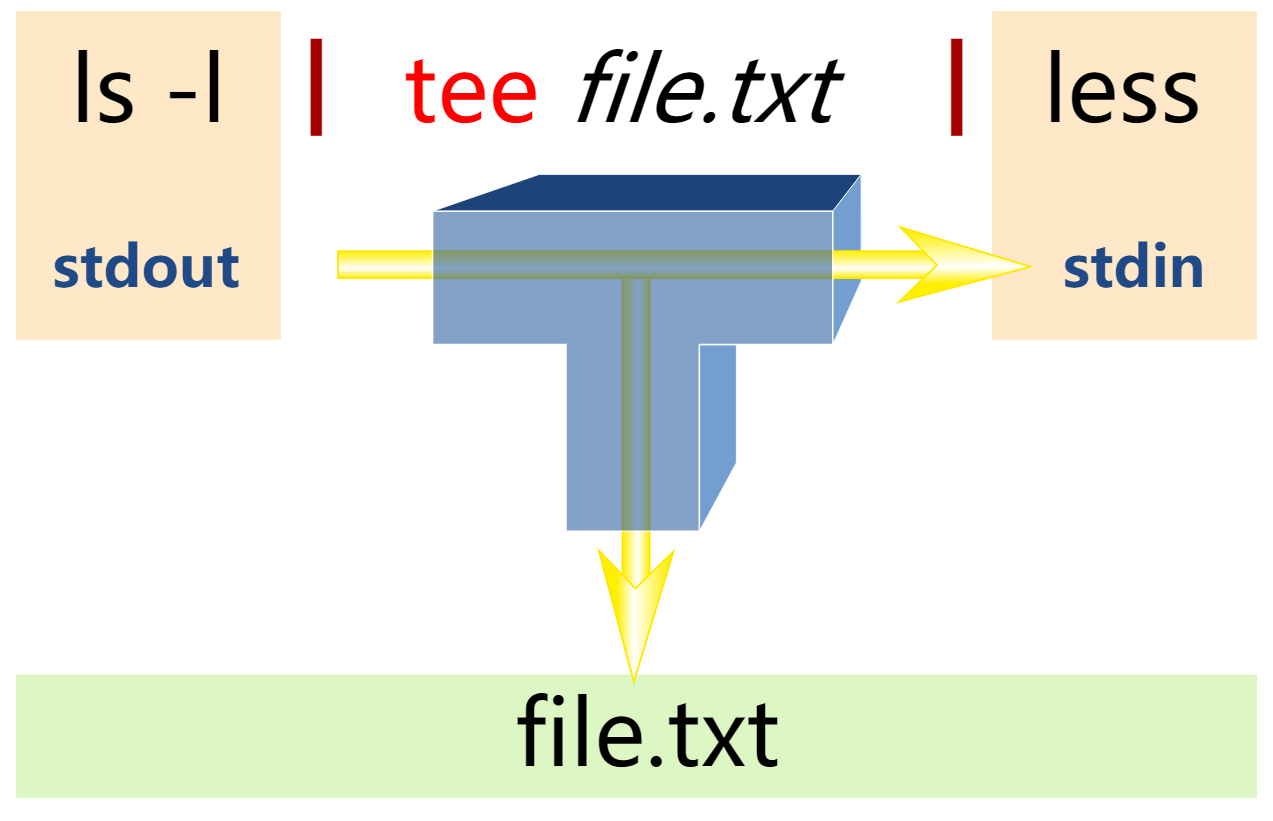
tee的功能通常是用管道,让它不但能在萤幕输出,而且也能够将它储存在档案中。当一个资料在被另一个指令或程式改变之前的中间输出,也能够用tee来捕捉它。tee命令能够读取标准输入,之后将它的内容写入到标准输出,同时将它的副本写入特定的档案或变数中。
tee [ -a ] [ -i ] [檔案 ... ]
参数:
檔案一个或多个档案,能够接收 tee-d 的输出。
Flags:
-a追加(append)到目标文件而不是覆盖-i忽略中断。
[cpy@public ~]$ ll -as

总用量 32

 0 drwx------  10 cpy  cpy    206 12月 25 17:50 .

 0 drwxr-xr-x.  8 root root   111 12月 25 15:45 ..

12 -rw-------   1 cpy  cpy  12194 12月 23 19:58 .bash_history

 4 -rw-r--r--   1 cpy  cpy     18 8月   3 2016 .bash_logout

 4 -rw-r--r--   1 cpy  cpy    193 8月   3 2016 .bash_profile

 4 -rw-r--r--   1 cpy  cpy    231 8月   3 2016 .bashrc

 0 drwxrwxr-x   4 cpy  cpy     34 12月  9 19:12 .cache

 0 drwxrwxr-x   3 cpy  cpy     18 11月 25 11:53 .config

 4 -rw-rw-r--   1 cpy  cpy     35 12月 25 17:50 file

 0 drwxrwxr-x   7 cpy  cpy    120 12月 23 16:59 game_manager

 0 drwxrwxr-x   4 cpy  cpy     28 12月  9 19:12 go

 4 drwxrwxr-x  10 cpy  cpy   4096 11月 26 12:25 perfCCpp

 0 drwxrw----   3 cpy  cpy     19 12月  9 19:12 .pki

 0 drwxrwxr-x   5 cpy  cpy    176 12月 14 11:53 soft

 0 drwx------   2 cpy  cpy     25 11月 25 12:21 .ssh

[cpy@public ~]$ ll -as | tee file | cat

总用量 28

 0 drwx------  10 cpy  cpy    206 12月 25 17:50 .

 0 drwxr-xr-x.  8 root root   111 12月 25 15:45 ..

12 -rw-------   1 cpy  cpy  12194 12月 23 19:58 .bash_history

 4 -rw-r--r--   1 cpy  cpy     18 8月   3 2016 .bash_logout

 4 -rw-r--r--   1 cpy  cpy    193 8月   3 2016 .bash_profile

 4 -rw-r--r--   1 cpy  cpy    231 8月   3 2016 .bashrc

 0 drwxrwxr-x   4 cpy  cpy     34 12月  9 19:12 .cache

 0 drwxrwxr-x   3 cpy  cpy     18 11月 25 11:53 .config

 0 -rw-rw-r--   1 cpy  cpy      0 12月 25 17:51 file

 0 drwxrwxr-x   7 cpy  cpy    120 12月 23 16:59 game_manager

 0 drwxrwxr-x   4 cpy  cpy     28 12月  9 19:12 go

 4 drwxrwxr-x  10 cpy  cpy   4096 11月 26 12:25 perfCCpp

 0 drwxrw----   3 cpy  cpy     19 12月  9 19:12 .pki

 0 drwxrwxr-x   5 cpy  cpy    176 12月 14 11:53 soft

 0 drwx------   2 cpy  cpy     25 11月 25 12:21 .ssh

[cpy@public ~]$
In computing, tee is a command in command-line interpreters (shells) using standard streams which reads standard input and writes it to both standard output and one or more files, effectively duplicating its input.[1] It is primarily used in conjunction with pipes and filters. The command is named after the T-splitter used in plumbing.[2]
The tee command is normally used to split the output of a program so that it can be both displayed and saved in a file. The command can be used to capture intermediate output before the data is altered by another command or program. The tee command reads standard input, then writes its content to standard output. It simultaneously copies the result into the specified file(s) or variables. The syntax differs depending on the command's implementation.
io/multi.go
// MultiWriter creates a writer that duplicates its writes to all the
// provided writers, similar to the Unix tee(1) command.
//
// Each write is written to each listed writer, one at a time.
// If a listed writer returns an error, that overall write operation
// stops and returns the error; it does not continue down the list.
func MultiWriter(writers ...Writer) Writer {
   allWriters := make([]Writer, 0, len(writers))
   for _, w := range writers {
      if mw, ok := w.(*multiWriter); ok {
         allWriters = append(allWriters, mw.writers...)
      } else {
         allWriters = append(allWriters, w)
      }
   }
   return &multiWriter{allWriters}
}
tee MultiWriter creates a writer that duplicates its writes to all the // provided writers, similar to the Unix tee(1) command.的更多相关文章
- Linux shell tee指令学习
转载自:http://blog.163.com/xujian900308@126/blog/static/12690761520129911304568/ tee tee:读取标准输入的数据,并将 ...
- tee 解决readonly 文件无法修改
tee 是什么: 老规矩,找男人问.
- 可信执行环境(TEE)介绍
可信执行环境(TEE)是Global Platform(GP)提出的概念.针对移动设备的开放环境,安全问题也越来越受到关注,不仅仅是终端用户,还包括服务提供者,移动运营商,以及芯片厂商.TEE是与设备 ...
- 可信执行环境TEE(转)
硬件威胁:ARM的架构设计 软件威胁 TEE是中等安全级别 可信执行环境(TEE)是Global Platform(GP)提出的概念.针对移动设备的开放环境,安全问题也越来越受到关注,不仅仅是终端用户 ...
- Linux tee的花式用法和pee
1.tee多重定向 tee [options] FILE1 FILE2 FILE3... tee的作用是将一份标准输入多重定向,一份重定向到标准输出/dev/stdout,然后还将标准输入重定向到每个 ...
- Linux tee命令详解
Linux tee命令 Linux tee命令用于读取标准输入的数据,并将其内容输出成文件.如果文件指定为"-",则将输入内容复制到标准输出 tee指令会从标准输入设备读取数据,将 ...
- 可信执行环境(TEE)介绍 与应用
原文:http://blog.csdn.net/wed110/article/details/53894927 可信执行环境(TEE,Trusted Execution Environment) 是G ...
- TEE&TrustZone
一.TEE(Trusted Execution Environment) 1 A look back 1)2009 OMTP(Open Mobile Terminal Platform),首次定义了T ...
- 显示程序输出并复制到文件(tee 命令)
Linux tee命令用于读取标准输入的数据,并将其内容输出成文件. tee指令会从标准输入设备读取数据,将其内容输出到标准输出设备,同时保存成文件. 语法 tee [-ai][--help][--v ...
随机推荐
- [leetcode]297. Serialize and Deserialize Binary Tree一般二叉树的编解码
由于一般的前序遍历不能唯一的还原出原本你的二叉树,所以要改变一下: 记录二叉树的结构信息,也就是空节点用符号表示 一般的前序遍历只是记录了节点的前后顺序,通过记录空节点,每一层的结构就可以记录下来 解 ...
- 基于Opencv的简单图像处理
实验环境 本实验均在笔记本电脑完成,电脑的配置如表1所示: 系统 Windows 10 家庭版 处理器 英特尔 Core i5-6200 @ 2.30GHz 双核 主板 宏碁 Zoro_SL 内存 1 ...
- http协议中的缓存机制
强缓存 - expires,服务器给客户端一个过期日期,如(2020-12-12),过了该时间,客户端请求服务器重新获取.存在问题:客户端与服务端存在时间差,会导致过期时间不准确 - Cache-co ...
- Apache下的配置文件httpd.conf、httpd-vhosts.conf 转
Apache下的配置文件httpd.conf.httpd-vhosts.conf(windows) 2013-05-24 22:09 by youxin, 58 阅读, 0 评论, 收藏, 编辑 ht ...
- 巧用 Lazy 解决.NET Core中的循环依赖关系
原文作者: Thomas Levesque 原文链接:https://thomaslevesque.com/2020/03/18/lazily-resolving-services-to-fix-ci ...
- Logrotate工具使用
Logrotate logrotate是一个被设计来简化系统管理日志文件的工具,在系统运行时,如果产生大量的日志文件,可以使用该工具进行管理,如/var/log/*文件夹是存储系统和应用日志的目录 ...
- [翻译]Azure 网关迁移至 .NET Core 3.1 性能提升一倍
原文:[Azure Active Directory's gateway is on .NET Core 3.1!] Azure Active Directory 的网关服务是一个反向代理,它为构成 ...
- SDUST数据结构 - chap7 图
判断题: 选择题: 函数题: 6-1 邻接矩阵存储图的深度优先遍历: 裁判测试程序样例: #include <stdio.h> typedef enum {false, true} boo ...
- .NET Core部署到linux(CentOS)最全解决方案,进阶篇(Supervisor+Nginx)
在.NET Core部署到linux(CentOS)最全解决方案,常规篇一文,我们详细讲解了传统的.NET Core部署到Linux服务器的方法,学到了Linux在虚拟机下的安装.Xshell,Xft ...
- px转rem的填坑之路
这是要为一个vue项目做自适应,设计稿是1920*1080的,要适应各种手机.ipad.3840*2160的超大屏,所以就选择了rem,包用的是 postcss-pxtorem 在适配的时候遇到了很多 ...