
【UNIAPP】接入导航系统完整版
// 查询附近/搜索关键词

<template>

    <view>

        <!--地图容器-->

        <map id="myMap" :markers="markers" style="width:100%;height:350px;" :longitude="longitude" :latitude="latitude" scale='16'>

        </map>

        <!-- 输入框 -->

        <view class="cu-form-group">

            <view class="title">查询地址</view>

            <input placeholder="请输入查询地址关键词" name="input" v-model="keyword"></input>

        </view>

        <!-- 搜索 -->

        <view class="padding flex flex-direction">

            <button class="cu-btn bg-blue margin-tb-sm lg" @click="Search">查询</button>

        </view>

        <!-- 列表 -->

        <view class="cu-list menu sm-border card-menu">

            <!-- 每行列表 -->

            <view class="cu-item" v-for="(value,key) in listData" @click="beat_it(value.lat,value.lng)">

                <view class="content padding-tb-sm">

                    <view>

                        <image src="../../static/导航.png" style="width: 25px;height: 25px;"></image>

                        </text>{{ value.title}}

                    </view>

                    <view class="text-gray text-sm">

                        <text class="text-gray" style="margin-left: 4px;">地址:{{ value.address }}</text>

                    </view>

                </view>

                <view class="action" @click="check_distance(value.lat,value.lng)">

                    <image src="../../static/导航执行.png" style="width: 30px;height: 30px;float: right;margin-top: 1px;"></image>

                </view>

            </view>

            <!-- 每行列表 -->

        </view>

        <!-- 模态框 -->

        <view>

            <u-modal v-model="show" :content="content" show-confirm-button="true" show-cancel-button="true" confirm-text="查看路线"

             @confirm="confirm"></u-modal>

            </u-modal>

        </view>

    </view>

</template>

<script>

    // 引入SDK核心类,js文件根据自己业务,位置可自行放置

    // var QQMapWX = require('../../js_sdk/wxmp-qqmap/qqmap-wx-jssdk.js');

    import QQMapWX from '../../js_sdk/wxmp-qqmap/qqmap-wx-jssdk.js';

    export default {

        data() {

            return {

                qqmapsdk: "",

                longitude: "",

                latitude: "",

                keyword: "",

                distance: "",

                listData: [],

                show: false,

                content: "",

                markers: "",

                setData: []

            }

        },

        methods: {

            /* 跳转路线规划 */

            confirm() {

                uni.navigateTo({

                    url: '/pages/naviegation/naviegation'

                })

            },

            /* 地图移动点击地址位置 */

            beat_it(lat, lon) {

                this.latitude = lat

                this.longitude = lon

                // 储存session

                uni.setStorageSync('latitude_end', lat.toString())

                uni.setStorageSync('longitude_end', lon.toString())

                this.markers = [{

                    id: 0,

                    latitude: lat,

                    longitude: lon,

                    width: 30,

                    height: 30,

                    iconPath: "../../static/naviegation/地图地点.png",

                    callout: { //可根据需求是否展示经纬度

                        content: "当前位置",

                        color: '#FF3300',

                        display: 'ALWAYS',

                        fontSize: "20",

                    },

                }, ]

            },

            /* 搜索 */

            Search() {

                const that = this;

                that.listData = []

                console.log("Search")

                that.qqmapsdk.search({

                    keyword: that.keyword,

                    success: function(res) {

                        // console.log(res)

                        /* 遍历渲染 */

                        if (res.status == 0) {

                            res.data.some((item, i) => {

                                that.listData.push({

                                    id: item.id,

                                    title: item.title,

                                    category: item.category,

                                    address: item.address,

                                    tel: item.tel,

                                    lat: item.location.lat,

                                    lng: item.location.lng

                                })

                            })

                        }

                    },

                    fail: function(res) {

                        console.log(res);

                    },

                    complete: function(res) {

                        console.log(res);

                    }

                });

            },

            /* 位置授权 */

            getAuthorizeInfo() {

                const that = this;

                uni.authorize({

                    scope: 'scope.userLocation',

                    success() { // 允许授权

                        that.getLocationInfo();

                    },

                    fail() { // 拒绝授权

                        that.openConfirm();

                        console.log("你拒绝了授权,无法获得周边信息")

                    }

                })

            },

            // 获取地理位置

            getLocationInfo() {

                const that = this;

                uni.getLocation({

                    type: 'wgs84',

                    success(res) {

                        that.latitude = res.latitude

                        that.longitude = res.longitude

                        uni.setStorageSync('latitude', res.latitude.toString())

                        uni.setStorageSync('longitude', res.longitude.toString())

                        // console.log("地址位置", res);

                        that.markers = [{

                            id: 0,

                            latitude: res.latitude,

                            longitude: res.longitude,

                            width: 30,

                            height: 30,

                            iconPath: "../../static/naviegation/地图地点.png",

                            callout: { //可根据需求是否展示经纬度

                                content: "当前位置",

                                color: '#FF3300',

                                display: 'ALWAYS',

                                fontSize: "20",

                            },

                        }, ]

                    }

                });

            },

            // 再次获取授权

            // 当用户第一次拒绝后再次请求授权

            openConfirm() {

                uni.showModal({

                    title: '请求授权当前位置',

                    content: '需要获取您的地理位置,请确认授权',

                    success: (res) => {

                        if (res.confirm) {

                            uni.openSetting(); // 打开地图权限设置

                        } else if (res.cancel) {

                            uni.showToast({

                                title: '你拒绝了授权,无法获得周边信息',

                                icon: 'none',

                                duration: 1000

                            })

                        }

                    }

                });

            },

            /* 模态框打开后 计算距离 */

            check_distance(lat, lng) {

                var _this = this;

                //调用距离计算接口

                _this.qqmapsdk.calculateDistance({

                    //mode: 'driving',//可选值:'driving'(驾车)、'walking'(步行),不填默认:'walking',可不填

                    //from参数不填默认当前地址

                    //获取表单提交的经纬度并设置from和to参数(示例为string格式)

                    // from: e.detail.value.start || '', //若起点有数据则采用起点坐标,若为空默认当前地址

                    // to: e.detail.value.dest, //终点坐标

                    from: '',

                    to: lat.toString() + "," + lng.toString(),

                    success: function(res) { //成功后的回调

                        // console.log(res);

                        var res = res.result;

                        var dis = [];

                        for (var i = 0; i < res.elements.length; i++) {

                            dis.push(res.elements[i].distance); //将返回数据存入dis数组,

                        }

                        _this.distance = dis[0]

                        // console.log("check_distance", _this.distance)

                        _this.content = "本地点距离您" + _this.distance + "米"

                        _this.show = true

                    },

                    fail: function(error) {

                        console.error(error);

                    },

                    complete: function(res) {

                        console.log(res);

                    }

                });

            }

        },

        onLoad() {

            console.log("onLoad")

            this.qqmapsdk = new QQMapWX({

                key: 'U key'

            });

            this.getAuthorizeInfo();

            // this.Search()

        },

        onPullDownRefresh() {

        },

        onReachBottom() {

        },

    }

</script>

<style lang="scss" scoped>

</style>
// 导航路线页面/分类步行/骑行/驾车

<template>

    <view>

        <!-- 返回上一页 -->

        <image src="../../static/返回.png" @click="back" style="width: 25px;height: 25px;

        position: absolute;z-index: 99;margin-top: 52rpx;margin-left: 20rpx;"></image>

        <!-- 地图 -->

        <map id="myMap" style="width: 100%; height: 800px" :longitude="longitude" :latitude="latitude" scale='16' :markers="markers"

         :polyline="polyline" show-location>

        </map>

        <!-- 底部 -->

        <view class="box" style="position: absolute;bottom: 0px;width: 100%;">

            <view class="cu-bar tabbar bg-white">

                <view class="action" @click="walking">

                    <view class="cuIcon-cu-image">

                        <image src="../../static/naviegation/步行.png"></image>

                    </view>

                    <view :class="{'text-red':walkingisActive,'text-grey':walkingisError}">步行</view>

                </view>

                <view class="action" @click="bicycling">

                    <view class="cuIcon-cu-image" >

                        <image src="../../static/naviegation/骑行.png"></image>

                    </view>

                    <view :class="{'text-red':bicyclingisActive,'text-grey':bicyclingisError}">骑行</view>

                </view>

                <view class="action"  @click="driving">

                    <view class="cuIcon-cu-image">

                        <image src="../../static/naviegation/驾车.png"></image>

                    </view>

                    <view :class="{'text-red':drivingisActive,'text-grey':drivingisError}">驾车</view>

                </view>

            </view>

        </view>

    </view>

</template>

<script>

    // 引入SDK核心类,js文件根据自己业务,位置可自行放置

    // var QQMapWX = require('../../js_sdk/wxmp-qqmap/qqmap-wx-jssdk.js');

    import QQMapWX from '../../js_sdk/wxmp-qqmap/qqmap-wx-jssdk.js';

    export default {

        data() {

            return {

                longitude: "",

                latitude: "",

                longitude_end: "",

                latitude_end: "",

                mode:"walking",

                polyline: "",

                qqmapsdk: "",

                markers: [],

                /* 图标 */

                walkingisActive:true,

                walkingisError:false,

                bicyclingisActive:false,

                bicyclingisError:true,

                drivingisActive:false,

                drivingisError:true,

            }

        },

        onLoad() {

            // console.log("onLoad")

            this.qqmapsdk = new QQMapWX({

                key: 'U key'

            });

            this.latitude_end = uni.getStorageSync('latitude_end')

            this.longitude_end = uni.getStorageSync('longitude_end')

            this.latitude = uni.getStorageSync('latitude')

            this.longitude = uni.getStorageSync('longitude')

            this.getAuthorizeInfo();

            this.daohang()

        },

        methods: {

            /* 返回 */

            back(){

                console.log("back")

                uni.navigateBack({

                })

            },

            /* 路线类型 */

            walking(){

                this.mode = "walking";

                this.daohang();

            },

            bicycling(){

                this.mode = "bicycling";

                this.daohang();

                this.walkingisActive=false;

                this.walkingisError=true;

                this.bicyclingisActive=true;

                this.bicyclingisError=false;

                this.drivingisActive=false;

                this.drivingisError=true;

            },

            driving(){

                this.mode = "driving";

                this.daohang();

                this.walkingisActive=false;

                this.walkingisError=true;

                this.bicyclingisActive=false;

                this.bicyclingisError=true;

                this.drivingisActive=true;

                this.drivingisError=false;

            },

            /* 位置授权 */

            getAuthorizeInfo() {

                const that = this;

                uni.authorize({

                    scope: 'scope.userLocation',

                    success() { // 允许授权

                        that.getLocationInfo();

                    },

                    fail() { // 拒绝授权

                        that.openConfirm();

                        console.log("你拒绝了授权,无法获得周边信息")

                    }

                })

            },

            // 获取地理位置

            getLocationInfo() {

                const that = this;

                uni.getLocation({

                    type: 'wgs84',

                    success(res) {

                        that.latitude = res.latitude

                        that.longitude = res.longitude

                        // console.log("地址位置", res);

                    }

                });

            },

            // 再次获取授权

            // 当用户第一次拒绝后再次请求授权

            openConfirm() {

                uni.showModal({

                    title: '请求授权当前位置',

                    content: '需要获取您的地理位置,请确认授权',

                    success: (res) => {

                        if (res.confirm) {

                            uni.openSetting(); // 打开地图权限设置

                        } else if (res.cancel) {

                            uni.showToast({

                                title: '你拒绝了授权,无法获得周边信息',

                                icon: 'none',

                                duration: 1000

                            })

                        }

                    }

                });

            },

            /* 路线规划 */

            daohang() {

                const that = this;

                // console.log("目标位置",uni.getStorageSync('latitude_end') + "," + uni.getStorageSync('longitude_end'))

                // console.log("起点位置",that.latitude.toString() + "," + that.longitude.toString())

                //调用距离计算接口

                that.qqmapsdk.direction({

                    mode: that.mode, //可选值:'driving'(驾车)、'walking'(步行)、'bicycling'(骑行),不填默认:'driving',可不填

                    //from参数不填默认当前地址

                    from: that.latitude.toString() + "," + that.longitude.toString(),

                    to: uni.getStorageSync('latitude_end') + "," + uni.getStorageSync('longitude_end'),

                    success: function(res) {

                        var ret = res;

                        var coors = ret.result.routes[0].polyline,

                            pl = [];

                        //坐标解压(返回的点串坐标,通过前向差分进行压缩)

                        var kr = 1000000;

                        for (var i = 2; i < coors.length; i++) {

                            coors[i] = Number(coors[i - 2]) + Number(coors[i]) / kr;

                        }

                        //将解压后的坐标放入点串数组pl中

                        for (var i = 0; i < coors.length; i += 2) {

                            pl.push({

                                latitude: coors[i],

                                longitude: coors[i + 1]

                            })

                        }

                        // console.log(pl)

                        // 设置polyline属性,将路线显示出来,将解压坐标第一个数据作为起点

                        that.latitude = pl[0].latitude,

                            that.longitude = pl[0].longitude,

                            that.polyline = [{

                                points: pl,

                                color: "#00CC66", //线条的颜色

                                borderColor:"#009900",

                                width: 10, //宽度

                                arrowLine: true, //是否带箭头

                                borderWidth: 2 ,//线的边框宽度,还有很多参数,请看文档

                            }]

                        that.markers = [{

                                id: 0,

                                latitude: that.latitude,

                                longitude: that.longitude,

                                width: 30,

                                height: 30,

                                iconPath:"../../static/naviegation/地图地点.png",

                                callout: { //可根据需求是否展示经纬度

                                    content: "起点",

                                    color: '#FF3300',

                                    display: 'ALWAYS',

                                    fontSize: "20",

                                },

                            }, {

                                id: 1,

                                latitude: that.latitude_end,

                                longitude: that.longitude_end,

                                width: 30,

                                height: 30,

                                iconPath:"../../static/naviegation/地图地点.png",

                                callout: { //可根据需求是否展示经纬度

                                    content: "终点",

                                    color: '#FF3300',

                                    display: 'ALWAYS',

                                    fontSize: "20",

                                },

                            },

                        ]

                    },

                    fail: function(error) {

                        console.error(error);

                    },

                    complete: function(res) {

                        console.log(res);

                    }

                });

            }

        },

    }

</script>

<style>

</style>
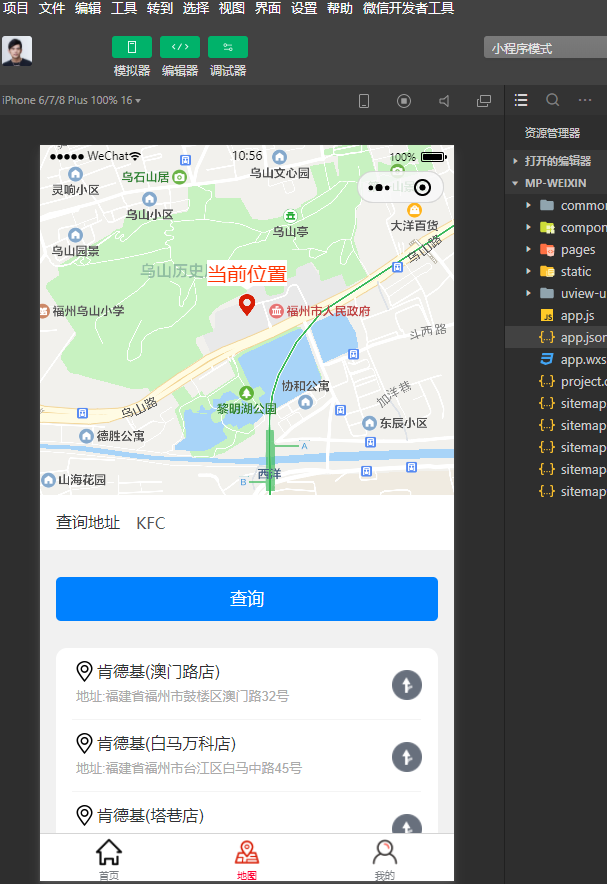
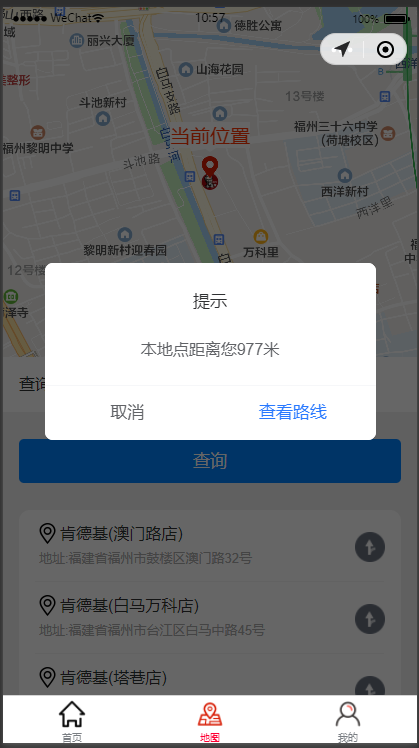
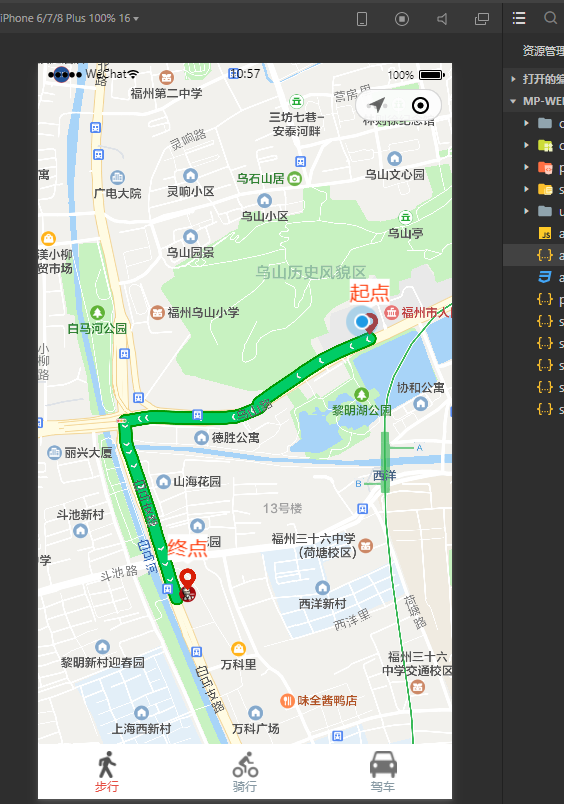
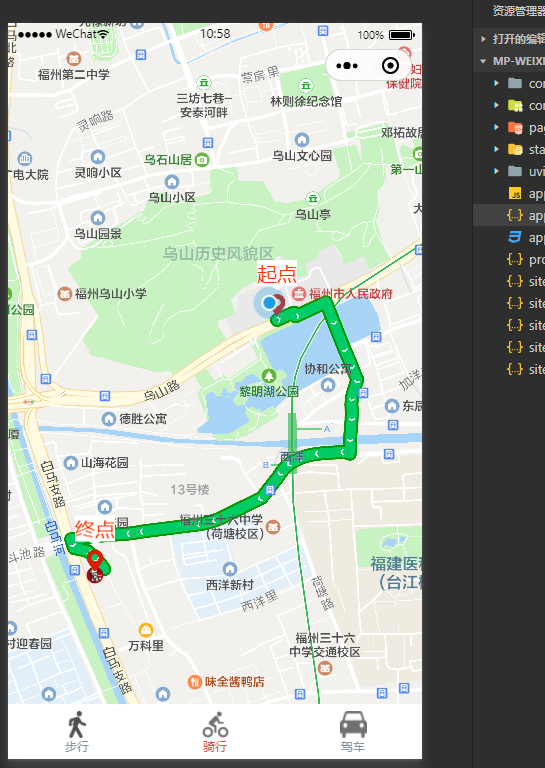
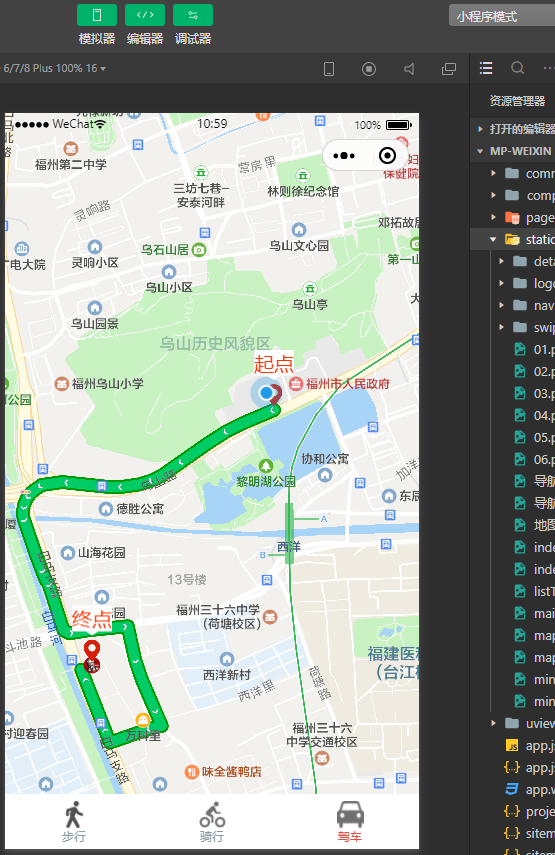
效果图:
【UNIAPP】接入导航系统完整版的更多相关文章
- 如何安全的将VMware vCenter Server使用的SQL Server Express数据库平滑升级到完整版
背景: 由于建设初期使用的vSphere vCenter for Windows版,其中安装自动化过程中会使用SQL Server Express的免费版数据库进行基础环境构建.而此时随着业务量的增加 ...
- Android版的菜谱客户端应用源码完整版
Android版的菜谱客户端应用源码完整版,这个文章是从安卓教程网转载过来的,不是本人的原创,希望能够帮到大家的学习吧. <ignore_js_op> 152936qc7jdnv6vo0c ...
- sed实例精解--例说sed完整版
原文地址:sed实例精解--例说sed完整版 作者:xiaozhenggang 最近在学习shell,怕学了后面忘了前面的就把学习和实验的过程记录下来了.这里是关于sed的,前面有三四篇分开的,现在都 ...
- flexbox-CSS3弹性盒模型flexbox完整版教程
原文链接:http://caibaojian.com/flexbox-guide.html flexbox-CSS3弹性盒模型flexbox完整版教程 A-A+ 前端博客•2014-05-08•前端开 ...
- 转贴 IT外企那点儿事完整版
转贴 IT外企那点儿事完整版 第一章:外企也就那么回儿事(http://www.cnblogs.com/forfuture1978/archive/2010/04/30/1725341.html) 1 ...
- C#.Net 上传图片,限制图片大小,检查类型完整版
C#.Net 上传图片,限制图片大小,检查类型完整版 源代码: 处理图片类,如检查图片大小,按宽度比例缩小图片 public class CImageLibrary{ public enum Va ...
- office2016 软件全集 官方下载免费完整版(含破解文件)不含垃圾软件 win10完美激活
office2016官方下载免费完整版是新一代办公软件,office2016官方下载免费完整版已经分享到下面,office2016官方下载免费完整版包括了Word.Excel.PowerPoint.O ...
- 老王Python培训视频教程(价值500元)【基础进阶项目篇 – 完整版】
老王Python培训视频教程(价值500元)[基础进阶项目篇 – 完整版] 教学大纲python基础篇1-25课时1.虚拟机安装ubuntu开发环境,第一个程序:hello python! (配置开发 ...
- thinkPHP3.2.3完整版 在sae上面的部署
第一步: thinkPHP3.2.3完整版,目录结构如下 第二步:在新浪sae上面创建一个新应用 第三步:用svn down,下来会有两个文件:index.php.config.ya ...
随机推荐
- python脚本乱码的解决方法
使用python2 在windows cmd 执行python脚本发生乱码的解决方法 可以先把中文解码为unicode,然后再转化为gbk显示正常,需要在代码打印中文处添加 print(':这是一段中 ...
- python之列表操作的几个函数
Python中的列表是可变的,这是它却别于元组和字符串最重要的特点,元组和字符串的元素不可修改.列举一些常用的列表操作的函数和方法. 1,list.append(x),将x追加到列表list末尾: 1 ...
- [.NET] - EventSource类的使用
EventSource类: 这个类是在.NET 4.5新推出的一个类,用来提供创建事件用于 Windows 事件跟踪的功能 (ETW).在之前如果要配置一个Event Tracing for Wind ...
- 【Tomcat】手写迷你版Tomcat
目录 源码地址 一,分析 Mini版Tomcat需要实现的功能 二,开发--准备工作 2.1 新建Maven工程 2.2 定义编译级别 2.3 新建主类编写启动入口和端口 三,开发--1.0版本 3. ...
- mybatis实现MySQL数据库的增删改查
环境: jdk1.8 mysql5.7 maven3.6.0 IDEA 什么是mybatis框架? MyBatis 是一款优秀的持久层框架, 它支持自定义 SQL.存储过程以及高级映射. MyBati ...
- Spring Cloud Config应用篇(九)
一.SpringCloud Config 配置中心 1.1.配置中心说明 SpringCloud Config 服务器以下简称"配置中心". Spring Cloud Config ...
- Java学习日报7.23
import java.util.Scanner;public class LandP {public static void main(String args[]) { System.out.pri ...
- Queue的使用说明
普通的Queue.Queue是单个进程间的队列,不同进程不能共享:multiprocessing.Queue()是不同进程间使用的,可以共享:如果是进程池的话需要使用multiprocessing.M ...
- java容器-Collection
1.介绍 collection<E>是java中容器的最主要的接口,该接口继承于Iterable<E>,使得java中所有实现Collection<E>的容器 ...
- 注意力论文解读(1) | Non-local Neural Network | CVPR2018 | 已复现
文章转自微信公众号:[机器学习炼丹术] 参考目录: 目录 0 概述 1 主要内容 1.1 Non local的优势 1.2 pytorch复现 1.3 代码解读 1.4 论文解读 2 总结 论文名称: ...