
微信小程序 | app.json配置属性
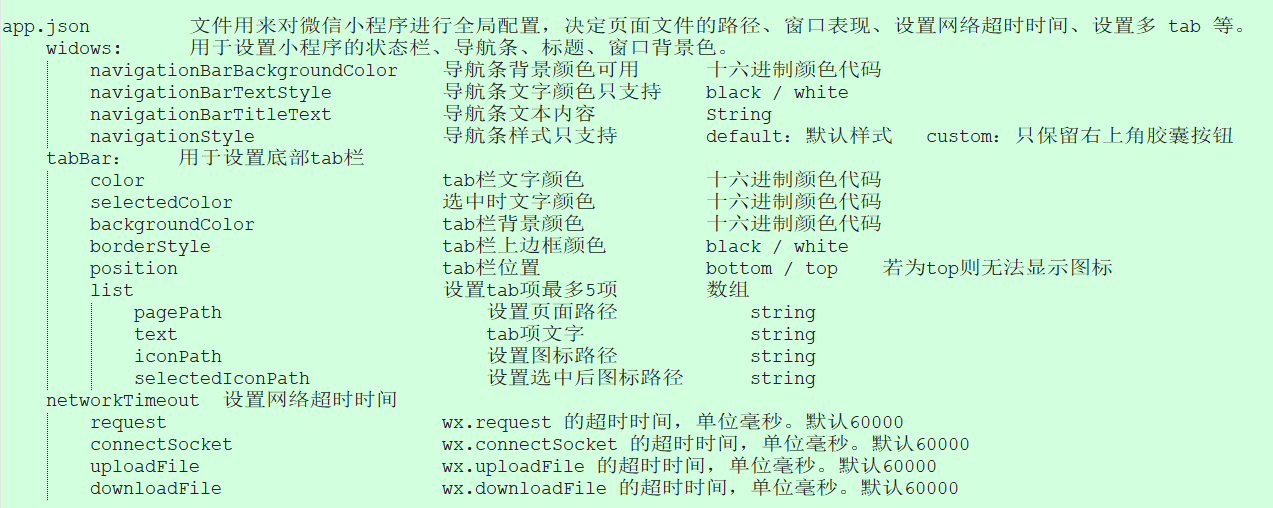
app.json 文件用来对微信小程序进行全局配置,决定页面文件的路径、窗口表现、设置网络超时时间、设置多 tab 等。
widows: 用于设置小程序的状态栏、导航条、标题、窗口背景色。
navigationBarBackgroundColor 导航条背景颜色可用 十六进制颜色代码
navigationBarTextStyle 导航条文字颜色只支持 black / white
navigationBarTitleText 导航条文本内容 String
navigationStyle 导航条样式只支持 default:默认样式 custom:只保留右上角胶囊按钮
tabBar: 用于设置底部tab栏
color tab栏文字颜色 十六进制颜色代码
selectedColor 选中时文字颜色 十六进制颜色代码
backgroundColor tab栏背景颜色 十六进制颜色代码
borderStyle tab栏上边框颜色 black / white
position tab栏位置 bottom / top 若为top则无法显示图标
list 设置tab项最多5项 数组
pagePath 设置页面路径 string
text tab项文字 string
iconPath 设置图标路径 string
selectedIconPath 设置选中后图标路径 string
networkTimeout 设置网络超时时间
request wx.request 的超时时间,单位毫秒。默认60000
connectSocket wx.connectSocket 的超时时间,单位毫秒。默认60000
uploadFile wx.uploadFile 的超时时间,单位毫秒。默认60000
downloadFile wx.downloadFile 的超时时间,单位毫秒。默认60000
微信小程序 | app.json配置属性的更多相关文章
- 微信小程序 app.json 配置
我们使用app.json文件来对微信小程序进行全局配置,决定页面文件的路径.窗口表现.设置网络超时时间.设置多 tab 等. 以下是一个包含了所有配置选项的简单配置app.json : { " ...
- 微信小程序app.json配置
找到app.json文件,找到window配置项 1.windows选项下导航栏样式 "navigationBarBackgroundColor":#F6F6F6 // 导航栏的背 ...
- 微信小程序 - app.json配置解析
{ "pages": [ "pages/index/index", "pages/logs/logs", "pages/login ...
- 微信小程序app.json文件常用全局配置
小程序根目录下的 app.json 文件用来对微信小程序进行全局配置,决定页面文件的路径.窗口表现.设置网络超时时间.设置多 tab 等. JOSN文件不允许注释,下面为了学习加上注释,粘贴需要的片段 ...
- 微信小程序 app.json文件配置
https://developers.weixin.qq.com/miniprogram/dev/index.html 起步 https://developers.weixin.qq.com/min ...
- 微信小程序 --- app.json文件
app.json文件用于配置项目:用于对小程序进行全局设置: pages:定义小程序的路由.(凡是不在这个配置里面的东西,都无法打开) (特别注意:结尾不能有 逗号 否则会出错) window:定义小 ...
- 微信小程序---app.json中设置背景色不生效解决办法
按照官方文档的说明,backgroundColor应该可以设置窗口的背景色. "window":{ "backgroundTextStyle":"li ...
- 微信小程序:全局配置app.json
微信小程序:全局配置app.json 一.全局配置app.json app.json文件用来对微信小程序进行全局配置,决定页面文件的路径.窗口表现.设置网络超时时间.设置多 tab 等. 以下是一个包 ...
- 微信小程序:页面配置 page.json
微信小程序:页面配置 page.json 一.页面配置 page.json 如果整个小程序的风格是蓝色调,那么可以在 app.json 里边声明顶部颜色是蓝色即可. 实际情况可能不是这样,可能你小程序 ...
随机推荐
- Self-publishing 自出版
Self-publishing 自出版 出书 传统出版 在过去的几十年中,发布意味着要经过代理商和发布者. 自出版 如今,自助出版允许作者绕过出版商和书店,直接向公众出售. refs https:// ...
- JSON-LD & SEO
JSON-LD & SEO https://json-ld.org/ https://en.wikipedia.org/wiki/JSON-LD Google Search structure ...
- Learning web development with MDN
Learning web development with MDN Server-side website programming Dynamic Websites – Server-side pro ...
- React LifeCycle API
React LifeCycle API old API & new API 不可以混用 demo https://codesandbox.io/s/react-parent-child-lif ...
- Teadocs & markdown website
Teadocs & markdown website Teadocs 是一款能够帮你快速构建html文档的工具,它基于nodejs编写,并使用markdown来编写文档内容. Teadocs ...
- svg & regex
svg & regex https://developer.mozilla.org/en-US/docs/Web/JavaScript/Reference/Global_Objects/Reg ...
- 「NGK每日快讯」2021.2.2日NGK公链第91期官方快讯!
- SPC算力币异军突起,或将跑赢币圈全场
比特币在出现反弹以后,并没有向上突破,而是回调,目前已经跌破了35000美金.目前,整个市场都在关注着比特币的动向,毕竟,比特币的走势,关注着资本的流向.不过,也有一部分巨鲸们将目光对准了币圈的其它数 ...
- [转]ROS Q&A | How to read LaserScan data
http://www.theconstructsim.com/read-laserscan-data/ Step 1. Open a project on ROS Development Studio ...
- Python3+PYQT5 实现并打包exe小工具(1)
前言: 由于项目原因,配置测试环境与正式环境切换频率很高,固写了一键切换环境的工具.用于记录. 实现逻辑: 1.读取注册表中客户端的安装目录,把固定的环境配置文件添加到固定目录下实现配置测试环境: 2 ...