
node.js module.exports & exports & module.export all in one
node.js module.exports & exports & module.export all in one
cjs
const log = console.log;

log(`exports`, exports);

log(`module`, module);

// TypeError: Cannot set property 'a' of undefined

// module.export.a = 1;

// module.export.b = 2;

// module.export.c = 3;

// module.export.d = 4;

// 自定义属性 umd

module.umd = {

  a: 1,

  b: 2,

  c: 3,

  d: 4,

};

// 自定义属性 export

module.export = {

  a: 1,

  b: 2,

  c: 3,

  d: 4,

};

exports.a = 11;

exports.b = 22;

exports.c = 33;

exports.d = 44;

// module.exports 覆盖 exports

module.exports = { c: 333 };

module.exports.d = 444;

log(`\nexports`, exports);

log(`module`, module);

/*

exports { a: 11, b: 22, c: 33, d: 44 }

module Module {

  id: '.',

  path: '/Users/xgqfrms-mbp/Documents/GitHub/umd-npm-package/src',

  exports: { c: 333, d: 444 },

  parent: null,

  filename: '/Users/xgqfrms-mbp/Documents/GitHub/umd-npm-package/src/export.js',

  loaded: false,

  children: [],

  paths: [

    '/Users/xgqfrms-mbp/Documents/GitHub/umd-npm-package/src/node_modules',

    '/Users/xgqfrms-mbp/Documents/GitHub/umd-npm-package/node_modules',

    '/Users/xgqfrms-mbp/Documents/GitHub/node_modules',

    '/Users/xgqfrms-mbp/Documents/node_modules',

    '/Users/xgqfrms-mbp/node_modules',

    '/Users/node_modules',

    '/node_modules'

  ],

  umd: { a: 1, b: 2, c: 3, d: 4 },

  export: { a: 1, b: 2, c: 3, d: 4 }

}

*/
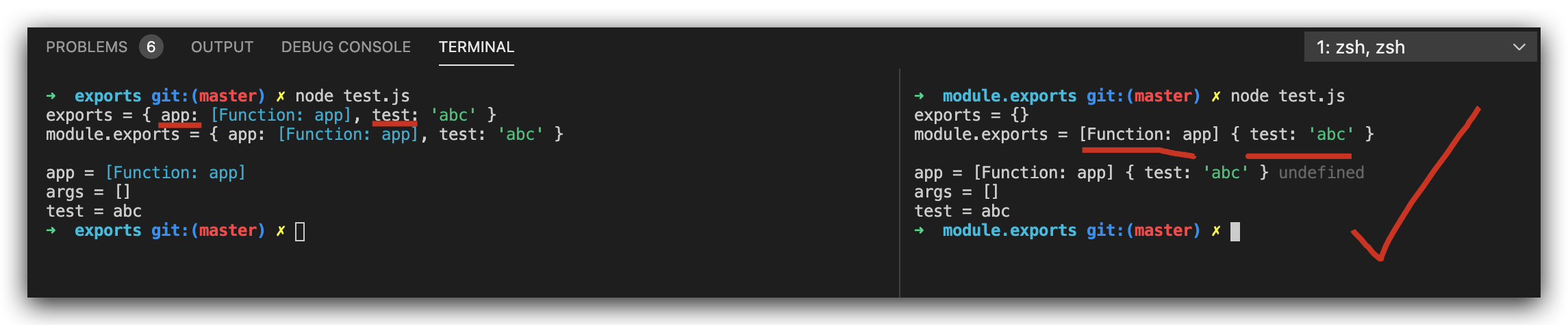
module.exports vs exports
const log = console.log;

const app = (datas = [], debug = false) => {

  log(`args =`, datas);

};

const test = `abc`;

//  default export (const app = require(`./app`);)

module.exports = app;

module.exports.test = test;

//

// module.exports.app = app;

//

// module.exports = {

//   app,

// };

log(`exports =`, exports);

log(`module.exports =`, module.exports);

// exports = {}

// module.exports = [Function: app] { test: 'abc' }

// log(`module`, module);
const log = console.log;

//  import default module

const app = require(`./app`);

// const app, {test} = require(`./app`);

log(`\napp =`, app, app.app);

app();

// app = [Function: app] undefined

// args = []

log(`test =`, app.test);

// test = abc
const log = console.log;

const app = (datas = [], debug = false) => {

  log(`args =`, datas);

};

const test = `abc`;

//

// exports = app;

//  module export (const { app, } = require(`./app`);)

exports.app = app;

exports.test = test;

log(`exports =`, exports);

log(`module.exports =`, module.exports);

// exports = { app: [Function: app], test: 'abc' }

// module.exports = { app: [Function: app], test: 'abc' }

// log(`module`, module);
const log = console.log;

//  imports multi modules

const { app, test, } = require(`./app`);

log(`\napp =`, app);

app();

// app = [Function: app]

// args = []

log(`test =`, test);

// test = abc
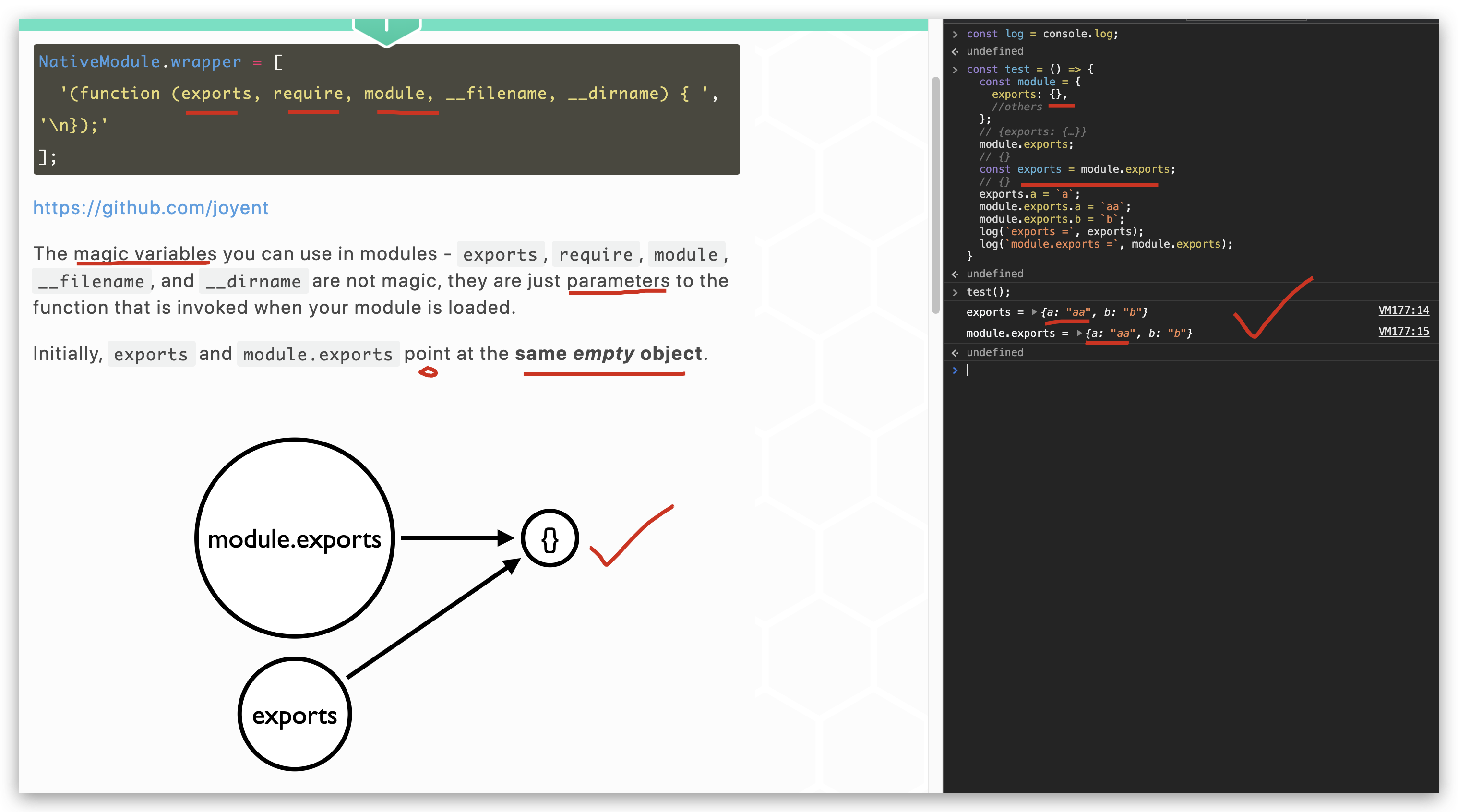
exports = module.exports
module.exports 与 exports 指向同一个Object 引用
https://blog.tableflip.io/the-difference-between-module-exports-and-exports
"use strict";

/**

 *

 * @author xgqfrms

 * @license MIT

 * @copyright xgqfrms

 * @created 2020-10-01

 * @modified

 *

 * @description

 * @difficulty Easy Medium Hard

 * @complexity O(n)

 * @augments

 * @example

 * @link

 * @solutions

 *

 * @best_solutions

 *

 */

const log = console.log;

//  module.exports 与 exports 指向同一个Object 引用

// SyntaxError: Identifier 'module' has already been declared

// module = {

//   exports: {},

//   //others

// };

// // {exports: {…}}

// module.exports;

// // {}

// exports = module.exports;

// // {}

// exports.a = `a`;

// module.exports.a = `aa`;

// module.exports.b = `b`;

// log(`exports =`, exports);

// log(`module.exports =`, module.exports);

/*

exports = { a: 'aa', b: 'b' }

module.exports = { a: 'aa', b: 'b' }

*/

const test = () => {

  const module = {

    exports: {},

    //others

  };

  // {exports: {…}}

  module.exports;

  // {}

  const exports = module.exports;

  // {}

  exports.a = `a`;

  module.exports.a = `aa`;

  module.exports.b = `b`;

  log(`exports =`, exports);

  log(`module.exports =`, module.exports);

}

test();

/*

exports = { a: 'aa', b: 'b' }

module.exports = { a: 'aa', b: 'b' }

*/
refs
https://gist.github.com/xgqfrms/b69677e524d4c4e154fef6342914eb00
xgqfrms 2012-2020
www.cnblogs.com 发布文章使用:只允许注册用户才可以访问!
node.js module.exports & exports & module.export all in one的更多相关文章
- (译)Node.js的模块-exports和module.exports
原文标题:Node.js Module – exports vs module.exports 原文链接:http://www.hacksparrow.com/node-js-exports-vs-m ...
- Node.js模块导出exports 和 module.exports 的区别
原文: https://blog.csdn.net/Pwiling/article/details/51958693 每一个node.js执行文件,都自动创建一个module对象,同时,module对 ...
- node.js中的exports和module.exports
不同的编程语言都有各自的代码组织和复用的方式,如.net.php中的命名空间,python中的import,ruby中的module等,来避免命名空间污染.一直都没搞清楚node中的exports和m ...
- node.js模块中exports和module.exports的区别
Node应用由模块组成,采用CommonJS模块规范. 根据这个规范,每个文件就是一个模块,有自己的作用域.在一个文件里面定义的变量.函数.类,都是私有的,对其他文件不可见. CommonJS规范规定 ...
- Node.js中的exports与module.exports的区分
1. module应该是require方法中,上下文中的对象 2. exports对象应该是上下文中引用module.exports的新对象 3. exports.a = xxx 会将修改更新到mod ...
- Node.js Error: Cannot find module express的解决办法
1.全局安装express框架,cmd打开命令行,输入如下命令: npm install -g express express 4.x版本中将命令工具分出来,安装一个命令工具,执行命令: npm in ...
- Node.js Error: Cannot find module express的解决办法(转载)
1.全局安装express框架,cmd打开命令行,输入如下命令: npm install -g express express 4.x版本中将命令工具分出来,安装一个命令工具,执行命令: npm in ...
- node启动服务报错Node.js Error: Cannot find module express
在node文件夹中(M:\express-test),执行 npm install express 在使用npm安装express时,报npm WARN saveError ENOENT: no su ...
- es6 import export 与 node 中的module.exports exports
1.export a.export 变量 export var name = 'jack';export var age = 18;//等同于 var name = 'jack';var age = ...
- Node.js中exports,module.exports以及require方法
在Node.js中,使用module.exports.f = ...与使用exports.f = ...是一样的,此时exports就是module.exports的一种简写方式.但是,需要注意的是, ...
随机推荐
- 树莓派zero 使用usb串口连接
使用minicom连接bash$ lsusbBus 002 Device 001: ID 1d6b:0003 Linux Foundation 3.0 root hubBus 001 Device 0 ...
- get_or_create update_or_create
django/query.py at master · django/django https://github.com/django/django/blob/master/django/db/mod ...
- (Oracle)数据库用户的密码过期时间如何修改为永不过期
Oracle的密码过期规则是用Profile来管理的,系统默认只有一个Profile(DEFAULT),该profile的密码过期规则为180天.那么如何修改Oracle数据库用户的密码过期时间为永不 ...
- file descriptor 0 1 2 一切皆文件 stdout stderr stdin /dev/null 沉默是金 pipes 禁止输出 屏蔽 stdout 和 stderr 输入输出重定向 重定向文件描述符
movie.mpeg.001 movie.mpeg.002 movie.mpeg.003 ... movie.mpeg.099 $cat movie.mpeg.0*>movie.mpeg ...
- POJ 3461__KMP算法
[题目描述] 法国作家乔治·佩雷克(Georges Perec,1936-1982)曾经写过一本书,<敏感字母>(La disparition),全篇没有一个字母'e'.他是乌力波小组(O ...
- Linux CGroup入门
Linux cgroup Linux CGroup全称Linux Control Group, 是Linux内核的一个功能,用来限制,控制与分离一个进程组群的资源(如CPU.内存.磁盘输入输出等).L ...
- 三:SpringBoot-配置系统全局异常映射处理
三:SpringBoot-配置系统全局异常映射处理 1.异常分类 1.1 业务异常 1.2 系统异常 2.自定义异常处理 2.1 自定义业务异常类 2.2 自定义异常描述对象 2.3 统一异常处理格式 ...
- Spring框架——JDBC方式搭建项目
学习Spring框架,使用JDBC的方式配置方式搭建一个项目,进行项目总结. 首先,采用MVC设计模式思想,搭建项目目录. 然后各个目录文件下面的相关源码附上: controller目录: impor ...
- mysql错误(Incorrect key file for table)
Incorrect key file for table 'C:\Windows\TEMP\#sql578_6e2_68d.MYI'; try to repair it mysql错误:mysql需要 ...
- Flink-v1.12官方网站翻译-P016-Flink DataStream API Programming Guide
Flink DataStream API编程指南 Flink中的DataStream程序是对数据流实现转换的常规程序(如过滤.更新状态.定义窗口.聚合).数据流最初是由各种来源(如消息队列.套接字流. ...