
在Sql Server Intergration Service中设置Catalog下所部署所有项目的参数值
在Sql Server 2012开始,微软给SSIS添加了Project Model这种新的项目类型,与之对应的是在Sql Server数据库引擎中引入了Intergration Services Catalog这种新的部署方式。
当你在Sql Server中启用Intergration Service Catalog后,就会在Intergration Services Catalog下多出一个系统文件夹叫SSISDB,如下图所示我们已经发布了一个SSIS项目SSIS_LOG_TESTING到子文件夹Demo_Project_Folder下:
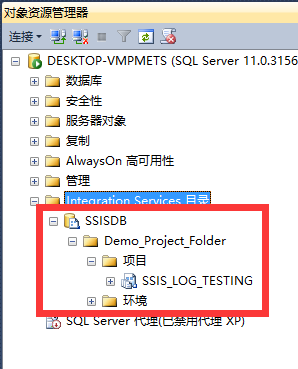
而在数据库中,我们也可以看到Sql Server自动生成了一个名叫SSISDB的数据库,该数据库就是用来存储Intergration Services Catalog下的项目数据的,请不要乱动其中的数据。

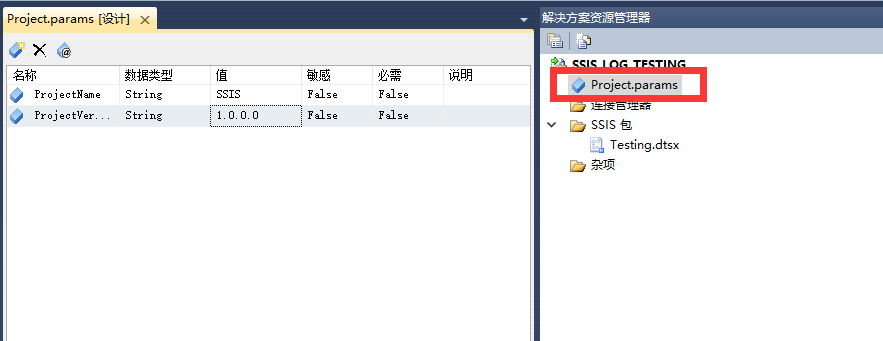
用过SSIS Project Model的开发人员应该都知道,这种新的项目类型相比老的Package Model有很多好处,其中一个好处就是可以在项目级别上定义全局参数,SSIS项目中的所有dtsx包都可以访问项目参数,如下图所示:
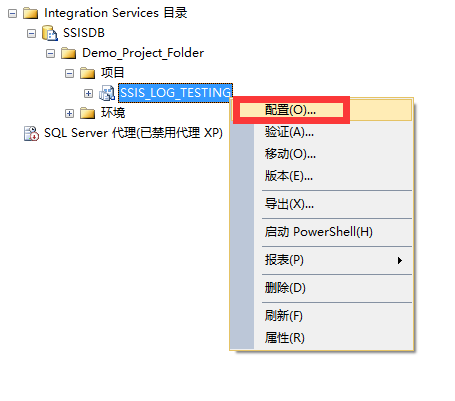
而当项目发布到Intergration Services Catalog后,也可以在Intergration Services Catalog上直接修改这些项目参数的值:

但是随之而来的问题是,随着在Intergration Services Catalog部署的SSIS项目越来越多,有没有什么办法能过统一管理这些SSIS项目的参数呢?因为Project Model的项目参数有个很大的缺点,那就是没有办法将其值存储在数据库中,而老的Pakacge Model是可以将SSIS项目中Configuration中的值存储在数据库表中的。所以导致了Project Model的项目参数没法集中管理,设想一下你的Intergration Services Catalog下如果有100个SSIS项目,假如这100项目都有一个同名的项目参数叫UserName,你现在想更改这100个项目的UserName项目参数,你只有手动打开每个项目的配置去设置UserName项目参数,是一件很耗时的操作。
而Intergration Services Catalog生成的数据库SSISDB中提供了一系列视图和存储过程,可以让我们用Sql语句来操作每个SSIS项目的项目参数,如下图所示:
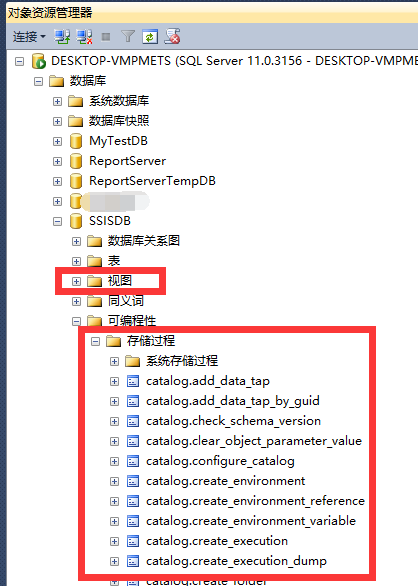
其中有一个视图和存储过程特别有用,这里列出来:
视图catalog.object_parameters
该视图可以返回在Intergration Services Catalog中发布所有SSIS项目的项目参数信息,官方介绍如下:
Displays the parameters for all packages and projects in the Integration Services catalog.
| Column name | Data type | Description |
|---|---|---|
| parameter_id | bigint | The unique identifier (ID) of the parameter. |
| project_id | bigint | The unique ID of the project. |
| object_type | smallint | The type of parameter. The value is 20 for a project parameter and the value is 30 for a package parameter. |
| object_name | sysname | The name of the corresponding project or package. |
| parameter_name | sysname(nvarchar(128)) | The name of the parameter. |
| data_type | nvarchar(128) | The data type of the parameter. |
| required | bit | When the value is 1, the parameter value is required in order to start the execution. When the value is 0, the parameter value is not required to start the execution. |
| sensitive | bit | When the value is 1, the parameter value is sensitive. When the value is 0, the parameter value is not sensitive. |
| description | nvarchar(1024) | An optional description of the package. |
| design_default_value | sql_variant | The default value for the parameter that was assigned during the design of the project or package. |
| default_value | sql_variant | The default value that is currently used on the server. |
| value_type | char(1) | Indicates the type of parameter value. This field displays V when parameter_value is a literal value and R when the value is assigned by referencing an environment variable. |
| value_set | bit | When the value is 1, the parameter value has been assigned. When the value is 0, the parameter value has not been assigned. |
| referenced_variable_name | nvarchar(128) | The name of the environment variable that is assigned to the value of the parameter. The default value is NULL. |
| validation_status | char(1) | Identified for informational purposes only. Not used in SQL Server 2017. |
| last_validation_time | datetimeoffset(7) | Identified for informational purposes only. Not used in SQL Server 2017. |
Permissions
To see rows in this view, you must have one of the following permissions: +
READ permission on the project
Membership to the ssis_admin database role
Membership in the sysadmin server role.
Row-level security is enforced; only rows that you have permission to view are displayed.
该视图查询结果截图如下:
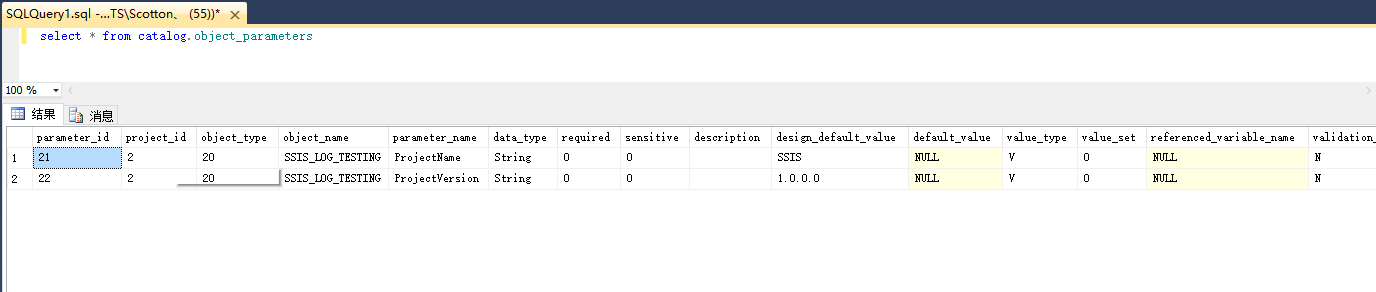
存储过程catalog.set_object_parameter_value
该存储过程可以设置在Intergration Services Catalog中部署SSIS项目的项目参数,官方介绍如下:
Sets the value of a parameter in the Integration Services catalog. Associates the value to an environment variable or assigns a literal value that is used by default when no other values are assigned.
Syntax
catalog.set_object_parameter_value [@object_type =] object_type

    , [@folder_name =] folder_name

    , [@project_name =] project_name

    , [@parameter_name =] parameter _name

    , [@parameter_value =] parameter_value

 [  , [@object_name =] object_name ]

 [  , [@value_type =] value_type ]
Arguments
[@object_type =] object_type The type of parameter. Use the value 20 to indicate a project parameter or the value 30 to indicate a package parameter. The object_type is smallInt.
[@folder_name =] folder_name The name of the folder that contains the parameter. The folder_name is nvarchar(128).
[@project_name =] project_name The name of the project that contains the parameter. The project_name is nvarchar(128).
[@parameter_name =] parameter_name The name of the parameter. The parameter_name is nvarchar(128).
[@parameter_value =] parameter_value The value of the parameter. The parameter_value is sql_variant.
[@object_name =] object_name The name of the package. This argument required when the parameter is a package parameter. The object_name is nvarchar(260).
[@value_type =] value_type The type of parameter value. Use the character V to indicate that parameter_value is a literal value that is used by default when no other values are assigned prior to execution. Use the character R to indicate that parameter_value is a referenced value and has been set to the name of an environment variable. This argument is optional, the character V is used by default. The value_type is char(1).
Return Code Value
0 (success)
Result Sets
None
Permissions
This stored procedure requires one of the following permissions:
READ and MODIFY permissions on the project
Membership to the ssis_admin database role
Membership to the sysadmin server role
Errors and Warnings
The following list describes some conditions that may cause the stored procedure to raise an error:
The parameter type is not valid
The project name is not valid
For package parameters, the package name is not valid
The value type is not valid
The user does not have the appropriate permissions
Remarks
If no value_type is specified, a literal value for parameter_value is used by default. When a literal value is used, the value_set in the object_parameters view is set to
1. A NULL parameter value is not allowed.If value_type contains the character
R, which denotes a referenced value, parameter_value refers to the name of an environment variable.The value
20may be used for object_type to denote a project parameter. In this case, a value for object_name is not necessary, and any value specified for object_name is ignored. This value is used when the user wants to set a project parameter.The value
30may be used for object_type to denote a package parameter. In this case, a value for object_name is used to denote the corresponding package. If object_name is not specified, the stored procedure returns an error and terminates.
该存储过程的执行结果如下:
EXEC catalog.set_object_parameter_value 20,N'Demo_Project_Folder',N'SSIS_LOG_TESTING',N'ProjectVersion',N'2.0.0.0'


在Sql Server Intergration Service中设置Catalog下所部署所有项目的参数值的更多相关文章
- SSRS (SQL Server Report Service) 在IE9, IE10下显示不全的解决办法
原文:SSRS (SQL Server Report Service) 在IE9, IE10下显示不全的解决办法 在做项目的过程中遇到SSRS与IE9, IE10不兼容的情况,具体表现为报表页面在IE ...
- SQL Server Reporting Service(SSRS) 第六篇 SSRS 部署总结
前段时间完成了第一批次SSRS报表的开发,本来以为大功已经告成,结果没有想到在整个发布与部署过程中还是遇到了很多的问题,现将这些问题一一列举出来,希望对以后能够有所启发! 1. 关于数据源与数据集的发 ...
- SQL Server R2 2008中的SQL Server Management Studio 阻止保存要求重新创建表的更改问题的设置方法
在2008中会加入阻止保存要求重新创建表的更改这个选项.症状表现为修改表结构的时候会"阻止"你. SQL Server 2008“阻止保存要求重新创建表的更改”的错误的解决方案是本 ...
- SQL Server Reporting Service(SSRS) 第一篇 我的第一个SSRS例子
很早就知道SQL SERVER自带的报表工具SSRS,但一直没有用过,最近终于需要在工作中一展身手了,于是我特地按照自己的理解做了以下总结: 1. 安装软件结构 SSRS全称SQL Server Re ...
- SQL Server 2005 Service Broker
一.引言 SQL Server 2005 的一个主要成就是可以实现可靠.可扩展且功能完善的数据库应用程序.与 .NET Framework 2.0 公共语言运行库 (CLR) 的集成使开发人员可以将重 ...
- C#面试题(转载) SQL Server 数据库基础笔记分享(下) SQL Server 数据库基础笔记分享(上) Asp.Net MVC4中的全局过滤器 C#语法——泛型的多种应用
C#面试题(转载) 原文地址:100道C#面试题(.net开发人员必备) https://blog.csdn.net/u013519551/article/details/51220841 1. . ...
- Sql Server Report Service 的部署问题(Reporting Service 2014為什麼不需要IIS就可以運行)
http://www.cnblogs.com/syfblog/p/4651621.html Sql Server Report Service 的部署问题 近期在研究SSRS部署问题,因为以前也用到过 ...
- Sql Server Report Service 的部署问题
近期在研究SSRS部署问题,因为以前也用到过SSRS报表,但当时开发的报表是有专门的集成系统的,不需要我自己去部署,所以对这一块的部署也不熟悉,我记得当时我是直接开发出一个SSRS 报表,然后会通过自 ...
- [转]Sql Server Report Service 的部署问题
本文转自:https://www.cnblogs.com/syfblog/p/4651621.html 近期在研究SSRS部署问题,因为以前也用到过SSRS报表,但当时开发的报表是有专门的集成系统的, ...
随机推荐
- Mysql数据库重要知识点(知了堂学习心得)
Mysql数据库知识点 1.管理数据库语句: 使用数据库: use test; 添加数据库: create database 数据库名; create database test; 修改数据库: al ...
- Locust no-web 模式与参数详解
读前参考:<性能测试工具Locust > 熟悉 Apache ab 工具的同学都知道,它是没有界面的,通过命令行执行. Locust 同样也提供的命令行运行,好处就是更节省客户端资源. 命 ...
- 用python在excel中读取与生成随机数写入excel中
今天是我第一次发博客,就关于python在excel中的应用作为我的第一篇吧. 具体要求是:在一份已知的excel表格中读取学生的学号与姓名,再将这些数据放到新的excel表中的第一列与第二列,最后再 ...
- The Hungarian Abhorrence Principle
原文:http://www.butunclebob.com/ArticleS.UncleBob.TheHungarianAbhorrencePrinciple The Hungarian Abh ...
- 【原创】java NIO FileChannel 学习笔记 新建一个FileChannel
首先使用FileChannel 的open方法获取一个FileChannel对象.下面这段代码是FileChannel中open方法的代码. public static FileChannel ope ...
- java构造器执行顺序一个有趣的简单实例
一 Animal为父类,构造器中调用public(default.protected) say方法,Dog继承了Animal,并重载了say方法.新建Dog对象,查看运行结果,若将Animal中say ...
- php 简单通用的日志记录方法
使用file_put_contents 方法来实现简单便捷的日志记录功能 方法1: // use \r\n for new line on windows, just \n on linux func ...
- android官网文档学习笔记
1.android的四大组件的了大概功能 activity:负责显示界面,和用户交互. service:运行在后台. content provider:为程序app之间的数据访问提供接口. broad ...
- java.lang.Exception: 资源处理失败,失败原因:com.mysql.jdbc.exceptions.jdbc4.MySQLSyntaxErrorException: Unknown column '?????‰' in 'where clause'
1:Unknown column '?????‰' in 'where clause',这个问题,百度一搜,挺多的,但是貌似好像没有解决我的问题.贴一下我是如何拼接sql的.解决这个sql拼接bug的 ...
- 微信小程序<web-view>嵌入网页后,小程序如何和网页交互传值?
最近开发一个项目由于小程序某些组件的限制,然后想到嵌入网页,但是遇到一个问题:网页端调取数据的时候需要 小程序传递多个参数值才能用,如何传值呢? 最初我想到是<web-view src=&quo ...