
salesforce零基础学习(八十三)analytics:reportChart实现Dashboard(仪表盘)功能效果
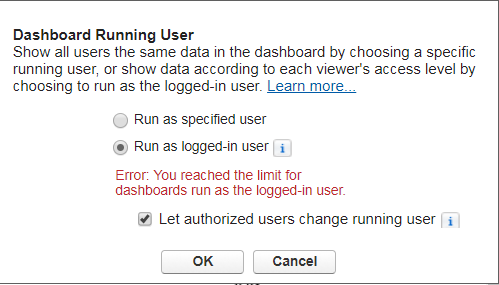
项目中经常会用到Report以及Dashboard来分析汇总数据,Dashboard可以指定view as user,如果针对不同的用户需要显示其允许查看的数据,比如 根据role hierarchy来显示数据,需要指定run as login user.但是dashboards runas the logged-in user是有数量的限制的,针对此种情况,就需要使用自定义实现Dashboard功能。
使用自定义操作可以通过apex class获取数据,在visualforce page上画不同组的chart,点击chart以后跳转到相关详情的report页面,但是这种情况无法处理funnel chart的情况,因为visualforce的api没有提供funnel chart样式的元素。
这种情况下,比较偷懒的操作为在Report上使用Role Hierarchy进行限制来对数据进行获取,然后在Report中配置chart,使用aynalytics:reportChart传递需要显示的report ids进行展示,从而实现dashboard的效果。
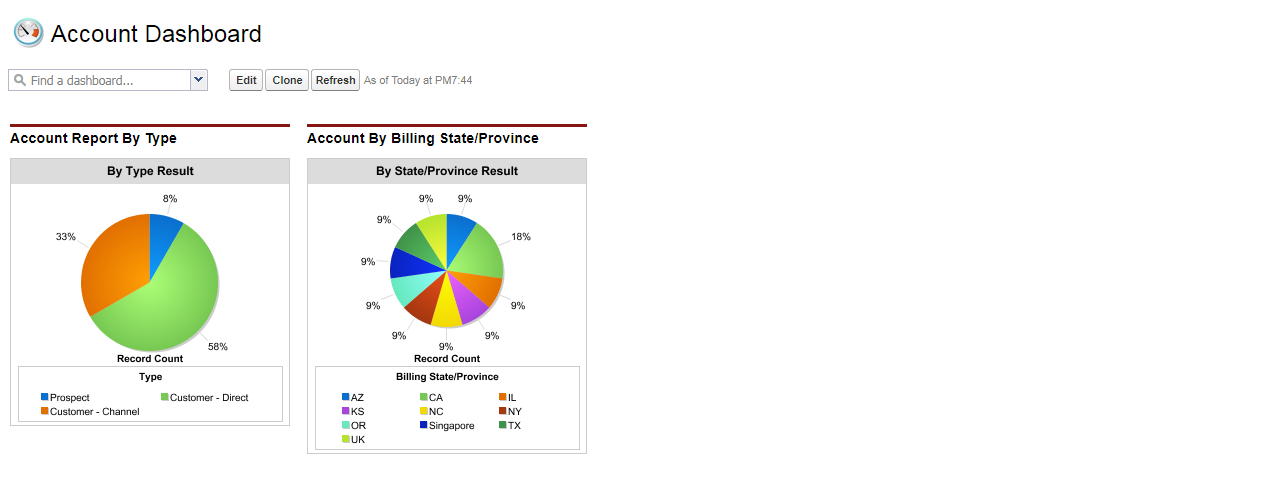
功能:实现自定义Dashboard,Dashboard显示两个chart,分别为通过Type对Account进行分组以及通过State/Province对Account分组,每个用户只能看到当前用户以及下级的内容。
准备工作:
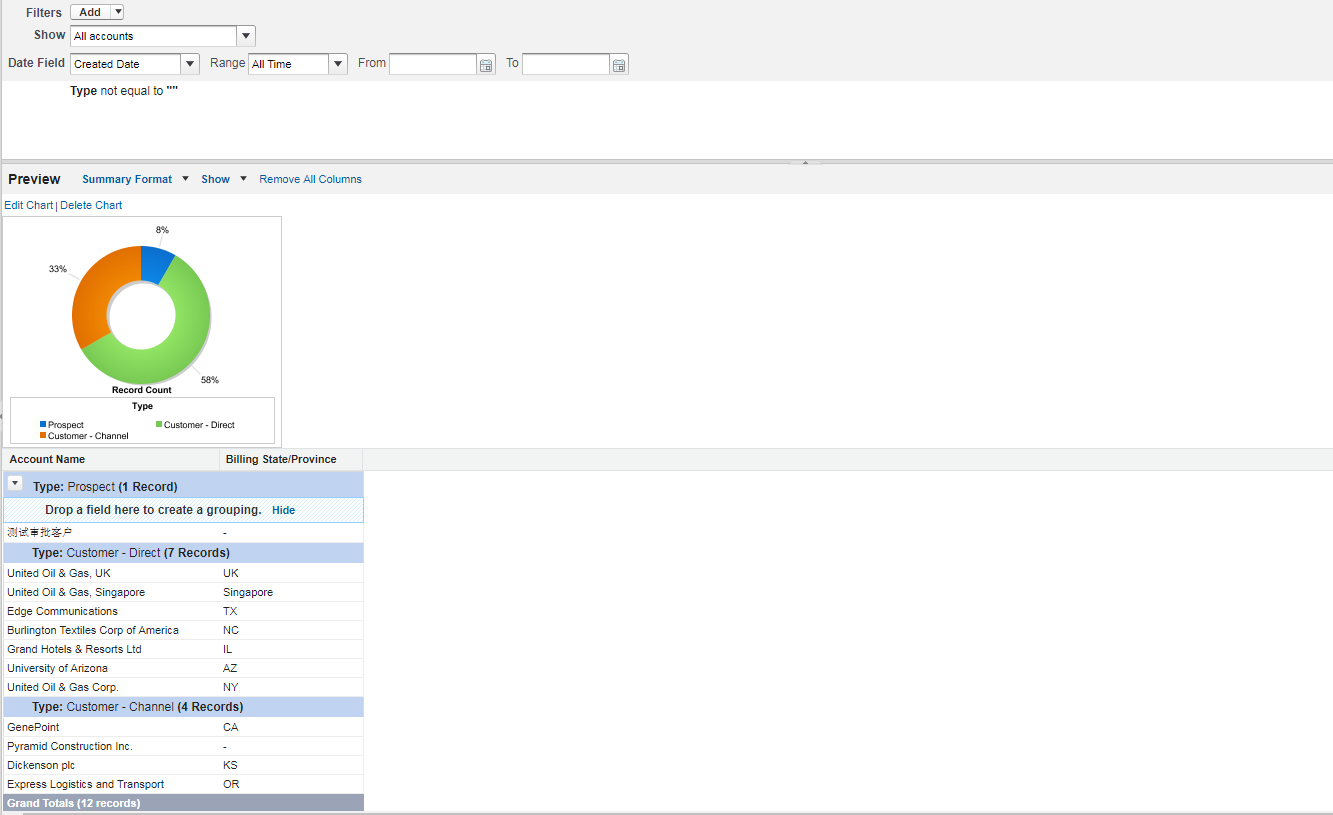
1.创建Report,此Report通过Type进行分组,developername为Account_Report_By_Type
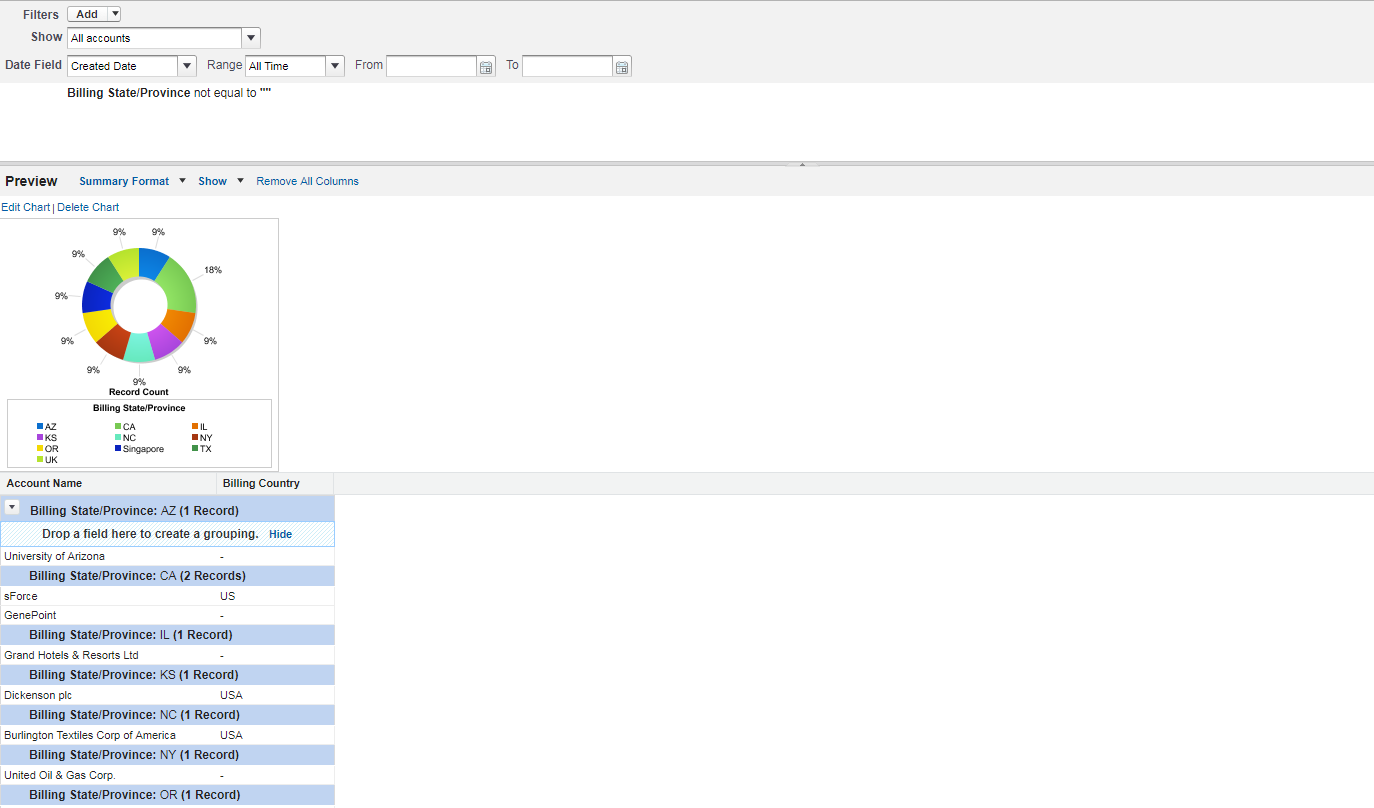
2.创建Report,此Report通过State/Province进行分组,developername为Account_By_Billing_State_Province
3.创建Dashboard,包含上面的两个Report,datasource也分别对应上面两个report。
准备工作结束,现在需要通过程序来实现上面的Dashboard。
1.AnalyticsReportChartController:用来获取上述两个report id,并放在reportIds
 public with sharing class AnalyticsReportChartController {

     public List<Id> reportIds{get;set;}

     public AnalyticsReportChartController() {

         reportIds = new List<Id>();

         reportIds.add(accountByTypeReportId);

         reportIds.add(accountByStateProvinceReportId);

     }

     public Id accountByTypeReportId{

         get {

             if(accountByTypeReportId == null) {

                 Report rt = [select id from Report where DeveloperName = 'Account_Report_By_Type' limit 1];

                 accountByTypeReportId = rt.Id;

             }

             return accountByTypeReportId;

         }set;

     }

     public Id accountByStateProvinceReportId {

         get {

             if(accountByStateProvinceReportId == null) {

                 Report rt = [select id from Report where DeveloperName = 'Account_By_Billing_State_Province' limit 1];

                 accountByStateProvinceReportId = rt.Id;

             }

             return accountByStateProvinceReportId;

         }set;

     }

 }
2.AnalyticsReportChart.page:实现展示两个report的chart,点击后跳转到相关的report中
 <apex:page controller="AnalyticsReportChartController">

     <apex:panelGrid columns="2">

         <apex:outputPanel id="reportPanel">

             <apex:repeat value="{!reportIds}" var="report">

                 <div style="display: inline-block;width: 400px;height: 400px;vertical-align: top;">

                     <analytics:reportChart reportId="{!report}" showRefreshButton="false" size="small" cacheResults="false"></analytics:reportChart>

                 </div>

             </apex:repeat>

         </apex:outputPanel>

     </apex:panelGrid>

 </apex:page>
效果展示:

总结:使用analytics:reportChart可以很方便的实现DashBoard的展示效果,但是此种方式仅限于Dashboard中的一个Chart对应一个Report,而不是一个Chart对应多个Report,如果出现一个Chart对应多个Report,需要创建成一对一的关系才能实现。
salesforce零基础学习(八十三)analytics:reportChart实现Dashboard(仪表盘)功能效果的更多相关文章
- salesforce 零基础学习(六十八)http callout test class写法
此篇可以参考: https://developer.salesforce.com/docs/atlas.en-us.apexcode.meta/apexcode/apex_classes_restfu ...
- salesforce零基础学习(八十)使用autoComplete 输入内容自动联想结果以及去重实现
项目中,我们有时候会需要实现自动联想功能,比如我们想输入用户或者联系人名称,去联想出系统中有的相关的用户和联系人,当点击以后获取相关的邮箱或者其他信息等等.这种情况下可以使用jquery ui中的au ...
- salesforce零基础学习(八十二)审批邮件获取最终审批人和审批意见
项目中,审批操作无处不在.配置审批流时,我们有时候会用到queue,related user设置当前步骤的审批人,审批人可以一个或者多个.当审批人有多个时,邮件中获取当前记录的审批人和审批意见就不能随 ...
- salesforce零基础学习(八十七)Apex 中Picklist类型通过Control 字段值获取Dependent List 值
注:本篇解决方案内容实现转自:http://mysalesforceescapade.blogspot.com/2015/03/getting-dependent-picklist-values-fr ...
- salesforce零基础学习(八十九)使用 input type=file 以及RemoteAction方式上传附件
在classic环境中,salesforce提供了<apex:inputFile>标签用来实现附件的上传以及内容获取.salesforce 零基础学习(二十四)解析csv格式内容中有类似的 ...
- salesforce零基础学习(一百一十三)Trigger中获取IP地址的过程
本篇参考: https://developer.salesforce.com/docs/atlas.en-us.228.0.apexcode.meta/apexcode/apex_class_Auth ...
- salesforce零基础学习(九十六)Platform Event浅谈
本篇参考:https://developer.salesforce.com/blogs/2018/07/which-streaming-event-do-i-use.html https://trai ...
- salesforce零基础学习(一百零五)Change Data Capture
本篇参考: https://developer.salesforce.com/docs/atlas.en-us.232.0.api_streaming.meta/api_streaming/using ...
- salesforce 零基础学习(五十二)Trigger使用篇(二)
第十七篇的Trigger用法为通过Handler方式实现Trigger的封装,此种好处是一个Handler对应一个sObject,使本该在Trigger中写的代码分到Handler中,代码更加清晰. ...
随机推荐
- 学习如何看懂SQL Server执行计划(二)——函数计算篇
二.函数计算部分 --------------------标量聚合--------------------/* 标量聚合-主要在聚合函数操作中产生 计算标量:根据行中的现有值计算出一个新值 流聚合:在 ...
- javascript字典数据结构Dictionary实现
<!DOCTYPE html> <html xmlns="http://www.w3.org/1999/xhtml"> <head runat=&qu ...
- DevOps之归纳总结
唠叨话 关于德语关我屁事的知识点,仅提供精华汇总,具体知识点细节,参考教程网址,如需帮助,请留言. DevOps归纳总结 <DevOps功能与性能>浏览器(饼干Cookie.会话Sessi ...
- 解读python中SocketServer源码
在看SocketServer源码之前,先看一个例子: class Base(object): def __init__(self, name): self.name = name self.Testf ...
- sys.argv向脚本中传递参数
可以向脚本中传递无限多个参数,其值是一个列表,默认sys.argv[0]内容是脚本文件路径加文件名 test.py文件中的内容如下: #! /usr/bin/python3import sys pri ...
- centos安装openoffice服务
第一步:yum install openoffice.org-brand openoffice.org-core openoffice.org-java-common xvfb openoffice. ...
- 2017年最受欢迎的UI框架
前端领域最近几年发展的特别迅速,可以说是百家争鸣.在底层的前端框架领域中,最早是jquery称霸互联网,近两年MVVM类型的框架慢慢成为主流,Vue.React和Angular三大框架并驾齐驱.可以说 ...
- bug:逆向思维的延伸
哈哈,我又来了. 前段时间自己出了一个bug,说起来也属于比较常见的类型 A业务需要做一个活动,需要B业务判断,如果是通过A业务跳转至B业务的用户,则在B页面给这类用户展示一个对应的弹窗.(A是新增业 ...
- fiddler学习资源
小坦克 fiddler教程:http://www.cnblogs.com/TankXiao/archive/2012/04/25/2349049.htmlps:另外博主其他测试文章也值得一看 涂根 ...
- 搭建yeoman自动化构建工具
yeoman可以快速的搭建一个项目的手脚架,初次接触yeoman,在搭建的过程中遇到了很多的问题. yeoman需要node.js(http://nodejs.org)和git(http://git- ...