
Web性能测试工具之ab入门篇
1. ab简介
2. ab下载
2.1 Windows系统

2.2 linux系统
yum install httpd
3. ab运行
4. 使用ab进行性能测试
ab -n  -c  http://www.cnblogs.com

# -n 总共10次请求,-c 模拟10个并发用户,即10个并发请求博客园首页,共请求10次

ab -t  -c  http://www.cnblogs.com

# -t 是测试执行时间,-c 模拟10个并发用户,即10个并发请求博客园首页,持续10秒
5. 测试结果
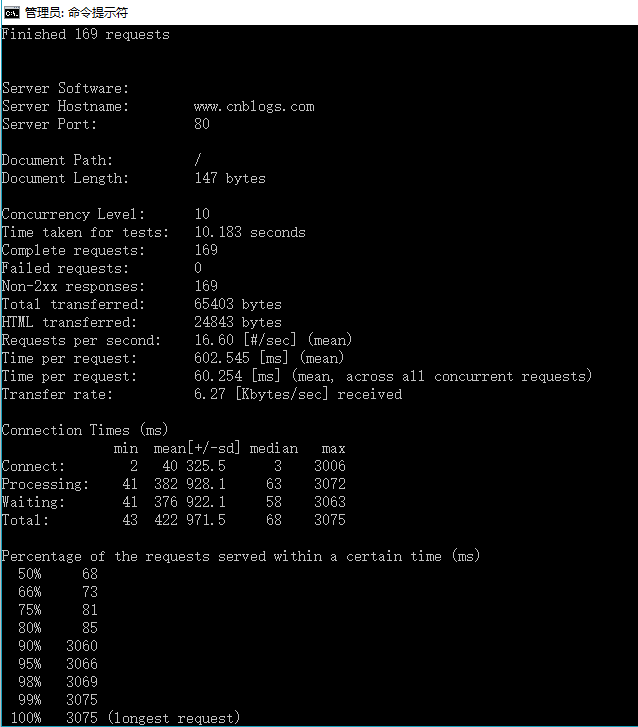
6. 结果解析
Server Software:

Server Hostname:        www.cnblogs.com

Server Port:

Document Path:          /

Document Length:         bytes    #HTTP响应数据的正文长度

Concurrency Level:          #并发数

Time taken for tests:   10.183 seconds    #测试执行时间

Complete requests:          #完成请求数

Failed requests:            #失败请求数

Non-2xx responses:

Total transferred:       bytes    #网络总传输量

HTML transferred:        bytes    #HTML内容传输量

Requests per second:    16.60 [#/sec] (mean)    #每秒请求数

Time per request:       602.545 [ms] (mean)    #用户平均请求等待时间,计算公式:测试执行总时间/(总请求数/并发用户数)

Time per request:       60.254 [ms] (mean, across all concurrent requests)    #服务器平均请求等待时间,计算公式:测试执行总时间/总请求数

Transfer rate:          6.27 [Kbytes/sec] received    #平均传输速率

Connection Times (ms)    #响应时间小、中、大值

              min  mean[+/-sd] median   max

Connect:            325.5

Processing:       928.1

Waiting:          922.1

Total:            971.5

Percentage of the requests served within a certain time (ms)    #一定时间内请求完成的百分比,如50%用户完成的响应时间在68ms内, %用户完成的响应时间在73ms内,%用户在3075ms内完成

  %

  %

  %

  %

  %

  %

  %

  %

 %    (longest request)
7. ab运行参数详解
Usage: ab [options] [http://]hostname[:port]/path

Options are:

-n requests Number of requests to perform

-c concurrency Number of multiple requests to make at a time

-t timelimit Seconds to max. to spend on benchmarking

This implies -n

-s timeout Seconds to max. wait for each response

Default is  seconds

-b windowsize Size of TCP send/receive buffer, in bytes

-B address Address to bind to when making outgoing connections

-p postfile File containing data to POST. Remember also to set -T

-u putfile File containing data to PUT. Remember also to set -T

-T content-type Content-type header to use for POST/PUT data, eg.

'application/x-www-form-urlencoded'

Default is 'text/plain'

-v verbosity How much troubleshooting info to print

-w Print out results in HTML tables

-i Use HEAD instead of GET

-x attributes String to insert as table attributes

-y attributes String to insert as tr attributes

-z attributes String to insert as td or th attributes

-C attribute Add cookie, eg. 'Apache=1234'. (repeatable)

-H attribute Add Arbitrary header line, eg. 'Accept-Encoding: gzip'

Inserted after all normal header lines. (repeatable)

-A attribute Add Basic WWW Authentication, the attributes

are a colon separated username and password.

-P attribute Add Basic Proxy Authentication, the attributes

are a colon separated username and password.

-X proxy:port Proxyserver and port number to use

-V Print version number and exit

-k Use HTTP KeepAlive feature

-d Do not show percentiles served table.

-S Do not show confidence estimators and warnings.

-q Do not show progress when doing more than  requests

-l Accept variable document length (use this for dynamic pages)

-g filename Output collected data to gnuplot format file.

-e filename Output CSV file with percentages served

-r Don't exit on socket receive errors.

-m method Method name

-h Display usage information (this message)
-n 即requests,用于指定压力测试/总请求数。

-c 即concurrency,用于指定压力测试的并发数。

-t 即timelimit,测试执行最大秒数,它可以让测试限制在一个固定的总时间以内,默认值为50000。

-s 即timeout,请求最大等待时长,默认30s

-b 即windowsize,TCP发送/接收的缓冲大小(单位:字节)。

-p 即postfile,发送POST请求时需要上传的文件,文件格式如"p1=1&p2=2"。使用方法是 -p .txt 。 (配合-T)

-u 即putfile,发送PUT请求时需要上传的文件。(配合-T)

-T 即content-type,用于设置Content-Type请求头信息,如 -T "application/x-www-form-urlencoded”,默认值为text/plain。(配合-p)

-v 即verbosity,设置显示信息的详细程度 – 4或更大值会显示头信息, 3或更大值可以显示响应代码(, 200等), 2或更大值可以显示警告和其他信息。

-w 以HTML表格形式打印结果。

-i 使用HEAD请求代替GET请求。

-x 插入字符串作为table标签的属性。

-y 插入字符串作为tr标签的属性。

-z 插入字符串作为td标签的属性。

-C 添加cookie信息,例如:"Apache=1234"。此参数可以重复,用逗号分割。提示:可以借助session实现原理传递 JSESSIONID参数, 实现保持会话的功能,如-C "c1=1234,c2=2,c3=3, JSESSIONID=FF056CD16DA9D71CB131C1D56F0319F8"。

-H 添加任意的请求头,例如:"Accept-Encoding: gzip",请求头将会添加在现有的多个请求头之后(可以重复该参数选项以添加多个)。

-A 添加一个基本的网络认证信息,用户名和密码之间用英文冒号隔开。

-P 添加一个基本的代理认证信息,用户名和密码之间用英文冒号隔开。如-P proxy-auth-username:password

-X 指定使用的代理服务器和端口号,例如:"126.10.10.3:88"。

-V 显示版本号并退出。

-k 使用HTTP的KeepAlive特性。

-d 不显示百分比。

-S 不显示预估和警告信息。

-q 超过150个请求后不显示进度

-l 接受可变文档长度(用于动态页面)

-g filename 输出结果信息到gnuplot格式的文件中。

-e filename 输出结果信息到CSV格式的文件中。

-r 指定接收到错误信息时不退出程序。

-m method 方法名

-h 帮助
Web性能测试工具之ab入门篇的更多相关文章
- pylot是一款开源的web性能测试工具
pylot是一款开源的web性能测试工具,http://www.pylot.org/ 参考文档:http://www.pylot.org/gettingstarted.html很容易上手 使用分为以下 ...
- 【web性能】web性能测试工具推荐
WEB性能测试工具主要分为三种,一种是测试页面资源加载速度的,一种是测试页面加载完毕后页面呈现.JS操作速度的,还有一种是总体上对页面进行评价分析,下面分别对这些工具进行介绍,如果谁有更好的工具也请一 ...
- Web性能测试工具:http_load安装&使用简介
除了siege,在Web性能测试工具中,http_load也是比较热门和常见的一款,有时因为种种原因,只能使用现成的工具,所以多了解和掌握一种Web性能测试工具是很有必要的. 1.下载安装包 略过 2 ...
- Web性能测试工具:Siege安装&使用简介
在Web性能测试工具中,siege是比较热门和常见的,它有安装简单,使用简单,测试报告详细的特点. 并且可以在文本中预定义一系列待测试url模拟,并可设定一定并发量下持续指定时间or测试进行测试. 比 ...
- Web性能测试工具推荐
WEB性能测试工具主要分为三种: 一种是测试页面资源加载速度的: 一种是测试页面加载完毕后页面呈现.JS操作速度的: 一种是总体上对页面进行评价分析. ~~~如果谁有更好的工具也请一起分享下 1. ...
- Web性能测试工具JMeter
做Web方面的黑盒测试,也就是功能测试,基本不需要什么测试工具,都是直接打开浏览器访问,点一点界面就行. 现在流行的移动互联网应用,客户端和服务端的开发是分离的,两者开发进度肯定不一样,可能存在服务端 ...
- 【转】开源性能测试工具 - Apache ab 介绍
版权声明:本文可以被转载,但是在未经本人许可前,不得用于任何商业用途或其他以盈利为目的的用途.本人保留对本文的一切权利.如需转载,请在转载是保留此版权声明,并保证本文的完整性.也请转贴者理解创作的辛劳 ...
- web性能测试工具——http_load
http_load是一款基于Linux平台的web服务器性能测试工具,用于测试web服务器的吞吐量与负载,web页面的性能. http_load是基于linux.unix平台的一种性能测工具 它以并行 ...
- 2015第22周一Web性能测试工具及IE扩展区别
在高性能web测试工具推荐http://www.jb51.net/article/23034.htm中发现了dynaTrace 感觉很不错,不但可以检测资源加载瀑布图,而且还能监控页面呈现时间,CPU ...
随机推荐
- Python的json and pickle序列化
json序列化和json反序列化 #!/usr/bin/env python3 # -*- coding: utf-8 -*- __author__ = '人生入戏' import json a = ...
- Linux服务器硬盘状态查看
首先执行fdisk -l最底下 Device Start End Sectors Size Type /dev/vda1 2048 6143 4096 2M BIOS boot /dev/vda2 6 ...
- Android 之异步任务(AsyncTask,Handler,Message,looper)
AsyncTask: 3个类型(Params,Progress和Result),4个步骤(onPreExecute(),doInBackground(Params…),onProgressUpdate ...
- PHP中isset和empty的区别(最后总结)
PHP的isset()函数 一般用来检测变量是否设置 格式:bool isset ( mixed var [, mixed var [, ...]] ) 功能:检测变量是否设置 返回值: 若变量不存在 ...
- 使用LayUI操作数据表格
接着 上一篇 继续完善我们的demo,这次我们加一个搜索按钮 搜索 在table标签的上方,加入这样一组html <div class="demoTable"> 搜索商 ...
- WPF布局控件与子控件的HorizontalAlignment/VerticalAlignment属性之间的关系
WPF布局控件与子控件的HorizontalAlignment/VerticalAlignment属性之间的关系: 1.Canvas/WrapPanel控件: 其子控件的HorizontalAlign ...
- tcpip第三章
1,ip协议不可靠.无连接特性介绍 不可靠:计算机A往计算机B发送数据报1,若途径的路由器缓存已满,或者ttl(time to live 生存周期)到了,则路由器直接丢弃数据包1,并产生icmp数据包 ...
- Day4 闭包、装饰器decorator、迭代器与生成器、面向过程编程、三元表达式、列表解析与生成器表达式、序列化与反序列化
一.装饰器 一.装饰器的知识储备 1.可变长参数 :*args和**kwargs def index(name,age): print(name,age) def wrapper(*args,**k ...
- Python实战之Selenium自动化测试web登录(2)
#!/usr/bin/env python3 # -*- coding:utf-8 -*- from selenium import webdriver from selenium.webdriver ...
- cmd获取python返回值
test.py代码如下: import urllib2 import sys try: f = urllib2.urlopen('http://www.baidu.com/',timeout = 10 ...