
解决linux AMR转MP3出现转码成功却无法播放的问题
根据帖子:http://blog.csdn.net/z313731418/article/details/50218341 的提示,在linux安装ffmpeg,确实在linux下使用命令可以将amr转成mp3,并且可以进行播放,不过使用编译的jave-1.0.2.jar进行转化的时候,目录下生成了mp3文件并没有变大反而变小(windows下转码会变大,不过代码会报错,不过转化的mp3是可以播放的),发现mp3不能正常播放。项目代码抛出异常如下:

经过项目组的老大的指引:
使用反编译软件查看了该jar的源代码,查找 “ Stream mapping:(linux下出现的)” 和 “Duration: N/A, bitrate: N/A(windows下出现)”对应的源代码如下:
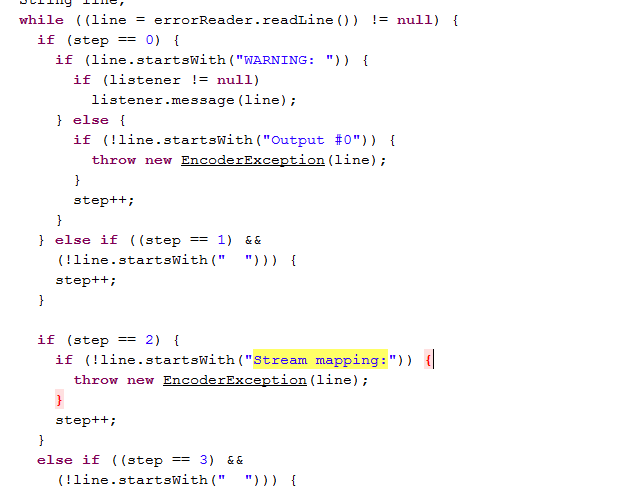

原因分析:
可以确定的一点最后都是拼接成命令:/tmp/jave-1/ffmpeg -i 源文件路径 -f mp3 -y 输出路径 让amr变成mp3
都抛出异常,不过windows下的文件确实转化成功,并且可以播放。根据转化之后的mp3文件的大小判断,可能是异常处理导致写入文件操作被迫中断了。
综合这些分析之后,决定对源代码的异常处理进行修改,重新修改jar包再进行打包。
解决方案:
将 public void encode(File source, File target, EncodingAttributes attributes, EncoderProgressListener listener){}这个方法里面的try的处理读取的异常处理代码进行重写
  public void encode(File source, File target, EncodingAttributes attributes, EncoderProgressListener listener)

    throws IllegalArgumentException, InputFormatException, EncoderException

  {

    String formatAttribute = attributes.getFormat();

    Float offsetAttribute = attributes.getOffset();

    Float durationAttribute = attributes.getDuration();

    AudioAttributes audioAttributes = attributes.getAudioAttributes();

    VideoAttributes videoAttributes = attributes.getVideoAttributes();

    if ((audioAttributes == null) && (videoAttributes == null)) {

      throw new IllegalArgumentException(

        "Both audio and video attributes are null");

    }

    target = target.getAbsoluteFile();

    target.getParentFile().mkdirs();

    FFMPEGExecutor ffmpeg = this.locator.createExecutor();

    if (offsetAttribute != null) {

      ffmpeg.addArgument("-ss");

      ffmpeg.addArgument(String.valueOf(offsetAttribute.floatValue()));

    }

    ffmpeg.addArgument("-i");

    ffmpeg.addArgument(source.getAbsolutePath());

    if (durationAttribute != null) {

      ffmpeg.addArgument("-t");

      ffmpeg.addArgument(String.valueOf(durationAttribute.floatValue()));

    }

    if (videoAttributes == null) {

      ffmpeg.addArgument("-vn");

    } else {

      String codec = videoAttributes.getCodec();

      if (codec != null) {

        ffmpeg.addArgument("-vcodec");

        ffmpeg.addArgument(codec);

      }

      String tag = videoAttributes.getTag();

      if (tag != null) {

        ffmpeg.addArgument("-vtag");

        ffmpeg.addArgument(tag);

      }

      Integer bitRate = videoAttributes.getBitRate();

      if (bitRate != null) {

        ffmpeg.addArgument("-b");

        ffmpeg.addArgument(String.valueOf(bitRate.intValue()));

      }

      Integer frameRate = videoAttributes.getFrameRate();

      if (frameRate != null) {

        ffmpeg.addArgument("-r");

        ffmpeg.addArgument(String.valueOf(frameRate.intValue()));

      }

      VideoSize size = videoAttributes.getSize();

      if (size != null) {

        ffmpeg.addArgument("-s");

        ffmpeg.addArgument(String.valueOf(size.getWidth()) + "x" +

          String.valueOf(size.getHeight()));

      }

    }

    if (audioAttributes == null) {

      ffmpeg.addArgument("-an");

    } else {

      String codec = audioAttributes.getCodec();

      if (codec != null) {

        ffmpeg.addArgument("-acodec");

        ffmpeg.addArgument(codec);

      }

      Integer bitRate = audioAttributes.getBitRate();

      if (bitRate != null) {

        ffmpeg.addArgument("-ab");

        ffmpeg.addArgument(String.valueOf(bitRate.intValue()));

      }

      Integer channels = audioAttributes.getChannels();

      if (channels != null) {

        ffmpeg.addArgument("-ac");

        ffmpeg.addArgument(String.valueOf(channels.intValue()));

      }

      Integer samplingRate = audioAttributes.getSamplingRate();

      if (samplingRate != null) {

        ffmpeg.addArgument("-ar");

        ffmpeg.addArgument(String.valueOf(samplingRate.intValue()));

      }

      Integer volume = audioAttributes.getVolume();

      if (volume != null) {

        ffmpeg.addArgument("-vol");

        ffmpeg.addArgument(String.valueOf(volume.intValue()));

      }

    }

    ffmpeg.addArgument("-f");

    ffmpeg.addArgument(formatAttribute);

    ffmpeg.addArgument("-y");

    ffmpeg.addArgument(target.getAbsolutePath());

    try {

      ffmpeg.execute();

    } catch (IOException e) {

      throw new EncoderException(e);

    }

    try {

      String lastWarning = null;

      long progress = 0L;

      RBufferedReader reader = null;

      reader = new RBufferedReader(new InputStreamReader(

        ffmpeg.getErrorStream()));

      MultimediaInfo info = parseMultimediaInfo(source, reader);

      long duration;

      long duration;

      if (durationAttribute != null) {

        duration =

          Math.round(durationAttribute.floatValue() * 1000.0F);

      } else {

        duration = info.getDuration();

        if (offsetAttribute != null)

        {

          duration = duration -

            Math.round(offsetAttribute.floatValue() * 1000.0F);

        }

      }

      if (listener != null) {

        listener.sourceInfo(info);

      }

      int step = 0;

      String line;

      while ((line = reader.readLine()) != null)

      {

        String line;

        if (step == 0) {

          if (line.startsWith("WARNING: ")) {

            if (listener != null)

              listener.message(line);

          } else {

            if (!line.startsWith("Output #0")) {

              throw new EncoderException(line);

            }

            step++;

          }

        } else if ((step == 1) &&

          (!line.startsWith("  "))) {

          step++;

        }

        if (step == 2) {

          if (!line.startsWith("Stream mapping:")) {

            throw new EncoderException(line);

          }

          step++;

        }

        else if ((step == 3) &&

          (!line.startsWith("  "))) {

          step++;

        }

        if (step == 4) {

          line = line.trim();

          if (line.length() > 0) {

            Hashtable table = parseProgressInfoLine(line);

            if (table == null) {

              if (listener != null) {

                listener.message(line);

              }

              lastWarning = line;

            } else {

              if (listener != null) {

                String time = (String)table.get("time");

                if (time != null) {

                  int dot = time.indexOf('.');

                  if ((dot > 0) && (dot == time.length() - 2) &&

                    (duration > 0L)) {

                    String p1 = time.substring(0, dot);

                    String p2 = time.substring(dot + 1);

                    try {

                      long i1 = Long.parseLong(p1);

                      long i2 = Long.parseLong(p2);

                      progress = i1 * 1000L +

                        i2 * 100L;

                      int perm =

                        (int)Math.round(progress * 1000L /

                        duration);

                      if (perm > 1000) {

                        perm = 1000;

                      }

                      listener.progress(perm);

                    }

                    catch (NumberFormatException localNumberFormatException) {

                    }

                  }

                }

              }

              lastWarning = null;

            }

          }

        }

      }

      if ((lastWarning == null) ||

        (SUCCESS_PATTERN.matcher(lastWarning).matches())) break label1089;

      throw new EncoderException(lastWarning);

    }

    catch (IOException e)

    {

      throw new EncoderException(e); } finally {

      jsr 6; } localObject1 =

      returnAddress;

    ffmpeg.destroy();

    ret; label1089: jsr -9;

  }

}
上述中的异常处理部分代码进行封装,保证不修改源代码。增加如下方法:
  protected void processErrorOutput(EncodingAttributes attributes, BufferedReader errorReader, File source, EncoderProgressListener listener) throws EncoderException, IOException {

    String lastWarning = null;

    long progress = 0L;

    Float offsetAttribute = attributes.getOffset();

    MultimediaInfo info = parseMultimediaInfo(source, (RBufferedReader)errorReader);

    Float durationAttribute = attributes.getDuration();

    long duration;

    long duration;

    if (durationAttribute != null) {

      duration = Math.round(durationAttribute.floatValue() * 1000.0F);

    }

    else {

      duration = info.getDuration();

      if (offsetAttribute != null) {

        duration -= Math.round(offsetAttribute.floatValue() * 1000.0F);

      }

    }

    if (listener != null) {

      listener.sourceInfo(info);

    }

    int step = 0;

    String line;

    while ((line = errorReader.readLine()) != null) {

      if (step == 0) {

        if (line.startsWith("WARNING: ")) {

          if (listener != null)

            listener.message(line);

        } else {

          if (!line.startsWith("Output #0")) {

            throw new EncoderException(line);

          }

          step++;

        }

      } else if ((step == 1) &&

        (!line.startsWith("  "))) {

        step++;

      }

      if (step == 2) {

        if (!line.startsWith("Stream mapping:")) {

          throw new EncoderException(line);

        }

        step++;

      }

      else if ((step == 3) &&

        (!line.startsWith("  "))) {

        step++;

      }

      if (step == 4) {

        line = line.trim();

        if (line.length() > 0) {

          Hashtable table = parseProgressInfoLine(line);

          if (table == null) {

            if (listener != null) {

              listener.message(line);

            }

            lastWarning = line;

          } else {

            if (listener != null) {

              String time = (String)table.get("time");

              if (time != null) {

                int dot = time.indexOf(46);

                if ((dot > 0) && (dot == time.length() - 2) && (duration > 0L))

                {

                  String p1 = time.substring(0, dot);

                  String p2 = time.substring(dot + 1);

                  try {

                    long i1 = Long.parseLong(p1);

                    long i2 = Long.parseLong(p2);

                    progress = i1 * 1000L + i2 * 100L;

                    int perm = (int)Math.round(progress * 1000L / duration);

                    if (perm > 1000) {

                      perm = 1000;

                    }

                    listener.progress(perm);

                  }

                  catch (NumberFormatException e) {

                  }

                }

              }

            }

            lastWarning = null;

          }

        }

      }

    }

    if ((lastWarning != null) &&

      (!SUCCESS_PATTERN.matcher(lastWarning).matches()))

      throw new EncoderException(lastWarning);

  }

}
将encode方法的中相同的代码修改成调用processErrorOutput(attributes, reader, source, listener); 修改之后的源代码:
  public void encode(File source, File target, EncodingAttributes attributes, EncoderProgressListener listener)

    throws IllegalArgumentException, InputFormatException, EncoderException

  {

    FFMPEGExecutor ffmpeg = this.locator.createExecutor();

    setAttributes(attributes, ffmpeg, source, target);

    try {

      ffmpeg.execute();

    } catch (IOException e) {

      throw new EncoderException(e);

    }

    try {

      RBufferedReader reader = new RBufferedReader(new InputStreamReader(ffmpeg.getErrorStream()));

      processErrorOutput(attributes, reader, source, listener);

    } catch (IOException e) {

      throw new EncoderException(e);

    } finally {

      ffmpeg.destroy();

    }

  }
实际上jar包并没有修改啥,只是把异常处理的代码进行抽离成一个方法processErrorOutput而已。
最终实现代码:
import java.io.BufferedReader;

import java.io.File;

import java.io.IOException;

import org.slf4j.Logger;

import org.slf4j.LoggerFactory;

import it.sauronsoftware.jave.*;

/**

 * 音频工具类

 */

public class AudioUtil {

    private static Logger logger = LoggerFactory.getLogger(AudioUtil.class);

    /**

     * Amr格式音频转为Mp3格式

     *

     * @param sourcePath

     *            amr格式源路径

     *

     * @param targetPath

     *            mp3格式输出路径

     *

     * @example getAmrConversionMp3("D:\\test\\04296548.amr","D:\\test\\04296548.mp3");

     *

     */

    public static void getAmrConversionMp3(String sourcePath, String targetPath) {

        File source = new File(sourcePath);

        File target = new File(targetPath);

        AudioAttributes audio = new AudioAttributes();

        AmrToMp3Encoder encoder = new AmrToMp3Encoder();

        audio.setCodec("libmp3lame");

        EncodingAttributes attrs = new EncodingAttributes();

        attrs.setFormat("mp3");

        attrs.setAudioAttributes(audio);

        try {

            encoder.encode(source, target, attrs);

        } catch (IllegalArgumentException e) {

            e.printStackTrace();

        } catch (InputFormatException e) {

            e.printStackTrace();

        } catch (EncoderException e) {

            e.printStackTrace();

        }

    }

    /**

     * 判断文件是不是amr格式

     *

     * @param  fileName  文件名

     * */

    public static boolean isAudioAmr(String fileName) {

        String tmpName = fileName.toLowerCase();

        return  tmpName.endsWith(".amr");

    }

    private static class AmrToMp3Encoder extends Encoder {

        protected void processErrorOutput(EncodingAttributes attributes, BufferedReader errorReader, File source, EncoderProgressListener listener) throws EncoderException, IOException {

            // 屏蔽默认的错误处理

            try {

                String line;

                while ((line = errorReader.readLine()) != null) {

                    logger.debug(line);

                }

            }

            catch (Exception exp) {

                logger.error("file convert error message process failed. ", exp);

            }

        }

    }

}
结论:
编写AmrToMp3Encoder类继承Encoder,并重写方法processErrorOutput,将默认的方法里面的异常方法全部屏蔽,通过单元测试发现,在linux下和windows下都不会抛出异常,
而且转化的mp3格式均可以播放。可能真的是这个jar包还存在着bug。该结果是在客观事实中进行求证,如有不对之处,请留下评论,大家一起探讨一下,而且ffmpeg这个文件需要进行替换处理,使用你所在linux环境的ffmpeg。修改jar包的源代码已经贴上了。
不想手动的同学可以直接下载:
链接: https://pan.baidu.com/s/1c2FAp8k 密码: fmx3
该帖子属于原创帖子:转载请贴原帖子的地址,谢谢!
解决linux AMR转MP3出现转码成功却无法播放的问题的更多相关文章
- 解决linux下安装nodejs后npm未成功安装的问题
1.下载npm软件包 点击链接进入下载页面:npm下载 2.下载完成后将压缩包放到家目录下就可以(也可以放到其他地方) 3.解压 tar -zxvf 压缩包名称,解压后你会得到一个文件夹,进入后是这样 ...
- java amr格式转mp3格式(完美解决Linux下转换0K问题)
原文:http://linjie.org/2015/08/06/amr%E6%A0%BC%E5%BC%8F%E8%BD%ACmp3%E6%A0%BC%E5%BC%8F-%E5%AE%8C%E7%BE% ...
- java实现windows下amr转换为mp3(可实现微信语音和qq语音转换)
最近做一个项目需要将微信的语音文件放在页面进行播放,查了好多资料发现,web页面直接播放并没有一个好的解决方案,于是就想到了先将amr文件转换成易于在页面播放的mp3文件,然后在进行播放,现在将amr ...
- ffmpeg centos6.5上安装(测试 amr 转换为 mp3)
1. 下载相关源码包 wget http://www.tortall.net/projects/yasm/releases/yasm-1.2.0.tar.gz wget http://sourcefo ...
- linux下MySQL 5.6源码安装
linux下MySQL 5.6源码安装 1.下载:当前mysql版本到了5.6.20 http://dev.mysql.com/downloads/mysql 选择Source Code 2.必要软件 ...
- 解决Linux系统下Mysql数据库中文显示成问号的问题
当我们将开发好的javaWEB项目部署到linux系统上,操作数据库的时候,会出现中文乱码问题,比如做插入操作,发现添加到数据库的数据中文出现论码,下面就将解决linux下mysql中文乱码问题! 打 ...
- 超简单解决linux音乐播放器乱码问题
问题 中文MP3的tag信息有些因为采用了GBK编码, 导致linux下的大多播放器(Rhythmbox, Audacious)无法正确识别而显示乱码. 如下图Audacious的乱码情况. 网上的常 ...
- linux下hadoop2.6.1源码64位的编译
linux下hadoop2.6.1源码64位的编译 一. 前言 Apache官网上提供的hadoop本地库是32位的,如果我们的Linux服务器是64位的话,就会现问题.我们在64位服务器执行Hado ...
- 完美解决 Linux 下 Sublime Text 中文输入
首先,我参考了好几篇文章,都是蛮不错的,先列出来: sublime-text-imfix:首先推荐这个方法,最简单,但是在我的系统上有些问题.可用这个的强烈推荐用这个 完美解决 Linux 下 Sub ...
随机推荐
- 【Mybatis】 JdbcType 与 JavaType对应关系
一.MyBatis 通过包含的jdbcType类型 BIT FLOAT CHAR TIMESTAMP OTHER UNDEFINED TINYINT REAL VARCHAR BINARY BLOB ...
- OminiMarkupPreview快捷键
The default key bindings: Windows, Linux: Ctrl+Alt+O: Preview Markup in Browser. Ctrl+Alt+X: Export ...
- [js高手之路]性能优化技巧 - 缓存与函数重载实战
所谓缓存,通俗点讲就是把已经做过的事情结果先暂时存起来,下次再做同样的事情,不用再重新去做,只要把之前的存的结果拿出来用即可,很明显大大提升了效率.他的应用场景非常广泛.如: 1.缓存ajax结果,大 ...
- 阿里 java学习之路
https://maimai.cn/article/detail?fid=96107193&push_id=5603&share_user=http%3A%2F%2Fi9.taou.c ...
- mysql转ElasticSearch的案例分析
前言 最近工作中在进行一些技术优化,为了减少对数据库的压力,对于只读操作,在程序与db之间加了一层-ElasticSearch.具体实现是db与es通过bin-log进行同步,保证数据一致性,代码调用 ...
- Laravel学习基础篇之--路由
终于还是决定再多学一门重量级框架,当然首选必备还是被称为最优雅的Web开发框架--Laravel 对于框架的入门,首先了解它的路由规则是先前必备的,以下是laravel 中几种常见的基础路由规则 // ...
- Kosaraju算法详解
Kosaraju算法是干什么的? Kosaraju算法可以计算出一个有向图的强连通分量 什么是强连通分量? 在一个有向图中如果两个结点(结点v与结点w)在同一个环中(等价于v可通过有向路径到达w,w也 ...
- Spring AOP 通过order来指定顺序
详见:http://blog.yemou.net/article/query/info/tytfjhfascvhzxcyt398 Spring中的事务是通过aop来实现的,当我们自己写aop拦截的时候 ...
- SQL Server 常用操作XML
--修改FunctionNo节点值,@OperateFunctionNo为参数 set @DataXml.modify('replace value of (/CrudData/FunctionNo/ ...
- mha 复制检查报错“There is no alive server. We can't do failover”
安装mha所参考的文章: http://linzhijian.blog.51cto.com/1047212/1906434 http://www.cnblogs.com/xiaoboluo768/p/ ...