
Android中SimpleAdapter的使用—自定义列表
本人初学Android,今天研究到Adapter这块感觉挺有意思的,写了个自定义列表进行测试
首先我们新建一个layout列表布局文件,具体布局可以自己设定。
下面贴上我的自定义布局文件代码
 <?xml version="1.0" encoding="utf-8"?>

 <LinearLayout xmlns:android="http://schemas.android.com/apk/res/android"

     android:orientation="horizontal"

     android:layout_width="match_parent"

     android:background="@drawable/list"

     android:layout_height="wrap_content">

     <ImageView

         android:id="@+id/ico"

         android:layout_width="64dp"

         android:layout_height="64dp"

         android:background="@mipmap/ic_launcher"/>

     <LinearLayout

         android:layout_width="match_parent"

         android:layout_height="wrap_content"

         android:orientation="vertical">

         <TextView

             android:id="@+id/biaoti"

             android:layout_width="match_parent"

             android:layout_height="wrap_content"

             android:text="我是标题"

             android:layout_marginTop="5dp"

             android:textSize="22sp"/>

         <TextView

             android:id="@+id/content"

             android:layout_marginTop="5dp"

             android:layout_width="match_parent"

             android:layout_height="wrap_content"

             android:textSize="16sp"

             android:text="我是项目信息"/>

     </LinearLayout>

 </LinearLayout>
上面代码的效果图如下,整体用的是一个Image,以及两个TextView
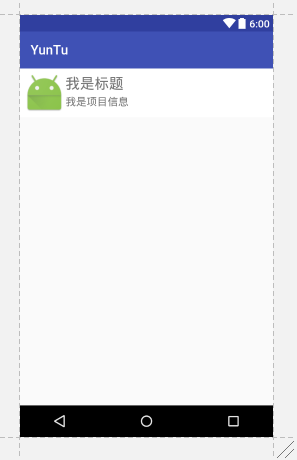
不好看就先凑合吧,测试用
接下来我们开始MainActivity.java
 package yuntu.com.yuntu;

 import android.support.v7.app.AppCompatActivity;

 import android.os.Bundle;

 import android.view.View;

 import android.widget.AdapterView;

 import android.widget.ListView;

 import android.widget.SimpleAdapter;

 import android.widget.TextView;

 import android.widget.Toast;

 import java.util.ArrayList;

 import java.util.HashMap;

 import java.util.List;

 import java.util.Map;

 public class MainActivity extends AppCompatActivity {

     private ListView listView;

 //声明标题

     private String[] title = new String[]{

             "我是第1个Title", "我是第2个Title", "我是第3个Title", "我是第4个Title"

     };

 //声明内容

     private String[] content = new String[]{

             "我是第1个content", "我是第2个content", "我是第3个content", "我是第4个content"

     };

 //声明图标

     private int[] imgIds = new int[]{R.mipmap.ic_launcher, R.mipmap.ic_launcher, R.mipmap.ic_launcher,R.mipmap.ic_launcher};

     @Override

     protected void onCreate(Bundle savedInstanceState) {

         super.onCreate(savedInstanceState);

         setContentView(R.layout.activity_main);

         listView = (ListView) findViewById(R.id.list_item01);

         List<Map<String, Object>> listitem = new ArrayList<Map<String, Object>>();

         for (int i=0;i<content.length;i++){

             Map<String, Object> map = new HashMap<String, Object>();

             map.put("ico",imgIds[i]);

             map.put("title",title[i]);

             map.put("content",content[i]);

             listitem.add(map);

         }

         SimpleAdapter simpleAdapter = new SimpleAdapter(this,listitem,R.layout.main_list,new String[]{"title","content","ico"},new int[]{R.id.biaoti,R.id.content,R.id.ico});

         listView.setAdapter(simpleAdapter);

         listView.setOnItemClickListener(new AdapterView.OnItemClickListener() {

             @Override

             public void onItemClick(AdapterView<?> parent, View view, int position, long id) {

                 TextView bt = (TextView) view.findViewById(R.id.biaoti);

                 TextView nr = (TextView) view.findViewById(R.id.content);

                 Toast.makeText(MainActivity.this, bt.getText() + "|" + nr.getText(), Toast.LENGTH_SHORT).show();

             }

         });

     }

 }

//本篇文章记录日常代码,希望也可以帮到需要的人
                    ————鲨哒哒
Android中SimpleAdapter的使用—自定义列表的更多相关文章
- Android中使用ListView绘制自定义表格(2)
上回再写了<Android中使用ListView绘制自定义表格>后,很多人留言代码不全和没有数据样例.但因为项目原因,没法把源码全部贴上来.近两天,抽空简化了一下,做了一个例子. 效果图如 ...
- Android(java)学习笔记137:Android中SimpleAdapter,ArrayAdapter和BaseAdapter常见的适配器
1.SimpleAdapter(BaseAdapter子类扩展类): simpleAdapter的扩展性最好,可以定义各种各样的布局出来,可以放上ImageView(图片)等.可以显示比较复杂的列表, ...
- Android(java)学习笔记79:Android中SimpleAdapter,ArrayAdapter和BaseAdapter常见的适配器
1. SimpleAdapter(BaseAdapter子类扩展类): simpleAdapter的扩展性最好,可以定义各种各样的布局出来,可以放上ImageView(图片)等.可以显示比较复杂的列表 ...
- Android中的树状(tree)列表
树状列表前端挺常用的,还有人专门写过Ztree,Android中有的时候也需要使用到树状列表,上篇文章写了一下ExpandableListView,ExpandableListView最多支持两级结构 ...
- android中RecyclerView控件的列表项横向排列
本文是在上一篇文章的基础上做的修改:android中RecyclerView控件的使用 1.修改列表项news_item.xml:我这里是把新闻标题挪到了新闻图片的下面显示 <?xml vers ...
- Android 中的AlertDialog使用自定义布局
Android使用指定的View开发弹窗功能 Android开发中进程会使用到我们的AlertDialog,但是比较可惜的是我们的Android原生的AlertDialog的效果又比较的简陋,这个时候 ...
- Android中为TextView增加自定义的HTML标签
Android中的TextView,本身就支持部分的Html格式标签.这其中包括常用的字体大小颜色设置,文本链接等.使用起来也比较方便,只需要使用Html类转换一下即可.比如: textView.se ...
- Android中的通知—Notification 自定义通知
Android中Notification通知的实现步骤: 1.获取NotificationManager对象NotificationManager的三个公共方法:①cancel(int id) 取消以 ...
- Android中intent如何传递自定义数据类型
转载自:http://www.cnblogs.com/GoAhead/archive/2012/07/16/2593868.html 大家好,好久不见,今天要给大家讲一下Android中Intent中 ...
随机推荐
- Hibernate基础学习(三)—Session
一.概述 Session接口是Hibernate向应用程序提供的操纵数据库最主要的接口,它提供了基本的保存.更新.删除和加载Java对象的方法. Session具有一个缓存,位于缓 ...
- Java基础学习(三)—面向对象(上)
一.理解面向对象 面向对象是一种思想,是基于面向过程而言的,就是说面向对象是将功能等通过对象来实现,将功能封装进对象之中,让对象去实现具体的细节:这种思想是将数据作为第一位,而方法或者说是 ...
- 23(java/io/data_io)
package test_ppt;import java.io.*;public class test_ppt{ public static void main(String args[]) thro ...
- Tensorflow学习笔记---0--TensorBoard
运行mnist_with_summaries学习TensorBoard时,由于需要GPU支持,运行窗口报错:Couldn't open CUDA library cupti64_80.dll 解决办法 ...
- 计算机程序的思维逻辑 (79) - 方便的CompletionService
上节,我们提到,在异步任务程序中,一种常见的场景是,主线程提交多个异步任务,然后希望有任务完成就处理结果,并且按任务完成顺序逐个处理,对于这种场景,Java并发包提供了一个方便的方法,使用Comple ...
- Druid Indexing 服务
索引服务由三个主要组件:一个是peon 组件,可以运行一个任务,一个是Middle Managers组件,管理peons,和一个overlord 组件管理任务分发给Middle Managers. o ...
- meta 整理
< meta > 元素 概要 标签提供关于HTML文档的元数据.元数据不会显示在页面上,但是对于机器是可读的.它可用于浏览器(如何显示内容或重新加载页面),搜索引擎(关键词),或其他 we ...
- (转)使用string.Format需要注意的一个性能问题
今天,我在写C#代码时,突然发现一个最熟悉的陌生人 —— string.Format.在写C#代码的日子里,与它朝夕相伴,却没有真正去了解它.只知道在字符串比较多时,用它比用加号进行字符串连接效率更高 ...
- cocos2d-x - C++/Lua交互
使用tolua++将自定义的C++类嵌入,让lua脚本使用 一般过程: 自定义类 -> 使用tolua++工具编译到LuaCoco2d.cpp中 -> lua调用 步骤一:自定义一个C++ ...
- HDU 5008 求第k小子串
本题要求第k小的distinct子串,可以根据height数组,二分出这个第k小子串所在后缀的位置信息.由于题目要求子串起始下标尽可能小.所以再在rank数组中,二分出与当前后缀LCP大于等于所求子串 ...