
Android中SimpleAdapter的使用—自定义列表
本人初学Android,今天研究到Adapter这块感觉挺有意思的,写了个自定义列表进行测试
首先我们新建一个layout列表布局文件,具体布局可以自己设定。
下面贴上我的自定义布局文件代码
 <?xml version="1.0" encoding="utf-8"?>

 <LinearLayout xmlns:android="http://schemas.android.com/apk/res/android"

     android:orientation="horizontal"

     android:layout_width="match_parent"

     android:background="@drawable/list"

     android:layout_height="wrap_content">

     <ImageView

         android:id="@+id/ico"

         android:layout_width="64dp"

         android:layout_height="64dp"

         android:background="@mipmap/ic_launcher"/>

     <LinearLayout

         android:layout_width="match_parent"

         android:layout_height="wrap_content"

         android:orientation="vertical">

         <TextView

             android:id="@+id/biaoti"

             android:layout_width="match_parent"

             android:layout_height="wrap_content"

             android:text="我是标题"

             android:layout_marginTop="5dp"

             android:textSize="22sp"/>

         <TextView

             android:id="@+id/content"

             android:layout_marginTop="5dp"

             android:layout_width="match_parent"

             android:layout_height="wrap_content"

             android:textSize="16sp"

             android:text="我是项目信息"/>

     </LinearLayout>

 </LinearLayout>
上面代码的效果图如下,整体用的是一个Image,以及两个TextView
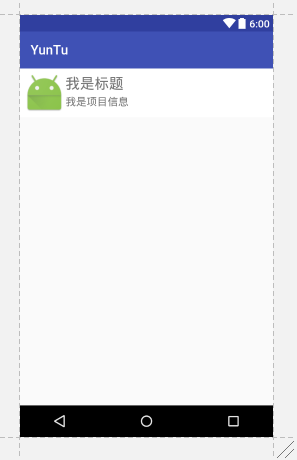
不好看就先凑合吧,测试用
接下来我们开始MainActivity.java
 package yuntu.com.yuntu;

 import android.support.v7.app.AppCompatActivity;

 import android.os.Bundle;

 import android.view.View;

 import android.widget.AdapterView;

 import android.widget.ListView;

 import android.widget.SimpleAdapter;

 import android.widget.TextView;

 import android.widget.Toast;

 import java.util.ArrayList;

 import java.util.HashMap;

 import java.util.List;

 import java.util.Map;

 public class MainActivity extends AppCompatActivity {

     private ListView listView;

 //声明标题

     private String[] title = new String[]{

             "我是第1个Title", "我是第2个Title", "我是第3个Title", "我是第4个Title"

     };

 //声明内容

     private String[] content = new String[]{

             "我是第1个content", "我是第2个content", "我是第3个content", "我是第4个content"

     };

 //声明图标

     private int[] imgIds = new int[]{R.mipmap.ic_launcher, R.mipmap.ic_launcher, R.mipmap.ic_launcher,R.mipmap.ic_launcher};

     @Override

     protected void onCreate(Bundle savedInstanceState) {

         super.onCreate(savedInstanceState);

         setContentView(R.layout.activity_main);

         listView = (ListView) findViewById(R.id.list_item01);

         List<Map<String, Object>> listitem = new ArrayList<Map<String, Object>>();

         for (int i=0;i<content.length;i++){

             Map<String, Object> map = new HashMap<String, Object>();

             map.put("ico",imgIds[i]);

             map.put("title",title[i]);

             map.put("content",content[i]);

             listitem.add(map);

         }

         SimpleAdapter simpleAdapter = new SimpleAdapter(this,listitem,R.layout.main_list,new String[]{"title","content","ico"},new int[]{R.id.biaoti,R.id.content,R.id.ico});

         listView.setAdapter(simpleAdapter);

         listView.setOnItemClickListener(new AdapterView.OnItemClickListener() {

             @Override

             public void onItemClick(AdapterView<?> parent, View view, int position, long id) {

                 TextView bt = (TextView) view.findViewById(R.id.biaoti);

                 TextView nr = (TextView) view.findViewById(R.id.content);

                 Toast.makeText(MainActivity.this, bt.getText() + "|" + nr.getText(), Toast.LENGTH_SHORT).show();

             }

         });

     }

 }

//本篇文章记录日常代码,希望也可以帮到需要的人
                    ————鲨哒哒
Android中SimpleAdapter的使用—自定义列表的更多相关文章
- Android中使用ListView绘制自定义表格(2)
上回再写了<Android中使用ListView绘制自定义表格>后,很多人留言代码不全和没有数据样例.但因为项目原因,没法把源码全部贴上来.近两天,抽空简化了一下,做了一个例子. 效果图如 ...
- Android(java)学习笔记137:Android中SimpleAdapter,ArrayAdapter和BaseAdapter常见的适配器
1.SimpleAdapter(BaseAdapter子类扩展类): simpleAdapter的扩展性最好,可以定义各种各样的布局出来,可以放上ImageView(图片)等.可以显示比较复杂的列表, ...
- Android(java)学习笔记79:Android中SimpleAdapter,ArrayAdapter和BaseAdapter常见的适配器
1. SimpleAdapter(BaseAdapter子类扩展类): simpleAdapter的扩展性最好,可以定义各种各样的布局出来,可以放上ImageView(图片)等.可以显示比较复杂的列表 ...
- Android中的树状(tree)列表
树状列表前端挺常用的,还有人专门写过Ztree,Android中有的时候也需要使用到树状列表,上篇文章写了一下ExpandableListView,ExpandableListView最多支持两级结构 ...
- android中RecyclerView控件的列表项横向排列
本文是在上一篇文章的基础上做的修改:android中RecyclerView控件的使用 1.修改列表项news_item.xml:我这里是把新闻标题挪到了新闻图片的下面显示 <?xml vers ...
- Android 中的AlertDialog使用自定义布局
Android使用指定的View开发弹窗功能 Android开发中进程会使用到我们的AlertDialog,但是比较可惜的是我们的Android原生的AlertDialog的效果又比较的简陋,这个时候 ...
- Android中为TextView增加自定义的HTML标签
Android中的TextView,本身就支持部分的Html格式标签.这其中包括常用的字体大小颜色设置,文本链接等.使用起来也比较方便,只需要使用Html类转换一下即可.比如: textView.se ...
- Android中的通知—Notification 自定义通知
Android中Notification通知的实现步骤: 1.获取NotificationManager对象NotificationManager的三个公共方法:①cancel(int id) 取消以 ...
- Android中intent如何传递自定义数据类型
转载自:http://www.cnblogs.com/GoAhead/archive/2012/07/16/2593868.html 大家好,好久不见,今天要给大家讲一下Android中Intent中 ...
随机推荐
- AOP杂谈
1.什么是AOP? Spring 2大特性: IOC (Inverse of Control)和 AOP(Aspect Oriented Programming) PS: AOP:面向切面编程 设计 ...
- 跟着刚哥梳理java知识点——变量之间的类型转换(四)
变量之间的类型转换主要包括自动类型转换和强制类型转换. 1.自动类型转换:当容量小的数据类型与容量大的数据类型做运算时,容量小的会自动的转换成容量大的类型. [知识点]: a)char,byte,sh ...
- 跟着刚哥梳理java知识点——注释(二)
1.单行注释 // //这是main方法,程序的入口 public static void main(String[] args) { //输出语句 System.out.println(" ...
- 第一章 自定义MVC框架
第一章 自定义MVC框架1.1 MVC模式设计 组成:Model:模型,用于数据和业务的处理 View :视图,用于数据的显示 Controller:控制器 ...
- T-SQL语句中的转换函数
书接上回 前面讲了聚合函数.字符串函数 今天一起来看下转换函数 首先是 值类型转换 ),degree) 在C#里面是convert,现在在SQL中也是他,convert(转换类型,被转换列)from ...
- 本地yum服务搭建
1.准备linux ISO系统镜像文件 (例如:rhel-server-5.5-i386-dvd.iso) 2.linux虚拟机(centos 7 192.168.50.24 ),启动sshd服务 ...
- Android -- 带你从源码角度领悟Dagger2入门到放弃(二)
1,接着我们上一篇继续介绍,在上一篇我们介绍了简单的@Inject和@Component的结合使用,现在我们继续以老师和学生的例子,我们知道学生上课的时候都会有书籍来辅助听课,先来看看我们之前的Stu ...
- html5表单元素详解
表单是Html中获取用户输入的手段.此文对表单的元素进行了详细整理. 表单基本元素 form input button form元素 html4中,form元素相当于表单的外包装,其他都要在里面.ht ...
- SpringMVC结合ajaxfileupload文件无刷新上传
jQuery没有提供ajax的文件上传,我们可以通过ajaxfileupload实现ajax文件的上传.其实ajaxfileupload文件上传特别的简单.下面就演示一下在SpringMVC中实现aj ...
- ICDM评选:数据挖掘十大经典算法
原文地址:http://blog.csdn.net/aladdina/article/details/4141177 国际权威的学术组织the IEEE International Conferenc ...