
js swipeDelete 滑动删除
先上图看看整体实际效果
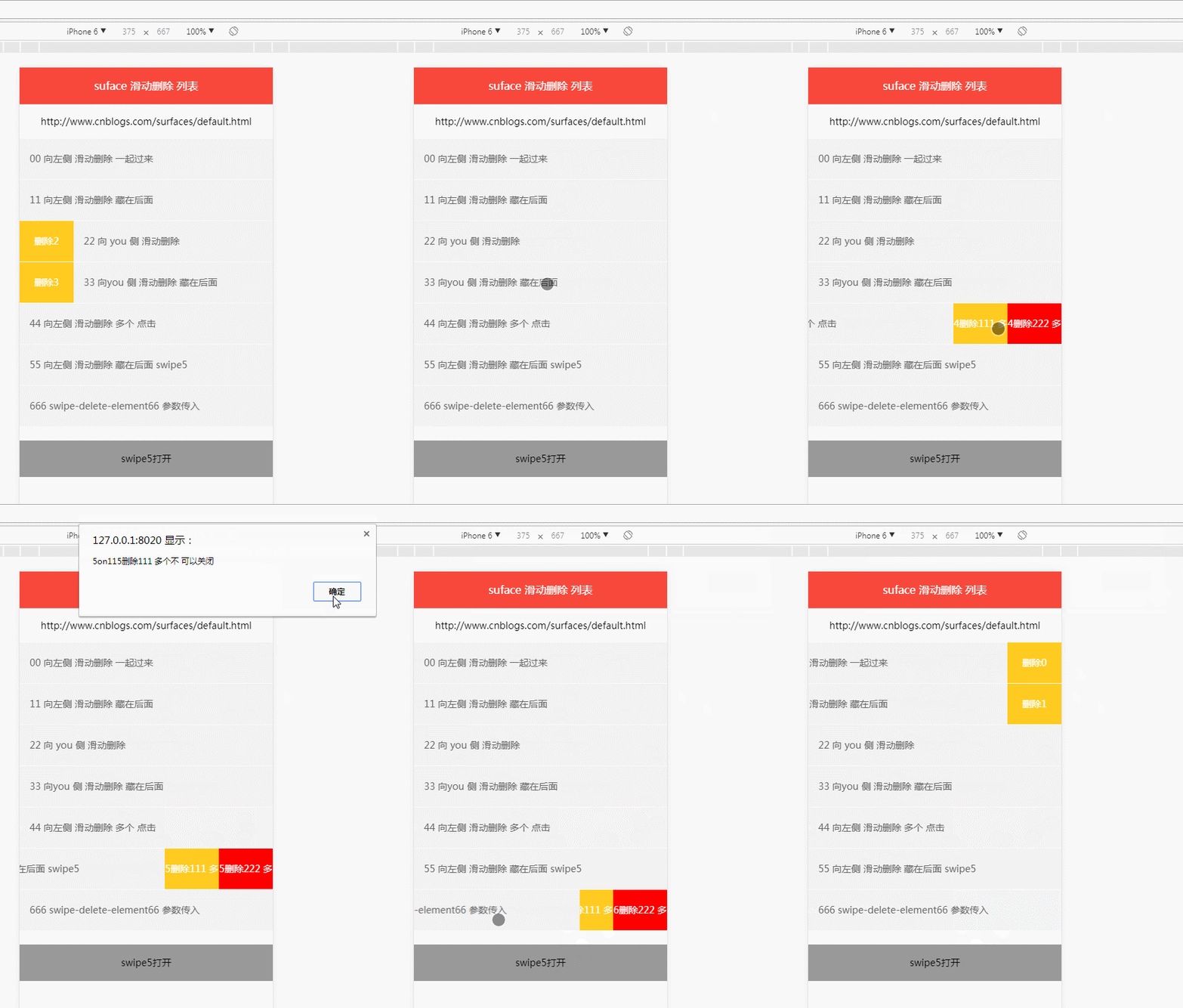
看看用法 与参数
默认参数
var defaults = {
		 	   distance:80,  //滑动距离
		 	   units:'px',  //默认单位
		 	   touchStart:function(){},//触摸开始回调
		 	   opened:function(){},//展开后回调
		 	   closed:function(){},//关闭后回调
		 	   duration:100,//毫秒
               deleteBtn:'.swipe-delete-btn',  //删除元素
               direction:'left',  //滑动方向
               deleteClose:true,  //点击删除是否 关闭
               deleteFn:function(){}  //删除事件   retuan false 不关闭  //   retuan true 关闭
};
dom 节点如下 支持种结构
 <li id="li" class="swipe-delete-element list-li" >
    <div class="con ">
     00 向左侧 滑动删除 一起过来
    </div>
    <div class="swipe-delete-btn btn">删除0</div>
   </li>
<li id="li" class=" list-li">
    <div class="con swipe-delete-element ">
     11 向左侧 滑动删除 藏在后面
    </div>
    <div class="swipe-delete-btn btn" style="right:0px;">删除1</div>
   </li>
对应的js 如下
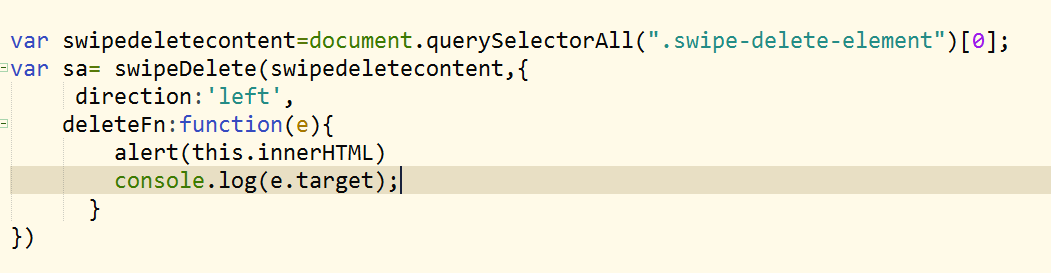

参数 deleteClose:false,用法 点击 删除按钮并收回 滑动元素, 点击事件回调函数 deleteFn里面 return true 可以收回,或者通过 sa5.swipeClose() 方法促其关闭;
var swipedeletecontent5=document.querySelectorAll(".swipe-delete-element")[5];
var sa5=new swipeDelete(swipedeletecontent5,{
	distance:160,
	deleteBtn:'.swipe-delete-btn2',
	deleteClose:false,
	//direction:'left',
	touchStart:function(e){
		console.log("sa6 touchStart"+this.innerHTML);
		//console.log(this.innerHTML==e.target.innerHTML);
	},
	opened:function(e){
		//console.log("sa6 opened");
		console.log("sa6 opened"+this.innerHTML);
	},
	closed:function(e){
		//console.log("sa6 closed");
		console.log("sa6 closed"+this.innerHTML);
	},
	deleteFn:function(e){
		var that=this;
      console.log(e.target.parentNode);
		if(that.className=="on1"){
			alert("5on11"+that.innerHTML+'不 可以关闭');

		}else if(that.className=="on2"){
		alert("5on22"+that.innerHTML+'可以关闭');
		return true; //关闭
		}
	  }
})
sa5.swipeOpen();
//console.log(sa5)

document.getElementById("j_opend").addEventListener("click",function(){
	 var swipe5=document.querySelector(".swipe5").querySelector(".swipe-delete-element");
	 var flagOpen=swipe5.getAttribute("data-lock");

	 if(flagOpen=='false'){
	 	sa5.swipeOpen();
		this.innerHTML="swipe5 关闭"
	 }

	 if(swipe5.getAttribute("data-lock")=='true'){
	 	sa5.swipeClose();

		this.innerHTML="swipe5打开 "
	 }

})
上面 其他方法
sa5.swipeOpen(); sa5.swipeClose();
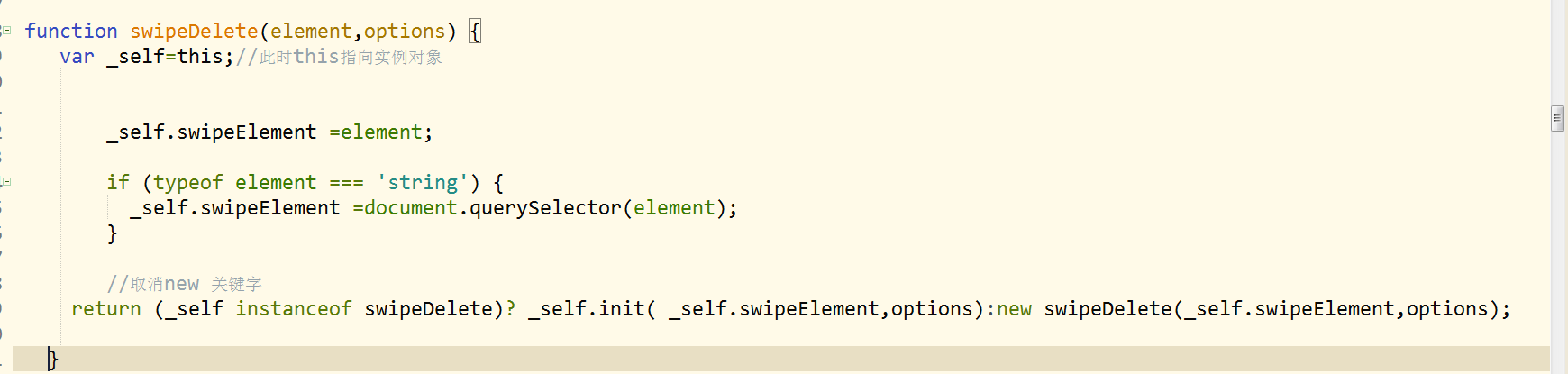
附上完整代码
<!doctype html>
<html>
<head>
<meta charset="utf-8">
<title>滑动删除</title>
<meta http-equiv="X-UA-Compatible" content="edge,chrome=1"  />
<meta http-equiv="Cache-Control" content="no-siteapp" /> <!-- 避免转码 -->
<meta name="keywords" content=""/>
<meta name="description" content=""/>
<meta name="viewport"   content="initial-scale=1.0,user-scalable=no,maximum-scale=1,width=device-width"  />
<meta name="renderer" content="webkit|ie-comp|ie-stand">
<meta name="apple-itunes-app" content="app-id=932758491">

 <meta http-equiv="pragma" content="no-cache">
 <meta http-equiv="cache-control" content="no-cache">
 <meta http-equiv="expires" content="0">

<meta name="format-detection" content="telephone=no">
<meta name="format-detection" content="address=no">
<meta name="format-detection" content="email=no" >
<meta name="apple-mobile-web-app-title" content="">
<meta name="apple-mobile-web-app-capable" content="yes" />
<meta name="apple-mobile-web-app-status-bar-style" content="black-translucent" />
<meta name="screen-orientation" content="portrait"> <!-- uc强制竖屏  设置横屏应用得在config里面设置,网页是无法做到的 -->
<meta name="x5-orientation" content="portrait"> <!-- QQ强制竖屏 -->
<meta name="msapplication-tap-highlight" content="no"> <!-- windows phone 点击无高光 -->
<meta name="HandheldFriendly" content="true">  <!-- 针对手持设备优化,主要是针对一些老的不识别viewport的浏览器,比如黑莓 -->

 <style>
/* CSS Document */
@charset "utf-8";
html,body,div,dl,dt,dd,ul,ol,li,h1,h2,h3,h4,h5,h6,pre,form,fieldset,input,textarea,p,blockquote,span,img,button ,em,i,b{margin:0;padding:0;}
html{-webkit-text-size-adjust:100%;-webkit-tap-highlight-color:transparent;min-width:320px;font-size:62.5%;}
body{font-family:"微软雅黑",'Helvetica Neue',Helvetica,tahoma,arial,sans-serif;text-rendering:optimizeLegibility;-webkit-font-smoothing:antialiased;line-height:1;font-size:14px;-webkit-touch-callout:none;-webkit-user-select:none;}
article,aside,dialog,figure,footer,header,hgroup,menu,nav,section{display:block}
dl,li,menu,ol,ul{list-style:none}
address,em,i,th{font-weight:400;font-style:normal}
a{color:#999;display:block;}
a:link,a:visited{color:#999;text-decoration:none;cursor:pointer}
a:hover{cursor:pointer}
a:active,a:focus{outline:0;}
img{width:100%;border:0;vertical-align:middle;-webkit-user-select:none;}
input,select{outline:0}
h1,h2,h3,h4,h5,h6{font-size:100%;font-variant:normal;font-weight:normal;}
button,input[type=button],input[type=tel],input[type=reset],input[type=submit]{line-height:normal!important;-webkit-appearance:none}
::-webkit-input-placeholder{color:#777;}
::input-placeholder{color:#777;}
input:focus::-webkit-input-placeholder{-webkit-transition:.1s;opacity:0;}
input:focus::input-placeholder{transition:.1s;opacity:0;}
 header {
  background: #f7483b;
  border-bottom: 1px solid #ccc
 }

 header h2 {
  text-align: center;
  line-height: 54px;
  font-size: 16px;
  color: #fff
 }

 .list-ul {
  overflow: hidden
 }

 .list-li {
  line-height: 60px; height: 60px;
  border-bottom: 1px solid #fcfcfc;
  position: relative;

  color: #666;
  background: #f2f2f2;
  -webkit-transition-duration:-webkit-transform .1s;
 transition-duration:transform .1s;  -webkit-transition-timing-function:ease-out ;transition-timing-function:ease-out ;
 }
  .con{ padding: 0 15px; position: relative; z-index: 7;    background: #f2f2f2;}
 .btn {
  position: absolute;
  top: 0;
  right: -80px;
  text-align: center;
  background: #ffcb20;
  color: #fff;
  width: 80px; z-index: 2;
 }

  .btn div {
  float: left; display: inline-block; height: 60px;;
  background: #ffcb20;
  color: #fff;
  width: 80px; z-index: 2;
 }
  .btn div:nth-of-type(2) {
  background: red;

 }
 </style>

</head>

<body>
 <header>
  <h2>suface 滑动删除 列表</h2>
 </header>
 <div style="height: 50px;; text-align: center; line-height: 50px;">http://www.cnblogs.com/surfaces/default.html</div>

 <section class="list">
  <ul class="list-ul">
   <li id="li" class="swipe-delete-element list-li" >
    <div class="con ">
     00 向左侧 滑动删除 一起过来
    </div>
    <div class="swipe-delete-btn btn">删除0</div>
   </li>

   <li id="li" class=" list-li">
    <div class="con swipe-delete-element ">
     11 向左侧 滑动删除 藏在后面
    </div>
    <div class="swipe-delete-btn btn" style="right:0px;">删除1</div>
   </li>

    <li id="li" class=" list-li swipe-delete-element" >
    <div class="con ">
     22 向  you  侧 滑动删除
    </div>
    <div class="swipe-delete-btn btn" style="right:auto; left: -80px;">删除2</div>
   </li>

   <li id="li" class=" list-li " >
    <div class="con swipe-delete-element">
     33 向you  侧 滑动删除   藏在后面
    </div>
    <div class="swipe-delete-btn btn" style="right:auto; left: 0px;">删除3</div>
   </li>

     <li id="li" class=" list-li swipe-delete-element" >
    <div class="con  ">
     44 向左侧 滑动删除   多个 点击
    </div>
    <div class="swipe-delete-btn btn "  style="right: -160px;width:160px">
    	<div style="width: 80px;" class="on1">4删除111 多个</div>
    	<div style="width: 80px;" class="on2">4删除222 多个</div>
    </div>
   </li>

     <li id="li" class=" list-li  swipe5"  >
    <div class="con  swipe-delete-element " >
     55 向左侧 滑动删除   藏在后面 swipe5
    </div>
    <div class="swipe-delete-btn2 btn"  style="right: 0px;width:160px">
    	<div style="width: 80px;" class="on1">5删除111 多个</div>
    	<div style="width: 80px;" class="on2">5删除222 多个</div>
    </div>
   </li>

  <li id="li" class=" list-li " >
    <div class="con  swipe-delete-element66">
    666   swipe-delete-element66 参数传入
    </div>
    <div class="swipe-delete-btn2 btn"  style="right: 0px;width:160px">
    	<div style="width: 80px;" class="on1">6删除111 多个</div>
    	<div style="width: 80px;" class="on2">6删除222 多个</div>
    </div>
   </li>
  </ul>
 </section>

 <div style="height: 400px;;">

 	<div id="j_opend" style="padding: 20px; text-align: center; background:#999; margin: 20px auto;">点击swipe5 关闭 </div>

 </div>

 <script>

eval(function(d,e,a,c,b,f){b=function(a){return(a<e?"":b(parseInt(a/e)))+(35<(a%=e)?String.fromCharCode(a+29):a.toString(36))};if(!"".replace(/^/,String)){for(;a--;)f[b(a)]=c[a]||b(a);c=[function(a){return f[a]}];b=function(){return"\\w+"};a=1}for(;a--;)c[a]&&(d=d.replace(new RegExp("\\b"+b(a)+"\\b","g"),c[a]));return d}('(6(b,a,c){6 d(g,f){2 e=F;e.P=g;4(Z g==="27"){e.P=a.28(g)}8(e 22 d)?e.1H(e.P,f):W d(e.P,f)}d.1Y={1Z:d,1E:6(){18(2 f=1;f<E.1z;f++){18(2 e 1y E[f]){4(E[f].20(e)){E[0][e]=E[f][e]}}}8 E[0]},1x:9,1o:6(){2 g=a.2a("2b");2 f={2d:"2f",2i:"1R"};18(2 e 1y f){4(g.5[e]!==c){8 f[e]}}g=Y;8 7}(),1H:6(g,f){2 e=F;2 f=f||{};2 h={13:26,14:"16",1r:6(){},1p:6(){},1n:6(){},1m:1l,1d:".1S-1V-1X",S:"R",1c:9,11:6(){}};e.12=e.1E({},h,f);e.1A(g,e.12)},1A:6(h,t){2 o=F;2 s=h;2 n=7;2 m=9;2 f=c;2 r=0;2 i=0;2 l={x:0,y:0,1a:+W 19};2 g=s.1D(t.1d)[0];2 q=t.11;2 p=t.S;2 j=t.1c;s.17("Q-O","7");4(!g){g=s.1u.29==1&&s.1u.1D(t.1d)[0]}2 e=t.13;2 k=t.14;o.S=p;g.J("1B",6(v){2 u=F;2 v=v;2 w=v.2l;4(t.1c==9){o.K(s,t)}4(t.11&&t.11.X(w,E)==9){o.K(s,t)}v.1T()});s.J("1B",6(u){o.K(s,t)});s.J("1U",6(u){2 v=u.1w[0];4(!o.1x){8 7}n=7;m=9;f=c;l={x:v.1f||v.1g,y:v.1h||v.1i,1a:+W 19};s.5.1j=s.5.1k="24";i=(s.5.H.V(/G\\(/g,"").V(/(16|1v|%)\\)/g,""))*1||(s.5.I.V(/G\\(/g,"").V(/(16|1v|%)\\)/g,""))*1||0;4(s.1q("Q-O")=="7"){t.1r&&t.1r.X(s,E)}a.J("2c",6(y){4(!m){8}4(y.1w.1z>1||y.1t&&y.1t!==1){8}2 z=y.1F[0];2 x={x:z.1f||z.1g,y:z.1h||z.1i};4(Z f==="2g"){f=!!(f||15.U(x.x-l.x)<15.U(x.y-l.y))}4(f){m=7;8}y.1e();o.L=x.x-l.x+i;n=9;4(p=="R"){4(o.L>=0){s.5.H=s.5.I="G(-"+0+k+") M(0)"}N{2 w=15.U(o.L);s.5.H=s.5.I="G("+-w+k+") M(0)";4(w>e){w=e;s.5.H=s.5.I="G("+-w+k+") M(0)"}}}4(p=="1b"){4(o.L>=0){2 w=15.U(o.L);s.5.H=s.5.I="G("+w+k+") M(0)";4(w>e){w=e;s.5.H=s.5.I="G("+w+k+" ) M(0)"}}N{s.5.H=s.5.I="G(-"+0+k+") M(0)"}}});a.J("1W",6(x){4(!m||!n){n=7;m=7;8}n=7;m=7;2 A=x.1F[0];2 w={x:A.1f||A.1g,y:A.1h||A.1i,1C:+W 19};2 D=w.1C-l.1a;2 C=t.13;2 B=t.S;2 z=o.L;2 y="1Q";4(s.1q("Q-O")=="9"){y="23"}4(D<1G&&(z<-10&&B==="R"||z>10&&B==="1b")||D>1G&&(z<-T(C/3)&&B==="R"||z>T(C/3)&&B==="1b")){4(y=="1Q"){o.1I(s,t)}N{o.K(s,t);x.1e()}}N{o.K(s,t);x.1e()}})});8 F},K:6(l,m){2 h=F;2 l=l||h.P;2 m=m||h.12;2 e=7;2 k=h.1o;2 g=m.14;2 f=1J(m.1m/1K)||1l;2 i=0;2 j=6(n){l.1L(k,E.1M,7);e=9;j=Y;i++;4(i>1){8}l.17("Q-O","7");m.1n&&m.1n.X(l,E);2e=Y};l.5.H=l.5.I="G(-"+0+g+") ";l.5.1j=l.5.1k=f+"s";l.J(k,j.1N(F),7);1O(6(){4(e){8}j()},T(f+25));8 F},1I:6(m,n){2 i=F;2 m=m||i.P;2 n=n||i.12;2 f=n.13;2 h=n.14;2 g=1J(n.1m/1K)||1l;2 j=0;2 e=7;2 l=i.1o;2 k=6(o){m.1L(l,E.1M,7);e=9;k=Y;j++;4(j>1){8}m.17("Q-O","9");4(m.1q("Q-O")=="9"){n.1p&&n.1p.X(m,E)}};4(n.S=="R"){f=f*-1}m.2h;m.5.H=m.5.I="G("+f+h+") ";m.5.1j=m.5.1k=g+"s";m.J(l,k.1N(F),7);1O(6(){4(e){8}k()},T(g+25));8 F}};4(Z 1P=="2j"){2k.1P=d}N{4(Z 1s=="6"&&1s.2m){1s(6(){8 d})}N{b.2n=d}}})(2o,21);',
62,149,"  var  if style function false return true                               arguments this translateX WebkitTransform transform addEventListener swipeClose touchesDiff translateZ else lock swipeElement data left direction parseInt abs replace new apply null typeof  deleteFn options distance units Math px setAttribute for Date startTime right deleteClose deleteBtn preventDefault pageX clientX pageY clientY webkitTransitionDuration transitionDuration 100 duration closed endEvent opened getAttribute touchStart define scale parentNode rem touches allowMultiple in length swipeEvent click endTime querySelectorAll extend changedTouches 300 init swipeOpen Number 1000 removeEventListener callee bind setTimeout exports close transitionend swipe stopPropagation touchstart delete touchend btn prototype constructor hasOwnProperty document instanceof open 0s  80 string querySelector nodeType createElement div touchmove WebkitTransition callback webkitTransitionEnd undefined clientLeft transition object module target amd swipeDelete window".split(" "),
0,{}));

var swipedeletecontent=document.querySelectorAll(".swipe-delete-element")[0];
var sa= swipeDelete(swipedeletecontent,{
	 direction:'left',
	deleteFn:function(e){
	 	alert(this.innerHTML)
	 	console.log(e.target);
	  }
})

var swipedeletecontent1=document.querySelectorAll(".swipe-delete-element")[1];
var sa1= swipeDelete(swipedeletecontent1,{

	 deleteFn:function(e){
	 	alert(this.innerHTML);
	 	console.log(e.target);

	 }
})

var swipedeletecontent2=document.querySelectorAll(".swipe-delete-element")[2];
var sa2= swipeDelete(swipedeletecontent2,{
	 direction:'right',
	 deleteFn:function(e){
	 	alert(this.innerHTML);
	 	console.log(e.target);

	 }
})
//console.log(sa2.swipeOpen())

var swipedeletecontent3=document.querySelectorAll(".swipe-delete-element")[3];
var sa3= swipeDelete(swipedeletecontent3,{
     direction:'right',
	 deleteFn:function(e){
	 		alert(this.innerHTML);
	 	console.log(e.target);

	 }
})
//console.log(sa3);

var swipedeletecontent4=document.querySelectorAll(".swipe-delete-element")[4];
var sa4= swipeDelete(swipedeletecontent4,{
	distance:160,
	direction:'left',
	deleteFn:function(e){
		//console.log(e.target);

	 	var that=this;

		if(that.className=="on1"){
			alert("on1"+that.innerHTML)
		}else if(that.className=="on2"){
		alert("on2"+that.innerHTML)
		}
	  }
})
//console.log(sa4.swipeOpen())

var swipedeletecontent5=document.querySelectorAll(".swipe-delete-element")[5];
var sa5=new swipeDelete(swipedeletecontent5,{
	distance:160,
	deleteBtn:'.swipe-delete-btn2',
	deleteClose:false,
	//direction:'left',
	touchStart:function(e){
		console.log("sa6 touchStart"+this.innerHTML);
		//console.log(this.innerHTML==e.target.innerHTML);
	},
	opened:function(e){
		//console.log("sa6 opened");
		console.log("sa6 opened"+this.innerHTML);
	},
	closed:function(e){
		//console.log("sa6 closed");
		console.log("sa6 closed"+this.innerHTML);
	},
	deleteFn:function(e){
		var that=this;
      console.log(e.target.parentNode);
		if(that.className=="on1"){
			alert("5on11"+that.innerHTML+'不 可以关闭');

		}else if(that.className=="on2"){
		alert("5on22"+that.innerHTML+'可以关闭');
		return true; //关闭
		}
	  }
})
sa5.swipeOpen();
//console.log(sa5)

document.getElementById("j_opend").addEventListener("click",function(){
	 var swipe5=document.querySelector(".swipe5").querySelector(".swipe-delete-element");
	 var flagOpen=swipe5.getAttribute("data-lock");

	 if(flagOpen=='false'){
	 	sa5.swipeOpen();
		this.innerHTML="swipe5 关闭"
	 }

	 if(swipe5.getAttribute("data-lock")=='true'){
	 	sa5.swipeClose();

		this.innerHTML="swipe5打开 "
	 }

})

var sa66=new swipeDelete(".swipe-delete-element66",{
	distance:160,
	deleteBtn:'.swipe-delete-btn2',
	deleteClose:true,
	//direction:'left',
	touchStart:function(e){
		console.log("sa6 touchStart"+this.innerHTML);
		//console.log(this.innerHTML==e.target.innerHTML);
	},
	opened:function(e){
		//console.log("sa6 opened");
		console.log("sa6 opened"+this.innerHTML);
	},
	closed:function(e){
		//console.log("sa6 closed");
		console.log("sa6 closed"+this.innerHTML);
	},
	deleteFn:function(e){
		var that=this;
        console.log(e.target.parentNode);
		if(that.className=="on1"){
			alert("6on11"+that.innerHTML);

		}else if(that.className=="on2"){
		alert("6on22"+that.innerHTML)

		}
	 	//console.log(this.innerHTML);

	  }
})
console.log(sa66);
 </script>

</body>
</html>
js swipeDelete 滑动删除的更多相关文章
- 移动端 滑动删除 swipeDelete
功能比较简单常见,最近整理一下做备份记录.先看看线上 整体实际效果 下面是swipeDelete 用法 demo 默认参数 var defaults = { distance:80, //滑动距离 u ...
- 写一个js向左滑动删除 交互特效的插件——Html5 touchmove
需求描述 需要实现类似QQ中对联系人的操作:向左滑动,滑出删除按钮.滑动超过一半时松开则自动滑到底,不到一半时松开则返回原处. 纯js实现 使用了h5的touchmove等事件,以及用js动态改变cs ...
- Ionic 2 :如何实现列表滑动删除按钮
http://blog.csdn.net/h254532699/article/details/54382123 使用Ionic这种框架伟大的地方在于用户界面元素默认准备好了,意味着你可以设计更好的a ...
- framework7滑动删除列表触发chrome 报错解决办法
使用 <div class="list-block"> <ul> <li class="swipeout"> <div ...
- touch实现滑动删除
请用chrome手机模式查看或者在手机上查看(转载请注明出处) <!DOCTYPE html> <html> <head> <meta charset=&qu ...
- 原生H5页面模拟APP左侧滑动删除效果
话不多说,往左侧滑动,显示删除,我们先来看一下效果图:如下: 这个布局我就不多说,反正就是一行ul,li, class名“item” js代码如下: $(".item").on(& ...
- Android开发学习之路-RecyclerView滑动删除和拖动排序
Android开发学习之路-RecyclerView使用初探 Android开发学习之路-RecyclerView的Item自定义动画及DefaultItemAnimator源码分析 Android开 ...
- iOS UITableViewCell滑动删除
一般我们使用列表的形式展现数据就会用到UITableView.在熟练掌握了用UITableView展示数据以后,开发过程中可能会遇到需要删除数据的需求,我们想实现在一行数据上划动一下,然后出现一个删除 ...
- Android 用HorizontalScrollView实现ListView的Item滑动删除 ,滑动错乱 冲突
用HorizontalScrollView实现类似微信的滑动删除 测试于:Android2.2+ 对于Android来说按键操作已经在减少,越来越多的手势操作层出不穷,今天介绍一款LIstView的I ...
随机推荐
- visual studio相关操作
1.同一个解决方案下的两个项目之间怎么相互调用 在项目的“引用”上右键,添加引用,选你要引用的项目.然后在代码里就能调用引用项目里的某个类的方法了. 2.如果一个项目类型为”类库“的项目要运行,会报如 ...
- bootstrapru软件官网
一 bootstrap:http://v3.bootcss.com/ 二 起步:http://v3.bootcss.com/getting-started/ 三 全局css样式:htt ...
- 读汤姆大叔《JavaScript变量对象》笔记
一段简单的JavaScript代码思考 先看一段简单的代码,打印结果是??为什么why?? 从上述打印结果不难看出,在打印基本变量num.函数表达式fn.函数声明fun时,就已经知道变量num.函数表 ...
- 有具体名称的匿名函数var bar = function foo(){}
http://kangax.github.io/nfe/ 命名的函数表达式 函数表达式实际上可以经常看到.Web开发中的一个常见模式是基于某种特性测试来"分叉"函数定义,从而获得最 ...
- JSON 数据操作
2018,狗年.如果在你出生日期的年份上加12等于2018的话,私聊我,今年是你的本命年,你得发红包!!! 子(鼠).丑(牛).寅(虎).卯(兔).辰(龙).巳(蛇).午(马).未(羊).申(猴).酉 ...
- MongoDB建立主从复制小案例(一主一从)
花了两天学习了mongoDB, 今天接触到了mongo的主从配置, 把它记下来 1. 开启两个mongo服务器(用于一主一从, 没有加安全验证相关参数 : 可以使用mongd-help查看) mong ...
- deeplearning.ai 神经网络和深度学习 week1 深度学习概论 听课笔记
1. 预测房价.广告点击率:典型的神经网络,standard NN. 图像:卷积神经网络,CNN. 一维序列数据,如音频,翻译:循环神经网络,RNN. 无人驾驶,涉及到图像.雷达等更多的数据类型:混合 ...
- HDU2289-Cup-二分
Cup Time Limit: 3000/1000 MS (Java/Others) Memory Limit: 32768/32768 K (Java/Others)Total Submiss ...
- BZOJ3916: [Baltic2014]friends
题目:http://www.lydsy.com/JudgeOnline/problem.php?id=3916 复习一下hash(然后被傻叉错误卡了半天TAT... 取出一个字串:h[r]-h[l-1 ...
- XYZZY(spfa求最长路)
http://acm.hdu.edu.cn/showproblem.php?pid=1317 XYZZY Time Limit: 2000/1000 MS (Java/Others) Memor ...