
angular-utils-ui-breadcrumbs使用心得
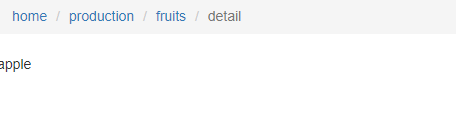
angular-utils-ui-breadcrumbs是一个用来自动生成面包屑导航栏的一个插件,需要依赖angular、UIRouter和bootstrap3.css。生成的界面截图如下,点击相应的面包屑会跳转到相应的路由,点击相应的路由也会自动生成相应的面包屑:
安装:npm install angular-utils-ui-breadcrumbs
github:https://github.com/michaelbromley/angularUtils/tree/master/src/directives/uiBreadcrumbs
模块依赖:
var app = angular.module('myapp', ['ui.router.state.events','angularUtils.directives.uiBreadcrumbs']);
这里使用了ui.router.state.events模块,因为该uiBreadcrumbs依赖于$stateChangeSuccess事件,而uiRouter在1.x版本之后推荐使用Transition钩子,为了兼容原来的版本,将不被推荐的state events事件封装到了stateEvent.js文件中,该文件在UIRouter包中,所以我们需要引入该文件,angularUtils.directives.uiBreadcrumbs模块已经依赖了ui.router模块,我们不需要在这里重复引入。
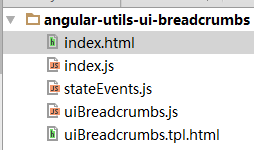
文件目录结构如下:
<!--index.html-->

<!DOCTYPE html>

<html lang="en" ng-app="myapp" ng-strict-di>

<head>

    <meta charset="UTF-8">

    <title>angular-utils-ui-breadcrumbs</title>

    <link href="https://cdn.bootcss.com/bootstrap/3.3.7/css/bootstrap.min.css" rel="stylesheet">

</head>

<body>

<ui-breadcrumbs displayname-property="data.displayName" abstract-proxy-property="data.proxy" template-url="./uiBreadcrumbs.tpl.html"></ui-breadcrumbs>

<ui-view name="home"></ui-view>

</body>

<script src="https://cdn.bootcss.com/angular.js/1.6.0/angular.min.js"></script>

<script src="https://cdn.bootcss.com/angular-ui-router/1.0.3/angular-ui-router.min.js"></script>

<script src="stateEvents.js"></script>

<script src="uiBreadcrumbs.js"></script>

<script src="index.js"></script>

</html>
//index.js

var app = angular.module('myapp', ['ui.router.state.events','angularUtils.directives.uiBreadcrumbs']);

app.config(['$stateProvider', '$urlRouterProvider', ($stateProvider, $urlRouterProvider) =>{

    $urlRouterProvider.otherwise('/home/production');

    $stateProvider

        .state('home', {

            abstract: true,

            url: '/home',

            data: {

              proxy: 'home.info'

            },

            views: {

                'home@': {

                    template: '<div ui-view="content"></div>'

                }

            }

        })

        .state('home.info', {

            url: '/info',

            data: {

                displayName: 'home'

            },

            views: {

                'content@home': {

                    template: '<a ui-sref="^.production">production</a>'

                }

            }

        })

        .state('home.production', {

            url: '/production',

            data: {

              displayName: 'production'

            },

            views: {

                'content@home': {

                    template: '<a ui-sref=".fruits">fruits</a>'

                }

            }

        })

        .state('home.production.fruits', {

            url: '/fruits',

            data: {

                displayName: 'fruits'

            },

            views: {

                'content@home': {

                    template: `<ul>

                        <li><a ui-sref=".detail({type: 'apple'})">apple</a></li>

                        <li><a ui-sref=".detail({type: 'banane'})">banane</a></li>

                        <li><a ui-sref=".detail({type: 'pear'})">pear</a></li>

                    </ul>`

                }

            }

        })

        .state('home.production.fruits.detail', {

            url: '/:type',

            data: {

                displayName: 'detail'

            },

            views: {

                'content@home': {

                    template: '<div>{{$resolve.fruit}}</div>'

                }

            },

            resolve: {

                fruit: ['$stateParams', $stateParams =>{

                    return $stateParams.type

                }]

            }

        })

}]);
下面详细说明一下该插件的使用方法:
<ui-breadcrumbs displayname-property="data.displayName"

                [template-url=""]

                [abstract-proxy-property=""]>

</ui-breadcrumbs>
dispalyname-property:(必须的),该属性指向了你声明路由时候的state配置对象的某个属性,该属性的值就是在该路由下面包屑会展示的值,如果没有指定,将会展示state的name属性。
template-url: (可选)指定uiBreadcrumbs.tpl.html的路径,该文件是ui-breadcrumbs指令的模版,如果不指定,将默认使用以下目录,以下是源码的内容:
   var moduleName = 'angularUtils.directives.uiBreadcrumbs';

    var templateUrl = 'directives/uiBreadcrumbs/uiBreadcrumbs.tpl.html';

    /**

     * Module

     */

    var module;

    try {

        module = angular.module(moduleName);

    } catch(err) {

        // named module does not exist, so create one

        module = angular.module(moduleName, ['ui.router']);

    }
abstract-proxy-property: (可选),当使用abstract state的时候,我们是不能够transition到该状态的。因此我们就不能够展示该状态的面包屑,因为当点击一个abstract state将会导致一个异常,所以为了解决这种情况,我们可以让abstract-proxy-property指向一个state config属性,该属性的值是某个state.name,即某个路由,当需要显示abstract state的面包屑的时候,将会寻找该state.name来代替该abstract state,如以上例子,我们指定了home.info这个状态。
angular-utils-ui-breadcrumbs使用心得的更多相关文章
- 开始学习Angular Mobile UI
介绍 Mobile AngularUI 可以让你使用Twitter Booostrap和Angular JS来开发混合移动App和桌面应用程序. 下面是是一些贯穿整个项目的步骤,我强烈的建议你去继续阅 ...
- 阿里云 Angular 2 UI框架 NG-ZORRO介绍
说明: Angular2出来后,一直想找个基于Angular2的前端后台管理框架,但一直没有找到比较适合的.前段时间在Angular官网资源无意之间看到NG-ZORRO,NG-ZORRO由阿里计算平台 ...
- Angular 2 to Angular 4 with Angular Material UI Components
Download Source - 955.2 KB Content Part 1: Angular2 Setup in Visual Studio 2017, Basic CRUD applicat ...
- Angular第三方UI组件库------ionic
一.Angular UI组件库 ------------ionic 1. 官网:https://ionicframework.com 文档:https://ionicframework.com/d ...
- angular中ui calendar的一些使用心得
ui calendar是封装fullcalendar的一款angular指令插件 官方地址:http://angular-ui.github.io/ui-calendar/ fullcalendar ...
- 容器化分布式日志组件ExceptionLess的Angular前端UI
写在前面 随着微服务架构的流行,日志也需要由专门的分布式日志组件来完成这个工作,我们项目使用的是 ExceptionLess 这个组件,它是前后端分离的:这篇文章我们就来实践容器化 Exception ...
- angular路由——ui.route
angular路由 使用案例 <!DOCTYPE html> <html lang="en"> <head> <meta charset= ...
- Domino Angular 前端UI开发
因为如今前端的要求越来越专业化,不少企业已经有前端的专业职位了.当然我们dominio软件企业.有些也在特意招一些前端的project师. 比方如今流程的多平台(之前我的有教程).就必需要有专业的UI ...
- angular 的ui.router 定义不同的state 对应相同的url
Angular UI Router: Different states with same URL? The landing page of my app has two states: home-p ...
- Angular Mobile UI API文档
这个是angular-mobile-ui的主要模块 应用这个模块你也将同时获取到mobile-angular-ui.core和mobile-angular-ui.components的特性 他不在需要 ...
随机推荐
- XML功能
REF:https://www.baidu.com/link?url=_-UY8rZVAORlesKTth0F7C8LbvXCL4lSwz6vmQVnTEgmT06NFGdoaD9FbuEQhR7xG ...
- 易语言 【寻找文本】命令的bug
最近在重写易语言模块的时候,在取子文本操作时老是出错,经常出现一些奇怪的问题,一开始以为是代码问题,可是找半天硬是找不到问题所在. 于是进入了找bug模式,这么几行代码,看了我半个小时,左改右改,总感 ...
- QCW切割 --铁片
1.QCW切割旋转轴限位部件 --刘锦峰协助 :铁片 功率85% 最大功率100 最小功率50 脉宽0.1ms 调整焦点-0.5左右
- bzoj1027 [HNOI2004]打鼹鼠
[HNOI2004]打鼹鼠 2014年5月2日2,8605 Description 鼹鼠是一种很喜欢挖洞的动物,但每过一定的时间,它还是喜欢把头探出到地面上来透透气的.根据这个特点阿Q编写了一个打鼹鼠 ...
- node.js上除了Express还有哪些好用的web开发框架
老司机都有体会, 开发本身没有多难, 最纠结其实是最初的技术和框架选型, 本没有绝对的好坏之分, 可一旦选择了不适合于自己业务场景的框架, 将来木已成舟后开发和维护成本都很高, 等发现不合适的时候更换 ...
- java关键字中文对比
abstract 摘要|抽象assert 声称boolean 布尔break 中断byte 字节case 实例catch 捕捉char 烧焦class 类const 常量continue 持续defa ...
- Yii 2.0 数据库操作总结
1. 概述 操作数据库有2种方式: DAO(data access object),不安全 ORM(onject relational mapping) 2. DAO Yii::app()->d ...
- WPF加载程序集中字符串资源
WPF资源 WPF资源使用其实的也是resources格式嵌入资源,默认的资源名称为"应用程序名.g.resources",不过WPF资源使用的pack URI来访问资源. 添加图 ...
- CMake安装(源码方式)
CMake主页是 https://cmake.org/download/ 一.不指定安装目录方式(不需要配置环境变量) 1.安装必备包(存在的包不用卸载,yum会自动更新) yum install - ...
- jscodeshift 简易教程
本文首发于 https://github.com/whxaxes/blog/issues/10 背景 jscodeshift 是 fb 出的一个 codemod toolkit,基于 recast 这 ...