
MySQL 慢查询日志分析及可视化结果
MySQL 慢查询日志分析及可视化结果
MySQL 慢查询日志分析
- pt-query-digest分析慢查询日志
pt-query-digest --report slow.log
- 报告最近半个小时的慢查询:
pt-query-digest --report --since 1800s slow.log
- 报告一个时间段的慢查询:
pt-query-digest --report --since '2013-02-10 21:48:59' --until '2013-02-16 02:33:50' slow.log
- 报告只含select语句的慢查询:
pt-query-digest --filter '$event->{fingerprint} =~ m/^select/i' slow.log
- 报告针对某个用户的慢查询:
pt-query-digest --filter '($event->{user} || "") =~ m/^root/i' slow.log
- 报告所有的全表扫描或full join的慢查询:
pt-query-digest --filter '(($event->{Full_scan} || "") eq "yes") || (($event->{Full_join} || "") eq "yes")' slow.log
- 把查询保存到query_review表
pt-query-digest --user=root –password=abc123 --review h=localhost,D=test,t=query_review--create-review-table slow.log
- 把查询保存到query_history表
pt-query-digest --user=root –password=abc123 --review h=localhost,D=test,t=query_ history--create-review-table slow.log_20140401
pt-query-digest --user=root –password=abc123--review h=localhost,D=test,t=query_history--create-review-table slow.log_20140402
- 通过tcpdump抓取mysql的tcp协议数据,然后再分析
tcpdump -s 65535 -x -nn -q -tttt -i any -c 1000 port 3306 > mysql.tcp.txt
pt-query-digest --type tcpdump mysql.tcp.txt> slow_report9.log
- 分析binlog
mysqlbinlog mysql-bin.000093 > mysql-bin000093.sql
pt-query-digest --type=binlog mysql-bin000093.sql > slow_report10.log
- 分析general log
pt-query-digest --type=genlog localhost.log > slow_report11.log
更多filter的事件属性

将慢查询日志的分析结果可视化
使用pt-query-digest分析慢查询日志并将查询分析数据保存到MySQL数据库表中.然后使用Query-Digest-UI来展示分析结果.
由于Query-Digest-UI是基于PHP的Web应用程序,因此需要LAMP环境的支持.
查询分析结果可视化步骤如下:
- 创建相关数据库表
-- install.sql

-- Create the database needed for the Query-Digest-UI

DROP DATABASE IF EXISTS slow_query_log;

CREATE DATABASE slow_query_log;

USE slow_query_log;

-- Create the global query review table

CREATE TABLE `global_query_review` (

  `checksum` bigint(20) unsigned NOT NULL,

  `fingerprint` text NOT NULL,

  `sample` longtext NOT NULL,

  `first_seen` datetime DEFAULT NULL,

  `last_seen` datetime DEFAULT NULL,

  `reviewed_by` varchar(20) DEFAULT NULL,

  `reviewed_on` datetime DEFAULT NULL,

  `comments` text,

  `reviewed_status` varchar(24) DEFAULT NULL,

  PRIMARY KEY (`checksum`)

) ENGINE=InnoDB DEFAULT CHARSET=utf8;

-- Create the historical query review table

CREATE TABLE `global_query_review_history` (

  `hostname_max` varchar(64) NOT NULL,

  `db_max` varchar(64) DEFAULT NULL,

  `checksum` bigint(20) unsigned NOT NULL,

  `sample` longtext NOT NULL,

  `ts_min` datetime NOT NULL DEFAULT '0000-00-00 00:00:00',

  `ts_max` datetime NOT NULL DEFAULT '0000-00-00 00:00:00',

  `ts_cnt` float DEFAULT NULL,

  `Query_time_sum` float DEFAULT NULL,

  `Query_time_min` float DEFAULT NULL,

  `Query_time_max` float DEFAULT NULL,

  `Query_time_pct_95` float DEFAULT NULL,

  `Query_time_stddev` float DEFAULT NULL,

  `Query_time_median` float DEFAULT NULL,

  `Lock_time_sum` float DEFAULT NULL,

  `Lock_time_min` float DEFAULT NULL,

  `Lock_time_max` float DEFAULT NULL,

  `Lock_time_pct_95` float DEFAULT NULL,

  `Lock_time_stddev` float DEFAULT NULL,

  `Lock_time_median` float DEFAULT NULL,

  `Rows_sent_sum` float DEFAULT NULL,

  `Rows_sent_min` float DEFAULT NULL,

  `Rows_sent_max` float DEFAULT NULL,

  `Rows_sent_pct_95` float DEFAULT NULL,

  `Rows_sent_stddev` float DEFAULT NULL,

  `Rows_sent_median` float DEFAULT NULL,

  `Rows_examined_sum` float DEFAULT NULL,

  `Rows_examined_min` float DEFAULT NULL,

  `Rows_examined_max` float DEFAULT NULL,

  `Rows_examined_pct_95` float DEFAULT NULL,

  `Rows_examined_stddev` float DEFAULT NULL,

  `Rows_examined_median` float DEFAULT NULL,

  `Rows_affected_sum` float DEFAULT NULL,

  `Rows_affected_min` float DEFAULT NULL,

  `Rows_affected_max` float DEFAULT NULL,

  `Rows_affected_pct_95` float DEFAULT NULL,

  `Rows_affected_stddev` float DEFAULT NULL,

  `Rows_affected_median` float DEFAULT NULL,

  `Rows_read_sum` float DEFAULT NULL,

  `Rows_read_min` float DEFAULT NULL,

  `Rows_read_max` float DEFAULT NULL,

  `Rows_read_pct_95` float DEFAULT NULL,

  `Rows_read_stddev` float DEFAULT NULL,

  `Rows_read_median` float DEFAULT NULL,

  `Merge_passes_sum` float DEFAULT NULL,

  `Merge_passes_min` float DEFAULT NULL,

  `Merge_passes_max` float DEFAULT NULL,

  `Merge_passes_pct_95` float DEFAULT NULL,

  `Merge_passes_stddev` float DEFAULT NULL,

  `Merge_passes_median` float DEFAULT NULL,

  `InnoDB_IO_r_ops_min` float DEFAULT NULL,

  `InnoDB_IO_r_ops_max` float DEFAULT NULL,

  `InnoDB_IO_r_ops_pct_95` float DEFAULT NULL,

  `InnoDB_IO_r_bytes_pct_95` float DEFAULT NULL,

  `InnoDB_IO_r_bytes_stddev` float DEFAULT NULL,

  `InnoDB_IO_r_bytes_median` float DEFAULT NULL,

  `InnoDB_IO_r_wait_min` float DEFAULT NULL,

  `InnoDB_IO_r_wait_max` float DEFAULT NULL,

  `InnoDB_IO_r_wait_pct_95` float DEFAULT NULL,

  `InnoDB_IO_r_ops_stddev` float DEFAULT NULL,

  `InnoDB_IO_r_ops_median` float DEFAULT NULL,

  `InnoDB_IO_r_bytes_min` float DEFAULT NULL,

  `InnoDB_IO_r_bytes_max` float DEFAULT NULL,

  `InnoDB_IO_r_wait_stddev` float DEFAULT NULL,

  `InnoDB_IO_r_wait_median` float DEFAULT NULL,

  `InnoDB_rec_lock_wait_min` float DEFAULT NULL,

  `InnoDB_rec_lock_wait_max` float DEFAULT NULL,

  `InnoDB_rec_lock_wait_pct_95` float DEFAULT NULL,

  `InnoDB_rec_lock_wait_stddev` float DEFAULT NULL,

  `InnoDB_rec_lock_wait_median` float DEFAULT NULL,

  `InnoDB_queue_wait_min` float DEFAULT NULL,

  `InnoDB_queue_wait_max` float DEFAULT NULL,

  `InnoDB_queue_wait_pct_95` float DEFAULT NULL,

  `InnoDB_queue_wait_stddev` float DEFAULT NULL,

  `InnoDB_queue_wait_median` float DEFAULT NULL,

  `InnoDB_pages_distinct_min` float DEFAULT NULL,

  `InnoDB_pages_distinct_max` float DEFAULT NULL,

  `InnoDB_pages_distinct_pct_95` float DEFAULT NULL,

  `InnoDB_pages_distinct_stddev` float DEFAULT NULL,

  `InnoDB_pages_distinct_median` float DEFAULT NULL,

  `QC_Hit_cnt` float DEFAULT NULL,

  `QC_Hit_sum` float DEFAULT NULL,

  `Full_scan_cnt` float DEFAULT NULL,

  `Full_scan_sum` float DEFAULT NULL,

  `Full_join_cnt` float DEFAULT NULL,

  `Full_join_sum` float DEFAULT NULL,

  `Tmp_table_cnt` float DEFAULT NULL,

  `Tmp_table_sum` float DEFAULT NULL,

  `Filesort_cnt` float DEFAULT NULL,

  `Filesort_sum` float DEFAULT NULL,

  `Tmp_table_on_disk_cnt` float DEFAULT NULL,

  `Tmp_table_on_disk_sum` float DEFAULT NULL,

  `Filesort_on_disk_cnt` float DEFAULT NULL,

  `Filesort_on_disk_sum` float DEFAULT NULL,

  `Bytes_sum` float DEFAULT NULL,

  `Bytes_min` float DEFAULT NULL,

  `Bytes_max` float DEFAULT NULL,

  `Bytes_pct_95` float DEFAULT NULL,

  `Bytes_stddev` float DEFAULT NULL,

  `Bytes_median` float DEFAULT NULL,

  UNIQUE KEY `hostname_max` (`hostname_max`,`checksum`,`ts_min`,`ts_max`),

  KEY `ts_min` (`ts_min`),

  KEY `checksum` (`checksum`)

) ENGINE=InnoDB DEFAULT CHARSET=utf8;
- 创建数据库账号
$ mysql -uroot -p -h 192.168.1.190 < install.sql

$ mysql -uroot -p -h 192.168.1.190 -e "grant ALL ON slow_query_log.* to 'slowlog'@'%' IDENTIFIED BY '123456';"
- 配置Query-Digest-UI
git clone https://github.com/kormoc/Query-Digest-UI.git

cd Query-Digest-UI

cp config.php.example config.php

vi config.php

$reviewhost = array(

// Replace hostname and database in this setting

// use host=hostname;port=portnum if not the default port

    'dsn'           => 'mysql:host=192.168.1.190;port=3306;dbname=slow_query_log',

    'user'          => 'slowlog',

    'password'      => '123456',

// See http://www.percona.com/doc/percona-toolkit/2.1/pt-query-digest.html#cmdoption-pt-query-digest--review

    'review_table'  => 'global_query_review',

// This table is optional. You don't need it, but you lose detailed stats

// Set to a blank string to disable

// See http://www.percona.com/doc/percona-toolkit/2.1/pt-query-digest.html#cmdoption-pt-query-digest--review-history

    'history_table' => 'global_query_review_history',

);
4)使用pt-query-digest分析日志并将分析结果导入数据库
pt-query-digest --user=slowlog --password=123456 --review h=192.168.1.190,D=slow_query_log,t=global_query_review --review-history h=192.168.1.190,D=slow_query_log,t=global_query_review_history --no-report --limit=0% --filter=" \$event->{Bytes} = length(\$event->{arg}) and \$event->{hostname}=\"$HOSTNAME\"" /usr/local/mysql/data/slow.log
5)访问web界面查看可视化结果
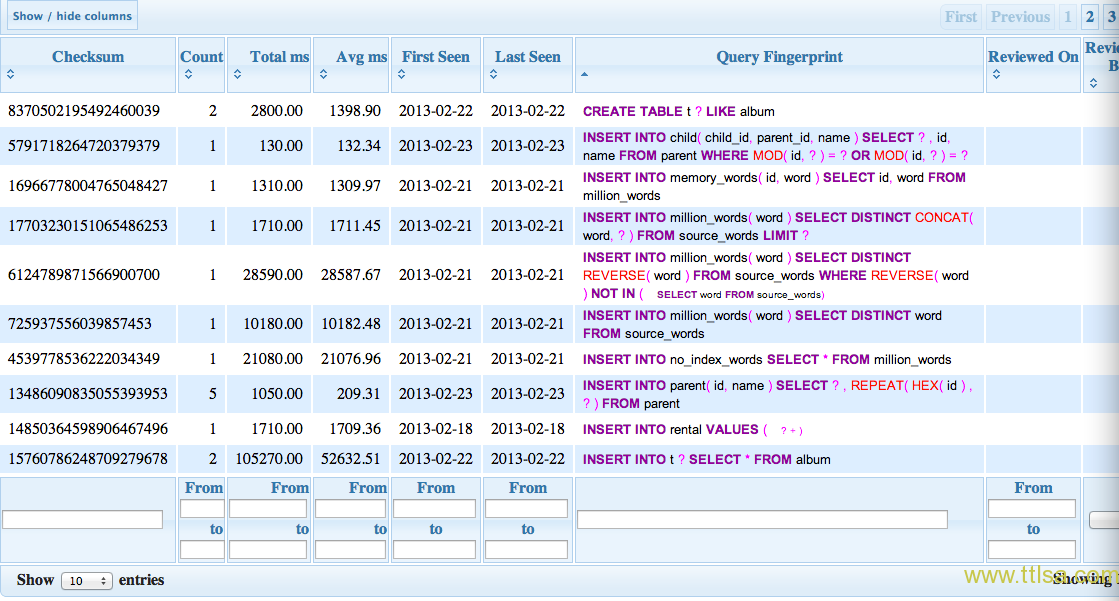
MySQL 慢查询日志分析及可视化结果的更多相关文章
- mysql慢查询日志分析工具 mysqlsla(转)
mysql数据库的慢查询日志是非常重要的一项调优辅助日志,但是mysql默认记录的日志格式阅读时不够友好,这是由mysql日志记录规则所决定的,捕获一条就记录一条,虽说记录的信息足够详尽,但如果将浏览 ...
- MySQL慢查询日志分析
一:查询slow log的状态,如示例代码所示,则slow log已经开启. mysql> show variables like '%slow%'; +-------------------- ...
- MySQL慢查询日志分析提取【转】
原文:https://www.cnblogs.com/skymyyang/p/7239010.html 一:查询slow log的状态,如示例代码所示,则slow log已经开启. mysql> ...
- mysql慢查询日志分析工具(python写的)
D:\NormalSoftware>python mysql_filter_slow_log.py ./mysql1-slow.log --no-duplicates --sort-avg-qu ...
- mysql慢查询日志分析工具mysqldumpslow
一.mysqldumpslow为mysql自带,安装后既带有该工具. 二.mysqldumpslow经常使用的参数 -s,是order的顺序 al 平均锁定时间 ar 平均返回记录时间 at 平均查询 ...
- MySQL 慢查询日志分析工具(pt-query-digest)
1. 慢查询命令: 是否开启和日志路径:show variables like '%slow_query_log%'; 最大查询时间:show variables like '%query_time% ...
- Mysql慢查询日志过程
原创地址 :http://itlab.idcquan.com/linux/MYSQL/922126.html mysql慢查询日志对于跟踪有问题的查询非常有用,可以分析出代码实现中耗费资源的sql语句 ...
- Mysql慢查询和慢查询日志分析
Mysql慢查询和慢查询日志分析 众所周知,大访问量的情况下,可添加节点或改变架构可有效的缓解数据库压力,不过一切的原点,都是从单台mysql开始的.下面总结一些使用过或者研究过的经验,从配置以 ...
- 企业级中带你ELK如何实时收集分析Mysql慢查询日志
什么是Mysql慢查询日志? 当SQL语句执行时间超过设定的阈值时,便于记录到指定的日志文件中或者表中,所有记录称之为慢查询日志 为什么要收集Mysql慢查询日志? 数据库在运行期间,可能会存在这很多 ...
随机推荐
- jsoup开发网页客户端3
这个系列好久没更新,最近好忙,老大说未来是Html5的,所以最近一直学习前端以及Html5的一些东西.Android5.0的诞生,让我们眼前一亮,独特的Material风格更是吸引了无数人. 话说不学 ...
- Good Bye 2016 //智商再次下线,边界爆炸.....
A B很水就略了.. C.又是一次wannafly一样的判断区间的..... 边界设为2000000 正好GG...... fst的时候立马想到上次也是这么wa过的...... 所以下次遇到这种题 ...
- 用上CommonMark.NET,.NET平台终于有了好用的markdown引擎
缺少好用的markdown引擎之前一直是.NET平台上的一个痛点.因为这个痛点,我们被迫痛苦地使用了pandoc--不是pandoc做的不好,而是pandoc是由Haskell开发的,只能在Windo ...
- javascript 中断函数的使用 setInterval()——返回顶部
方法名称:gotop() 功能描述:点击某个元素,调用方法gotop(),固定间隔,滚动至屏幕顶部 日期 :2016.06.06 16:02 author :cyh2009@live.com < ...
- ubuntu搭建shad(-_-)owscoks(影梭)
准备步骤 apt-get updateapt-get install python-gevent python-pippip install shadowsocks 新建一个json文件内容如下,文件 ...
- Python学习 过程中零散知识点的总结
自学资料比较零碎,本文是对在Python学习过程中积累的零零散散的知识点的总结 ============================================================ ...
- BZOJ 1432: [ZJOI2009]Function
1432: [ZJOI2009]Function Time Limit: 5 Sec Memory Limit: 64 MBSubmit: 1046 Solved: 765[Submit][Sta ...
- PHP处理海量样本相似度聚类算法
catalogue . TF-IDF . 基于空间向量的余弦算法 . 最长公共子序列 . 最小编辑距离算法 . similar_text . local sensitive hash 局部非敏感哈希 ...
- Spring 4支持的Java 8新特性一览
有众多新特性和函数库的Java 8发布之后,Spring 4.x已经支持其中的大部分.有些Java 8的新特性对Spring无影响,可以直接使用,但另有些新特性需要Spring的支持.本文将带您浏览S ...
- Android内存优化-内存泄漏的几个场景以及解决方式
转自:http://blog.csdn.net/a910626/article/details/50849760 一.什么是内存泄漏 在Java程序中,如果一个对象没有利用价值了,正常情况下gc是会对 ...