
基于JQuery的简单富文本编辑器
利用jQuery实现最简单的编辑器

我试了很多种方法,目前最快捷能够实现及其简单的编辑可以使用 document.execCommand("ForeColor", "false", sColor);就能实现。
但是看到 MDN web文档上提示该方法已经废弃。这个方法并不是很好,有时间会去选择更好的方法。
<!DOCTYPE html>

<html>

    <head>

        <meta charset="utf-8">

        <title></title>

    </head>

    <style type="text/css">

        .editor_div {

            border: 1px solid #ccc;

        }

        .btn_div {

            border-bottom: 1px solid #ccc;

            height: 28px;

        }

        .span_btn {

            -webkit-user-select: none;

            -moz-user-select: none;

            -ms-user-select: none;

            user-select: none;

            font-size: 21px;

            font-weight: 400;

            display: inline-block;

            margin-left: 21px;

            cursor: pointer;

            position: relative;

        }

        .editor_content {

            height: 200px;

            width: 100%;

            overflow: hidden;

        }

        .header_con {

            position: absolute;

            top: 28px;

            left: 0;

            background-color: #e8e8e8;

            display: none;

            width: 50px;

            text-align: center;

        }

        .header_hcon {

            height: 19px;

            width: 50px;

            border-top: 1px solid #ccc;

            display: inline-block;

        }

    </style>

    <body>

        <div class="editor_div">

            <div class="btn_div">

                <span class="span_btn" onclick="tobebold()" id="tobebold">加粗B</span>

                <span class="span_btn" onclick="showchildren(this)">标签H

                    <span class="header_con">

                        <span class="header_hcon" onclick="clcikthis(this)" data-type="H5">H5</span>

                        <span class="header_hcon" onclick="clcikthis(this)" data-type="H4">H4</span>

                        <span class="header_hcon" onclick="clcikthis(this)" data-type="H3">H3</span>

                        <span class="header_hcon" onclick="clcikthis(this)" data-type="H2">H2</span>

                        <span class="header_hcon" onclick="clcikthis(this)" data-type="H1">H1</span>

                        <span class="header_hcon" onclick="clcikthis(this)" data-type="p">正文</span>

                    </span>

                </span>

                <span class="span_btn" onclick="showchildren(this)">颜色C

                    <span class="header_con">

                        <span class="header_hcon" onclick="changecolor(this)">red</span>

                        <span class="header_hcon" onclick="changecolor(this)">blue</span>

                        <span class="header_hcon" onclick="changecolor(this)">pink</span>

                        <span class="header_hcon" onclick="changecolor(this)">gold</span>

                    </span>

                </span>

            </div>

            <div class="editor_content" id="editor_content" tabindex="0" contenteditable="true">

            </div>

        </div>

    </body>

    <script src="./jquery.min.js" type="text/javascript" charset="utf-8"></script>

    <script type="text/javascript">

        if (window.getSelection) { //一般浏览器

            userSelection = window.getSelection();

        } else if (document.selection) { //IE浏览器、Opera

            userSelection = document.selection.createRange();

        }

        var oldHtml = ""

        var oldStr = ""

        var newHtml = ""

        var newStr = ""

        const tobebold = () => {

            document.execCommand("Bold", "false", null);

        }

        const showchildren = (e) => {

            $(e).children("span").css({

                "display": "inline-block"

            })

        }

        const clcikthis = (e) => {

            let hheader = $(e).attr("data-type")

            if (userSelection.toString().length != 0) {

                document.execCommand("FormatBlock", "false", hheader);

            }

            event.stopPropagation();

            $(e).parent().hide()

            return false

        }

        const changecolor = (e) => {

            let sColor = $(e).html().toLowerCase()

            document.execCommand("ForeColor", "false", sColor);

            event.stopPropagation();

            $(e).parent().hide()

            return false

        }

        // 点击后除指定位置外其他地方都会隐藏

        $("body").click(function(e) {

            if (!$(e.target).closest(".span_btn").length) {

                $(".header_con").hide();

            }

        });

    </script>

</html>
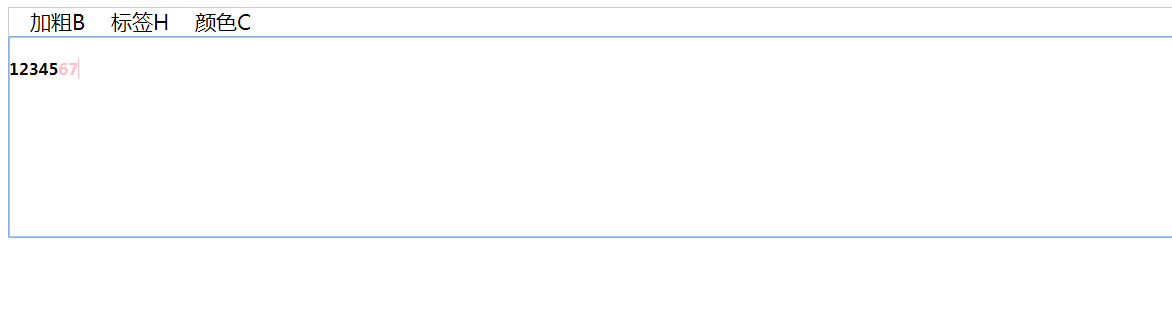
图片效果如下
基于JQuery的简单富文本编辑器的更多相关文章
- 基于jquery的bootstrap在线文本编辑器插件Summernote
Summernote是一个基于jquery的bootstrap超级简单WYSIWYG在线编辑器.Summernote非常的轻量级,大小只有30KB,支持Safari,Chrome,Firefox.Op ...
- 原生JS实现简单富文本编辑器2
<!DOCTYPE html> <html lang="en"> <head> <meta charset="UTF-8&quo ...
- 原生JS实现简单富文本编辑器
<!DOCTYPE html> <html lang="en"> <head> <meta charset="UTF-8&quo ...
- 基于jquery的bootstrap在线文本编辑器插件Summernote 简单强大
Summernote是一个基于jquery的bootstrap超级简单WYSIWYG在线编辑器.Summernote非常的轻量级,大小只有30KB,支持Safari,Chrome,Firefox.Op ...
- 基于jquery的bootstrap在线文本编辑器插件Summernote (转)
Summernote是一个基于jquery的bootstrap超级简单WYSIWYG在线编辑器.Summernote非常的轻量级,大小只有30KB,支持Safari,Chrome,Firefox.Op ...
- Jquery的bootstrap在线文本编辑器插件Summernote
http://www.jqcool.net/demo/201407/bootstrap-summernote/ Summernote是一个基于jquery的bootstrap超级简单WYSIWYG在线 ...
- Android - 富文本编辑器
Android富文本编辑器(一):基础知识 目前主流的基于Android富文本开发方式思路如下: 基于TextView图文混排 使用方式: TextView textView = new TextVi ...
- 基于ABP做一个简单的系统——实战篇:4.基于富文本编辑器,Razor模板引擎生成内容并导出Word 填坑记录
起因 需求是这样的,有一种协议需要生成,协议的模板是可配置的,在生成过程中,模板中的内容可以根据约定的标记进行替换(就像mvc的razor模板一样).生成后的内容还需要导出成word或pdf. 常见的 ...
- N个富文本编辑器/基于Web的HTML编辑器
转自:http://www.cnblogs.com/lingyuan/archive/2010/11/15/1877447.html 基于WEB的HTML 编辑器,WYSIWYG所见即所得的编辑器,或 ...
随机推荐
- 【Redis】Set常见应用场景
微信抽奖小程序 >点击参与抽奖加入集合 SADD key {userID} >查看参与抽奖所有用户 SMEMBERS key >抽取count名中奖者 SRANGEMEMBER ke ...
- CSS实现漂亮的小水球效果
先看效果图: 代码: <!DOCTYPE html> <html> <head> <meta charset="utf-8" /> ...
- 小BUG大原理:重写WebMvcConfigurationSupport后SpringBoot自动配置失效
一.背景 公司的项目前段时间发版上线后,测试反馈用户的批量删除功能报错.正常情况下看起来应该是个小 BUG,可怪就怪在上个版本正常,且此次发版未涉及用户功能的改动.因为这个看似小 BUG 我了解到不少 ...
- 【Windows】快速启动软件 非点击软件图标 无限弹窗
1. 添加系统路径 单独新建文件夹A用于存放待快速启动的软件的快捷方式图标,复制文件夹A的路径-> 右击windows shell中此电脑->属性->高级系统设置->环境变量- ...
- linux:基本指令
指令标准格式 指令主体 [选项][操作对象] 基础指令 ls 1.ls 列出当前工作目录下的所有文件/文件夹的名称 2.ls 路径 列出指定路径下的所有文件/文件夹的名称 路径: 1.相对路径 会用 ...
- css 图片宽度、居中、倒影
<!DOCTYPE html> <html lang="en"> <head> <meta charset="UTF-8&quo ...
- Rocket - tilelink - Nodes
https://mp.weixin.qq.com/s/KJ8pVH76rdxPOZ1vE3QlKA 简单介绍tilelink对Diplomacy Nodes的实现. 1. TLImp ...
- jchdl - RTL实例 - Mux
https://mp.weixin.qq.com/s/OmQRQU2mU2I5d-qtV4PAwg 二选一输出. 参考链接 https://github.com/wjcdx/jchdl/blo ...
- Java实现 LeetCode 814 二叉树剪枝 (遍历树)
814. 二叉树剪枝 给定二叉树根结点 root ,此外树的每个结点的值要么是 0,要么是 1. 返回移除了所有不包含 1 的子树的原二叉树. ( 节点 X 的子树为 X 本身,以及所有 X 的后代. ...
- ASP.NET通过更改Url进行页面传值
这里,通过假数据,手动创建的一个类,然后创建的一个集合,放入下拉框,选好值以后,点确定 会在另一个页面产生对应的id,有不懂的欢迎评论 创建一个类: using System; using Syste ...