
Spring的JDBC的使用(配置和CRUD)
导包:

Spring的JDBC模板的使用
一、默认连接池
创建数据库
create database spring4;
use spring4;
create table account(id int primary key auto_increment,name varchar(20),money double);
使用JDBC模板保存数据
创建一个测试类
package com.rick.jdbc.demo1;

import org.junit.Test;

import org.springframework.jdbc.core.JdbcTemplate;

import org.springframework.jdbc.datasource.DriverManagerDataSource;

/*

 * JDBC模板的使用

 */

public class JdbcDemo1 {

	@Test

	public void demo1() {

		//创建连接池

		DriverManagerDataSource driverManagerDataSource = new DriverManagerDataSource();

		driverManagerDataSource.setDriverClassName("com.mysql.jdbc.Driver");

		driverManagerDataSource.setUrl("jdbc:mysql:///spring4");

		driverManagerDataSource.setUsername("root");

		driverManagerDataSource.setPassword("000000");

		//创建JDBC模板

		JdbcTemplate jdbcTemplate = new JdbcTemplate(driverManagerDataSource);

		jdbcTemplate.update("insert into account values (null,?,?)","张三",100000);

	}

}
点击运行就能发现数据库中多了一条数据
这样的弊端是每次都得重新创建,重新new
我们可以将连接池和模板交给Spring管理(控制反转)
导入aop .jar(应为在spring4中用ioc也需要引入aop的包,spring3就不用了)
引入Spring的配置文件
<?xml version="1.0" encoding="UTF-8"?>

<beans xmlns="http://www.springframework.org/schema/beans"

	xmlns:xsi="http://www.w3.org/2001/XMLSchema-instance"

	xmlns:context="http://www.springframework.org/schema/context"

	xmlns:aop="http://www.springframework.org/schema/aop"

	xmlns:tx="http://www.springframework.org/schema/tx"

	xsi:schemaLocation="http://www.springframework.org/schema/beans

	http://www.springframework.org/schema/beans/spring-beans.xsd

	http://www.springframework.org/schema/context

	http://www.springframework.org/schema/context/spring-context.xsd

	http://www.springframework.org/schema/aop

	http://www.springframework.org/schema/aop/spring-aop.xsd

	http://www.springframework.org/schema/tx

	http://www.springframework.org/schema/tx/spring-tx.xsd">

	<!-- 配置Spring的内置连接池 -->

	<bean id = "dataSource" class = "org.springframework.jdbc.datasource.DriverManagerDataSource">

		<!-- 属性注入 -->

		<property name="driverClassName" value="com.mysql.jdbc.Driver"></property>

		<property name="url" value="jdbc:mysql:///spring4"></property>

		<property name="username" value="root"></property>

		<property name="password" value="000000"></property>

	</bean>

	<!-- 配置spring的JDBC的模板 -->

	<bean id="jdbcTemplate" class = "org.springframework.jdbc.core.JdbcTemplate">

		<property name="dataSource" ref = "dataSource"></property>

	</bean>

</beans>
创建测试类TestDemo2
package com.rick.jdbc.demo1;

import javax.annotation.Resource;

import org.junit.Test;

import org.junit.runner.RunWith;

import org.springframework.jdbc.core.JdbcTemplate;

import org.springframework.test.context.ContextConfiguration;

import org.springframework.test.context.junit4.SpringJUnit4ClassRunner;

@RunWith(SpringJUnit4ClassRunner.class)//让测试运行于Spring测试环境

@ContextConfiguration("classpath:applicationContext.xml")

public class JdbcDemo2 {

	@Resource(name="jdbcTemplate")//注入

	private JdbcTemplate jdbcTemplate;

	@Test

	public void demo2() {

		jdbcTemplate.update("insert into account values (null,?,?)","王五",100000);

	}

}
运行!然后数据库中多了一条记录,运行成功
二、使用开源的数据库连接池-DBCP的使用
导包:添加两个dbcp的依赖包

将配置文件中的内置连接池的代码改成以下代码即可,其他不变
<!-- 配置DBCP数据库连接池 -->

	<bean id="dataSource" class = "org.apache.commons.dbcp.BasicDataSource">

		<property name="driverClassName" value="com.mysql.jdbc.Driver"></property>

		<property name="url" value="jdbc:mysql:///spring4"></property>

		<property name="username" value="root"></property>

		<property name="password" value="000000"></property>

	</bean>
三、使用开源的数据库连接池-DBCP的使用(重要)
导包:c3p0只需要一个jar包

将配置文件中的内置连接池的代码改成以下代码即可,其他不变(注意name和上面的内置和dbcp是不一样的)
<!-- 配置C3P0数据库连接池 -->

	 <bean id="dataSource" class = "com.mchange.v2.c3p0.ComboPooledDataSource">

		<property name="driverClass" value="com.mysql.jdbc.Driver"></property>

		<property name="jdbcUrl" value="jdbc:mysql:///spring4"></property>

		<property name="user" value="root"></property>

		<property name="password" value="000000"></property>

	</bean>
一般在开发的时候这些连接池的东西不会直接写在配置文件中
抽取配置到属性文件
定义一个属性文件 jdbc.properties
jdbc.driverClass=com.mysql.jdbc.Driver

jdbc.url=jdbc:mysql:///spring4

idbc.username =root

jdbc.password=000000
在spring配置文件中引入属性文件两种方式
- bean标签引入(很少使用)
- context标签引入
    <!-- 第一种bean标签引入(不常用) -->

	<bean class="org.springframework.beans.factory.config.PropertyPlaceholderConfigurer">

		<property name="location" value="classpath:jdbc.properties"/>

	</bean>

	<!-- 第二种context标签引入 -->

	<context:property-placeholder location="classpath:jdbc.properties"/>
修改配置文件

ok!下面
使用JDBC的模板完成CRUD的操作


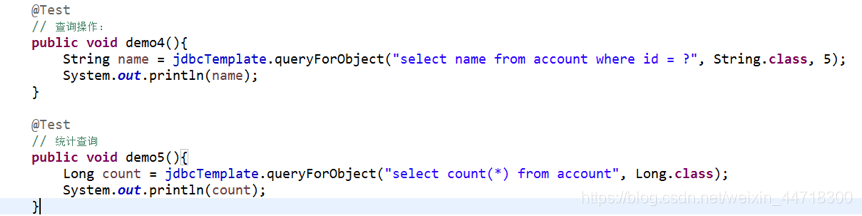

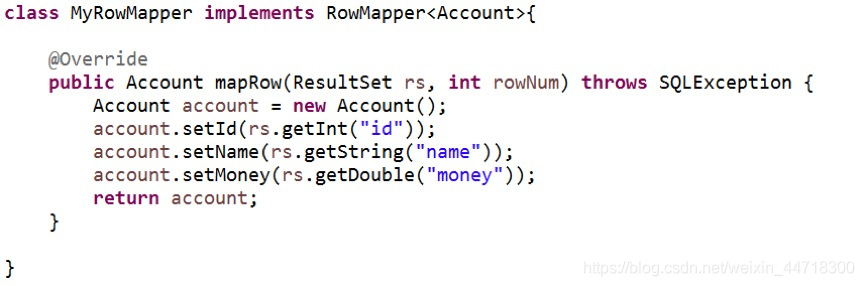
封装数据:
Spring的JDBC的使用(配置和CRUD)的更多相关文章
- Mysql在spring中jdbc.properties连接配置
############################## mysql的数据源 ############################## jdbc.driver=com.mysql.jdbc.D ...
- Spring实战6:利用Spring和JDBC访问数据库
主要内容 定义Spring的数据访问支持 配置数据库资源 使用Spring提供的JDBC模板 写在前面:经过上一篇文章的学习,我们掌握了如何写web应用的控制器层,不过由于只定义了SpitterRep ...
- spring中jdbc的配置
本文中的JdbcTemplate的用法可以参看官方文档http://docs.spring.io/spring/docs/3.2.5.RELEASE/spring-framework-referenc ...
- 【Spring JDBC】数据源配置(二)
一.Spring内置数据源 1. 创建Maven Project,修改pom.xml <properties> <!-- JDK版本 --> <java.version& ...
- 十九 Spring的JDBC模版使用: 模版的CRUD的操作
Spring的JDBC模版使用: 模版的CRUD的操作 保存操作 修改操作 删除操作 查询操作 import com.ithheima.jdbc.domian.Account; @RunWith(Sp ...
- Spring整合JDBC(连接池、JDBC模板、Dao配置到Spring容器、配置文件的优化)
1.Spring整合JDBC (1)导包(共12个): c3p0连接池.JDBC驱动(4个) Spring-jdbc.Spring-tx事务(2个) (2)JDBC模板对象(JDBCTemplate) ...
- Spring的JDBC模板
Spring对持久层技术支持 JDBC : org.springframework.jdbc.core.JdbcTemplate Hibernate3.0 : org.springframework. ...
- java框架之Spring(3)-JDBC模板使用&事务管理
下面内容使用到的 jar 包下载 JDBC模板使用 入门 1.导包,如要导入 Spring 的基本开发包.数据库驱动包.Spring 提供的 JDBC 模板包,如下: 2.测试: @Test publ ...
- Spring+SpringMVC+JDBC实现登录
Spring+SpringMVC+JDBC实现登录 有一位程序员去相亲的时候,非常礼貌得说自己是一名程序员,并解释自己是做底层架构的,于是女方听到"底层"两个字,就一脸嫌弃:什么时 ...
随机推荐
- javascript入门教程02
JavaScript中的运算符 (1)算术运算符 + :相加 var a=123,b=45; document.write(a+b); - :相减 document.write(a-b); *:相乘 ...
- 「题解」「HNOI2013」切糕
文章目录 「题解」「HNOI2013」切糕 题目描述 思路分析及代码 题目分析 题解及代码 「题解」「HNOI2013」切糕 题目描述 点这里 思路分析及代码 题目分析 这道题的题目可以说得上是史上最 ...
- npm安装包时的几种模式
本文原文地址:https://www.limitcode.com/detail/59a15b1a69e95702e0780249.html 回顾 npm install 命令 最近在写Node程序的时 ...
- 61二叉搜索树的第k个结点
题目描述 给定一颗二叉搜索树,请找出其中的第k大的结点.例如, 5 / \ 3 7 /\ /\ 2 4 6 8 中,按结点数值大小顺序第三个结点的值为4. 思路:二叉搜索树的中序遍历是递增的序列,使用 ...
- redhat 7.6 rpm ,yum ,编译安装
rpm rpm -ivh 包名 //安装 rpm -e 包名 //卸载 which mount 查看命令安装目录 rpm -qf /usr/bin/mount // ...
- Python 基础之序列化模块pickle与json
一:pickle 序列化模块把不能够直接存储的数据,变得可存储就是序列化把存储好的数据,转化成原本的数据类型,加做反序列化 php: 序列化和反序列化(1)serialize(2)unserializ ...
- 堡垒机安装google-authenticator
公司线上的使用机器不能让用户随意的登陆,所以就不能让开发随意的登陆到生产的机器的.于是就打算使用google-auth的验证方式呢. 如果google-auth的方式. 搭建google-authen ...
- 事件驱动的TCP协议Socket通信
事件驱动的TCP协议Socket通信 介绍 常规的Socket通信案例一般都是在某个线程中建立连接,然后用一个while(true)循环判断是或否有数据传输,但是这种方法有局限性. 1.收到消息在处理 ...
- MyBatis 学习二之简单练习巩固
1.新建一个maven项目并在pom.xml中添加依赖 2.项目架构 配置文件:SqlMapConfig.xml <?xml version="1.0" encoding ...
- 联想电脑硬盘保护系统EDU8.0.1iso安装
管理306机房4年了,15年我带领的第一批学生参加吉林省职业院校技能大赛的时候,领导把这个机房交给我负责.那个时候这个机房的机器是全校的顶配,30台DELL16G内存,2T硬盘,I7处理器,后面是6组 ...