
Spring的JDBC的使用(配置和CRUD)
导包:

Spring的JDBC模板的使用
一、默认连接池
创建数据库
create database spring4;
use spring4;
create table account(id int primary key auto_increment,name varchar(20),money double);
使用JDBC模板保存数据
创建一个测试类
package com.rick.jdbc.demo1;

import org.junit.Test;

import org.springframework.jdbc.core.JdbcTemplate;

import org.springframework.jdbc.datasource.DriverManagerDataSource;

/*

 * JDBC模板的使用

 */

public class JdbcDemo1 {

	@Test

	public void demo1() {

		//创建连接池

		DriverManagerDataSource driverManagerDataSource = new DriverManagerDataSource();

		driverManagerDataSource.setDriverClassName("com.mysql.jdbc.Driver");

		driverManagerDataSource.setUrl("jdbc:mysql:///spring4");

		driverManagerDataSource.setUsername("root");

		driverManagerDataSource.setPassword("000000");

		//创建JDBC模板

		JdbcTemplate jdbcTemplate = new JdbcTemplate(driverManagerDataSource);

		jdbcTemplate.update("insert into account values (null,?,?)","张三",100000);

	}

}
点击运行就能发现数据库中多了一条数据
这样的弊端是每次都得重新创建,重新new
我们可以将连接池和模板交给Spring管理(控制反转)
导入aop .jar(应为在spring4中用ioc也需要引入aop的包,spring3就不用了)
引入Spring的配置文件
<?xml version="1.0" encoding="UTF-8"?>

<beans xmlns="http://www.springframework.org/schema/beans"

	xmlns:xsi="http://www.w3.org/2001/XMLSchema-instance"

	xmlns:context="http://www.springframework.org/schema/context"

	xmlns:aop="http://www.springframework.org/schema/aop"

	xmlns:tx="http://www.springframework.org/schema/tx"

	xsi:schemaLocation="http://www.springframework.org/schema/beans

	http://www.springframework.org/schema/beans/spring-beans.xsd

	http://www.springframework.org/schema/context

	http://www.springframework.org/schema/context/spring-context.xsd

	http://www.springframework.org/schema/aop

	http://www.springframework.org/schema/aop/spring-aop.xsd

	http://www.springframework.org/schema/tx

	http://www.springframework.org/schema/tx/spring-tx.xsd">

	<!-- 配置Spring的内置连接池 -->

	<bean id = "dataSource" class = "org.springframework.jdbc.datasource.DriverManagerDataSource">

		<!-- 属性注入 -->

		<property name="driverClassName" value="com.mysql.jdbc.Driver"></property>

		<property name="url" value="jdbc:mysql:///spring4"></property>

		<property name="username" value="root"></property>

		<property name="password" value="000000"></property>

	</bean>

	<!-- 配置spring的JDBC的模板 -->

	<bean id="jdbcTemplate" class = "org.springframework.jdbc.core.JdbcTemplate">

		<property name="dataSource" ref = "dataSource"></property>

	</bean>

</beans>
创建测试类TestDemo2
package com.rick.jdbc.demo1;

import javax.annotation.Resource;

import org.junit.Test;

import org.junit.runner.RunWith;

import org.springframework.jdbc.core.JdbcTemplate;

import org.springframework.test.context.ContextConfiguration;

import org.springframework.test.context.junit4.SpringJUnit4ClassRunner;

@RunWith(SpringJUnit4ClassRunner.class)//让测试运行于Spring测试环境

@ContextConfiguration("classpath:applicationContext.xml")

public class JdbcDemo2 {

	@Resource(name="jdbcTemplate")//注入

	private JdbcTemplate jdbcTemplate;

	@Test

	public void demo2() {

		jdbcTemplate.update("insert into account values (null,?,?)","王五",100000);

	}

}
运行!然后数据库中多了一条记录,运行成功
二、使用开源的数据库连接池-DBCP的使用
导包:添加两个dbcp的依赖包

将配置文件中的内置连接池的代码改成以下代码即可,其他不变
<!-- 配置DBCP数据库连接池 -->

	<bean id="dataSource" class = "org.apache.commons.dbcp.BasicDataSource">

		<property name="driverClassName" value="com.mysql.jdbc.Driver"></property>

		<property name="url" value="jdbc:mysql:///spring4"></property>

		<property name="username" value="root"></property>

		<property name="password" value="000000"></property>

	</bean>
三、使用开源的数据库连接池-DBCP的使用(重要)
导包:c3p0只需要一个jar包

将配置文件中的内置连接池的代码改成以下代码即可,其他不变(注意name和上面的内置和dbcp是不一样的)
<!-- 配置C3P0数据库连接池 -->

	 <bean id="dataSource" class = "com.mchange.v2.c3p0.ComboPooledDataSource">

		<property name="driverClass" value="com.mysql.jdbc.Driver"></property>

		<property name="jdbcUrl" value="jdbc:mysql:///spring4"></property>

		<property name="user" value="root"></property>

		<property name="password" value="000000"></property>

	</bean>
一般在开发的时候这些连接池的东西不会直接写在配置文件中
抽取配置到属性文件
定义一个属性文件 jdbc.properties
jdbc.driverClass=com.mysql.jdbc.Driver

jdbc.url=jdbc:mysql:///spring4

idbc.username =root

jdbc.password=000000
在spring配置文件中引入属性文件两种方式
- bean标签引入(很少使用)
- context标签引入
    <!-- 第一种bean标签引入(不常用) -->

	<bean class="org.springframework.beans.factory.config.PropertyPlaceholderConfigurer">

		<property name="location" value="classpath:jdbc.properties"/>

	</bean>

	<!-- 第二种context标签引入 -->

	<context:property-placeholder location="classpath:jdbc.properties"/>
修改配置文件

ok!下面
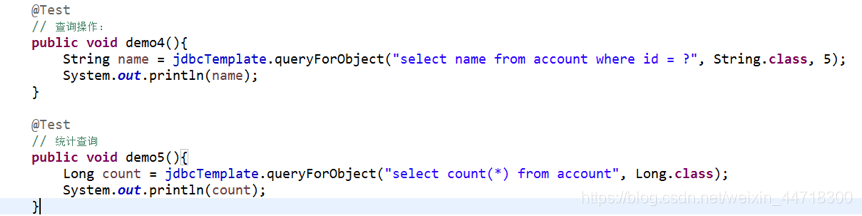
使用JDBC的模板完成CRUD的操作



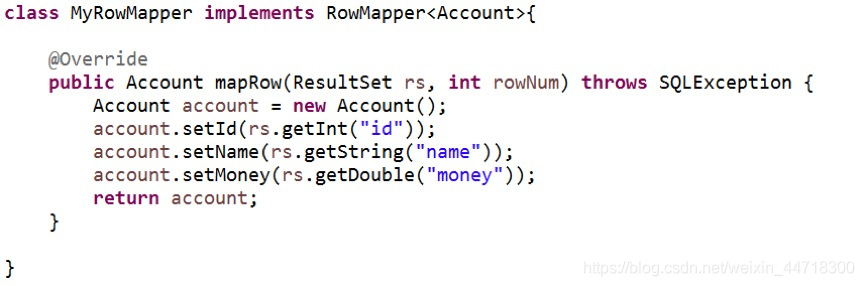
封装数据:
Spring的JDBC的使用(配置和CRUD)的更多相关文章
- Mysql在spring中jdbc.properties连接配置
############################## mysql的数据源 ############################## jdbc.driver=com.mysql.jdbc.D ...
- Spring实战6:利用Spring和JDBC访问数据库
主要内容 定义Spring的数据访问支持 配置数据库资源 使用Spring提供的JDBC模板 写在前面:经过上一篇文章的学习,我们掌握了如何写web应用的控制器层,不过由于只定义了SpitterRep ...
- spring中jdbc的配置
本文中的JdbcTemplate的用法可以参看官方文档http://docs.spring.io/spring/docs/3.2.5.RELEASE/spring-framework-referenc ...
- 【Spring JDBC】数据源配置(二)
一.Spring内置数据源 1. 创建Maven Project,修改pom.xml <properties> <!-- JDK版本 --> <java.version& ...
- 十九 Spring的JDBC模版使用: 模版的CRUD的操作
Spring的JDBC模版使用: 模版的CRUD的操作 保存操作 修改操作 删除操作 查询操作 import com.ithheima.jdbc.domian.Account; @RunWith(Sp ...
- Spring整合JDBC(连接池、JDBC模板、Dao配置到Spring容器、配置文件的优化)
1.Spring整合JDBC (1)导包(共12个): c3p0连接池.JDBC驱动(4个) Spring-jdbc.Spring-tx事务(2个) (2)JDBC模板对象(JDBCTemplate) ...
- Spring的JDBC模板
Spring对持久层技术支持 JDBC : org.springframework.jdbc.core.JdbcTemplate Hibernate3.0 : org.springframework. ...
- java框架之Spring(3)-JDBC模板使用&事务管理
下面内容使用到的 jar 包下载 JDBC模板使用 入门 1.导包,如要导入 Spring 的基本开发包.数据库驱动包.Spring 提供的 JDBC 模板包,如下: 2.测试: @Test publ ...
- Spring+SpringMVC+JDBC实现登录
Spring+SpringMVC+JDBC实现登录 有一位程序员去相亲的时候,非常礼貌得说自己是一名程序员,并解释自己是做底层架构的,于是女方听到"底层"两个字,就一脸嫌弃:什么时 ...
随机推荐
- 5-3 使用antDesign的form组件
import { Form, Icon, Input, Button, Checkbox } from 'antd'; class NormalLoginForm extends React.Comp ...
- Netsparker介绍
Netsparker是一款综合型的web应用安全漏洞扫描工具,它分为专业版和免费版,免费版的功能也比较强大.Netsparker与其他综合性的web应用安全扫描工具相比的一个特点是它能够更好的检测SQ ...
- Python流程控制-3 循环控制
循环控制,就是让程序循环运行某一段代码直到满足退出的条件,才退出循环. Python用关键字for和while来进行循环控制,但是没有其它语言的do...while语句(在Java和PHP中都有do ...
- Atcoder Grand Contest 037B(DP,组合数学,思维)
#include<bits/stdc++.h>using namespace std;const long long mod = 998244353;string s;int a[3000 ...
- 「luogu4135」作诗
「luogu4135」作诗 传送门 分块好题. 预处理出 \(f[i][j]\) 表示 \(i\) 号块到 \(j\) 号块的答案,\(num[i][k]\) 表示 \(k\) 在前 \(i\) 块的 ...
- 2020年java架构师是什么-java架构师基本要求
Java系统架构师是一个既必须掌控整体又必须洞察部分瓶颈并根据实际的业务流程情景得出解决方法的团队领导型角色.一个架构师得必须充足的创造力,可以各种各样目标要求开展不一样层面的拓展,为目标顾客出示更加 ...
- 概率图模型(PGM,Probabilistic Graphical Model)
PGM是现代信号处理(尤其是机器学习)的重要内容. PGM通过图的方式,将多个随机变量之前的关系通过简洁的方式表现出来.因此PGM包括图论和概率论的相关内容. PGM理论研究并解决三个问题: 1)表示 ...
- Windows数据类型探幽——千回百转你是谁?----转载
Windows数据类型探幽——千回百转你是谁?原创 danis 发布于2007-01-29 20:40:00 阅读数 749 收藏展开 Windows Data TypesWindows数据类型 由微 ...
- Mybatis+Spring的整合练习
一.建立数据库.建表 二.新建maven项目 三.添加依赖 <dependencies> <dependency> <groupId>junit</group ...
- VUE 动态切换列表active样式
参考VUE官方文档样式绑定 https://cn.vuejs.org/v2/guide/class-and-style.html 需求是动态加载出来了所有菜单列表,点击其中一个li元素改变这个元素的背 ...