
登录窗口java
这次代码是登录窗口的制作。
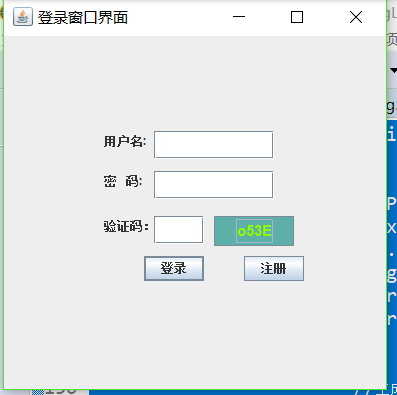
主要的方面是是包括,用户名、密码、验证码。以及输入数据所需要的文本框,对于验证码可以通过点击验证码进行修改。同时对于验证码的前景色和背景色同时都得到修改。
点击注册(这里还不完善)系统会提示你登录时需要输入的字符串,之后按照提示的字符串进行输入之后烯烃会对用户名以及密码验证码进行判断。可以通过enter直接进行登录二不用点击相应的按钮,之后如果错误会清空所输入的东西让您继续输入。 输入成功后即完成简单的登录。
重要内容是验证码的随机产生并进行显示。可以控制验证码的颜色以及字体还有大小。
package com.登录窗口;

    //模拟登录窗口

    import java.util.Random;

    import java.awt.Color;

    import java.awt.Font;

    import java.awt.event.ActionEvent;

    import java.awt.event.ActionListener;

    import javax.swing.*;

    public class DengLu  extends JFrame

    {

        /**

         *

         */

        private static final long serialVersionUID = 1L;//系统进行的添加

        static String wen=new String();

        private JLabel yonghula;

        private JLabel mimala;

        private JLabel yanzhengla;

        private JTextField yonghutxt;

        private JPasswordField mimatxt;

        private JTextField yanzhengtxt;

        private JButton anniu1bt;

        private JButton anniu2bt;

        private JButton mianban;

         public Color getRandomColor()

         {//获得随机颜色

             Random r=new Random();

             int R=r.nextInt(255),G=r.nextInt(255),B=r.nextInt(255);

              return new Color(R,G,B);

         }

        public String random()

        {

            Random r=new Random();

                String result = "";//随机产生四个数字或者是字母

                for(int i=0;i<4;i++){

                    int shuzi;

                    //生成一个1~3的int型的整数

                    shuzi=(r.nextInt(3)+1);

                     if(shuzi==1){//数字

                        shuzi=(r.nextInt(8)+1);

                        result=result+shuzi;

                    }

                    else if(shuzi==2){//大写字母

                        shuzi=(r.nextInt(25)+97);

                        result=result+(char)shuzi;

                    }

                    else {//小写字母

                        shuzi=(r.nextInt(25)+65);

                        result=result+(char)shuzi;

                    }

                }

                return result;

        }

        public DengLu()

        {

            this.setTitle("登录窗口界面");

            //用户的文本

            yonghula=new JLabel();

            yonghula.setText("用户名:");

            yonghula.setSize(60,50);

            yonghula.setLocation(100,80);

            //用户的输入框

            yonghutxt=new JTextField();

            yonghutxt.setSize(120,28);

            yonghutxt.setLocation(150,95);

            //密码文本

            mimala=new JLabel();

            mimala.setText("密   码:");

            mimala.setSize(50,50);

            mimala.setLocation(100,120);

            //密码输入框

            mimatxt=new JPasswordField();

            mimatxt.setEchoChar('$');

            mimatxt.setSize(120,28);

            mimatxt.setLocation(150,135);

            //登录按钮

            anniu1bt=new JButton("登录");

            anniu1bt.setSize(60,25);

            anniu1bt.setLocation(140,220);

            //注册按钮

            anniu2bt = new JButton("注册");

            anniu2bt.setSize(60, 25);

            anniu2bt.setLocation(240, 220);

            //验证码文本

            yanzhengla=new JLabel();

            yanzhengla.setText("验证码:");

            yanzhengla.setSize(70, 50);

            yanzhengla.setLocation(100,165);

            //验证码文本框

            yanzhengtxt= new JTextField();

            yanzhengtxt.setSize(50, 28);

            yanzhengtxt.setLocation(150, 180);

            //验证码

            mianban = new JButton();

            mianban.setSize(80, 30);

            mianban.setLocation(210, 180);

            wen=random();

            mianban.setText(wen);

            mianban.setFont(new Font("华文行楷",Font.BOLD,15));

            //判断

            anniu1bt.addActionListener(new ActionListener() {

                public void actionPerformed(ActionEvent arg0) {

                    if(yonghutxt.getText().trim().equals("dazhi")&&new String(mimatxt.getPassword()).trim().equals("dazhi666")&&yanzhengtxt.getText().trim().equals(wen))

                    {

                        JOptionPane.showMessageDialog(null, "登陆成功!");

                        System.exit(-1);

                    }

                    else if(yonghutxt.getText().trim().equals(""))

                        JOptionPane.showMessageDialog(null, "用户名不能为空");

                    else if(new String(mimatxt.getPassword()).trim().equals(""))

                        JOptionPane.showMessageDialog(null, "密码不能为空");

                    else if(yanzhengtxt.getText().trim().equals(""))

                        JOptionPane.showMessageDialog(null, "验证码不能为空");

                    else

                        JOptionPane.showMessageDialog(null, "登录错误");

                    yonghutxt.setText("");

                    mimatxt.setText("");

                    yanzhengtxt.setText("");

                    mianban.setBackground(getRandomColor());

                    mianban.setForeground(getRandomColor());

                    Random r=new Random();

                       String result = "";//随机产生四个数字或者是字母

                       for(int i=0;i<4;i++){

                           int shuzi;

                           //生成一个1~3的int型的整数

                           shuzi=(r.nextInt(3)+1);

                            if(shuzi==1){//数字

                               shuzi=(r.nextInt(8)+1);

                               result=result+shuzi;

                           }

                           else if(shuzi==2){//大写字母

                               shuzi=(r.nextInt(25)+97);

                               result=result+(char)shuzi;

                           }

                           else {//小写字母

                               shuzi=(r.nextInt(25)+65);

                               result=result+(char)shuzi;

                           }

                       }

                    wen=result;

                    mianban.setText(wen);

                }

            });

            //验证码处理

            anniu2bt.addActionListener(new ActionListener() {

                public void actionPerformed(ActionEvent arg0) {

                    // TODO 自动生成的方法存根

                    JOptionPane.showMessageDialog(null, "注册成功\n用户名:dazhi\n密码:dazhi666");

                       yonghutxt.setText("");

                       mimatxt.setText("");

                       yanzhengtxt.setText("");

                       Random r=new Random();

                       String result = "";//随机产生四个数字或者是字母

                       for(int i=0;i<4;i++){

                           int shuzi;

                           //生成一个1~3的int型的整数

                           shuzi=(r.nextInt(3)+1);

                        if(shuzi==1){//数字

                               shuzi=(r.nextInt(8)+1);

                               result=result+shuzi;

                           }

                           else if(shuzi==2){//大写字母

                               shuzi=(r.nextInt(25)+97);

                               result=result+(char)shuzi;

                           }

                           else {//小写字母

                               shuzi=(r.nextInt(25)+65);

                               result=result+(char)shuzi;

                           }

                       }

                       wen=result;

                       mianban.setText(wen);

                }

                });

            //重新获取验证码

           mianban.addActionListener(new ActionListener() {

                public void actionPerformed(ActionEvent arg0) {

                    mianban.setBackground(getRandomColor());

                    mianban.setForeground(getRandomColor());

                    Random r=new Random();

                       String result = "";//随机产生四个数字或者是字母(大写后者小写)

                       for(int i=0;i<4;i++){

                           int shuzi;

                           //生成一个1~3的int型的整数

                           shuzi=(r.nextInt(3)+1);

                            if(shuzi==1){//数字

                               shuzi=(r.nextInt(8)+1);

                               result=result+shuzi;

                           }

                           else if(shuzi==2){//大写字母

                               shuzi=(r.nextInt(25)+97);

                               result=result+(char)shuzi;

                           }

                           else {//小写字母

                               shuzi=(r.nextInt(25)+65);

                               result=result+(char)shuzi;

                           }

                       }

                    wen=result;

                    mianban.setText(wen);

                }

            });

         this.setLayout(null);//告知管理器这里不用布局管理器

         this.getRootPane().setDefaultButton(anniu1bt);//按回车需要执行的按钮操作

         this.setSize(400, 400);

         this.add(yonghula);

         this.add(yonghutxt);

         this.add(mimala);

         this.add(mimatxt);

         this.add(mimala);

         this.add(yanzhengla);

         this.add(yanzhengtxt);

         this.add(anniu1bt);

         this.add(anniu2bt);

         this.add(mianban);

         this.setVisible(true);//使窗口可视

         this.setResizable(true);//生成的窗口是否可以自由改变大小

         this.setDefaultCloseOperation(WindowConstants.EXIT_ON_CLOSE);

        }

        public static void main(String[] args)

        {

            new DengLu();

        }

    }
登录窗口java的更多相关文章
- 课程登记窗口java
设计窗口,实现课程的登记,并且将相应的数据写入文件之中.保证的是课程名称不可以重复,对于任课老师必须是在已经设定好的五位老师之中.并且上课地点也是在预先设定的范围内.窗口可以持续进行保存,数据将在判断 ...
- 【转】【WPF】WPF 登录窗口关闭时打开主窗口
在WPF中设计登录窗口关闭时打开主窗口,自动生成的App.xaml不能满足要求, 1.把App.xaml的属性窗口中的生成操作设定为 无 2.添加Program类 static class Progr ...
- SourceTree不出现用户登录窗口,提示错误fatal: unable to access'...'; error setting certificate verify locations
SourceTree不出现用户登录窗口,提示错误fatal: unable to access'...'; error setting certificate verify locations; .. ...
- QUI操作超时弹出登录窗口登录的处理方式
在使用QUI开发的业务系统中,如果长时间没操作,session过期后,再次操作系统超时会自动跳转到登陆页面,如果当前有一些操作没有保存,需要重新登录后再次填写信息,用户体验很不好! 为了避免超时后页面 ...
- C#实现登录窗口(不用隐藏)
C#登录窗口的实现,特点就是不用隐藏,感兴趣的朋友不要错过 (1).在程序入口处,打开登录窗口 复制代码代码如下: static void Main() { Application.EnableV ...
- 基于WebForm+EasyUI的业务管理系统形成之旅 -- 登录窗口(Ⅱ)
上篇<基于WebForm+EasyUI的业务管理系统形成之旅 -- 系统设置>,主要是介绍系统浏览器在线下载安装,这些前期准备是非常重要的. 最近忙于将工程管理系统中各个模块,用业务流程方 ...
- 高仿QQ即时聊天软件开发系列之三登录窗口用户选择下拉框
上一篇高仿QQ即时聊天软件开发系列之二登录窗口界面写了一个大概的布局和原理 这一篇详细说下拉框的实现原理 先上最终效果图 一开始其实只是想给下拉框加一个placeholder效果,让下拉框在未选择未输 ...
- 高仿QQ即时聊天软件开发系列之二登录窗口界面
继上一篇高仿QQ即时聊天软件开发系列之一开端之后,开始做登录窗口 废话不多说,先看效果,只有界面 可能还有一些细节地方没有做,例如那个LOGO嘛,不要在意这些细节 GIF虽短,可是这做起来真难,好吧因 ...
- C# WPF 建立无边框(标题栏)的登录窗口
前言:笔者最近用c#写WPF做了一个项目,此前未曾做过完整的WPF项目,算是一边学一边用,网上搜了不少资料,效率当然是不敢恭维的,有时会在一些很简单的问题上纠结很长时间,血与泪的教训可不少. 不过,正 ...
随机推荐
- Element UI中的上传文件功能
上传文件给后台: <el-upload style="display:inline-block" :limit=" class="upload-demo& ...
- 从源码看 PHP 7 数组的实现
本文所用源码为 PHP 7.4.4 的版本. PHP 7 数组概述 PHP 中的数组实际上是一个有序映射.映射是一种把 values 关联到 keys 的类型.此类型在很多方面做了优化,因此可以把它当 ...
- 将xml处理为json对象数组
function xmlStr2js(xmlStr) { var tagNames = xmlStr.match(/<\w+>/g) tagNames = deWeightTagNames ...
- foobox,基于foobar2000汉化版的CUI配置整合版
名 称:foobox 作 者:dreamawake 发布博客:https://www.cnblogs.com/foobox/ GitHub: https://github.com/dream7180/ ...
- 我用STM32MP1做了个疫情监控平台2—Qt环境搭建
目录 1.嵌入式Qt简介 2.查看开发板Qt库的版本 3.主机搭建Qt环境 4.第一个Qt程序--Hello World 5.一些问题 @ 1.嵌入式Qt简介 Qt 是一个跨平台的应用程序开发框架.使 ...
- thinkphp5.0.*命令执行批量脚本
import requests import Queue import threading import time user_agent = "Mozilla/5.0 (Windows NT ...
- 强化学习之七:Visualizing an Agent’s Thoughts and Actions
本文是对Arthur Juliani在Medium平台发布的强化学习系列教程的个人中文翻译,该翻译是基于个人分享知识的目的进行的,欢迎交流!(This article is my personal t ...
- Ubuntu16.04下安装搜狗输入法及实现中英文转换问题
1.问题描述 版本信息:Ubuntu16.04 解决问题:搜狗输入法的安装 2.解决办法 STEP1:搜索搜狗输入法for Linux --> 选择64bit --> 下载得到一个sogo ...
- Android菜单(menu)
Android 菜单 我们继续来进行学习,今天写一下在软件中用的还算较多的菜单. 1.Menu 菜单,很显然,作用就是点击不同的选项触发不同的方法.现在在安卓使用中推荐使用ActionBar,但这里 ...
- 记录一个不同的流媒体网站实现方法,和用Python爬虫爬它的坑
今天找到一片电影,想把它下载下来. 先开Networks工具分析一下: 初步分析发现,视频加载时会拉取TS格式的文件,推测这是一个m3u8的索引,记录着几百段TS文件,这样方便快进时加载. 但是实际分 ...