
包格式及IP地址,网络层协议
包格式及IP地址,网络层协议
1 案例1:配置静态路由
1.1 问题
配置路由接口IP地址并通过静态路由的配置实现全网的互通。
1.2 方案
按如下网络拓扑配置接口IP地址并通过静态路由的配置实现全网的互通如图-1所示:
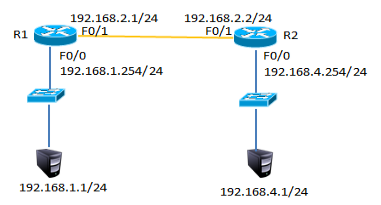
图-1
1.3 步骤
实现此案例需要按照如下步骤进行。
步骤一:配置静态路由
1)R1上配置接口IP
- R1(config)#interface fastEthernet 0/0
- R1(config-if)#ip address 192.168.1.254 255.255.255.0
- R1(config-if)#no shutdown
- R1(config-if)#exit
- R1(config)#interface fastEthernet 0/1
- R1(config-if)#ip address 192.168.2.1 255.255.255.0
- R1(config-if)#no shutdown
2)R2上配置接口IP
- R2(config)#interface fastEthernet 0/1
- R2(config-if)#ip address 192.168.2.2 255.255.255.0
- R2(config-if)#no shutdown
- R2config-if)#exit
- R2(config)#interface fastEthernet 0/0
- R2(config-if)#ip address 192.168.4.254 255.255.255.0
- R2(config-if)#no shutdown
3)R1上添加静态路由
- R1(config)#ip route 192.168.4.0 255.255.255.0 192.168.2.2
4)R1上查看路由表
- R1#show ip route
- Codes: C - connected, S - static, I - IGRP, R - RIP, M - mobile, B - BGP
- D - EIGRP, EX - EIGRP external, O - OSPF, IA - OSPF inter area
- N1 - OSPF NSSA external type 1, N2 - OSPF NSSA external type 2
- E1 - OSPF external type 1, E2 - OSPF external type 2, E - EGP
- i - IS-IS, L1 - IS-IS level-1, L2 - IS-IS level-2, ia - IS-IS inter area
- * - candidate default, U - per-user static route, o - ODR
- P - periodic downloaded static route
- Gateway of last resort is not set
- C 192.168.1.0/24 is directly connected, FastEthernet0/0
- C 192.168.2.0/24 is directly connected, FastEthernet0/1
- S 192.168.4.0/24 [1/0] via 192.168.2.2 //S表示静态路由
5)R2上添加静态路由
- R2(config)#ip route 192.168.1.0 255.255.255.0 192.168.2.1
6)R2上查看路由条目
- R2#show ip route
- Codes: C - connected, S - static, I - IGRP, R - RIP, M - mobile, B - BGP
- D - EIGRP, EX - EIGRP external, O - OSPF, IA - OSPF inter area
- N1 - OSPF NSSA external type 1, N2 - OSPF NSSA external type 2
- E1 - OSPF external type 1, E2 - OSPF external type 2, E - EGP
- i - IS-IS, L1 - IS-IS level-1, L2 - IS-IS level-2, ia - IS-IS inter area
- * - candidate default, U - per-user static route, o - ODR
- P - periodic downloaded static route
- Gateway of last resort is not set
- S 192.168.1.0/24 [1/0] via 192.168.2.1 //S表示静态路由
- C 192.168.2.0/24 is directly connected, FastEthernet0/1
- C 192.168.3.0/24 is directly connected, FastEthernet0/0
7)配置PC1的IP地址为192.168.1.1,网关为192.168.1.254
8)配置PC2的IP地址为192.168.4.1,网关为192.168.4.254
9)测试网络连通性,PC1 ping 192.168.4.1
- PC>ping 192.168.4.1
- Pinging 192.168.4.1 with 32 bytes of data:
- Reply from 192.168.4.1: bytes=32 time=1ms TTL=126
- Reply from 192.168.4.1: bytes=32 time=11ms TTL=126
- Reply from 192.168.4.1: bytes=32 time=10ms TTL=126
- Reply from 192.168.4.1: bytes=32 time=11ms TTL=126
- Ping statistics for 192.168.4.1:
- Packets: Sent = 4, Received = 4, Lost = 0 (0% loss),
- Approximate round trip times in milli-seconds:
- Minimum = 1ms, Maximum = 11ms, Average = 8ms
2 案例2:配置浮动路由
2.1 问题
配置浮动静态路由
2.2 方案
按如下网络拓扑配置接口IP地址配置浮动路由实现链路的冗余,如图-2所示
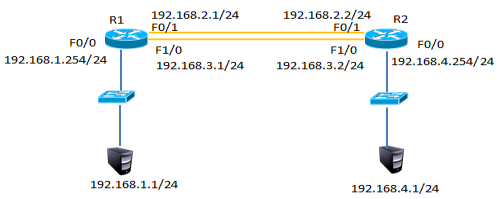
图-2
2.3 步骤
实现此案例需要按照如下步骤进行。
步骤一:配置静态路由并添加模块
1)R1上配置接口IP
在以上静态路由实验的基础上,先分别进入R1与R2的特权模式输入write命令保存配置信息,然后分别进入R1与R2的物理配置界面,点击开关按钮关闭路由器,添加NM-1FE-TX模块并再次点击开关按钮,如下图-3所示。
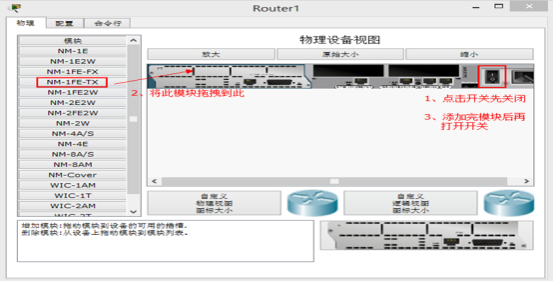
图-3
2)添加模块后将R1的F1/0接口连接到R2的F1/0接口修改拓扑如下图-4所示:
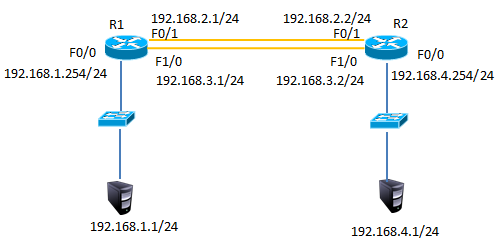
图-4
3)配置R1的F1/0接口IP
- R1(config)#interface fastEthernet 1/0
- R1(config-if)#ip address 192.168.3.1 255.255.255.0
- R1(config-if)#no shutdown
4)配置R2的F1/0接口IP
- R2(config)#interface fastEthernet 1/0
- R2(config-if)#ip address 192.168.3.2 255.255.255.0
- R2(config-if)#no shutdown
5)R1上添加静态浮动路由
- R1(config)#ip route 192.168.4.0 255.255.255.0 192.168.3.2 50 //管理距离50
6)R2上添加静态浮动路由
- R2(config)#ip route 192.168.1.0 255.255.255.0 192.168.3.1 50 //管理距离50
7)R1上查看路由表
- R1#show ip route
- Codes: C - connected, S - static, I - IGRP, R - RIP, M - mobile, B - BGP
- D - EIGRP, EX - EIGRP external, O - OSPF, IA - OSPF inter area
- N1 - OSPF NSSA external type 1, N2 - OSPF NSSA external type 2
- E1 - OSPF external type 1, E2 - OSPF external type 2, E - EGP
- i - IS-IS, L1 - IS-IS level-1, L2 - IS-IS level-2, ia - IS-IS inter area
- * - candidate default, U - per-user static route, o - ODR
- P - periodic downloaded static route
- Gateway of last resort is not set
- C 192.168.1.0/24 is directly connected, FastEthernet0/0
- C 192.168.2.0/24 is directly connected, FastEthernet0/1
- C 192.168.3.0/24 is directly connected, FastEthernet1/0
- S 192.168.4.0/24 [1/0] via 192.168.2.2 //只有下一跳为192.168.2.2的静态路由
8)禁用F/01接口
- R1(config)#interface fastEthernet 0/1
- R1(config-if)#shutdown
9)R1上查看路由表
- C 192.168.1.0/24 is directly connected, FastEthernet0/0
- S 192.168.4.0/24 [50/0] via 192.168.3.2//下一跳接口为192.168.4.2的路由生效
- C 192.168.4.0/24 is directly connected, FastEthernet1/0
10)测试网络连通性,PC1 ping 192.168.4.1
- PC>ping 192.168.4.1
- Pinging 192.168.4.1 with 32 bytes of data:
- Reply from 192.168.4.1: bytes=32 time=0ms TTL=126
- Reply from 192.168.4.1: bytes=32 time=10ms TTL=126
- Reply from 192.168.4.1: bytes=32 time=11ms TTL=126
- Reply from 192.168.4.1: bytes=32 time=1ms TTL=126
- Ping statistics for 192.168.4.1:
- Packets: Sent = 4, Received = 4, Lost = 0 (0% loss),
- Approximate round trip times in milli-seconds:
- Minimum = 0ms, Maximum = 11ms, Average = 5ms
3 案例3:配置多路由的静态路由
3.1 问题
配置多路由的静态路由
3.2 方案
网络环境及IP地址规划,如图-5所示
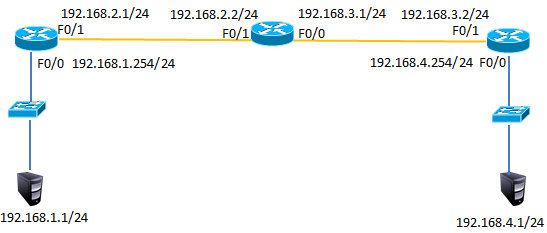
图-5
3.3 步骤
实现此案例需要按照如下步骤进行。
步骤一:配置路由IP和静态路由
1) R1上配置接口IP
- Router(config)#interface fastEthernet 0/0
- R1(config-if)#ip address 192.168.1.254 255.255.255.0
- R1(config-if)#no shutdown
- R1(config-if)#exit
- R1(config)#interface fastEthernet 0/1
- R1(config-if)#ip address 192.168.2.1 255.255.255.0
- R1(config-if)#no shutdown
2)R2上配置接口IP
- R2(config)#interface f0/1
- R2(config-if)#ip address 192.168.2.2 255.255.255.0
- R2(config-if)#no shutdown
- R2(config-if)#exit
- R2(config)#interface fastEthernet 0/0
- R2(config-if)#ip address 192.168.3.1 255.255.255.0
- R2(config-if)#no shutdown
3)R3上配置接口IP
- R3(config)#interface fastEthernet 0/1
- R3(config-if)#ip address 192.168.3.2 255.255.255.0
- R3(config-if)#no shutdown
- R3(config-if)#exit
- R3(config)#interface fastEthernet 0/0
- R3(config-if)#ip address 192.168.4.254 255.255.255.0
- R3(config-if)#no shutdown
4)R1、R2、R3上分别添加静态路由
- R1(config)#ip route 192.168.3.0 255.255.255.0 192.168.2.2
- R1(config)#ip route 192.168.4.0 255.255.255.0 192.168.2.2
- R2(config)#ip route 192.168.1.0 255.255.255.0 192.168.2.1
- R2(config)#ip route 192.168.4.0 255.255.255.0 192.168.3.2
- R3(config)#ip route 192.168.1.0 255.255.255.0 192.168.3.1
- R3(config)#ip route 192.168.2.0 255.255.255.0 192.168.3.1
5)R1上查看路由表
- R1#show ip route
- Codes: C - connected, S - static, I - IGRP, R - RIP, M - mobile, B - BGP
- D - EIGRP, EX - EIGRP external, O - OSPF, IA - OSPF inter area
- N1 - OSPF NSSA external type 1, N2 - OSPF NSSA external type 2
- E1 - OSPF external type 1, E2 - OSPF external type 2, E - EGP
- i - IS-IS, L1 - IS-IS level-1, L2 - IS-IS level-2, ia - IS-IS inter area
- * - candidate default, U - per-user static route, o - ODR
- P - periodic downloaded static route
- Gateway of last resort is not set
- C 192.168.1.0/24 is directly connected, FastEthernet0/0
- C 192.168.2.0/24 is directly connected, FastEthernet0/1
- S 192.168.3.0/24 [1/0] via 192.168.2.2 //静态路由
- S 192.168.4.0/24 [1/0] via 192.168.2.2 //静态路由
6)R2上查看路由表
- R2#show ip route
- Codes: C - connected, S - static, I - IGRP, R - RIP, M - mobile, B - BGP
- D - EIGRP, EX - EIGRP external, O - OSPF, IA - OSPF inter area
- N1 - OSPF NSSA external type 1, N2 - OSPF NSSA external type 2
- E1 - OSPF external type 1, E2 - OSPF external type 2, E - EGP
- i - IS-IS, L1 - IS-IS level-1, L2 - IS-IS level-2, ia - IS-IS inter area
- * - candidate default, U - per-user static route, o - ODR
- P - periodic downloaded static route
- Gateway of last resort is not set
- S 192.168.1.0/24 [1/0] via 192.168.2.1 //静态路由
- C 192.168.2.0/24 is directly connected, FastEthernet0/1
- C 192.168.3.0/24 is directly connected, FastEthernet0/0
- S 192.168.4.0/24 [1/0] via 192.168.3.2 //静态路由
7)R3上查看路由表
- R3#show ip route
- Codes: C - connected, S - static, I - IGRP, R - RIP, M - mobile, B - BGP
- D - EIGRP, EX - EIGRP external, O - OSPF, IA - OSPF inter area
- N1 - OSPF NSSA external type 1, N2 - OSPF NSSA external type 2
- E1 - OSPF external type 1, E2 - OSPF external type 2, E - EGP
- i - IS-IS, L1 - IS-IS level-1, L2 - IS-IS level-2, ia - IS-IS inter area
- * - candidate default, U - per-user static route, o - ODR
- P - periodic downloaded static route
- Gateway of last resort is not set
- S 192.168.1.0/24 [1/0] via 192.168.3.1 //静态路由
- S 192.168.2.0/24 [1/0] via 192.168.3.1 //静态路由
- C 192.168.3.0/24 is directly connected, FastEthernet0/1
- C 192.168.4.0/24 is directly connected, FastEthernet0/0
8)按图-4配置PC的IP地址
9)测试网络连通性,PC1 ping 192.168.2.2、192.168.3.1、192.168.3.2、192.168.4.1
- PC>ping 192.168.2.2 //ping 192.168.2.2
- Pinging 192.168.2.2 with 32 bytes of data:
- Reply from 192.168.2.2: bytes=32 time=0ms TTL=254
- Reply from 192.168.2.2: bytes=32 time=0ms TTL=254
- Reply from 192.168.2.2: bytes=32 time=0ms TTL=254
- Reply from 192.168.2.2: bytes=32 time=0ms TTL=254
- Ping statistics for 192.168.2.2:
- Packets: Sent = 4, Received = 4, Lost = 0 (0% loss),
- Approximate round trip times in milli-seconds:
- Minimum = 0ms, Maximum = 0ms, Average = 0ms
- PC>ping 192.168.3.1 //ping 192.168.3.1
- Pinging 192.168.3.1 with 32 bytes of data:
- Reply from 192.168.3.1: bytes=32 time=0ms TTL=254
- Reply from 192.168.3.1: bytes=32 time=3ms TTL=254
- Reply from 192.168.3.1: bytes=32 time=0ms TTL=254
- Reply from 192.168.3.1: bytes=32 time=0ms TTL=254
- Ping statistics for 192.168.3.1:
- Packets: Sent = 4, Received = 4, Lost = 0 (0% loss),
- Approximate round trip times in milli-seconds:
- Minimum = 0ms, Maximum = 3ms, Average = 0ms
- PC>ping 192.168.3.2 //ping 192.168.3.2
- Pinging 192.168.3.2 with 32 bytes of data:
- Reply from 192.168.3.2: bytes=32 time=0ms TTL=253
- Reply from 192.168.3.2: bytes=32 time=12ms TTL=253
- Reply from 192.168.3.2: bytes=32 time=0ms TTL=253
- Reply from 192.168.3.2: bytes=32 time=12ms TTL=253
- Ping statistics for 192.168.3.2:
- Packets: Sent = 4, Received = 4, Lost = 0 (0% loss),
- Approximate round trip times in milli-seconds:
- Minimum = 0ms, Maximum = 12ms, Average = 6ms
- PC>ping 192.168.4.1 //ping 192.168.4.1
- Pinging 192.168.4.1 with 32 bytes of data:
- Reply from 192.168.4.1: bytes=32 time=0ms TTL=125
- Reply from 192.168.4.1: bytes=32 time=10ms TTL=125
- Reply from 192.168.4.1: bytes=32 time=0ms TTL=125
- Reply from 192.168.4.1: bytes=32 time=22ms TTL=125
- Ping statistics for 192.168.4.1:
- Packets: Sent = 4, Received = 4, Lost = 0 (0% loss),
- Approximate round trip times in milli-seconds:
- Minimum = 0ms, Maximum = 22ms, Average = 8ms
4 案例4:配置默认路由
4.1 问题
配置默认路由
4.2 方案
网络环境及IP地址规划,如图-6所示

图-6
4.3 步骤
1)在案例3基础上删除R1与R3的静态路由
- R1(config)#no ip route 192.168.3.0 255.255.255.0 192.168.2.2
- R1(config)#no ip route 192.168.4.0 255.255.255.0 192.168.2.2
- R3(config)#no ip route 192.168.1.0 255.255.255.0 192.168.3.1
- R3(config)#no ip route 192.168.2.0 255.255.255.0 192.168.3.1
2)R1、R3添加默认路由
- R1(config)#ip route 0.0.0.0 0.0.0.0 192.168.2.2
- R3(config)#ip route 0.0.0.0 0.0.0.0 192.168.3.1
- 12)R1上查看路由表
- R1#show ip route
- Codes: C - connected, S - static, I - IGRP, R - RIP, M - mobile, B - BGP
- D - EIGRP, EX - EIGRP external, O - OSPF, IA - OSPF inter area
- N1 - OSPF NSSA external type 1, N2 - OSPF NSSA external type 2
- E1 - OSPF external type 1, E2 - OSPF external type 2, E - EGP
- i - IS-IS, L1 - IS-IS level-1, L2 - IS-IS level-2, ia - IS-IS inter area
- * - candidate default, U - per-user static route, o - ODR
- P - periodic downloaded static route
- Gateway of last resort is 192.168.2.2 to network 0.0.0.0
- C 192.168.1.0/24 is directly connected, FastEthernet0/0
- C 192.168.2.0/24 is directly connected, FastEthernet0/1
- S* 0.0.0.0/0 [1/0] via 192.168.2.2 //默认路由
3)R1、R3上查看路由表
- R1#show ip route
- Codes: C - connected, S - static, I - IGRP, R - RIP, M - mobile, B - BGP
- D - EIGRP, EX - EIGRP external, O - OSPF, IA - OSPF inter area
- N1 - OSPF NSSA external type 1, N2 - OSPF NSSA external type 2
- E1 - OSPF external type 1, E2 - OSPF external type 2, E - EGP
- i - IS-IS, L1 - IS-IS level-1, L2 - IS-IS level-2, ia - IS-IS inter area
- * - candidate default, U - per-user static route, o - ODR
- P - periodic downloaded static route
- Gateway of last resort is 192.168.3.1 to network 0.0.0.0
- C 192.168.1.0/24 is directly connected, FastEthernet0/0
- C 192.168.2.0/24 is directly connected, FastEthernet0/1
- S* 0.0.0.0/0 [1/0] via 192.168.2.2 //默认路由
- R3#show ip route
- Codes: C - connected, S - static, I - IGRP, R - RIP, M - mobile, B - BGP
- D - EIGRP, EX - EIGRP external, O - OSPF, IA - OSPF inter area
- N1 - OSPF NSSA external type 1, N2 - OSPF NSSA external type 2
- E1 - OSPF external type 1, E2 - OSPF external type 2, E - EGP
- i - IS-IS, L1 - IS-IS level-1, L2 - IS-IS level-2, ia - IS-IS inter area
- * - candidate default, U - per-user static route, o - ODR
- P - periodic downloaded static route
- Gateway of last resort is 192.168.3.1 to network 0.0.0.0
- C 192.168.3.0/24 is directly connected, FastEthernet0/1
- C 192.168.4.0/24 is directly connected, FastEthernet0/0
- S* 0.0.0.0/0 [1/0] via 192.168.3.1 //默认路由
4)测试网络连通性,PC1 ping 192.168.4.1
- PC>ping 192.168.4.1
- Pinging 192.168.4.1 with 32 bytes of data:
- Reply from 192.168.4.1: bytes=32 time=1ms TTL=125
- Reply from 192.168.4.1: bytes=32 time=0ms TTL=125
- Reply from 192.168.4.1: bytes=32 time=14ms TTL=125
- Reply from 192.168.4.1: bytes=32 time=14ms TTL=125
- Ping statistics for 192.168.4.1:
- Packets: Sent = 4, Received = 4, Lost = 0 (0% loss),
- Approximate round trip times in milli-seconds:
- Minimum = 0ms, Maximum = 14ms, Average = 7ms = 0ms,平均 = 0ms
包格式及IP地址,网络层协议的更多相关文章
- 详解BLE 空中包格式—兼BLE Link layer协议解析
BLE有几种空中包格式?常见的PDU命令有哪些?PDU和MTU的区别是什么?DLE又是什么?BLE怎么实现重传的?BLE ACK机制原理是什么?希望这篇文章能帮你回答以上问题. 虽然BLE空中包(pa ...
- DNS反射放大攻击分析——DNS反射放大攻击主要是利用DNS回复包比请求包大的特点,放大流量,伪造请求包的源IP地址为受害者IP,将应答包的流量引入受害的服务器
DNS反射放大攻击分析 摘自:http://www.shaojike.com/2016/08/19/DNS%E6%94%BE%E5%A4%A7%E6%94%BB%E5%87%BB%E7%AE%80%E ...
- IP数据报格式和IP地址路由
一.IP数据报格式 IP数据报格式如下: 注:需要注意的是网络数据包以大端字节序传输,当然头部也得是大端字节序,也就是说: The most significant bit is numbered 0 ...
- 自定义Nginx日志格式获取IP地址的省市份信息
注:图片如果损坏,点击文章链接:https://www.toutiao.com/i6806672112477012493/ 在linux中nginx日志产生的格式是下面的配置: $remote_add ...
- [转帖]IP /TCP协议及握手过程和数据包格式中级详解
IP /TCP协议及握手过程和数据包格式中级详解 https://www.toutiao.com/a6665292902458982926/ 写的挺好的 其实 一直没闹明白 网络好 广播地址 还有 网 ...
- LinuxC下获取UDP包中的路由目的IP地址和头标识目的地址
在接受到UDP包后,有时候我们需要根据所接收到得UDP包,获取它的路由目的IP地址和头标识目的地址. (一)主要的步骤: 在setsockopt中设置IP_PKTINFO,然后通过recvmsg来获取 ...
- 计算机网络中七层,五层,四层协议;IP 地址子网划分
七层协议: 7 应用层(http) 6 表示层(上层用户可以相互识别的数据:jpg) 5 会话层(不同主机不同线程间的通信) 4 运输层(tcp/ip:传输层提供端到端的透明数据服务)/差错控制和流量 ...
- 网络协议 2 - IP 地址和 MAC 地址
了解完网络协议,我们会发现,网络通信的五层模型里,有两个很重要的概念:IP 地址和 MAC 地址. 那么 IP 地址是怎么来的,又是怎么没的?MAC 地址与 IP 地址又有什么区别? 这回答上面问题前 ...
- 网络-数据包在路由转发过程中MAC地址和IP地址,变与不变
关于MAC地址和IP地址在传输过程中变与不变的问题: 结论:MAC地址在同一个广播域传输过程中是不变的,在跨越广播域的时候会发生改变的:而IP地址在传输过程中是不会改变的(除NAT的时候),总结为 路 ...
随机推荐
- 面试官系统精讲Java源码及大厂真题系列之Java线程安全的解决办法
1. 背景 1.1 static修饰类变量.方法.方法块. public + static = 该变量任何类都可以直接访问,而且无需初始化类,直接使用 类名.static 变量 1.2 多个线程同时 ...
- web安全测试--环境搭建
本博客主要作为作者的学习笔记,请勿装载. 作为一个安全测试的入门选手,一切操作在虚拟机中进行是最保险的. 第一先下载自己喜欢的虚拟机,我的笔记本用的VirtualBox(下载地址:https://ww ...
- 单片机基础——使用GPIO扫描检测按键
1. 准备工作 硬件准备 开发板首先需要准备一个小熊派IoT开发板,并通过USB线与电脑连接. 软件准备 需要安装好Keil - MDK及芯片对应的包,以便编译和下载生成的代码,可参考MDK安装教程 ...
- 5W随想
什么时候都要想5个W:what.where.when.why.who 比如:提bug的时候:这个问题是什么问题,在哪里发现的,什么时候发现的/什么时候修复好,怎么发现的/为什么是bug,谁发现的/指给 ...
- Simulink仿真入门到精通(十二) Publish发布M文件
12.1 M文件的注释 使用%进行注释. 连续多行注释Ctrl+R,取消注释Ctrl+T. 12.2 Cell模式 在MATLAB脚本文件中使用连续两个注释符,开启一个新的Cell块,%%后空一格追加 ...
- HTML实体符号代码
1. 特色的 © © © 版权标志 | | 竖线,常用作菜单或导航中的分隔符 · · · 圆点,有时被用来作为菜单分隔符 ↑ ↑ ↑ 上箭头,常用作网页“返回页面顶部”标识 € € € 欧元标识 ...
- 区间DP(力扣1000.合并石头的最低成本)
一.区间DP 顾名思义区间DP就是在区间上进行动态规划,先求出一段区间上的最优解,在合并成整个大区间的最优解,方法主要有记忆化搜素和递归的形式. 顺便提一下动态规划的成立条件是满足最优子结构和无后效性 ...
- C#的关键字Explicit 和 Implicit
一.explicit和implicit explicit 关键字用于声明必须使用强制转换来调用的用户定义的类型转换运算符:implicit 关键字用于声明隐式的用户自定义的类型转换运算符. 总结来说: ...
- 安卓手机tcpdump的使用
一.常规操作步骤 1. 手机要有root权限 2. 下载tcpdump http://www.strazzere.com/android/tcpdump 3. adb push c:\wherever ...
- javascript中indexOf()和lastIndexOf()详解
ECMAScript5为数组实例添加两方法:indexOf()和lastIndexOf().这两个方法接受两个参数:要查找的项和(可选的)表示查找起点位置的索引.其中,indexOf()方法从数组的开 ...