
MES Auto Logout
如果您在车间使用MES,可能存在这种情况有人在仍然登录的情况下偶尔离开终端。如果一段时间不使用终端,我们是否可以让用户自动注销。
1 首先,我们有一条using语句:
using System.Runtime.InteropServices
2 添加2个新类。
public class IdleEventArgs : EventArgs {

        private DateTime m_EventTime;

        public DateTime EventTime {

            get {

                return m_EventTime;

            }

        }

        public IdleEventArgs(DateTime timeOfEvent) {

            m_EventTime = timeOfEvent;

        }

    }

public class SystemIdleTimer : Component

{

	private const double INTERNAL_TIMER_INTERVAL = 550;

	[Description("Event that if fired when idle state is entered.")]

	public event OnEnterIdleStateEventHandler OnEnterIdleState;

	public delegate void OnEnterIdleStateEventHandler(object sender, IdleEventArgs e);

	[Description("Event that is fired when leaving idle state.")]

	public event OnExitIdleStateEventHandler OnExitIdleState;

	public delegate void OnExitIdleStateEventHandler(object sender, IdleEventArgs e);

	private System.Timers.Timer ticker;

	private int m_MaxIdleTime;

	private object m_LockObject;

	private bool m_IsIdle = false;

	[Description("Maximum idle time in seconds.")]

	public int MaxIdleTime {

		get { return m_MaxIdleTime; }

		set {

			if (value == 0) {

				throw new ArgumentException("MaxIdleTime must be larger then 0.");

			} else {

				m_MaxIdleTime = value;

			}

		}

	}

	public SystemIdleTimer()

	{

		m_LockObject = new object();

		ticker = new System.Timers.Timer(INTERNAL_TIMER_INTERVAL);

		ticker.Elapsed += InternalTickerElapsed;

	}

	public void Start()

	public void Stop()

	{

		ticker.Stop();

		lock (m_LockObject) {

			m_IsIdle = false;

		}

	}

	public bool IsRunning {

		get { return ticker.Enabled; }

	}

	private void InternalTickerElapsed(object sender, System.Timers.ElapsedEventArgs e)

	{

		uint idleTime = Win32Wrapper.GetIdle();

		if (idleTime > (MaxIdleTime * 1000)) {

			if (m_IsIdle == false) {

				lock (m_LockObject) {

					m_IsIdle = true;

				}

				IdleEventArgs args = new IdleEventArgs(e.SignalTime);

				if (OnEnterIdleState != null) {

					OnEnterIdleState(this, args);

				}

			}

		} else {

			if (m_IsIdle) {

				lock (m_LockObject) {

					m_IsIdle = false;

				}

				IdleEventArgs args = new IdleEventArgs(e.SignalTime);

				if (OnExitIdleState != null) {

					OnExitIdleState(this, args);

				}

			}

		}

	}

}

public class Win32Wrapper

{

	public struct LASTINPUTINFO

	{

		public uint cbSize;

		public uint dwTime;

	}

	[DllImport("User32.dll")]

	private static extern bool GetLastInputInfo(ref LASTINPUTINFO lii);

	public static uint GetIdle()

	{

		LASTINPUTINFO lii = new LASTINPUTINFO();

		lii.cbSize = Convert.ToUInt32((Marshal.SizeOf(lii)));

		GetLastInputInfo(ref lii);

		return Convert.ToUInt32(Environment.TickCount) - lii.dwTime;

	}

}
3 声明一新计时器对象的实例:
SystemIdleTimer idleTimer = new SystemIdleTimer();4 添加事件以处理用户何时空闲以及何时返回:
    private void idleTimer_OnEnterIdleState(object sender, IdleEventArgs args)

	{

		// This is where you put the code to deal with when the session has been detected

		// as entering an idle state

		MessageBox.Show("Get back to work Adam!");

		idleTimer.Start();

	}

	private void idleTimer_OnExitIdleState(object sender, IdleEventArgs args)

	{

		// This is where you put the code for when the session was idle and now has

		// been re-activated.  You might not need this for anything, but thought

		// it would be good to point out.

		MessageBox.Show("Good boy");

		idleTimer.Start();

	}

5 在表格加载时,将这些事件连接起来,并定义不活动的秒数,也可以根据具体情况进行调整:
private void MESMenu_Load(object sender, EventArgs args)
{
idleTimer.OnEnterIdleState += new SystemIdleTimer.OnEnterIdleStateEventHandler(idleTimer_OnEnterIdleState);
idleTimer.OnExitIdleState += new SystemIdleTimer.OnExitIdleStateEventHandler(idleTimer_OnExitIdleState);
idleTimer.MaxIdleTime = 10; // Seconds
idleTimer.Start();
}
6 最后,清理要处置的对象:public void DestroyCustomCode()
{
// ** Wizard Insert Location - Do not delete 'Begin/End Wizard Added Object Disposal' lines **
// Begin Wizard Added Object Disposal
// End Wizard Added Object Disposal
// Begin Custom Code Disposal
idleTimer.OnEnterIdleState -= new SystemIdleTimer.OnEnterIdleStateEventHandler(idleTimer_OnEnterIdleState);
idleTimer.OnExitIdleState -= new SystemIdleTimer.OnExitIdleStateEventHandler(idleTimer_OnExitIdleState);
idleTimer.Dispose();
// End Custom Code Disposal
}
现在您可以将此客制化保存到MES,运行它。如果10秒不移动鼠标会提醒您"Get Back To Work Adam", 只要您移动鼠标会提示"Good boy":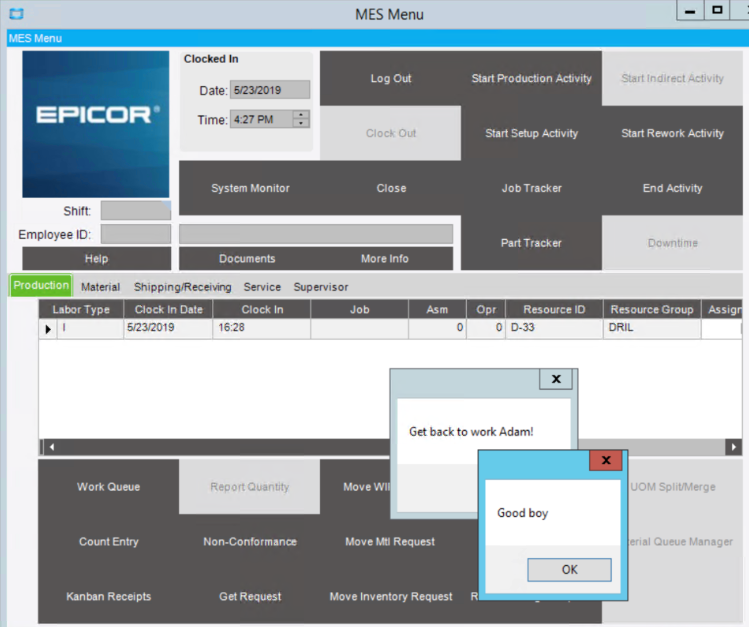
7 更新了OnEnterIdleState逻辑以调用LogOut,LogOut只是获取对按钮的引用并单击它:
private void idleTimer_OnEnterIdleState(object sender, IdleEventArgs args)

	{

		// This is where you put the code to deal with when the session has been detected

		// as entering an idle state

		this.LogOut();

		idleTimer.Start();

	}

	private void LogOut()

	{

		EpiButton btnLogOut = (EpiButton)csm.GetNativeControlReference("a2f6e795-4ab3-4121-bce4-e1d5f0881b0a");

		btnLogOut.PerformClick();

	} // LogOut()
如果这个博客对您有帮助,请帮忙给评论,谢谢!
如果您正在看这个并且意识到自己想要类似的东西,请联系我,谢谢!
MES Auto Logout的更多相关文章
- 关于linux系统安全配置脚本
本脚本是第二次更新,已经大量应用在某大型媒体网站体系中,加入了之前没有想到的一些安全设置.使用方法将其复制,保存为一个shell文件,比如security.sh.将其上传到Linux服务器上,执行sh ...
- RZ10
设定一些系统参数 例如在生成table maintenance的时候 由于表格结构复杂 导致生成维护程序时 超出了默认的内存限制 这时候可以通过RZ10 修改 zzta/dynpro_area ...
- linux运维安全工具集合[持续更新中..]
lynis 安全漏洞检测工具 https://cisofy.com/download/lynis/ https://cisofy.com/files/lynis-2.2.0.tar.gz ...
- Linux的系统安全设置Shell脚本
#!/bin/sh # desc: setup linux system security # powered by www.lvtao.net #account setup passwd -l xf ...
- I fullly understand why can not set "auto commit off" in sqlserver
This is xxxxx Because MES guy mistaken , the data was wrong and made system error then. After that I ...
- C++11特性——变量部分(using类型别名、constexpr常量表达式、auto类型推断、nullptr空指针等)
#include <iostream> using namespace std; int main() { using cullptr = const unsigned long long ...
- overflow:hidden与margin:0 auto之间的冲突
相对于父容器水平居中的代码margin:0 auto与overflow:hidden之间存在冲突.当这两个属性同时应用在一个DIV上时,在chrome浏览器中将无法居中.至于为啥我也不明白.
- Android Auto开发之一《开始学习Auto 》
共同学习,共同进步, 转载请注明出处.欢迎微信交流:sfssqs,申请注明"Android Car"字样 ================= =================== ...
- width:100%;与width:auto;的区别
<div> <p>1111</p> </div> div{ width:980px; background-color: #ccc; height:30 ...
随机推荐
- 痞子衡嵌入式:恩智浦SDK驱动代码风格检查工具预览版
大家好,我是痞子衡,是正经搞技术的痞子. 接上文 <恩智浦SDK驱动代码风格.模板.检查工具> 继续聊,是的,过去的三天里我花了一些时间做了一个基于 PyQt5 的 GUI 工具,可以帮助 ...
- Docker 技术系列之安装Docker Desktop for Mac
终于要进入到Docker技术系列了,感谢大家的持续关注. 为什么要选择Docker?因为Docker 轻巧快速,提供了可行.经济.高效的替代方案.举个例子,安装Nginx,Mysql,Redis等常用 ...
- Antd 表格内通过rowClassName实现隔行变色的显示方法(转载)
ant design中 table组件很方便,在项目中遇到了需要实现奇偶行颜色不同以方便阅读的功能,主要用到了rowClassName这一api,通过判断index的奇偶来实现不同的样式分配. row ...
- 什么是yarn,如何使用yarn安装项目依赖
一.yarn的简介: Yarn是facebook发布的一款取代npm的包管理工具. 二.yarn的特点: 1.速度超快. Yarn 缓存了每个下载过的包,所以再次使用时无需重复下载. 同时利用并行下载 ...
- 使用docker构建hadoop集群
docker的使用越来越普遍了,大家不知道docker的还需要进一步学习一下.这次咱们使用docker去进行hadoop集群的构建. 使用docker构建的好处真的很多,一台电脑上可以学习安装很多想做 ...
- 【Weiss】【第03章】练习3.12:单链表倒置
[练习3.12] a.编写一个非递归过程以O(N)时间反转单链表. b.使用常数附加空间编写一个过程以O(N)时间反转单链表. Answer: 这题的b貌似没啥意义,在a小题里直接用头插法,不断地将头 ...
- C++:利用全局钩子实现键盘锁
在家看网课,记笔记不方便.于是就想弄个键盘锁,方便学习(在寝室也好把外接键盘放上去打游戏). 其实这东西挺简单的,就三行代码. HHOOK hk; LRESULT CALLBACK kbproc(in ...
- channel的基本使用
1.管道分类 读写管道 只读管道 只写管道 缓冲通道 :创建时指定大小(如果不指定默认为非缓冲通道) 2.正确使用管道 管道关闭后自能读,不能写 写入管道不能超过管道的容量cap,满容量还写则会阻塞 ...
- OO课程的完结,软件工程学习的开始
目录 UML小结 阅读学习 大象:Thinking in UML UML精粹 UML和模式应用 本单元作业的架构设计 四个单元中架构设计及OO方法的演进 四个单元中测试与实践的演进 课程收获 三个具体 ...
- 「每日五分钟,玩转JVM」:两种算法
前言 上篇文章,我们了解了GC 的相关概念,这篇文章我们通过两个算法来了解如何去确定堆中的对象实例哪些是我们需要去回收的垃圾对象. 引用计数算法 引用计数法的原理很简单,就是在对象中维护一个计数器,当 ...