
swagger2 接口文档,整个微服务接口文档
1,因为整个微服务会有好多服务,比如会员服务,支付服务,订单服务,每个服务都集成了swagger
我们在访问的时候,不可能每个服务输入一个url 去访问,看起来很麻烦,所以我们需要在一个页面上集成整个微服务项目中所有的 swagger
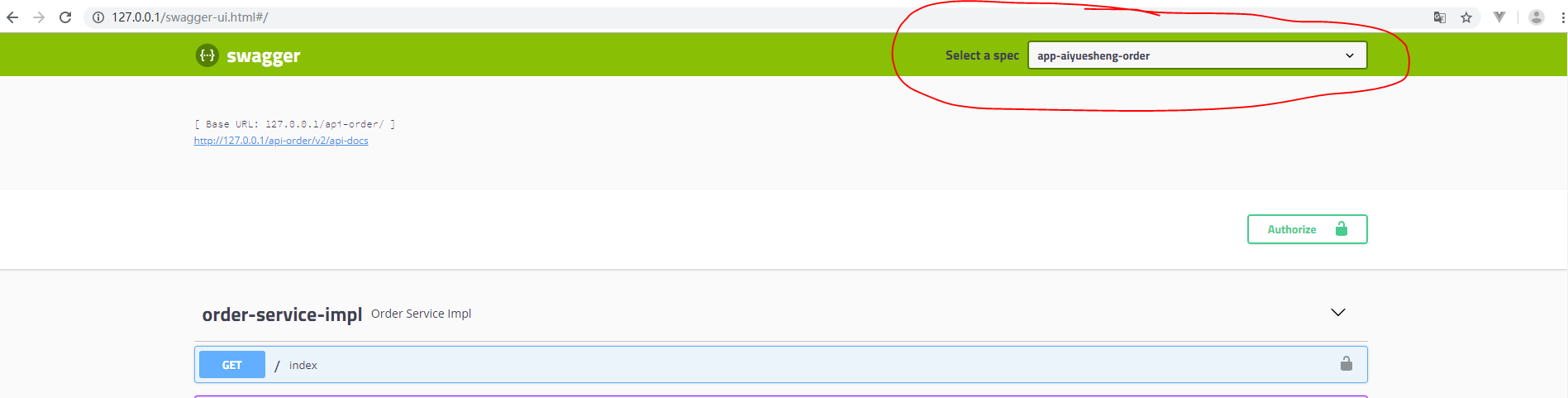
效果图:可以选择不同的应用,出来的是不同的swagger 接口文档
2,实现思路:
zuul 网关 + swagger
客户端访问一个应用,zuul 网关转发到相应的界面,看起来是在一个服务上的效果
3,eureka :注册中心
springcloud-config:注册中心:路由转发用配置中心做的,没有写在本地。可以参考springcloud-config 动态网关路由
springcloud-api-member-impl-service:在eureka 注册的服务是:app-aiyuesheng-member
springcloud-api-order-impl-service:在eureka 注册的服务是:app-aiyuesheng-order
springcloud-swagger2:swagger 服务
springcloud-zuul :zuul 网关服务
4,
第一步:
member 服务 和 order ,zuul 需要添加maven 依赖:
        <dependency>

            <groupId>com.spring4all</groupId>

            <artifactId>swagger-spring-boot-starter</artifactId>

            <version>1.7.0.RELEASE</version>

        </dependency>
第二步:
member ,order 配置文件添加:
##swagger扫包

swagger:

  base-package: com.aiyuesheng.api.impl
第三步:
swagger 的接口类的写法还是一样:
package com.aiyuesheng.api.impl;

import org.springframework.beans.factory.annotation.Autowired;

import org.springframework.web.bind.annotation.GetMapping;

import org.springframework.web.bind.annotation.PostMapping;

import org.springframework.web.bind.annotation.RequestMapping;

import org.springframework.web.bind.annotation.RestController;

import com.aiyuesheng.entity.Order;

import com.aiyuesheng.feign.OrderServiceFeign;

import com.netflix.hystrix.contrib.javanica.annotation.HystrixCommand;

import io.swagger.annotations.Api;

import io.swagger.annotations.ApiImplicitParam;

import io.swagger.annotations.ApiOperation;

@RestController

@Api("会员接口文档")

public class MemberServiceImpl {

    @Autowired

    private OrderServiceFeign orderServiceFeign;

    @ApiOperation("方法描述用例")

    @PostMapping("/swaggerIndex")

    public String swaggerMember() {

        return "swaggerIndex";

    }

    @ApiOperation("参数描述用例")

    @ApiImplicitParam(name = "name", value = "用户名", required = true, dataTypeClass = String.class)

    @GetMapping("/getAge")

    public String swaggerMemberParam(String userName) {

        return "chris";

    }

    @RequestMapping("/")

    public String index() {

        return "app-aiyuesheng-member";

    }

    // @HystrixCommand 默认开启服务隔离,是以线程池方式

    // @HystrixCommand 默认开启服务降级,fallbackMethod 方法名就是服务的降级名称

    // @HystrixCommand 默认开启服务熔断机制

    // @Hystrix 要禁止超时时间,默认1 秒,如果没有即使响应,会走业务逻辑,但是也会走服务降级方法,所以要禁止超时时间

    @HystrixCommand(fallbackMethod = "orderServiceFallback")

    @RequestMapping("/getOrder")

    public Order getOrder(String orderId) {

        System.out.println("orderToUserInfo:" + "当前线程池名称:" + Thread.currentThread().getName());

        return orderServiceFeign.getOrder(orderId);

    }

    @RequestMapping("/getOrder2")

    public Order getOrder2(String orderId) {

        System.out.println("orderToUserInfo:" + "当前线程池名称:" + Thread.currentThread().getName());

        return orderServiceFeign.getOrder(orderId);

    }

    @RequestMapping("/orderServiceFallback")

    public String orderServiceFallback() {

        return "服务器繁忙,请稍后重试";

    }

}
order 因为之前由feign 客户端调用,所以在父类里面也要加@Api()注解:
package com.aiyuesheng.api.impl;

import org.springframework.web.bind.annotation.GetMapping;

import org.springframework.web.bind.annotation.PostMapping;

import org.springframework.web.bind.annotation.RequestMapping;

import org.springframework.web.bind.annotation.RestController;

import com.aiyuesheng.api.IOrderService;

import com.aiyuesheng.entity.Order;

import io.swagger.annotations.Api;

import io.swagger.annotations.ApiImplicitParam;

import io.swagger.annotations.ApiOperation;

@RestController

@Api("订单接口文档")

public class OrderServiceImpl implements IOrderService {

    @ApiOperation("方法描述用例")

    @PostMapping("/swaggerIndex")

    public String swaggerOrder() {

        return "swaggerIndex";

    }

    @ApiOperation("参数描述用例")

    @ApiImplicitParam(name = "name", value = "用户名", required = true, dataTypeClass = String.class)

    @GetMapping("/getAge")

    public String swaggerOrderrParam(String userName) {

        return "chris";

    }

    @RequestMapping("/")

    public String index() {

        return "app-aiyuesheng-order";

    }

    @RequestMapping("/getOrder")

    public Order getOrder(String orderId) {

        Order order = new Order();

        order.setOrderId(orderId);

        order.setOrderName("订单名称");

        return order;

    }

}
父类:
@Api("订单接口文档")

public interface IOrderService {

    @RequestMapping("/getOrder")

    public Order getOrder(String orderId);

}
第四步:
启动类加上注解@EnableSwagger2Doc
@SpringBootApplication

@EnableEurekaClient

@EnableFeignClients

@EnableSwagger2Doc    //生成swagger文档

public class OrderApp {

    public static void main(String[] args) {

        SpringApplication.run(OrderApp.class, args);

    }

}
第五步:配置zuul:
package com.aiyuesheng;

import java.util.ArrayList;

import java.util.List;

import org.springframework.boot.SpringApplication;

import org.springframework.boot.autoconfigure.SpringBootApplication;

import org.springframework.boot.context.properties.ConfigurationProperties;

import org.springframework.cloud.client.discovery.EnableDiscoveryClient;

import org.springframework.cloud.context.config.annotation.RefreshScope;

import org.springframework.cloud.netflix.zuul.EnableZuulProxy;

import org.springframework.cloud.netflix.zuul.filters.ZuulProperties;

import org.springframework.context.annotation.Bean;

import org.springframework.context.annotation.Primary;

import org.springframework.stereotype.Component;

import com.spring4all.swagger.EnableSwagger2Doc;

import springfox.documentation.swagger.web.SwaggerResource;

import springfox.documentation.swagger.web.SwaggerResourcesProvider;

@EnableZuulProxy

@SpringBootApplication

@EnableDiscoveryClient

@EnableSwagger2Doc

public class ZuulApplication {

    public static void main(String[] args) {

        SpringApplication.run(ZuulApplication.class, args);

    }

    // @Bean

    // public TokenFilter accessFilter() {

    // return new TokenFilter();

    // }

    @RefreshScope

    @ConfigurationProperties("zuul")

    public ZuulProperties zuulProperties() {

        return new ZuulProperties();

    }

}

@Component

@Primary

class DocumentationConfig implements SwaggerResourcesProvider {

    @Override

    public List<SwaggerResource> get() {

        List resources = new ArrayList<>();

        resources.add(swaggerResource("app-aiyuesheng-member", "/api-member/v2/api-docs", "2.0"));

        resources.add(swaggerResource("app-aiyuesheng-order", "/api-order/v2/api-docs", "2.0"));

        return resources;

    }

    private SwaggerResource swaggerResource(String name, String location, String version) {

        SwaggerResource swaggerResource = new SwaggerResource();

        swaggerResource.setName(name);

        swaggerResource.setLocation(location);

        swaggerResource.setSwaggerVersion(version);

        return swaggerResource;

    }

}
zuul 的配置文件,回顾下,
spring:

  application:

    ####注册中心应用名称

    name:  service-zuul

  cloud:

    config:

    ####读取后缀

      profile: dev

      ####读取config-server注册地址

      discovery:

        service-id: config-server

        enabled: true

#####eureka服务注册地址

eureka:

  client:

    service-url:

           defaultZone: http://localhost:8100/eureka

server:

  port: 80

#配置手动实时刷新

#managementendpoints.web.exposure.include=*

management:

  endpoints:

    web:

      exposure:

        include: "*"
配置中心上的路由转发,回顾下:
### 配置网关反向代理

zuul:

  routes:

    api-member:

     ### 以 /api-member/访问转发到会员服务

      path: /api-member/**

      serviceId: app-aiyuesheng-member

    api-order:

        ### 以 /api-order/访问转发到订单服务

      path: /api-order/**

      serviceId: app-aiyuesheng-order
配置成功:访问http://127.0.0.1/swagger-ui.html#/
因为网关是80,然后再转发到对应的服务地址的
swagger2 接口文档,整个微服务接口文档的更多相关文章
- Spring Cloud微服务接口这么多怎么调试
导读 我们知道在微服务架构下,软件系统会被拆分成很多个独立运行的服务,而这些服务间需要交互通信,就需要定义各种各样的服务接口.具体来说,在基于Spring Cloud的微服务模式中,各个微服务会基于S ...
- 基于华为云CSE微服务接口兼容常见问题
微服务接口兼容常见问题 在进行微服务持续迭代开发的过程中,由于新特性在不停的加入,一些过时的特性在不停的修改,接口兼容问题面临巨大的挑战,特别是在运行环境多版本共存(灰度发布)的情况下.本章节主要描述 ...
- Spring Cloud微服务系列文,服务调用框架Feign
之前博文的案例中,我们是通过RestTemplate来调用服务,而Feign框架则在此基础上做了一层封装,比如,可以通过注解等方式来绑定参数,或者以声明的方式来指定请求返回类型是JSON. 这种 ...
- 微服务接口设计(RESTful规范)
微服务的接口设计(RESTful规范) 基本知识 URI:在RESTful架构中,每个URI代表一种资源 URI规范: 不用大写 用中杠-,不用下划线_ 路径中不能有动词,只能有名词 名词表示资源集合 ...
- feig中调用其他微服务接口无反应
1.调用微服务时get请求接口中不能使用@RequestBody注解,不然接口调用无反应.post接口中可以使用@RequestBody注解
- Spring Cloud微服务系列文,Hystrix与Eureka的整合
和Ribbon等组件一样,在项目中,Hystrix一般不会单独出现,而是会和Eureka等组件配套出现.在Hystrix和Eureka整合后的框架里,一般会用到Hystrix的断路器以及合并请求等特性 ...
- SpringCloud微服务之跨服务调用后端接口
SpringCloud微服务系列博客: SpringCloud微服务之快速搭建EurekaServer:https://blog.csdn.net/egg1996911/article/details ...
- .netcore 3.1高性能微服务架构:封装调用外部服务的接口方法--HttpClient客户端思路分析
众所周知,微服务架构是由一众微服务组成,项目中调用其他微服务接口更是常见的操作.为了便于调用外部接口,我们的常用思路一般都是封装一个外部接口的客户端,使用时候直接调用相应的方法.webservice或 ...
- 微服务·API文档
阅文时长 | 3.92分钟 字数统计 | 2754.05字符 主要内容 | 1.什么是API文档 2.API文档的使用 3.声明与参考资料 『微服务·API文档』 编写人 | SCscHero 编写时 ...
随机推荐
- CSS 加载动画
CSS加载动画 实现加载动画效果,需要的两个关键步骤: 1.做出环形外观 border:16px solid #f3f3f3; border-radius:50%; border-top:16px s ...
- python中excel数据分组处理
1.场景描述 因文本相似性热度统计(python版)需求中要根据故障类型进行分组统计,需要对excel进行分组后再分词统计,简单记录下,有需要的朋友可以直接拿走,不客气! 2.解决方案 采用panda ...
- 如何用Postman做接口自动化测试
目录 前言 什么是自动化测试 自动测试测试分类 为什么需要自动化测试 Postman自动化测试演示 1.新建集合 2.新建接口 3.填写自动化测试脚本 4.录入所有接口 5.执行自动化测试 前言 什么 ...
- Linux +Docker +Nginx 部署代理转发初探
很多开发人员仅仅只会码代码,如果让开发人员部署一些深入点的东西,或者做负载均衡等,很多开发人员估计就懵逼了,作为一个专业的开发还需要懂一些基本的运维知识:虽然说在互联网行业中,中小企业都有一个牛逼的运 ...
- PostgreSQL与MySQL对比
都属于开放源码的一员,性能和功能都在高速地提高和增强.MySQL AB的人们和PostgreSQL的开发者们都在尽可能地把各自的数据库改得越来越好,所以对于任何商业数据库使用其中的任何一个都不能算是错 ...
- layer打开弹窗时传递参数(content:)
在使用layer打开弹窗时,我希望带一些参数过去,进行某些判断.直接就可以用链接+参数的方式即可. js var userGrade=Mrant layer.open({ title: '权限管理', ...
- text-decoration与color属性
text-decoration属性值 如果指定某个标签的text-decoration属性时,希望为其添加多个样式(比如:上划线.下划线.删除线),那么需要把所有的值合并到一个规则中才会生效 p{ t ...
- Layabox UI 笔记
1.UI List 官方文档是 https://ldc2.layabox.com/doc/?language=zh&nav=zh-js-3-3-7 通常用List的时候会出现滚动条按钮比例拉 ...
- java编写非对称加密,解密,公钥加密,私钥解密,RSA,rsa
非对称加密已经被评为加密标准,主要包含(公钥加密私钥解密,或者私钥加密公钥解密)本文主要讲解的是如何用java生成 公钥和私钥并且 进行字符串加密 和字符串解密 //如需要代码copy如下 im ...
- 内网渗透之信息收集-Linux系统篇
linux 系统信息 grep MenTotal /proc/meminfo #查看系统内存总量 cat /etc/issue #查看系统名称 cat /etc/lsb-release #查看系统名称 ...