
Centos7 中打开和关闭防火墙及端口
关闭一个服务:systemctl stop firewalld.service
重启一个服务:systemctl restart firewalld.service
显示一个服务的状态:systemctl status firewalld.service
在开机时启用一个服务:systemctl enable firewalld.service
在开机时禁用一个服务:systemctl disable firewalld.service
查看服务是否开机启动:systemctl is-enabled firewalld.service
查看已启动的服务列表:systemctl list-unit-files|grep enabled
查看启动失败的服务列表:systemctl --failed
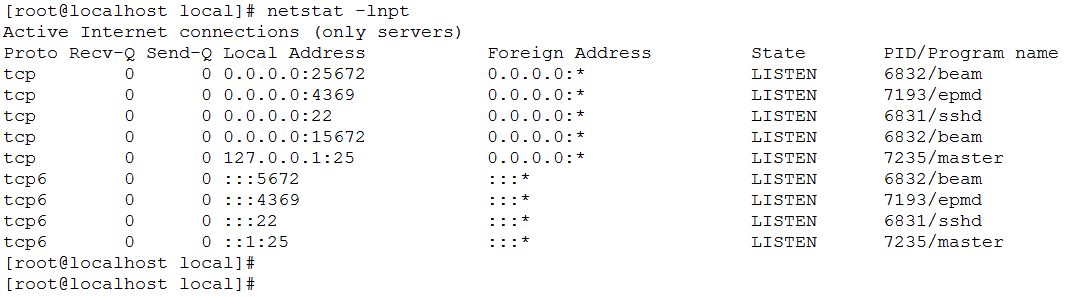
检查端口被哪个进程占用
netstat -lnpt |grep 5672

查看进程的详细信息
ps 6832

Centos7 中打开和关闭防火墙及端口的更多相关文章
- CentOS7使用firewalld打开关闭防火墙与端口(转载)
1.firewalld的基本使用 启动: systemctl start firewalld 查看状态: systemctl status firewalld 停止: systemctl disabl ...
- 关于学习CentOS7使用firewalld打开关闭防火墙和端口
1.firewalld简介 firewalld是centos7的一大特点,主要有两个优点:一是支持动态更新,不需要重启服务:二就是加入了防火墙的“zone”概念. firewalld有图形界面和工具界 ...
- CentOS7使用firewalld打开关闭防火墙与端口(转)
CentOS7使用firewalld打开关闭防火墙与端口 1.firewalld的基本使用 启动: systemctl start firewalld 关闭: systemctl stop ...
- CentOS7打开、关闭防火墙。
CentOS7 以上机器一些命令和低版本CentOS是有些差异的,本文只针对CentOS7 以上版本. CentOS7使用firewalld打开关闭防火墙与端口1.firewalld的基本使用启动: ...
- centos7怎么查看、打开和关闭防火墙
使用centos7会发现,用centos6以前的方式查看.打开和关闭防火墙都无效了.这是因为centos7的防火墙改用firewalld,而不再使用iptables了 查看centos7的防火墙的状态 ...
- CentOS7使用httpd apache 和firewalld打开关闭防火墙与端口
Centos7 使用systemctl 工具操作命令 systemctl 是Centos7的服务管理工具中的主要工具 ,它融合之前service和chkconfig的功能于一体 一.httpd的设置 ...
- 转 CentOS7使用firewalld打开关闭防火墙与端口
http://blog.csdn.net/huxu981598436/article/details/54864260 开启端口命令 输入firewall-cmd --query-port=6379/ ...
- centos7 中如何查看、打开、关闭防火墙。
首先是看centos7的防火墙的状态,查看的命令为: sudo systemctl status firewalld. 查看后,看到active(running)就意味着防火墙打开了, 如果想关闭防火 ...
- centos7 开放/关闭防火墙和端口
--------------------------------------------------------------防火墙----------------------------------- ...
随机推荐
- 7-12 产生每位数字相同的n位数 (30 分)
读入2个正整数A和B,1<=A<=9, 1<=B<=10,产生数字AA...A,一共B个A 输入格式: 在一行中输入A和B. 输出格式: 在一行中输出整数AA...A,一共B个 ...
- preload & prefetch
原文地址在 我的笔记里,觉得还行就给个 star 吧:) 关于 preload 和 prefetch 早有耳闻,知道它们可以优化页面加载速度,然具体情况却了解不多.搜索了相关的资料后对其有了些认识,在 ...
- 高性能MySQL之锁详解
一.背景 MySQL里面的锁大致可以分成全局锁.表级锁和行锁三类.数据库锁的设计的初衷是处理并发问题.我们知道多用户共享资源的时候,就有可能会出现并发访问的时候,数据库就需要合理的控制资源的访问规则, ...
- 运维介绍以及虚拟机,centos安装
运维的职责 1.企业的数据安全 2.网站7*24小时运行 3.企业服务好 服务器 服务器尺寸: 高度为单位:U(unit)1U=1.75英寸=4.45cm 服务器的分类: 机架式服务器 刀片式服务器 ...
- 备份Oracl数据库.bat
=========================== @echo off echo ================================================ echo Win ...
- Vue2.0 【第四季】第1节 实例入门-实例属性
目录 Vue2.0 [第四季]第1节 实例入门-实例属性 第1节 实例入门-实例属性 一.Vue和Jquery.js一起使用 二.实例调用自定义方法 Vue2.0 [第四季]第1节 实例入门-实例属性 ...
- Spark入门(五)--Spark的reduce和reduceByKey
reduce和reduceByKey的区别 reduce和reduceByKey是spark中使用地非常频繁的,在字数统计中,可以看到reduceByKey的经典使用.那么reduce和reduceB ...
- Spark入门(二)--如何用Idea运行我们的Spark项目
用Idea搭建我们的Spark环境 用IDEA搭建我们的环境有很多好处,其中最大的好处,就是我们甚至可以在工程当中直接运行.调试我们的代码,在控制台输出我们的结果.或者可以逐行跟踪代码,了解spark ...
- mycli初体验
一.安装 pip install mycli 二.使用 mycli --help 三.特点 语法不全,高亮等
- 聊聊order by rand()
总结写在前面: 1. 不建议直接使用order by rand(),原因是执行代价比较大 2. 介绍了内存临时表,对于内存临时表,由于回表不需要访问磁盘,所以往往是用rowid排序,可以减少参与排序字 ...