
Spring Boot 教程 (4) - swagger-ui
1. 什么是Swagger?
Swagger™的目标是为REST APIs 定义一个标准的,与语言无关的接口,使人和计算机在看不到源码或者看不到文档或者不能通过网络流量检测的情况下能发现和理解各种服务的功能。当服务通过Swagger定义,消费者就能与远程的服务互动通过少量的实现逻辑。类似于低级编程接口,Swagger去掉了调用服务时的很多猜测。
浏览 Swagger 去了解更多关于Swagger 项目的信息,包括附加的支持其他语言的库。
2. 在项目中集成Swagger
2.1 引入maven依赖
我自己的项目中使用的是swagger2。
<!--springboot父工程-->

    <parent>

        <groupId>org.springframework.boot</groupId>

        <artifactId>spring-boot-starter-parent</artifactId>

        <version>2.2.2.RELEASE</version>

        <relativePath/> <!-- lookup parent from repository -->

    </parent>

    <dependencies>

        <!--springboot框架web组件-->

        <dependency>

            <groupId>org.springframework.boot</groupId>

            <artifactId>spring-boot-starter-web</artifactId>

            <version>2.2.2.RELEASE</version>

        </dependency>

        <!--swagger-ui组件-->

        <dependency>

            <groupId>io.springfox</groupId>

            <artifactId>springfox-swagger-ui</artifactId>

            <version>2.9.2</version>

        </dependency>

        <!--swagger组件-->

        <dependency>

            <groupId>io.springfox</groupId>

            <artifactId>springfox-swagger2</artifactId>

            <version>2.9.2</version>

        </dependency>

        <!--mybatis整合springboot组件-->

        <dependency>

            <groupId>org.mybatis.spring.boot</groupId>

            <artifactId>mybatis-spring-boot-starter</artifactId>

            <version>2.1.0</version>

        </dependency>

        <!--mysql数据库连接驱动-->

        <dependency>

            <groupId>mysql</groupId>

            <artifactId>mysql-connector-java</artifactId>

            <version>8.0.18</version>

        </dependency>

        <!--lombok组件-->

        <dependency>

            <groupId>org.projectlombok</groupId>

            <artifactId>lombok</artifactId>

            <version>1.18.10</version>

        </dependency>

    </dependencies>

    <build>

        <!--springboot的maven插件-->

        <plugins>

            <plugin>

                <groupId>org.springframework.boot</groupId>

                <artifactId>spring-boot-maven-plugin</artifactId>

            </plugin>

            <plugin>

                <groupId>org.apache.maven.plugins</groupId>

                <artifactId>maven-compiler-plugin</artifactId>

                <configuration>

                    <compilerArgs>

                        <arg>-parameters</arg>

                    </compilerArgs>

                </configuration>

            </plugin>

        </plugins>

    </build>
2.2 Swagger的配置
SwggerConfig.java:package com.butterflytri.config; import com.google.common.base.Predicates;
import io.swagger.annotations.ApiOperation;
import org.springframework.context.annotation.Bean;
import org.springframework.context.annotation.Configuration;
import org.springframework.context.annotation.Profile;
import springfox.documentation.builders.ApiInfoBuilder;
import springfox.documentation.builders.ParameterBuilder;
import springfox.documentation.builders.PathSelectors;
import springfox.documentation.builders.RequestHandlerSelectors;
import springfox.documentation.schema.ModelRef;
import springfox.documentation.service.ApiInfo;
import springfox.documentation.service.Contact;
import springfox.documentation.service.Parameter;
import springfox.documentation.spi.DocumentationType;
import springfox.documentation.spring.web.plugins.Docket;
import springfox.documentation.swagger2.annotations.EnableSwagger2; import java.util.ArrayList;
import java.util.HashSet;
import java.util.List;
import java.util.Set; /**
* @author: WJF
* @date: 2020/5/21
* @description: SwaggerConfig
*/ /**
* {@link Configuration}:标志这是一个配置类,在spring boot引导类启动时,会自动加载这个类的配置。
* {@link Profile}:说明加载配置文件 'application.yml' 时加载对应的配置。
* {@link EnableSwagger2}:启用Swagger2的配置。
*/
@Configuration
@Profile("dev")
@EnableSwagger2
public class SwaggerConfig { @Bean
public Docket restApi() {
Class[] classes = this.getClasses();
Set<String> consumesSet = new HashSet<>();
consumesSet.add("application/x-www-form-urlencoded");
return new Docket(DocumentationType.SWAGGER_2)
.apiInfo(apiInfo())
.globalOperationParameters(parameters())
.ignoredParameterTypes(classes)
.forCodeGeneration(true)
.consumes(consumesSet)
.select()
.apis(Predicates.and(RequestHandlerSelectors.withMethodAnnotation(ApiOperation.class)))
.paths(PathSelectors.any())
.build();
} /**
* API文档的基本信息
* @return ApiInfo
*/
private ApiInfo apiInfo() {
return new ApiInfoBuilder()
.title("学生管理平台")
.description("学生管理平台文档")
.termsOfServiceUrl("http://127.0.0.1:8080/butterflytri/swagger-ui.html")
.contact(new Contact("wjf", "http://butterflytri.com", "butterflytri@163.com"))
.version("2.0")
.build();
} /**
* Swagger2可以在Swagger2文档中添加参数
* @return List<Parameter>
*/
private List<Parameter> parameters() {
// 添加一个参数butterflytri,参数描述:不死蝶
ParameterBuilder paramBuilder = new ParameterBuilder();
List<Parameter> paramList = new ArrayList<Parameter>();
paramBuilder.name("butterflytri")
.description("不死蝶")
.modelRef(new ModelRef("string"))
.parameterType("header")
.required(true)
.build();
paramList.add(paramBuilder.build());
return paramList;
} /**
* 获取class数组
* @return Class[]
*/
private Class[] getClasses() {
return new Class[]{};
} }2.3 控制层
StudentController.java:package com.butterflytri.controller; import com.butterflytri.entity.Student;
import com.butterflytri.service.StudentService;
import io.swagger.annotations.Api;
import io.swagger.annotations.ApiImplicitParam;
import io.swagger.annotations.ApiImplicitParams;
import io.swagger.annotations.ApiOperation;
import org.springframework.web.bind.annotation.*; import javax.annotation.Resource;
import java.util.List; /**
* @author: WJF
* @date: 2020/5/16
* @description: StudentController
*/
@Api(tags = "学生管理接口")
@RestController
@RequestMapping("/student")
public class StudentController { @Resource
private StudentService studentService; /**
* GET :请求从服务器获取特定资源。举个例子:GET /student(获取所有学生)
* @return List<Student>
*/
@ApiOperation(value = "查询所有学生", httpMethod = "GET", notes = "查询所有学生")
@GetMapping("/student")
public List<Student> student() {
return studentService.findAll();
} /**
* GET :请求从服务器获取特定资源。举个例子:GET /student/1(获取id为1学生)
* @param id
* @return Student
*/
@ApiOperation(value = "查询学生详情", httpMethod = "GET", notes = "查询学生详情")
@ApiImplicitParam(name = "id", value = "学生id", required = true, paramType = "form", dataTypeClass = Long.class)
@GetMapping("/student/{id}")
public Student student(@PathVariable("id") Long id) {
return studentService.findOne(id);
} /**
* POST :在服务器上创建一个新的资源。举个例子:POST /student(添加学生)
* @param student
*/
@PostMapping("/student")
@ApiOperation(value = "添加学生", httpMethod = "POST", notes = "添加学生")
@ApiImplicitParams({
@ApiImplicitParam(name = "studentName", value = "学生姓名", required = true, paramType = "form", dataTypeClass = String.class),
@ApiImplicitParam(name = "studentNo", value = "学生学号", required = true, paramType = "form", dataTypeClass = String.class),
@ApiImplicitParam(name = "sex", value = "学生性别", required = true, paramType = "form", dataTypeClass = String.class),
@ApiImplicitParam(name = "age", value = "学生年龄", required = true, paramType = "form", dataTypeClass = Integer.class)
})
public void student(@RequestBody Student student) {
studentService.add(student);
} /**
* PUT :更新服务器上的资源(客户端提供更新后的整个资源)。举个例子:PUT /student/1(更新学号为 1 的学生的所有信息)
* @param id
*/
@PutMapping("/student/{id}")
@ApiOperation(value = "根据id修改学生信息(大范围)", httpMethod = "PUT", notes = "根据id修改学生信息")
@ApiImplicitParams({
@ApiImplicitParam(name = "id", value = "学生id", required = true, paramType = "from", dataTypeClass = Long.class),
@ApiImplicitParam(name = "studentName", value = "学生姓名", required = true, paramType = "form", dataTypeClass = String.class),
@ApiImplicitParam(name = "studentNo", value = "学生学号", required = true, paramType = "form", dataTypeClass = String.class),
@ApiImplicitParam(name = "sex", value = "学生性别", required = true, paramType = "form", dataTypeClass = String.class),
@ApiImplicitParam(name = "age", value = "学生年龄", required = true, paramType = "form", dataTypeClass = Integer.class)
})
public void updateById(@PathVariable("id") Long id, Student student) {
studentService.updateAll(id,student);
} /**
* DELETE :从服务器删除特定的资源。举个例子:DELETE /student/1(删除学号为 1 的学生)
* @param id
*/
@DeleteMapping("/student/{id}")
@ApiOperation(value = "根据id删除学生信息", httpMethod = "DELETE", notes = "根据id删除学生信息")
@ApiImplicitParam(name = "id", value = "学生id", required = true, paramType = "from", dataTypeClass = Long.class)
public void deleteById(@PathVariable("id") Long id) {
studentService.delete(id);
} /**
* PATCH :更新服务器上的资源(客户端提供更改的属性,可以看做作是部分更新),使用的比较少,这里就不举例子了。
* @param id
* @param student
*/
@PatchMapping("/student/{id}")
@ApiOperation(value = "根据id修改学生信息(小范围)", httpMethod = "PATCH", notes = "根据id修改学生信息")
@ApiImplicitParams({
@ApiImplicitParam(name = "id", value = "学生id", required = true, paramType = "from", dataTypeClass = Long.class),
@ApiImplicitParam(name = "studentName", value = "学生姓名", required = true, paramType = "form", dataTypeClass = String.class),
@ApiImplicitParam(name = "studentNo", value = "学生学号", required = true, paramType = "form", dataTypeClass = String.class),
@ApiImplicitParam(name = "sex", value = "学生性别", required = true, paramType = "form", dataTypeClass = String.class),
@ApiImplicitParam(name = "age", value = "学生年龄", required = true, paramType = "form", dataTypeClass = Integer.class)
})
public void updatePart(@PathVariable("id") Long id, Student student) {
studentService.updatePart(id,student);
} }这些注解也是很容易理解的,相信各位聪明的技术大牛很快就会使用了。这些注解的具体作用其实看看就懂了,甚至不用去查资料,在这里解释下
@ApiImplicitParam这个注解的一个属性paramType,这个属性的取值有以下几种:- header:放在请求头,用于请求头参数的获取。使用
@RequestHeader,在代码中接收参数。 - query:用于get请求的参数拼接。使用
@RequestParam,在代码中接收参数。 - path:用于restful接口请求参数的获取。使用
@PathVariable,在映射地址上接收参数。 - body:放在请求体中,使用
@RequestBody接收参数。 - form:使用form表单的形式传递参数。
- header:放在请求头,用于请求头参数的获取。使用
2.4 Entity
Student.java:package com.butterflytri.entity; import io.swagger.annotations.ApiModel;
import io.swagger.annotations.ApiModelProperty;
import lombok.Getter;
import lombok.Setter;
import lombok.ToString; import java.io.Serializable; /**
* @author: WJF
* @date: 2020/5/16
* @description: Student
*/ @ToString
@Getter
@Setter
@ApiModel("学生Entity")
public class Student implements Serializable { @ApiModelProperty("学生id")
private Long id; @ApiModelProperty("学生姓名")
private String studentName; @ApiModelProperty("学生学号")
private String studentNo; @ApiModelProperty("性别")
private String sex; @ApiModelProperty("年龄")
private Integer age; }可以使用
@ApiModelProperty注解来标识每个Entity属性的意思。2.5 运行结果
启动项目,访问
http://127.0.0.1:8080/butterflytri/swagger-ui.html即可看到下面的页面:
点开学生管理接口可以看到
StudentController.java中写的所有接口方法: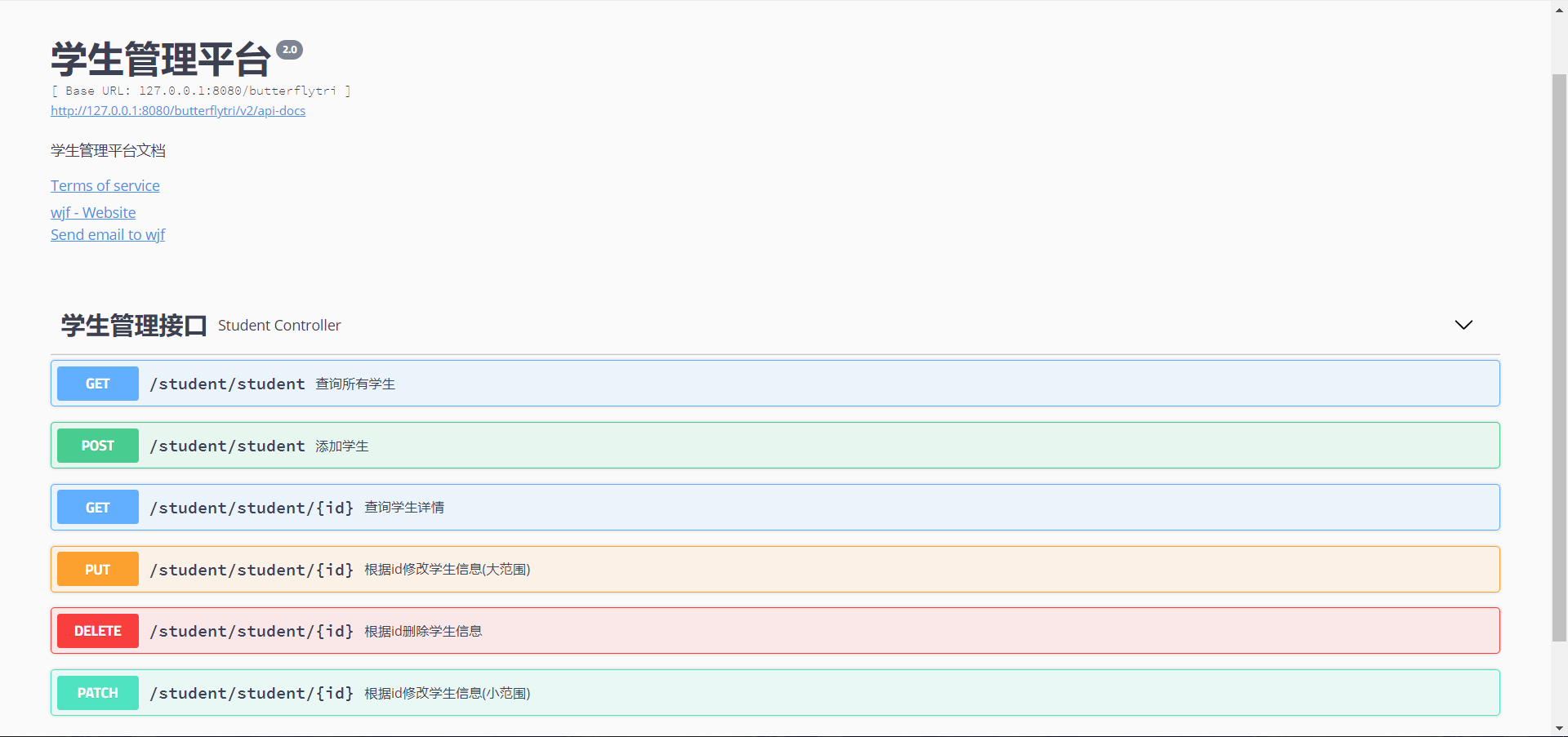
点开下面的Models,可以看到Entity中的
Student.java实体类: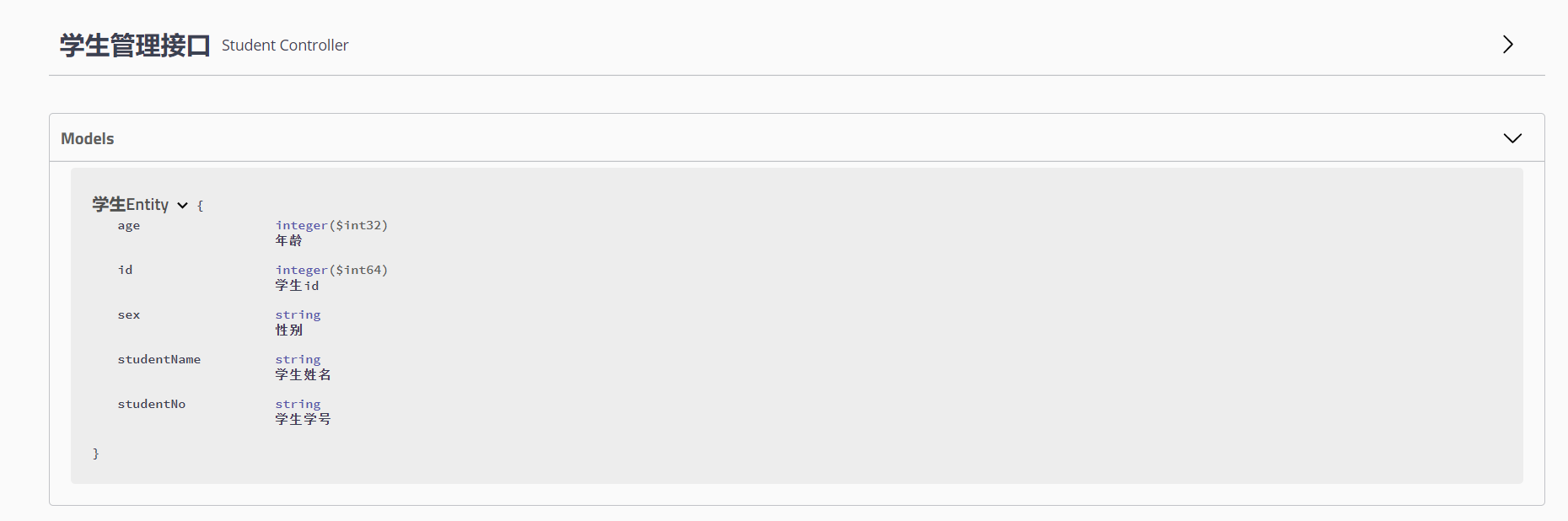
再点开查询所有学生这个方法,调用一下这个方法,点击Try it out测试一下方法:
在这里看到了一个参数
butterflytri,而且还是必传参数,这是因为我在SwaggerConfig.java这个配置文件类中进行了配置,不清楚的可以往上翻一翻,看看那个配置类。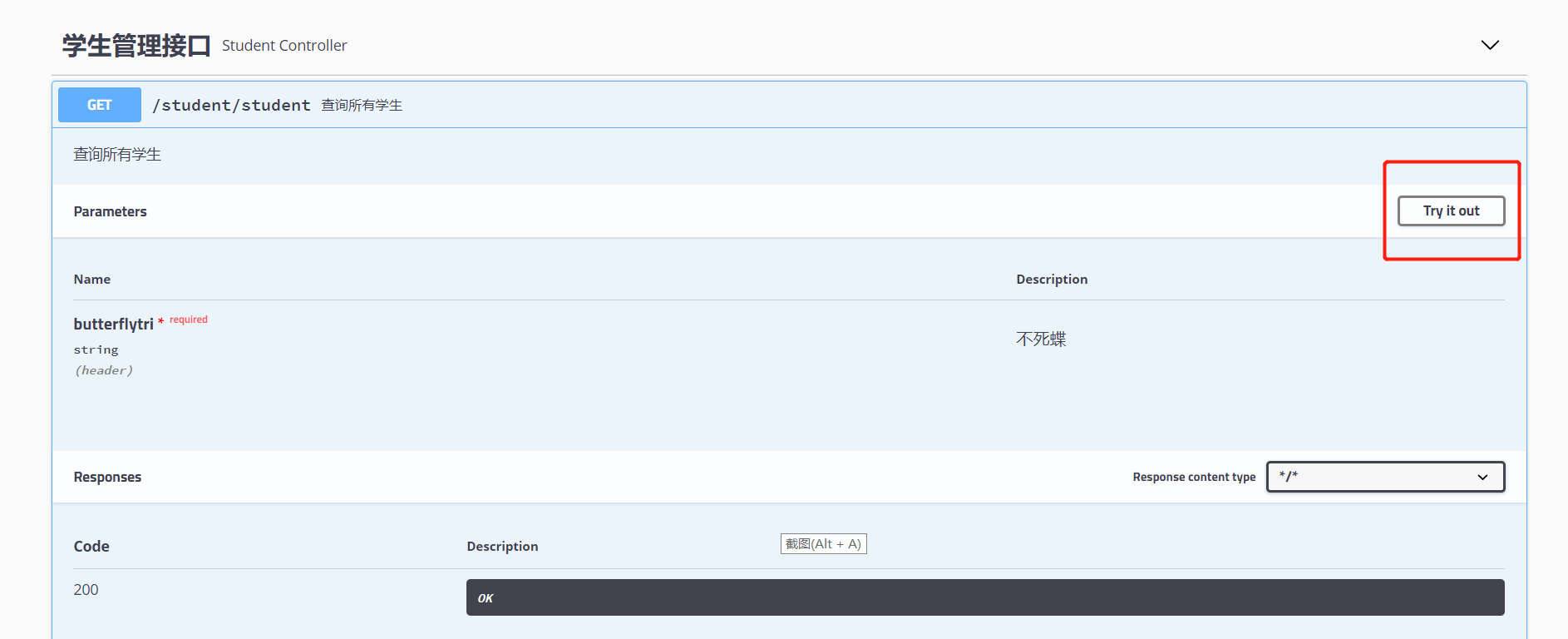
点击了Try it out按钮后,随便给这个参数赋值,反正这个参数没有什么,只是给大家做演示看的。然后点击execute按钮,就可以看到返回结果:
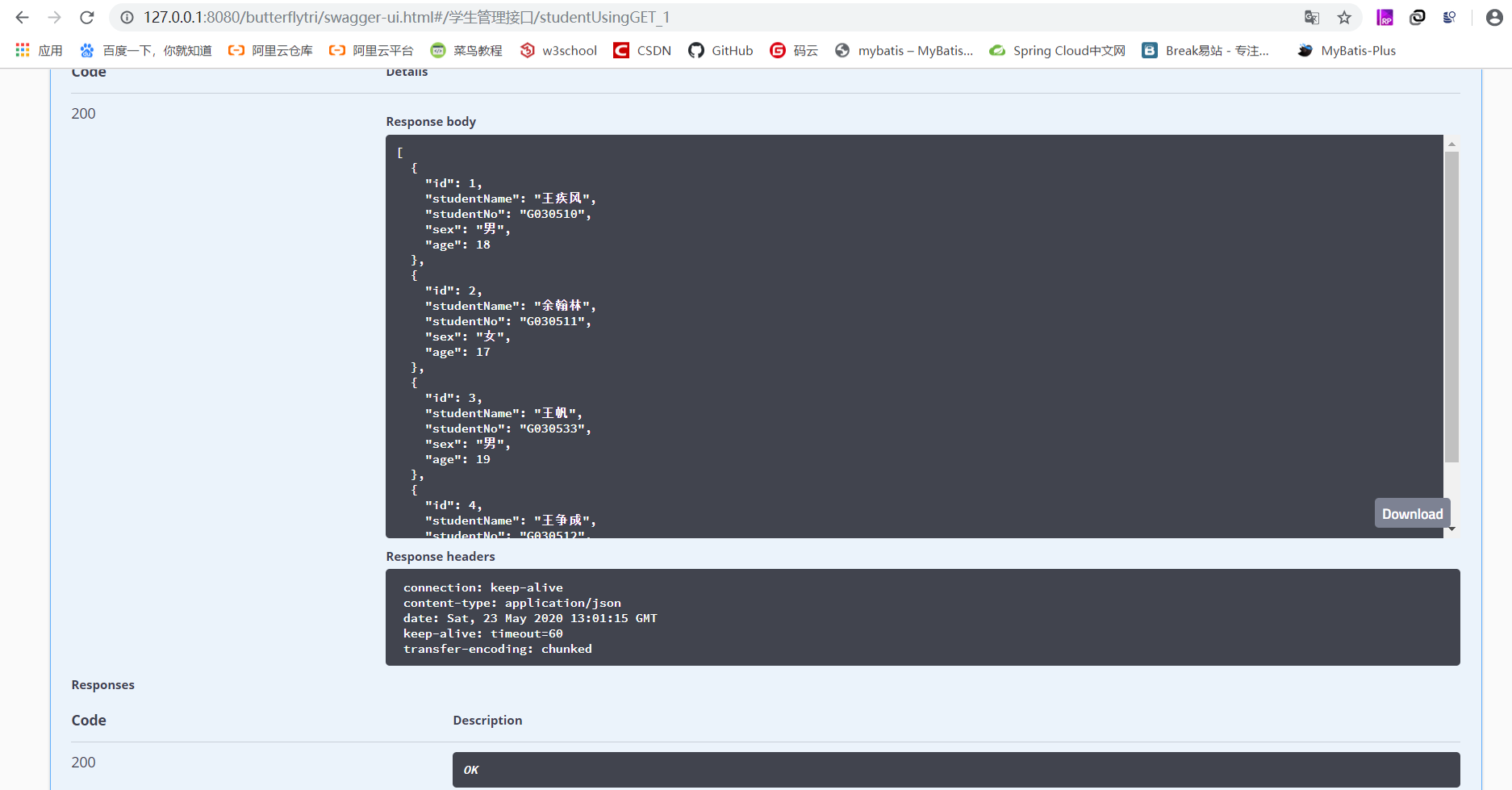
3. 项目地址
本项目传送门:spring-boot-swagger-ui
此教程会一直更新下去,觉得博主写的可以的话,关注一下,也可以更方便下次来学习。
Spring Boot 教程 (4) - swagger-ui的更多相关文章
- 【Spring Boot&&Spring Cloud系列】Spring Boot项目集成Swagger UI
前言 Swagger 是一个规范和完整的框架,用于生成.描述.调用和可视化 RESTful 风格的 Web 服务.总体目标是使客户端和文件系统作为服务器以同样的速度来更新.文件的方法,参数和模型紧密集 ...
- 程序员DD 《Spring boot教程系列》补充
最近在跟着程序员DD的Spring boot教程系列学习Spring boot,由于年代原因,Spring boot已经发生了一些变化,所以在这里进行一些补充. 补充的知识大多来自评论区,百度,Sta ...
- Spring Boot:整合Swagger文档
综合概述 spring-boot作为当前最为流行的Java web开发脚手架,越来越多的开发者选择用其来构建企业级的RESTFul API接口.这些接口不但会服务于传统的web端(b/s),也会服务于 ...
- Spring Boot 教程
Spring Boot 系列教程: Spring Boot:快速入门教程 Spring Boot:整合Swagger文档 Spring Boot:整合MyBatis框架 Spring Boot:实现M ...
- Spring Boot中使用Swagger CodeGen生成REST client
文章目录 什么是Open API规范定义文件呢? 生成Rest Client 在Spring Boot中使用 API Client 配置 使用Maven plugin 在线生成API Spring B ...
- Spring Boot教程(十六)属性配置文件详解(1)
相信很多人选择Spring Boot主要是考虑到它既能兼顾Spring的强大功能,还能实现快速开发的便捷.我们在Spring Boot使用过程中,最直观的感受就是没有了原来自己整合Spring应用时繁 ...
- Spring Boot 快速整合Swagger
一.前言 Spring Boot作为当前最为流行的Java web开发脚手架,越来越多的开发者选择用其来构建企业级的RESTFul API接口.这些接口不但会服务于传统的web端(b/s),也会服务于 ...
- Spring Boot教程(二十二)使用Swagger2构建强大的RESTful API文档(1)
由于Spring Boot能够快速开发.便捷部署等特性,相信有很大一部分Spring Boot的用户会用来构建RESTful API.而我们构建RESTful API的目的通常都是由于多终端的原因,这 ...
- 1024|推荐一个开源免费的Spring Boot教程
2020-1024=996! 今天,星期六,你们是否加班了?我反正加了!早上去公司开了一早上会,中午回家写下了这篇文章. 今天,我要推荐一个开源免费的Spring Boot项目,就是我最近日更的Spr ...
随机推荐
- 正则表达式(grep,awk,sed)和通配符
1. 正则表达式 1. 什么是正则表达式? 正则表达式就是为了处理大量的字符串而定义的一套规则和方法. 通过定义的这些特殊符号的辅助,系统管理员就可以快速过滤,替换或输出需要的字符串. Linux正则 ...
- CloudCC CRM探讨:精细流程管理与员工悟性培养
很多企业主招聘时更喜欢专业的销售,来给他们创造价值.老板不愿意花时间在"磨刀上",而喜欢员工一来就"砍柴".即使是建立培训机制,仍然很大程度依赖于员工自己的悟性 ...
- Js6利用class创建类
<!DOCTYPE html> <html> <head> <meta charset="UTF-8"> <title> ...
- C语言入门经典题目及其答案
写在开始: 我叫风骨散人,名字的意思是我多想可以不低头的自由生活,可现实却不是这样.家境贫寒,总得向这个世界低头,所以我一直在奋斗,想改变我的命运给亲人好的生活,希望同样被生活绑架的你可以通过自己的努 ...
- HDU 1248 寒冰王座(完全背包问题另类解法)
寒冰王座 Problem Description 不死族的巫妖王发工资拉,死亡骑士拿到一张N元的钞票(记住,只有一张钞票),为了防止自己在战斗中频繁的死掉,他决定给自己买一些道具,于是他来到了地精商店 ...
- python selenium(用例断言)
1.if ...else ...判断进行断言 from time import * from selenium import webdriver "): driver = webdriver ...
- App 自动化环境搭建
1.安装 Appium-desktop 工具 下载地址:https://github.com/appium/appium-desktop/releases 2.安装 Android 环境 安装 JDK ...
- TensorFlow实现时间序列预测
常常会碰到各种各样时间序列预测问题,如商场人流量的预测.商品价格的预测.股价的预测,等等.TensorFlow新引入了一个TensorFlow Time Series库(以下简称为TFTS),它可以帮 ...
- IP 基础知识全家桶,45 张图一套带走
前言 前段时间,有读者希望我写一篇关于 IP 分类地址.子网划分等的文章,他反馈常常混淆,摸不着头脑. 那么,说来就来!而且要盘就盘全一点,顺便挑战下小林的图解功力,所以就来个 IP 基础知识全家桶. ...
- RocketMQ-架构篇
RocketMQ-架构篇 1.Broker Broker是RocketMQ的服务端组件之一,所有消息存储在Broker上,所有的投递.消费请求也都由Broker进行处理.Broker是有状态的应用,本 ...