
Tensorflow学习教程------模型参数和网络结构保存且载入,输入一张手写数字图片判断是几
首先是模型参数和网络结构的保存
#coding:utf-8

import tensorflow as tf

from tensorflow.examples.tutorials.mnist import input_data

mnist = input_data.read_data_sets('MNIST_data',one_hot=True)

#每个批次的大小

batch_size = 100

n_batch = mnist.train._num_examples // batch_size

#定义两个placeholder

x = tf.placeholder(tf.float32, [None,784],name='x-input' )  #模型输入的地方加名字

y = tf.placeholder(tf.float32,[None,10])

keep_prob  = tf.placeholder(tf.float32,name='keepProb')

def weight_variable(shape):

    initial = tf.truncated_normal(shape,stddev=0.1) #生成一个截断的正态分布

    return tf.Variable(initial)

def bias_variable(shape):

    initial = tf.constant(0.1,shape = shape)

    return tf.Variable(initial)

#卷基层

def conv2d(x,W):

    return tf.nn.conv2d(x,W,strides=[1,1,1,1],padding='SAME')

#池化层

def max_pool_2x2(x):

    return tf.nn.max_pool(x,ksize=[1,2,2,1],strides=[1,2,2,1],padding='SAME')

#改变x的格式转为4D的向量[batch,in_height,in_width,in_channels]

x_image = tf.reshape(x, [-1,28,28,1])

#初始化第一个卷基层的权值和偏置

W_conv1 = weight_variable([5,5,1,32]) #5*5的采样窗口 32个卷积核从一个平面抽取特征 32个卷积核是自定义的

b_conv1 = bias_variable([32])  #每个卷积核一个偏置值

#把x_image和权值向量进行卷积,再加上偏置值,然后应用于relu激活函数

h_conv1 = tf.nn.relu(conv2d(x_image,W_conv1)+b_conv1)

h_pool1 = max_pool_2x2(h_conv1) #进行max-pooling

#初始化第二个卷基层的权值和偏置

W_conv2 = weight_variable([5,5,32,64]) # 5*5的采样窗口 64个卷积核从32个平面抽取特征  由于前一层操作得到了32个特征图

b_conv2 = bias_variable([64]) #每一个卷积核一个偏置值

#把h_pool1和权值向量进行卷积 再加上偏置值 然后应用于relu激活函数

h_conv2 = tf.nn.relu(conv2d(h_pool1,W_conv2) + b_conv2)

h_pool2 = max_pool_2x2(h_conv2) #进行max-pooling

#28x28的图片第一次卷积后还是28x28 第一次池化后变为14x14

#第二次卷积后 变为14x14 第二次池化后变为7x7

#通过上面操作后得到64张7x7的平面

#初始化第一个全连接层的权值

W_fc1 = weight_variable([7*7*64,1024])#上一层有7*7*64个神经元,全连接层有1024个神经元

b_fc1 = bias_variable([1024]) #1024个节点

#把第二个池化层的输出扁平化为一维

h_pool2_flat = tf.reshape(h_pool2,[-1,7*7*64])

#求第一个全连接层的输出

h_fc1 = tf.nn.relu(tf.matmul(h_pool2_flat,W_fc1)+b_fc1)

#keep_prob用来表示神经元的输出概率

h_fc1_drop = tf.nn.dropout(h_fc1,keep_prob)

#初始化第二个全连接层

W_fc2 = weight_variable([1024,10])

b_fc2 = bias_variable([10])

#计算输出

prediction = tf.nn.softmax(tf.matmul(h_fc1_drop,W_fc2)+b_fc2, name='output')   #模型输出的地方加名字

#交叉熵代价函数

cross_entropy = tf.reduce_mean(tf.nn.softmax_cross_entropy_with_logits(labels=y,logits=prediction))

#使用AdamOptimizer进行优化

train_step = tf.train.AdamOptimizer(1e-4).minimize(cross_entropy)

#结果存放在一个布尔列表中

correct_prediction = tf.equal(tf.argmax(prediction,1),tf.argmax(y,1)) #argmax返回一维张量中最大的值所在的位置

#求准确率

accuracy = tf.reduce_mean(tf.cast(correct_prediction,tf.float32))

with tf.Session() as sess:

    sess.run(tf.global_variables_initializer())

    for epoch in range(10):

        for batch in range(n_batch):

            batch_xs,batch_ys = mnist.train.next_batch(batch_size)

            sess.run(train_step,feed_dict={x:batch_xs,y:batch_ys,keep_prob:0.7})

        acc = sess.run(accuracy,feed_dict={x:mnist.test.images,y:mnist.test.labels,keep_prob:1.0})

        print ("Iter "+ str(epoch) + ", Testing Accuracy= " + str(acc))

    #保存模型参数与网络结构

    output_graph_def = tf.graph_util.convert_variables_to_constants(sess,sess.graph_def,output_node_names=['output'])

    #保存模型到目录下的model文件夹中

    with tf.gfile.FastGFile('/home/bayes/mymodel.pb',mode='wb') as f:

        f.write(output_graph_def.SerializeToString())
结果
Iter 0, Testing Accuracy= 0.8616

Iter 1, Testing Accuracy= 0.9663

Iter 2, Testing Accuracy= 0.9776

Iter 3, Testing Accuracy= 0.9815

Iter 4, Testing Accuracy= 0.985

Iter 5, Testing Accuracy= 0.9863

Iter 6, Testing Accuracy= 0.9871

Iter 7, Testing Accuracy= 0.9895

Iter 8, Testing Accuracy= 0.9878

Iter 9, Testing Accuracy= 0.9894

Converted 8 variables to const ops.
载入模型参数与网络结构,并且预测图片
#coding:utf-8

import tensorflow as tf

from tensorflow.examples.tutorials.mnist import input_data

from PIL import Image,ImageFilter

mnist = input_data.read_data_sets('MNIST_data',one_hot=True)

#定义一个placeholder

y = tf.placeholder(tf.float32,[None,10])

def imageprepare(argv): # 该函数读一张图片,处理后返回一个数组,进到网络中预测

    im = Image.open(argv).convert('L')

    width = float(im.size[0])

    height = float(im.size[1])

    newImage = Image.new('L', (28, 28), (255))  # creates white canvas of 28x28 pixels

    if width > height:  # check which dimension is bigger

        # Width is bigger. Width becomes 20 pixels.

        nheight = int(round((20.0 / width * height), 0))  # resize height according to ratio width

        if nheight == 0:  # rare case but minimum is 1 pixel

            nheight = 1

            # resize and sharpen

        img = im.resize((20, nheight), Image.ANTIALIAS).filter(ImageFilter.SHARPEN)

        wtop = int(round(((28 - nheight) / 2), 0))  # caculate horizontal pozition

        newImage.paste(img, (4, wtop))  # paste resized image on white canvas

    else:

        # Height is bigger. Heigth becomes 20 pixels.

        nwidth = int(round((20.0 / height * width), 0))  # resize width according to ratio height

        if (nwidth == 0):  # rare case but minimum is 1 pixel

            nwidth = 1

            # resize and sharpen

        img = im.resize((nwidth, 20), Image.ANTIALIAS).filter(ImageFilter.SHARPEN)

        wleft = int(round(((28 - nwidth) / 2), 0))  # caculate vertical pozition

        newImage.paste(img, (wleft, 4))  # paste resized image on white canvas

    # newImage.save("sample.png")

    tv = list(newImage.getdata())  # get pixel values

    # normalize pixels to 0 and 1. 0 is pure white, 1 is pure black.

    tva = [(255 - x) * 1.0 / 255.0 for x in tv]

    return tva

#载入模型

with tf.gfile.FastGFile('/home/bayes/mymodel.pb','rb' ) as f:

    graph_def = tf.GraphDef()

    graph_def.ParseFromString(f.read())

    tf.import_graph_def(graph_def,name='')

with tf.Session() as sess:

    output = sess.graph.get_tensor_by_name('output:0')

      #结果存放在一个布尔列表中

    correct_prediction = tf.equal(tf.argmax(y,1),tf.argmax(output,1)) #argmax返回一维张量中最大的值所在的位置

      #求准确率

    accuracy = tf.reduce_mean(tf.cast(correct_prediction,tf.float32))

    #训练的时候加了dropout,载入模型进行预测或者计算准确率的时候一定记得也加入dropout

    print (sess.run(accuracy,feed_dict={'x-input:0':mnist.test.images, y:mnist.test.labels,'keepProb:0':1.0}))

    array = imageprepare('/home/bayes/logs/3.jpg')

    prediction = tf.argmax(output,1)

    finalClass = sess.run(prediction,feed_dict={'x-input:0':[array],'keepProb:0':1.0})

    print('The digits in this image is:%d' % finalClass)
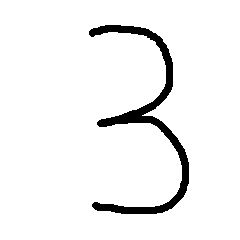
手写数字图片3
结果
I tensorflow/core/common_runtime/gpu/gpu_device.cc:906] DMA: 0

I tensorflow/core/common_runtime/gpu/gpu_device.cc:916] 0:   Y

I tensorflow/core/common_runtime/gpu/gpu_device.cc:975] Creating TensorFlow device (/gpu:0) -> (device: 0, name: GeForce GTX 1080 Ti, pci bus id: 0000:03:00.0)

0.9894

The digits in this image is:3
Tensorflow学习教程------模型参数和网络结构保存且载入,输入一张手写数字图片判断是几的更多相关文章
- tensorflow学习之(十)使用卷积神经网络(CNN)分类手写数字0-9
#卷积神经网络cnn import tensorflow as tf from tensorflow.examples.tutorials.mnist import input_data #数据包,如 ...
- 一文全解:利用谷歌深度学习框架Tensorflow识别手写数字图片(初学者篇)
笔记整理者:王小草 笔记整理时间2017年2月24日 原文地址 http://blog.csdn.net/sinat_33761963/article/details/56837466?fps=1&a ...
- 吴裕雄 python 神经网络——TensorFlow 卷积神经网络手写数字图片识别
import os import tensorflow as tf from tensorflow.examples.tutorials.mnist import input_data INPUT_N ...
- MindSpore手写数字识别初体验,深度学习也没那么神秘嘛
摘要:想了解深度学习却又无从下手,不如从手写数字识别模型训练开始吧! 深度学习作为机器学习分支之一,应用日益广泛.语音识别.自动机器翻译.即时视觉翻译.刷脸支付.人脸考勤--不知不觉,深度学习已经渗入 ...
- SVM学习笔记(二)----手写数字识别
引言 上一篇博客整理了一下SVM分类算法的基本理论问题,它分类的基本思想是利用最大间隔进行分类,处理非线性问题是通过核函数将特征向量映射到高维空间,从而变成线性可分的,但是运算却是在低维空间运行的.考 ...
- Tensorflow学习教程------利用卷积神经网络对mnist数据集进行分类_利用训练好的模型进行分类
#coding:utf-8 import tensorflow as tf from PIL import Image,ImageFilter from tensorflow.examples.tut ...
- Android+TensorFlow+CNN+MNIST 手写数字识别实现
Android+TensorFlow+CNN+MNIST 手写数字识别实现 SkySeraph 2018 Email:skyseraph00#163.com 更多精彩请直接访问SkySeraph个人站 ...
- 100天搞定机器学习|day39 Tensorflow Keras手写数字识别
提示:建议先看day36-38的内容 TensorFlow™ 是一个采用数据流图(data flow graphs),用于数值计算的开源软件库.节点(Nodes)在图中表示数学操作,图中的线(edge ...
- TensorFlow 卷积神经网络手写数字识别数据集介绍
欢迎大家关注我们的网站和系列教程:http://www.tensorflownews.com/,学习更多的机器学习.深度学习的知识! 手写数字识别 接下来将会以 MNIST 数据集为例,使用卷积层和池 ...
随机推荐
- Ajax请求传递数组参数的方法
方法一:拼接字符串参数 var arr={params:['param','param2']}; $.ajax({url:请求地址, data:arr, type:"POST", ...
- P 1024 科学计数法
转跳点:
- MFC 选择文件夹
WCHAR szPath[_MAX_PATH] = {}; BROWSEINFO bi; //指定父窗口,在对话框显示期间,父窗口将被禁用 bi.hwndOwner = this->GetSaf ...
- TX2--安装跑一python3.5
sudo add-apt-repository ppa:webupd8team/javasudo apt-get updatesudo apt-get install oracle-java8-ins ...
- jq监听
$(window).resize(function () {//风电月表格自适应高度 var handHeight =$(".tree-handler").height() $(& ...
- 吴裕雄--天生自然C++语言学习笔记:C++ 数据类型
使用编程语言进行编程时,需要用到各种变量来存储各种信息.变量保留的是它所存储的值的内存位置.这意味着,当创建一个变量时,就会在内存中保留一些空间. 可能需要存储各种数据类型(比如字符型.宽字符型.整型 ...
- PAT Advanced 1155 Heap Paths (30) [DFS, 深搜回溯,堆]
题目 In computer science, a heap is a specialized tree-based data structure that satisfies the heap pr ...
- python中的with用法
with是从Python2.5引入的一个新的语法,它是一种上下文管理协议,目的在于从流程图中把 try,except 和finally 关键字和 资源分配释放相关代码统统去掉,简化try….excep ...
- 个人安装GO1.13.6版本指南手册之搭建环境
因好奇而走进go语言,让你不在只闻其声,不见其形. https://golang.org/doc/install:这里是go语言的官网文档.吃不透英文,终究会被限制在有限的区域,一词词的吃透. 安装包 ...
- (转)Java并发编程:阻塞队列
Java并发编程:阻塞队列 在前面几篇文章中,我们讨论了同步容器(Hashtable.Vector),也讨论了并发容器(ConcurrentHashMap.CopyOnWriteArrayList), ...