
jenkins-gitlab-harbor-ceph基于Kubernetes的CI/CD运用(三)
从最基础镜像到业务容器 构建 【为gitlab项目部署做铺垫】
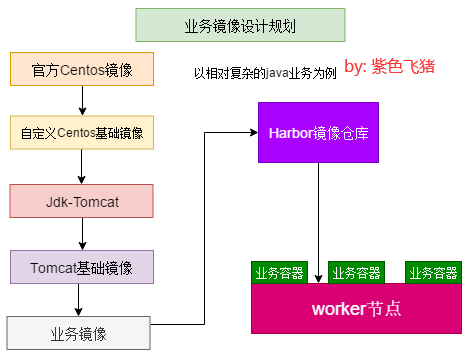
业务镜像设计规划
目录结构
# pwd

/data/k8s/app/myapp

# tree .

.

├── dockerfile

│   ├── pub-images

│   │   ├── jdk-1.8.162

│   │   │   ├── build-command.sh

│   │   │   ├── Dockerfile

│   │   │   ├── jdk-8u162-linux-x64.tar.gz

│   │   │   └── profile

│   │   └── tomcat-base

│   │       ├── apache-tomcat-8.0.32.tar.gz

│   │       ├── build-command.sh

│   │       ├── Dockerfile

│   │       └── filebeat-6.4.2-x86_64.rpm

│   ├── system

│   │   └── centos

│   │       ├── build-command.sh

│   │       ├── Dockerfile

│   │       └── filebeat-6.4.2-x86_64.rpm

│   └── web-test

│       └── tomcat-app1

│           ├── app1.tar.gz

│           ├── build-command.sh

│           ├── catalina.sh

│           ├── Dockerfile

│           ├── filebeat.yml

│           ├── myapp

│           │   └── index.html

│           ├── run_tomcat.sh

│           └── server.xml

└── yaml

    └── web-test

        └── tomcat-app1

            └── tomcat-app1.yaml

12 directories, 20 files
构建业务镜像
从最基础镜像说起
制作自定义centos基础镜像,centos:v7.5是基于官方centos7.5镜像更改tag并上传到Harbor服务器的最原始官方镜像
# pwd
/data/k8s/app/myapp/dockerfile/system/centos
# ll
总用量 10580
-rw-r--r-- 1 root root 128 3月 24 17:49 build-command.sh
-rw-r--r-- 1 root root 603 3月 24 17:48 Dockerfile
-rw-r--r-- 1 root root 10825499 10月 19 2018 filebeat-6.4.2-x86_64.rpm
# cat Dockerfile
#制作基础镜像,centos:v7.5是基于官方centos 7.5镜像更改tag并上传到Harbor服务器的最原始官方镜像
FROM harbor.linux.com/web-test/centos:7.5.1804
LABEL auth=zisefeizhu
ADD filebeat-6.4.2-x86_64.rpm /tmp/
RUN yum install -y epel-release /tmp/filebeat-6.4.2-x86_64.rpm && rm -rf /tmp/filebeat-6.4.2-x86_64.rpm
RUN yum install -y vim wget tree pcre pcre-devel gcc gcc-c++ zlib zlib-devel openssl openssl-devel net-tools iotop unzip zip iproute ntpdate nfs-utils tcpdump telnet traceroute
RUN rm -rf /etc/localtime && ln -snf /usr/share/zoneinfo/Asia/Shanghai /etc/localtime
# cat build-command.sh
#!/bin/bash
docker build -t harbor.linux.com/web-test/centos-base:v7.5 .
docker push harbor.linux.com/web-test/centos-base:v7.5
制作jdk-tomcat镜像
# pwd
/data/k8s/app/myapp/dockerfile/pub-images/jdk-1.8.162
# cat Dockerfile
#JDK Base Image
FROM harbor.linux.com/web-test/centos-base:v7.5
LABEL auth=zisefeizhu
ADD jdk-8u162-linux-x64.tar.gz /usr/local/src/
RUN ln -sv /usr/local/src/jdk1.8.0_162 /usr/local/jdk && groupadd tomcat -g 2020 && useradd tomcat -u 2020 -g 2020
ADD profile /etc/profile
ENV JAVA_HOME /usr/local/jdk
ENV JRE_HOME $JAVA_HOME/jre
ENV CLASSPATH $JAVA_HOME/lib/:$JRE_HOME/lib/
ENV PATH $PATH:$JAVA_HOME/bin
#RUN rm -rf /etc/localtime && ln -snf /usr/share/zoneinfo/Asia/Shanghai /etc/localtime
# cat profile
# /etc/profile
# System wide environment and startup programs, for login setup
# Functions and aliases go in /etc/bashrc
# It's NOT a good idea to change this file unless you know what you
# are doing. It's much better to create a custom.sh shell script in
# /etc/profile.d/ to make custom changes to your environment, as this
# will prevent the need for merging in future updates.
pathmunge () {
case ":${PATH}:" in
*:"$1":*)
;;
*)
if [ "$2" = "after" ] ; then
PATH=$PATH:$1
else
PATH=$1:$PATH
fi
esac
}
if [ -x /usr/bin/id ]; then
if [ -z "$EUID" ]; then
# ksh workaround
EUID=`/usr/bin/id -u`
UID=`/usr/bin/id -ru`
fi
USER="`/usr/bin/id -un`"
LOGNAME=$USER
MAIL="/var/spool/mail/$USER"
fi
# Path manipulation
if [ "$EUID" = "0" ]; then
pathmunge /usr/sbin
pathmunge /usr/local/sbin
else
pathmunge /usr/local/sbin after
pathmunge /usr/sbin after
fi
HOSTNAME=`/usr/bin/hostname 2>/dev/null`
HISTSIZE=1000
if [ "$HISTCONTROL" = "ignorespace" ] ; then
export HISTCONTROL=ignoreboth
else
export HISTCONTROL=ignoredups
fi
export PATH USER LOGNAME MAIL HOSTNAME HISTSIZE HISTCONTROL
# By default, we want umask to get set. This sets it for login shell
# Current threshold for system reserved uid/gids is 200
# You could check uidgid reservation validity in
# /usr/share/doc/setup-*/uidgid file
if [ $UID -gt 199 ] && [ "`/usr/bin/id -gn`" = "`/usr/bin/id -un`" ]; then
umask 002
else
umask 022
fi
for i in /etc/profile.d/*.sh /etc/profile.d/sh.local ; do
if [ -r "$i" ]; then
if [ "${-#*i}" != "$-" ]; then
. "$i"
else
. "$i" >/dev/null
fi
fi
done
unset i
unset -f pathmunge
export LANG=en_US.UTF-8
export HISTTIMEFORMAT="%F %T `whoami` "
export JAVA_HOME=/usr/local/jdk
export TOMCAT_HOME=/apps/tomcat
export PATH=$JAVA_HOME/bin:$JAVA_HOME/jre/bin:$TOMCAT_HOME/bin:$PATH
export CLASSPATH=.$CLASSPATH:$JAVA_HOME/lib:$JAVA_HOME/jre/lib:$JAVA_HOME/lib/tools.jar
# cat build-command.sh
#!/bin/bash
docker build -t harbor.linux.com/web-test/jdk-base:v8.162 .
docker push harbor.linux.com/web-test/jdk-base:v8.162
制作tomcat镜像
# pwd
/data/k8s/app/myapp/dockerfile/pub-images/tomcat-base
# ll
总用量 19536
-rw-r--r-- 1 root root 9169108 12月 16 2018 apache-tomcat-8.0.32.tar.gz
-rw-r--r-- 1 root root 144 3月 24 18:01 build-command.sh
-rw-r--r-- 1 root root 408 3月 24 18:00 Dockerfile
-rw-r--r-- 1 root root 10825499 12月 16 2018 filebeat-6.4.2-x86_64.rpm
# cat Dockerfile
#JDK Base Image
FROM harbor.linux.com/web-test/jdk-base:v8.162
LABEL auth=zisefeizhu
RUN mkdir /apps /data/tomcat/webapps /data/tomcat/logs -pv
ADD apache-tomcat-8.0.32.tar.gz /apps
RUN ln -sv /apps/apache-tomcat-8.0.32 /apps/tomcat && chown -R tomcat.tomcat /apps /data -R
#ADD filebeat-6.4.2-x86_64.rpm /tmp/
#RUN yum install -y /tmp/filebeat-6.4.2-x86_64.rpm && rm -rf /tmp/filebeat-6.4.2-x86_64.rpm
# cat build-command.sh
#!/bin/bash
docker build -t harbor.linux.com/web-test/tomcat-base:v8.0.32 .
sleep 5
docker push harbor.linux.com/web-test/tomcat-base:v8.0.32
制作业务镜像
# pwd
/data/k8s/app/myapp/dockerfile/web-test/tomcat-app1
# ll
总用量 52
-rw-r--r-- 1 root root 141 12月 16 2018 app1.tar.gz
-rw-r--r-- 1 root root 148 3月 24 18:06 build-command.sh
-rw-r--r-- 1 root root 23611 12月 16 2018 catalina.sh
-rw-r--r-- 1 root root 469 3月 24 18:05 Dockerfile
-rw-r--r-- 1 root root 402 12月 16 2018 filebeat.yml
drwxr-xr-x 2 root root 24 12月 16 2018 myapp
-rw-r--r-- 1 root root 364 3月 24 18:05 run_tomcat.sh
-rw-r--r-- 1 root root 6460 12月 16 2018 server.xml
# cat server.xml
<?xml version='1.0' encoding='utf-8'?>
<!--
Licensed to the Apache Software Foundation (ASF) under one or more
contributor license agreements. See the NOTICE file distributed with
this work for additional information regarding copyright ownership.
The ASF licenses this file to You under the Apache License, Version 2.0
(the "License"); you may not use this file except in compliance with
the License. You may obtain a copy of the License at
http://www.apache.org/licenses/LICENSE-2.0
Unless required by applicable law or agreed to in writing, software
distributed under the License is distributed on an "AS IS" BASIS,
WITHOUT WARRANTIES OR CONDITIONS OF ANY KIND, either express or implied.
See the License for the specific language governing permissions and
limitations under the License.
-->
<!-- Note: A "Server" is not itself a "Container", so you may not
define subcomponents such as "Valves" at this level.
Documentation at /docs/config/server.html
-->
<Server port="8005" shutdown="SHUTDOWN">
<Listener className="org.apache.catalina.startup.VersionLoggerListener" />
<!-- Security listener. Documentation at /docs/config/listeners.html
<Listener className="org.apache.catalina.security.SecurityListener" />
-->
<!--APR library loader. Documentation at /docs/apr.html -->
<Listener className="org.apache.catalina.core.AprLifecycleListener" SSLEngine="on" />
<!-- Prevent memory leaks due to use of particular java/javax APIs-->
<Listener className="org.apache.catalina.core.JreMemoryLeakPreventionListener" />
<Listener className="org.apache.catalina.mbeans.GlobalResourcesLifecycleListener" />
<Listener className="org.apache.catalina.core.ThreadLocalLeakPreventionListener" />
<!-- Global JNDI resources
Documentation at /docs/jndi-resources-howto.html
-->
<GlobalNamingResources>
<!-- Editable user database that can also be used by
UserDatabaseRealm to authenticate users
-->
<Resource name="UserDatabase" auth="Container"
type="org.apache.catalina.UserDatabase"
description="User database that can be updated and saved"
factory="org.apache.catalina.users.MemoryUserDatabaseFactory"
pathname="conf/tomcat-users.xml" />
</GlobalNamingResources>
<!-- A "Service" is a collection of one or more "Connectors" that share
a single "Container" Note: A "Service" is not itself a "Container",
so you may not define subcomponents such as "Valves" at this level.
Documentation at /docs/config/service.html
-->
<Service name="Catalina">
<!--The connectors can use a shared executor, you can define one or more named thread pools-->
<!--
<Executor name="tomcatThreadPool" namePrefix="catalina-exec-"
maxThreads="150" minSpareThreads="4"/>
-->
<!-- A "Connector" represents an endpoint by which requests are received
and responses are returned. Documentation at :
Java HTTP Connector: /docs/config/http.html (blocking & non-blocking)
Java AJP Connector: /docs/config/ajp.html
APR (HTTP/AJP) Connector: /docs/apr.html
Define a non-SSL/TLS HTTP/1.1 Connector on port 8080
-->
<Connector port="8080" protocol="HTTP/1.1"
connectionTimeout="20000"
redirectPort="8443" />
<!-- A "Connector" using the shared thread pool-->
<!--
<Connector executor="tomcatThreadPool"
port="8080" protocol="HTTP/1.1"
connectionTimeout="20000"
redirectPort="8443" />
-->
<!-- Define a SSL/TLS HTTP/1.1 Connector on port 8443
This connector uses the NIO implementation that requires the JSSE
style configuration. When using the APR/native implementation, the
OpenSSL style configuration is required as described in the APR/native
documentation -->
<!--
<Connector port="8443" protocol="org.apache.coyote.http11.Http11NioProtocol"
maxThreads="150" SSLEnabled="true" scheme="https" secure="true"
clientAuth="false" sslProtocol="TLS" />
-->
<!-- Define an AJP 1.3 Connector on port 8009 -->
<Connector port="8009" protocol="AJP/1.3" redirectPort="8443" />
<!-- An Engine represents the entry point (within Catalina) that processes
every request. The Engine implementation for Tomcat stand alone
analyzes the HTTP headers included with the request, and passes them
on to the appropriate Host (virtual host).
Documentation at /docs/config/engine.html -->
<!-- You should set jvmRoute to support load-balancing via AJP ie :
<Engine name="Catalina" defaultHost="localhost" jvmRoute="jvm1">
-->
<Engine name="Catalina" defaultHost="localhost">
<!--For clustering, please take a look at documentation at:
/docs/cluster-howto.html (simple how to)
/docs/config/cluster.html (reference documentation) -->
<!--
<Cluster className="org.apache.catalina.ha.tcp.SimpleTcpCluster"/>
-->
<!-- Use the LockOutRealm to prevent attempts to guess user passwords
via a brute-force attack -->
<Realm className="org.apache.catalina.realm.LockOutRealm">
<!-- This Realm uses the UserDatabase configured in the global JNDI
resources under the key "UserDatabase". Any edits
that are performed against this UserDatabase are immediately
available for use by the Realm. -->
<Realm className="org.apache.catalina.realm.UserDatabaseRealm"
resourceName="UserDatabase"/>
</Realm>
<Host name="localhost" appBase="/data/tomcat/webapps" unpackWARs="true" autoDeploy="true">
<!-- SingleSignOn valve, share authentication between web applications
Documentation at: /docs/config/valve.html -->
<!--
<Valve className="org.apache.catalina.authenticator.SingleSignOn" />
-->
<!-- Access log processes all example.
Documentation at: /docs/config/valve.html
Note: The pattern used is equivalent to using pattern="common" -->
<Valve className="org.apache.catalina.valves.AccessLogValve" directory="logs"
prefix="localhost_access_log" suffix=".txt"
pattern="%h %l %u %t "%r" %s %b" />
</Host>
</Engine>
</Service>
</Server>
# cat run_tomcat.sh
#!/bin/bash
echo "nameserver 223.6.6.6" > /etc/resolv.conf
echo "20.0.0.201 k8s-vip.example.com" >> /etc/hosts
/usr/share/filebeat/bin/filebeat -c /etc/filebeat/filebeat.yml -path.home /usr/share/filebeat -path.config /etc/filebeat -path.data /var/lib/filebeat -path.logs /var/log/filebeat &
su - tomcat -c "/apps/tomcat/bin/catalina.sh start"
tail -f /etc/hosts
# cat myapp/index.html
tomcat app1
# cat filebeat.yml
filebeat.prospectors:
- type: log
enabled: true
paths:
- /apps/tomcat/logs/catalina.out
fields:
log_type: web-test-tomcat-catalina-outlog
filebeat.config.modules:
path: ${path.config}/modules.d/*.yml
reload.enabled: false
setup.template.settings:
index.number_of_shards: 3
output.redis:
hosts: ["20.0.0.205:6379"]
key: "web-test"
db: 1
timeout: 5
password: "zisefeizhu"
# cat Dockerfile
#tomcat web1
FROM harbor.linux.com/web-test/tomcat-base:v8.0.32
ADD catalina.sh /apps/tomcat/bin/catalina.sh
ADD server.xml /apps/tomcat/conf/server.xml
ADD myapp/* /data/tomcat/webapps/myapp/
#ADD app1.tar.gz /data/tomcat/webapps/myapp/
ADD run_tomcat.sh /apps/tomcat/bin/run_tomcat.sh
ADD filebeat.yml /etc/filebeat/filebeat.yml
RUN chown -R tomcat.tomcat /data/ /apps/ && chmod a+x /apps/tomcat/bin/*.sh
EXPOSE 8080 8443
CMD ["/apps/tomcat/bin/run_tomcat.sh"]
# cat catalina.sh
#!/bin/sh
JAVA_OPTS="-server -Xms1g -Xmx1g -Xss512k -Xmn1g -XX:CMSInitiatingOccupancyFraction=65 -XX:+UseFastAccessorMethods -XX:+AggressiveOpts -XX:+UseBiasedLocking -XX:+DisableExplicitGC -XX:MaxTenuringThreshold=10 -XX:NewSize=2048M -XX:MaxNewSize=2048M -XX:NewRatio=2 -XX:PermSize=128m -XX:MaxPermSize=512m -XX:CMSFullGCsBeforeCompaction=5 -XX:+ExplicitGCInvokesConcurrent -XX:+UseConcMarkSweepGC -XX:+UseParNewGC -XX:+CMSParallelRemarkEnabled"
# OS specific support. $var _must_ be set to either true or false.
cygwin=false
darwin=false
os400=false
hpux=false
case "`uname`" in
CYGWIN*) cygwin=true;;
Darwin*) darwin=true;;
OS400*) os400=true;;
HP-UX*) hpux=true;;
esac
# resolve links - $0 may be a softlink
PRG="$0"
while [ -h "$PRG" ]; do
ls=`ls -ld "$PRG"`
link=`expr "$ls" : '.*-> \(.*\)$'`
if expr "$link" : '/.*' > /dev/null; then
PRG="$link"
else
PRG=`dirname "$PRG"`/"$link"
fi
done
# Get standard environment variables
PRGDIR=`dirname "$PRG"`
# Only set CATALINA_HOME if not already set
[ -z "$CATALINA_HOME" ] && CATALINA_HOME=`cd "$PRGDIR/.." >/dev/null; pwd`
# Copy CATALINA_BASE from CATALINA_HOME if not already set
[ -z "$CATALINA_BASE" ] && CATALINA_BASE="$CATALINA_HOME"
# Ensure that any user defined CLASSPATH variables are not used on startup,
# but allow them to be specified in setenv.sh, in rare case when it is needed.
CLASSPATH=
if [ -r "$CATALINA_BASE/bin/setenv.sh" ]; then
. "$CATALINA_BASE/bin/setenv.sh"
elif [ -r "$CATALINA_HOME/bin/setenv.sh" ]; then
. "$CATALINA_HOME/bin/setenv.sh"
fi
# For Cygwin, ensure paths are in UNIX format before anything is touched
if $cygwin; then
[ -n "$JAVA_HOME" ] && JAVA_HOME=`cygpath --unix "$JAVA_HOME"`
[ -n "$JRE_HOME" ] && JRE_HOME=`cygpath --unix "$JRE_HOME"`
[ -n "$CATALINA_HOME" ] && CATALINA_HOME=`cygpath --unix "$CATALINA_HOME"`
[ -n "$CATALINA_BASE" ] && CATALINA_BASE=`cygpath --unix "$CATALINA_BASE"`
[ -n "$CLASSPATH" ] && CLASSPATH=`cygpath --path --unix "$CLASSPATH"`
fi
# Ensure that neither CATALINA_HOME nor CATALINA_BASE contains a colon
# as this is used as the separator in the classpath and Java provides no
# mechanism for escaping if the same character appears in the path.
case $CATALINA_HOME in
*:*) echo "Using CATALINA_HOME: $CATALINA_HOME";
echo "Unable to start as CATALINA_HOME contains a colon (:) character";
exit 1;
esac
case $CATALINA_BASE in
*:*) echo "Using CATALINA_BASE: $CATALINA_BASE";
echo "Unable to start as CATALINA_BASE contains a colon (:) character";
exit 1;
esac
# For OS400
if $os400; then
# Set job priority to standard for interactive (interactive - 6) by using
# the interactive priority - 6, the helper threads that respond to requests
# will be running at the same priority as interactive jobs.
COMMAND='chgjob job('$JOBNAME') runpty(6)'
system $COMMAND
# Enable multi threading
export QIBM_MULTI_THREADED=Y
fi
# Get standard Java environment variables
if $os400; then
# -r will Only work on the os400 if the files are:
# 1. owned by the user
# 2. owned by the PRIMARY group of the user
# this will not work if the user belongs in secondary groups
. "$CATALINA_HOME"/bin/setclasspath.sh
else
if [ -r "$CATALINA_HOME"/bin/setclasspath.sh ]; then
. "$CATALINA_HOME"/bin/setclasspath.sh
else
echo "Cannot find $CATALINA_HOME/bin/setclasspath.sh"
echo "This file is needed to run this program"
exit 1
fi
fi
# Add on extra jar files to CLASSPATH
if [ ! -z "$CLASSPATH" ] ; then
CLASSPATH="$CLASSPATH":
fi
CLASSPATH="$CLASSPATH""$CATALINA_HOME"/bin/bootstrap.jar
if [ -z "$CATALINA_OUT" ] ; then
CATALINA_OUT="$CATALINA_BASE"/logs/catalina.out
fi
if [ -z "$CATALINA_TMPDIR" ] ; then
# Define the java.io.tmpdir to use for Catalina
CATALINA_TMPDIR="$CATALINA_BASE"/temp
fi
if [ -r "$CATALINA_BASE/bin/tomcat-juli.jar" ] ; then
CLASSPATH=$CLASSPATH:$CATALINA_BASE/bin/tomcat-juli.jar
else
CLASSPATH=$CLASSPATH:$CATALINA_HOME/bin/tomcat-juli.jar
fi
have_tty=0
if [ "`tty`" != "not a tty" ]; then
have_tty=1
fi
if $cygwin; then
JAVA_HOME=`cygpath --absolute --windows "$JAVA_HOME"`
JRE_HOME=`cygpath --absolute --windows "$JRE_HOME"`
CATALINA_HOME=`cygpath --absolute --windows "$CATALINA_HOME"`
CATALINA_BASE=`cygpath --absolute --windows "$CATALINA_BASE"`
CATALINA_TMPDIR=`cygpath --absolute --windows "$CATALINA_TMPDIR"`
CLASSPATH=`cygpath --path --windows "$CLASSPATH"`
JAVA_ENDORSED_DIRS=`cygpath --path --windows "$JAVA_ENDORSED_DIRS"`
fi
if [ -z "$JSSE_OPTS" ] ; then
JSSE_OPTS="-Djdk.tls.ephemeralDHKeySize=2048"
fi
JAVA_OPTS="$JAVA_OPTS $JSSE_OPTS"
JAVA_OPTS="$JAVA_OPTS -Djava.protocol.handler.pkgs=org.apache.catalina.webresources"
if [ -z "$LOGGING_CONFIG" ]; then
if [ -r "$CATALINA_BASE"/conf/logging.properties ]; then
LOGGING_CONFIG="-Djava.util.logging.config.file=$CATALINA_BASE/conf/logging.properties"
else
LOGGING_CONFIG="-Dnop"
fi
fi
if [ -z "$LOGGING_MANAGER" ]; then
LOGGING_MANAGER="-Djava.util.logging.manager=org.apache.juli.ClassLoaderLogManager"
fi
ENDORSED_PROP=ignore.endorsed.dirs
if [ -n "$JAVA_ENDORSED_DIRS" ]; then
ENDORSED_PROP=java.endorsed.dirs
fi
if [ -d "$CATALINA_HOME/endorsed" ]; then
ENDORSED_PROP=java.endorsed.dirs
fi
if [ -z "$USE_NOHUP" ]; then
if $hpux; then
USE_NOHUP="true"
else
USE_NOHUP="false"
fi
fi
unset _NOHUP
if [ "$USE_NOHUP" = "true" ]; then
_NOHUP=nohup
fi
# Add the JAVA 9 specific start-up parameters required by Tomcat
JDK_JAVA_OPTIONS="$JDK_JAVA_OPTIONS --add-opens=java.base/java.lang=ALL-UNNAMED"
JDK_JAVA_OPTIONS="$JDK_JAVA_OPTIONS --add-opens=java.rmi/sun.rmi.transport=ALL-UNNAMED"
export JDK_JAVA_OPTIONS
# ----- Execute The Requested Command -----------------------------------------
# Bugzilla 37848: only output this if we have a TTY
if [ $have_tty -eq 1 ]; then
echo "Using CATALINA_BASE: $CATALINA_BASE"
echo "Using CATALINA_HOME: $CATALINA_HOME"
echo "Using CATALINA_TMPDIR: $CATALINA_TMPDIR"
if [ "$1" = "debug" ] ; then
echo "Using JAVA_HOME: $JAVA_HOME"
else
echo "Using JRE_HOME: $JRE_HOME"
fi
echo "Using CLASSPATH: $CLASSPATH"
if [ ! -z "$CATALINA_PID" ]; then
echo "Using CATALINA_PID: $CATALINA_PID"
fi
fi
if [ "$1" = "jpda" ] ; then
if [ -z "$JPDA_TRANSPORT" ]; then
JPDA_TRANSPORT="dt_socket"
fi
if [ -z "$JPDA_ADDRESS" ]; then
JPDA_ADDRESS="localhost:8000"
fi
if [ -z "$JPDA_SUSPEND" ]; then
JPDA_SUSPEND="n"
fi
if [ -z "$JPDA_OPTS" ]; then
JPDA_OPTS="-agentlib:jdwp=transport=$JPDA_TRANSPORT,address=$JPDA_ADDRESS,server=y,suspend=$JPDA_SUSPEND"
fi
CATALINA_OPTS="$JPDA_OPTS $CATALINA_OPTS"
shift
fi
if [ "$1" = "debug" ] ; then
if $os400; then
echo "Debug command not available on OS400"
exit 1
else
shift
if [ "$1" = "-security" ] ; then
if [ $have_tty -eq 1 ]; then
echo "Using Security Manager"
fi
shift
exec "$_RUNJDB" "$LOGGING_CONFIG" $LOGGING_MANAGER $JAVA_OPTS $CATALINA_OPTS \
-D$ENDORSED_PROP="$JAVA_ENDORSED_DIRS" \
-classpath "$CLASSPATH" \
-sourcepath "$CATALINA_HOME"/../../java \
-Djava.security.manager \
-Djava.security.policy=="$CATALINA_BASE"/conf/catalina.policy \
-Dcatalina.base="$CATALINA_BASE" \
-Dcatalina.home="$CATALINA_HOME" \
-Djava.io.tmpdir="$CATALINA_TMPDIR" \
org.apache.catalina.startup.Bootstrap "$@" start
else
exec "$_RUNJDB" "$LOGGING_CONFIG" $LOGGING_MANAGER $JAVA_OPTS $CATALINA_OPTS \
-D$ENDORSED_PROP="$JAVA_ENDORSED_DIRS" \
-classpath "$CLASSPATH" \
-sourcepath "$CATALINA_HOME"/../../java \
-Dcatalina.base="$CATALINA_BASE" \
-Dcatalina.home="$CATALINA_HOME" \
-Djava.io.tmpdir="$CATALINA_TMPDIR" \
org.apache.catalina.startup.Bootstrap "$@" start
fi
fi
elif [ "$1" = "run" ]; then
shift
if [ "$1" = "-security" ] ; then
if [ $have_tty -eq 1 ]; then
echo "Using Security Manager"
fi
shift
eval exec "\"$_RUNJAVA\"" "\"$LOGGING_CONFIG\"" $LOGGING_MANAGER $JAVA_OPTS $CATALINA_OPTS \
-D$ENDORSED_PROP="\"$JAVA_ENDORSED_DIRS\"" \
-classpath "\"$CLASSPATH\"" \
-Djava.security.manager \
-Djava.security.policy=="\"$CATALINA_BASE/conf/catalina.policy\"" \
-Dcatalina.base="\"$CATALINA_BASE\"" \
-Dcatalina.home="\"$CATALINA_HOME\"" \
-Djava.io.tmpdir="\"$CATALINA_TMPDIR\"" \
org.apache.catalina.startup.Bootstrap "$@" start
else
eval exec "\"$_RUNJAVA\"" "\"$LOGGING_CONFIG\"" $LOGGING_MANAGER $JAVA_OPTS $CATALINA_OPTS \
-D$ENDORSED_PROP="\"$JAVA_ENDORSED_DIRS\"" \
-classpath "\"$CLASSPATH\"" \
-Dcatalina.base="\"$CATALINA_BASE\"" \
-Dcatalina.home="\"$CATALINA_HOME\"" \
-Djava.io.tmpdir="\"$CATALINA_TMPDIR\"" \
org.apache.catalina.startup.Bootstrap "$@" start
fi
elif [ "$1" = "start" ] ; then
if [ ! -z "$CATALINA_PID" ]; then
if [ -f "$CATALINA_PID" ]; then
if [ -s "$CATALINA_PID" ]; then
echo "Existing PID file found during start."
if [ -r "$CATALINA_PID" ]; then
PID=`cat "$CATALINA_PID"`
ps -p $PID >/dev/null 2>&1
if [ $? -eq 0 ] ; then
echo "Tomcat appears to still be running with PID $PID. Start aborted."
echo "If the following process is not a Tomcat process, remove the PID file and try again:"
ps -f -p $PID
exit 1
else
echo "Removing/clearing stale PID file."
rm -f "$CATALINA_PID" >/dev/null 2>&1
if [ $? != 0 ]; then
if [ -w "$CATALINA_PID" ]; then
cat /dev/null > "$CATALINA_PID"
else
echo "Unable to remove or clear stale PID file. Start aborted."
exit 1
fi
fi
fi
else
echo "Unable to read PID file. Start aborted."
exit 1
fi
else
rm -f "$CATALINA_PID" >/dev/null 2>&1
if [ $? != 0 ]; then
if [ ! -w "$CATALINA_PID" ]; then
echo "Unable to remove or write to empty PID file. Start aborted."
exit 1
fi
fi
fi
fi
fi
shift
touch "$CATALINA_OUT"
if [ "$1" = "-security" ] ; then
if [ $have_tty -eq 1 ]; then
echo "Using Security Manager"
fi
shift
eval $_NOHUP "\"$_RUNJAVA\"" "\"$LOGGING_CONFIG\"" $LOGGING_MANAGER $JAVA_OPTS $CATALINA_OPTS \
-D$ENDORSED_PROP="\"$JAVA_ENDORSED_DIRS\"" \
-classpath "\"$CLASSPATH\"" \
-Djava.security.manager \
-Djava.security.policy=="\"$CATALINA_BASE/conf/catalina.policy\"" \
-Dcatalina.base="\"$CATALINA_BASE\"" \
-Dcatalina.home="\"$CATALINA_HOME\"" \
-Djava.io.tmpdir="\"$CATALINA_TMPDIR\"" \
org.apache.catalina.startup.Bootstrap "$@" start \
>> "$CATALINA_OUT" 2>&1 "&"
else
eval $_NOHUP "\"$_RUNJAVA\"" "\"$LOGGING_CONFIG\"" $LOGGING_MANAGER $JAVA_OPTS $CATALINA_OPTS \
-D$ENDORSED_PROP="\"$JAVA_ENDORSED_DIRS\"" \
-classpath "\"$CLASSPATH\"" \
-Dcatalina.base="\"$CATALINA_BASE\"" \
-Dcatalina.home="\"$CATALINA_HOME\"" \
-Djava.io.tmpdir="\"$CATALINA_TMPDIR\"" \
org.apache.catalina.startup.Bootstrap "$@" start \
>> "$CATALINA_OUT" 2>&1 "&"
fi
if [ ! -z "$CATALINA_PID" ]; then
echo $! > "$CATALINA_PID"
fi
echo "Tomcat started."
elif [ "$1" = "stop" ] ; then
shift
SLEEP=5
if [ ! -z "$1" ]; then
echo $1 | grep "[^0-9]" >/dev/null 2>&1
if [ $? -gt 0 ]; then
SLEEP=$1
shift
fi
fi
FORCE=0
if [ "$1" = "-force" ]; then
shift
FORCE=1
fi
if [ ! -z "$CATALINA_PID" ]; then
if [ -f "$CATALINA_PID" ]; then
if [ -s "$CATALINA_PID" ]; then
kill -0 `cat "$CATALINA_PID"` >/dev/null 2>&1
if [ $? -gt 0 ]; then
echo "PID file found but no matching process was found. Stop aborted."
exit 1
fi
else
echo "PID file is empty and has been ignored."
fi
else
echo "\$CATALINA_PID was set but the specified file does not exist. Is Tomcat running? Stop aborted."
exit 1
fi
fi
eval "\"$_RUNJAVA\"" $LOGGING_MANAGER $JAVA_OPTS \
-D$ENDORSED_PROP="\"$JAVA_ENDORSED_DIRS\"" \
-classpath "\"$CLASSPATH\"" \
-Dcatalina.base="\"$CATALINA_BASE\"" \
-Dcatalina.home="\"$CATALINA_HOME\"" \
-Djava.io.tmpdir="\"$CATALINA_TMPDIR\"" \
org.apache.catalina.startup.Bootstrap "$@" stop
# stop failed. Shutdown port disabled? Try a normal kill.
if [ $? != 0 ]; then
if [ ! -z "$CATALINA_PID" ]; then
echo "The stop command failed. Attempting to signal the process to stop through OS signal."
kill -15 `cat "$CATALINA_PID"` >/dev/null 2>&1
fi
fi
if [ ! -z "$CATALINA_PID" ]; then
if [ -f "$CATALINA_PID" ]; then
while [ $SLEEP -ge 0 ]; do
kill -0 `cat "$CATALINA_PID"` >/dev/null 2>&1
if [ $? -gt 0 ]; then
rm -f "$CATALINA_PID" >/dev/null 2>&1
if [ $? != 0 ]; then
if [ -w "$CATALINA_PID" ]; then
cat /dev/null > "$CATALINA_PID"
# If Tomcat has stopped don't try and force a stop with an empty PID file
FORCE=0
else
echo "The PID file could not be removed or cleared."
fi
fi
echo "Tomcat stopped."
break
fi
if [ $SLEEP -gt 0 ]; then
sleep 1
fi
if [ $SLEEP -eq 0 ]; then
echo "Tomcat did not stop in time."
if [ $FORCE -eq 0 ]; then
echo "PID file was not removed."
fi
echo "To aid diagnostics a thread dump has been written to standard out."
kill -3 `cat "$CATALINA_PID"`
fi
SLEEP=`expr $SLEEP - 1 `
done
fi
fi
KILL_SLEEP_INTERVAL=5
if [ $FORCE -eq 1 ]; then
if [ -z "$CATALINA_PID" ]; then
echo "Kill failed: \$CATALINA_PID not set"
else
if [ -f "$CATALINA_PID" ]; then
PID=`cat "$CATALINA_PID"`
echo "Killing Tomcat with the PID: $PID"
kill -9 $PID
while [ $KILL_SLEEP_INTERVAL -ge 0 ]; do
kill -0 `cat "$CATALINA_PID"` >/dev/null 2>&1
if [ $? -gt 0 ]; then
rm -f "$CATALINA_PID" >/dev/null 2>&1
if [ $? != 0 ]; then
if [ -w "$CATALINA_PID" ]; then
cat /dev/null > "$CATALINA_PID"
else
echo "The PID file could not be removed."
fi
fi
echo "The Tomcat process has been killed."
break
fi
if [ $KILL_SLEEP_INTERVAL -gt 0 ]; then
sleep 1
fi
KILL_SLEEP_INTERVAL=`expr $KILL_SLEEP_INTERVAL - 1 `
done
if [ $KILL_SLEEP_INTERVAL -lt 0 ]; then
echo "Tomcat has not been killed completely yet. The process might be waiting on some system call or might be UNINTERRUPTIBLE."
fi
fi
fi
fi
elif [ "$1" = "configtest" ] ; then
eval "\"$_RUNJAVA\"" $LOGGING_MANAGER $JAVA_OPTS \
-D$ENDORSED_PROP="\"$JAVA_ENDORSED_DIRS\"" \
-classpath "\"$CLASSPATH\"" \
-Dcatalina.base="\"$CATALINA_BASE\"" \
-Dcatalina.home="\"$CATALINA_HOME\"" \
-Djava.io.tmpdir="\"$CATALINA_TMPDIR\"" \
org.apache.catalina.startup.Bootstrap configtest
result=$?
if [ $result -ne 0 ]; then
echo "Configuration error detected!"
fi
exit $result
elif [ "$1" = "version" ] ; then
"$_RUNJAVA" \
-classpath "$CATALINA_HOME/lib/catalina.jar" \
org.apache.catalina.util.ServerInfo
else
echo "Usage: catalina.sh ( commands ... )"
echo "commands:"
if $os400; then
echo " debug Start Catalina in a debugger (not available on OS400)"
echo " debug -security Debug Catalina with a security manager (not available on OS400)"
else
echo " debug Start Catalina in a debugger"
echo " debug -security Debug Catalina with a security manager"
fi
echo " jpda start Start Catalina under JPDA debugger"
echo " run Start Catalina in the current window"
echo " run -security Start in the current window with security manager"
echo " start Start Catalina in a separate window"
echo " start -security Start in a separate window with security manager"
echo " stop Stop Catalina, waiting up to 5 seconds for the process to end"
echo " stop n Stop Catalina, waiting up to n seconds for the process to end"
echo " stop -force Stop Catalina, wait up to 5 seconds and then use kill -KILL if still running"
echo " stop n -force Stop Catalina, wait up to n seconds and then use kill -KILL if still running"
echo " configtest Run a basic syntax check on server.xml - check exit code for result"
echo " version What version of tomcat are you running?"
echo "Note: Waiting for the process to end and use of the -force option require that \$CATALINA_PID is defined"
exit 1
fi
# cat build-command.sh
#!/bin/bash
TAG=$1
docker build -t harbor.linux.com/web-test/tomcat-app1:${TAG} .
sleep 5
docker push harbor.linux.com/web-test/tomcat-app1:${TAG}
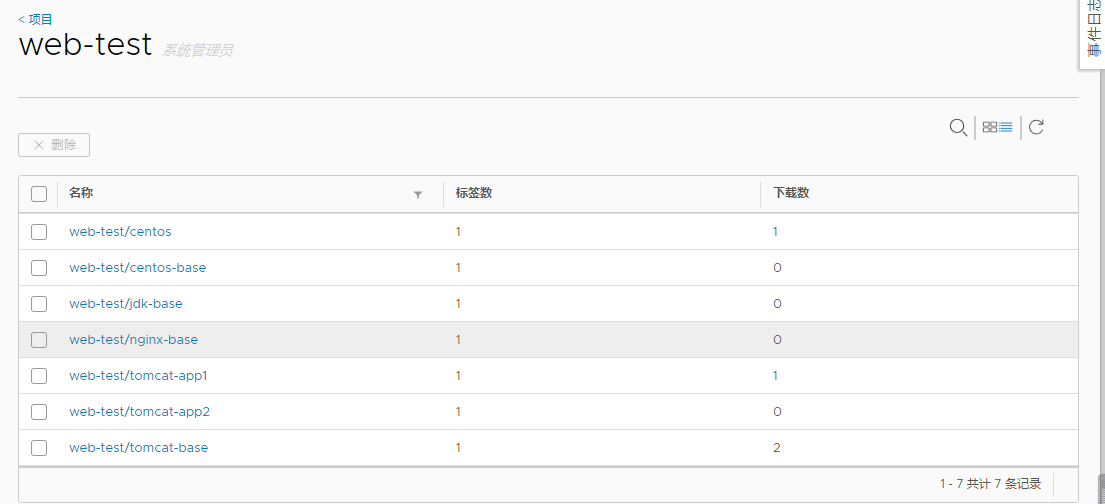
至此业务镜像构建完毕 执行所有的build-command.sh即可
bash build-command.sh 2020-03-24_10-12-30
docker run -it --rm -p 8801:8080 harbor.linux.com/web-test/tomcat-app1:2020-03-24_10-12-30
kubernetes部署清单
# pwd

/data/k8s/app/myapp/yaml/web-test/tomcat-app1

# cat tomcat-app1.yaml

kind: Deployment

apiVersion: apps/v1

metadata:

  labels:

    app: tomcat-app1-test

  name: web-test-tomcat1-deployment

  namespace: assembly

spec:

  replicas: 1

  selector:

    matchLabels:

      app: tomcat-app1-test

  template:

    metadata:

      labels:

        app: tomcat-app1-test

    spec:

      imagePullSecrets:

        - name: k8s-harbor-login

      containers:

      - name: web-test-tomcat1-spec

        image: harbor.linux.com/web-test/tomcat-app1:2020-03-24_10-12-30

        #command: ["/apps/tomcat/bin/run_tomcat.sh"]

        #imagePullPolicy: IfNotPresent

        imagePullPolicy: Always

        ports:

        - containerPort: 8080

          protocol: TCP

          name: http

---

kind: Service

apiVersion: v1

metadata:

  labels:

    app: tomcat-app1-test

  name: web-test-tomcat1-spec

  namespace: assembly

spec:

  type: NodePort

  ports:

  - name: http

    port: 80

    protocol: TCP

    targetPort: 8080

    nodePort: 33333

  selector:

    app: tomcat-app1-test

# kubectl get pods -n assembly

NAME                                          READY   STATUS        RESTARTS   AGE

jenkins-0                                     1/1     Running       0          6h48m

rbd-provisioner-9cf46c856-mvtx5               1/1     Running       41         5d12h

web-test-tomcat1-deployment-c58cb8d4f-krs6n   1/1     Running       0          4m17s

jenkins-gitlab-harbor-ceph基于Kubernetes的CI/CD运用(三)的更多相关文章
- jenkins-gitlab-harbor-ceph基于Kubernetes的CI/CD运用(一)
注:这部分的学习还是要靠自己多点点 多尝试尝试 这部分19年3月份我是玩的很溜的,一年没用,基本忘光光了. 学习要温故而知新! 流程拓扑图 前提准备 部署应用服务 部署kubernetes 集群:ht ...
- jenkins-gitlab-harbor-ceph基于Kubernetes的CI/CD运用(四)
前景提要 jenkins与gitlab结合,实现代码自动拉取:https://www.cnblogs.com/zisefeizhu/p/12548662.html jenkins与kubernetes ...
- jenkins-gitlab-harbor-ceph基于Kubernetes的CI/CD运用(二)
一张网图 因为我们使用了Docker in Docker技术,就是把jenkins部署在k8s里.jenkins master会动态创建slave pod,使用slave pod运行代码克隆,项目构建 ...
- 基于docker搭建Jenkins+Gitlab+Harbor+Rancher架构实现CI/CD操作
一.各个组件的功能描述: Docker 是一个开源的应用容器引擎. Jenkis 是一个开源自动化服务器. (1).负责监控gitlab代码.gitlab中配置文件的变动: (2).负责执行镜像文件的 ...
- 容器云平台No.10~通过gogs+drone+kubernetes实现CI/CD
什么是CI/CD 持续集成(Continous Intergration,CI)是一种软件开发实践,即团队开发成员经常集成它们的工作,通常每个成员每天至少集成一次,也就意味着每天可能会发生多次集成.每 ...
- 基于docker搭建Jenkins+Gitlab+Harbor+Rancher架构实现CI/CD操作(续)---Harbor的安装
前期安装文档:https://www.cnblogs.com/lq-93/p/11828626.html Harbor的作用: 开发提交代码至gitlab容器中,Jenkins拉取代码构建镜像 ...
- 基于docker搭建Jenkins+Gitlab+Harbor+Rancher架构实现CI/CD操作(续)
说明:前期的安装,请转向https://www.cnblogs.com/lq-93/p/11824039.html (4).查看gitlab镜像是否启动成功 docker inspect 容器id ...
- kubernetes的CI/CD
部署流程:把编码上传到gitlab上,使用webhook链接jenkins自动去编译docker镜像,然后上传到harbor本地docker镜像库中,再自动下载docker镜像,使用k8s控制dock ...
- Dockerfile+Jenkinsfile+GitLab轻松实现.NetCore程序的CI&CD
一.相关介绍 Dockerfile:关于Dockerfile的使用说明,我在文章<让.NetCore程序跑在任何有docker的地方>中有说到,这里不在赘述,需要的可以先看下,本文主要介绍 ...
随机推荐
- YY孵化虎牙,陌陌收购探探:你更看好谁?
近日欢聚时代公布了2017第四季财报和全年财报,表现不错.其CFO 金秉表示,虎牙最近向美国证券交易委员会(SEC)提交了注册上市申请书草案文件,可能会在美国IPO上市,以便获取自己的投资者群体以融资 ...
- 正则表达式入门-python代码
题记 本文介绍了Python对于正则表达式的支持,包括正则表达式基础以及Python正则表达式标准库的完整介绍及使用示例. 正则表达式在很多的应用中都有使用到,特别是在网络爬虫中格式化html后取出自 ...
- 部署描述符web.xml
部署描述符应用场景 需要传递初始参数给ServletContext 有多个过滤器,并要指定调用顺序 需要更改会话超时设置 要限制资源的访问,并配置用户身份验证方式 xsi:schemaLocation ...
- docker运行mysql主从备份,读写分离
1)从Docker官方下拉MySQL的image 打开https://hub.docker.com/ 搜索mysql 在docker中运行 默认tag为latest docker pull mysql ...
- Zookeeper:fsync超时导致实例异常
一.问题描述 2019-02-19 08:44左右,实时计算服务重启,报错显示找不到zk集群的leader节点,同时ZooKeeper集群有告警显示连接超时: 指标[连接耗时(ms)=18221]符合 ...
- C++扬帆远航——10(求π)
/* * Copyright (c) 2016,烟台大学计算机与控制工程学院 * All rights reserved. * 文件名:π.cpp * 作者:常轩 * 微信公众号:Worldhello ...
- Ambari2.7.4+HDP3.1.4安装 Centos7离线安装
一. Ambari等简单介绍 1.1Ambari Ambari是一种基于Web的工具,支持Apache Hadoop集群的创建 .管理和监控. Ambari已支持大多数Hadoop组件,包括HDFS. ...
- 【Spring Data 系列学习】了解 Spring Data JPA 、 Jpa 和 Hibernate
在开始学习 Spring Data JPA 之前,首先讨论下 Spring Data Jpa.JPA 和 Hibernate 之前的关系. JPA JPA 是 Java Persistence API ...
- file_put_contents生成ansi文件
$line_body = array('张三','李四','王五'); $line_body = array_map(function ($element){return iconv('UTF-8', ...
- IntelliJ IDEA神器使用技巧
说明:详情请参考慕课网课程:IntelliJ IDEA神器使用技巧:http://www.imooc.com/learn/924(感谢课程作者:闪电侠) 推荐: 1. 课程老师(闪电侠)IDEA快捷键 ...