
Error while importing sbt project:--创建sbt项目导入文件出错
错误截图如下:

Error while importing sbt project:

List([info] Loading global plugins from C:\Users\RYJ\.sbt\1.0\plugins

[warn] insecure HTTP request is deprecated 'http://maven.aliyun.com/nexus/content/groups/public'; switch to HTTPS or opt-in as ("aliyun" at "http://maven.aliyun.com/nexus/content/groups/public").withAllowInsecureProtocol(true)

[warn] insecure HTTP request is deprecated 'http://maven.aliyun.com/nexus/content/groups/public'; switch to HTTPS or opt-in as ("aliyun" at "http://maven.aliyun.com/nexus/content/groups/public").withAllowInsecureProtocol(true)

[warn] insecure HTTP request is deprecated 'http://maven.aliyun.com/nexus/content/groups/public'; switch to HTTPS or opt-in as ("aliyun" at "http://maven.aliyun.com/nexus/content/groups/public").withAllowInsecureProtocol(true)

[warn] insecure HTTP request is deprecated 'Patterns(ivyPatterns=Vector(http://repo.typesafe.com/typesafe/ivy-releases/[organization]/[module]/[revision]/[type]s/[artifact](-[classifier]).[ext]), artifactPatterns=Vector(http://repo.typesafe.com/typesafe/ivy-releases/[organization]/[module]/[revision]/[type]s/[artifact](-[classifier]).[ext]), isMavenCompatible=false, descriptorOptional=false, skipConsistencyCheck=false)'; switch to HTTPS or opt-in as Resolver.url("typesafe-ivy-releases", url(...)).withAllowInsecureProtocol(true)

[info] Loading project definition from F:\Code\Java\SbtObj\project

[warn] insecure HTTP request is deprecated 'http://maven.aliyun.com/nexus/content/groups/public'; switch to HTTPS or opt-in as ("aliyun" at "http://maven.aliyun.com/nexus/content/groups/public").withAllowInsecureProtocol(true)

[warn] insecure HTTP request is deprecated 'http://maven.aliyun.com/nexus/content/groups/public'; switch to HTTPS or opt-in as ("aliyun" at "http://maven.aliyun.com/nexus/content/groups/public").withAllowInsecureProtocol(true)

[warn] insecure HTTP request is deprecated 'Patterns(ivyPatterns=Vector(http://repo.typesafe.com/typesafe/ivy-releases/[organization]/[module]/[revision]/[type]s/[artifact](-[classifier]).[ext]), artifactPatterns=Vector(http://repo.typesafe.com/typesafe/ivy-releases/[organization]/[module]/[revision]/[type]s/[artifact](-[classifier]).[ext]), isMavenCompatible=false, descriptorOptional=false, skipConsistencyCheck=false)'; switch to HTTPS or opt-in as Resolver.url("typesafe-ivy-releases", url(...)).withAllowInsecureProtocol(true)

[warn] insecure HTTP request is deprecated 'http://maven.aliyun.com/nexus/content/groups/public'; switch to HTTPS or opt-in as ("aliyun" at "http://maven.aliyun.com/nexus/content/groups/public").withAllowInsecureProtocol(true)

[info] Loading settings for project sbtobj from build.sbt ...

[info] Set current project to SbtObj (in build file:/F:/Code/Java/SbtObj/)

[info] sbt server started at local:sbt-server-74de12ff202df04b48d5

sbt:SbtObj>

[info] Defining Global / sbtStructureOptions, Global / sbtStructureOutputFile and  others.

[info] The new values will be used by cleanKeepGlobs

[info]     Run `last` for details.

[info] Reapplying settings...

[info] Set current project to SbtObj (in build file:/F:/Code/Java/SbtObj/)

[info] Applying State transformations org.jetbrains.sbt.CreateTasks from C:/Users/RYJ/.IntelliJIdea2019./config/plugins/Scala/repo/org.jetbrains/sbt-structure-extractor/scala_2./sbt_1./2018.2.+-88400d3f/jars/sbt-structure-extractor.jar

[info] Reapplying settings...

[info] Set current project to SbtObj (in build file:/F:/Code/Java/SbtObj/)

[warn] insecure HTTP request is deprecated 'http://maven.aliyun.com/nexus/content/groups/public'; switch to HTTPS or opt-in as ("aliyun" at "http://maven.aliyun.com/nexus/content/groups/public").withAllowInsecureProtocol(true)

[warn] insecure HTTP request is deprecated 'http://maven.aliyun.com/nexus/content/groups/public'; switch to HTTPS or opt-in as ("aliyun" at "http://maven.aliyun.com/nexus/content/groups/public").withAllowInsecureProtocol(true)

[error] stack trace is suppressed; run 'last update' for the full output

[error] stack trace is suppressed; run 'last ssExtractDependencies' for the full output

[error] (update) lmcoursier.internal.shaded.coursier.error.FetchError$DownloadingArtifacts: Error fetching artifacts:

[error] https://repo1.maven.org/maven2/org/scala-lang/scala-compiler/2.13.1/scala-compiler-2.13.1.jar: wrong checksum: C:\Users\RYJ\AppData\Local\Coursier\cache\v1\https\repo1.maven.org\maven2\org\scala-lang\scala-compiler\2.13.1\scala-compiler-2.13.1.jar (expected SHA-1 2669fd1abfe2c76de9201174255f8454aa25c3e2 in C:\Users\RYJ\AppData\Local\Coursier\cache\v1\https\repo1.maven.org\maven2\org\scala-lang\scala-compiler\2.13.1\.scala-compiler-2.13.1.jar__sha1, got 1b073ccae686e76f296677dea625a1abd7e0eaac)

[error] (ssExtractDependencies) lmcoursier.internal.shaded.coursier.error.FetchError$DownloadingArtifacts: Error fetching artifacts:

[error] https://repo1.maven.org/maven2/org/scala-lang/scala-compiler/2.13.1/scala-compiler-2.13.1.jar: wrong checksum: C:\Users\RYJ\AppData\Local\Coursier\cache\v1\https\repo1.maven.org\maven2\org\scala-lang\scala-compiler\2.13.1\scala-compiler-2.13.1.jar (expected SHA-1 2669fd1abfe2c76de9201174255f8454aa25c3e2 in C:\Users\RYJ\AppData\Local\Coursier\cache\v1\https\repo1.maven.org\maven2\org\scala-lang\scala-compiler\2.13.1\.scala-compiler-2.13.1.jar__sha1, got 1b073ccae686e76f296677dea625a1abd7e0eaac)

[error] Total time:  s, completed -- ::

[info] shutting down sbt server)
解决方案:
1.更换镜像为国内
由于墙的问题,需要把下载源改为国内镜像,上面截图是我改过的,如果你改过也不行,直接看解决方案2.。
在.sbt项目下 (.sbt项目可以在文件管理器中直接搜索,默认是在C:\Users\用户名\.sbt 下) 面创建repositories文件(注意不需要任何后缀),然后添加如下内容:
[repositories]

local

aliyun: http://maven.aliyun.com/nexus/content/groups/public

typesafe-ivy-releases: http://repo.typesafe.com/typesafe/ivy-releases/, [organization]/[module]/[revision]/[type]s/[artifact](-[classifier]).[ext], bootOnly

sonatype-oss-releases

maven-central

sonatype-oss-snapshots
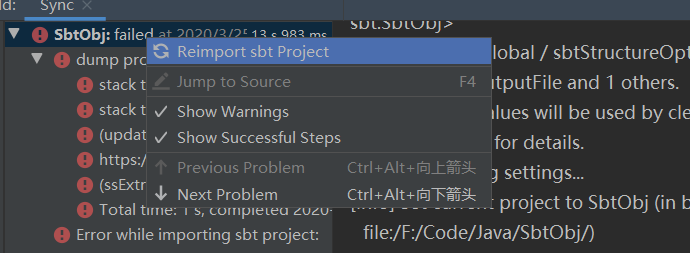
其它不用动,重新右键Reimport sbt Project运行看看,可以看到镜像已经从阿里云下载了。 当然了,这步设置好可能还是报错,没事,看第二个解决方案。
2.降低软件包版本
上面还是报错很大原因推测是下载的文件不存在或者找不到导致的,有可能你安装的这个文件太新了,国内镜像库还没同步过来,国外又访问不了,所以降低版本就行了。
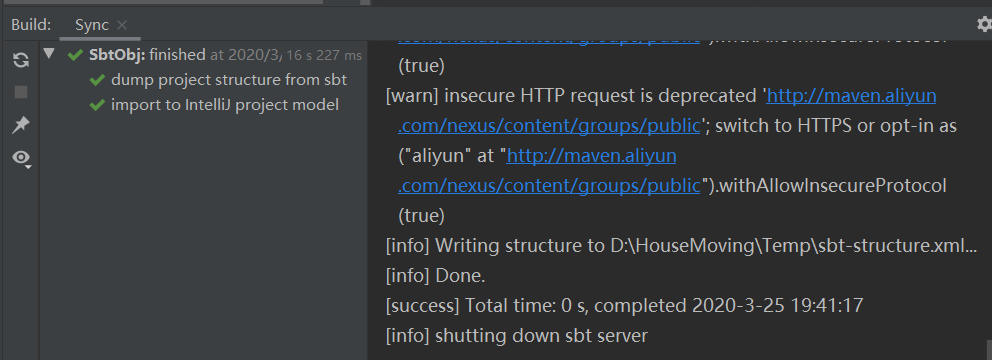
修改项目中的build.sbt文件,这里我因为是scala报错了,所以将 scalaVersion := "2.13.1" 改为 scalaVersion := "2.12.10", 然后保存,发现已经可以了。
Error while importing sbt project:--创建sbt项目导入文件出错的更多相关文章
- [转]ADT中通过DDMS导入文件出错ddms transfer error: Read-only file system,Failed to push selection: Read-only file system
[已解决] 原文 http://www.crifan.com/ddms_import_file_error_transfer_error_read_only_file_system/ 想要通过adt ...
- 命令行创建Maven项目卡住以及出错解决办法。
第一次通过命令行创建maven项目.结果,果不其然啊,还是出问题了,不过出问题比没有出问题强,知道哪里有问题并学会解决也是一种收获. 遇到的第一个问题,在从仓库下载东西的时候会卡住,我开始以为是网速问 ...
- MyEclipse下创建的项目导入到Eclipse中详细的图文配置方法
一.情景再现. 有些人比较喜欢用Myeclipse开发,有些人却比较喜欢用eclipse开发.但是其中有一个问题,Myeclipse里面的项目导入的时候出现了一个小小的问题. 如下: 二.说明问题 导 ...
- MyEclipse下创建的项目 导入eclipse
1.导入在MyEclipse下创建的项目 2.把项目变成Web项目,在项目上右键-->Properties-->选择Project Facets-->点击Convert to fac ...
- Eclipse和MyEclipse使用技巧--MyEclipse下创建的项目导入到Eclipse中详细的图文配置方法
一.情景再现. 有些人比较喜欢用Myeclipse开发,有些人却比较喜欢用eclipse开发.但是其中有一个问题,Myeclipse里面的项目导入的时候出现了一个小小的问题. 如下: 二.说明问题 导 ...
- 【maven】maven创建web项目-pom文件提示web.xml is missing and <failOnMissingWebXml> is set to true
使用maven创建web项目,选择war类型后,pom文件红叉 提示web.xml is missing and <failOnMissingWebXml> is set to true ...
- javaweb项目导入myecplise出错
项目导入出错:移动项目的时候.classpath .project不要删 build path -> use for source floder 把某一文件夹当作源码文件夹 bulid path ...
- vs 2019 create new project 创建新项目
下面的place solution and project in the same directory 不需要勾选
- mvn 创建的项目 导入到eclipse
首先,我的工具版本如下: jdk: java version "1.6.0_10-rc2"; maven: apache-maven-3.1.0; eclipse: MyEclip ...
随机推荐
- Spring MVC 增加静态资源配置mvc:resources跳转不了链接
在使用mvc:resources 要配合 <mvc:annotation-driven/> 一起
- OpenStack入门
云计算优势 降低成本,安全稳定,易扩展. 云计算三种服务模式 IaaS:基础设施即服务 IaaS(Infrastructure-as-a- Service):基础设施即服务.消费者通过Internet ...
- 如何进行Web服务的性能测试
涉及到web服务的功能在不断的增加,对于我们测试来说,我们不仅要保证服务端功能的正确性,也要验证服务端程序的性能是否符合要求.那么性能测试都要做些什么呢?我们该怎样进行性能测试呢? 性能测试 ...
- 【转】PHP中被忽略的性能优化利器:生成器.md
PHP 如果是做Python或者其他语言的小伙伴,对于生成器应该不陌生.但很多PHP开发者或许都不知道生成器这个功能,可能是因为生成器是PHP 5.5.0才引入的功能,也可以是生成器作用不是很明 ...
- OpenSSL编程之摘要
说明: 数字摘要是将任意长度的消息变成固定长度的短消息,它类似于一个自变量是消息的函数,也就是Hash函数.数字摘要就是采用单向Hash函数将需要加密的明文“摘要”成一串固定长度(128位)的密文这一 ...
- 差旅日志i·长安&北京(更新于8.21_夜)
大学之时,看到zealer王自如的差旅日志系列欲罢不能,扁平化的管理理念以及轻松的工作氛围,耳目一新的出差体验,抵消了部分不曾走入职场的紧张感甚至是恐惧感.如今初入职场也进入了职业生涯,特记录此次的差 ...
- 为什么我们要让人工智能玩游戏:微软Project AIX
<我的世界>游戏 2016年7月注:Project AIX已正式更名为Project Malmo 注:本文编译自Project AIX: Using Minecraft to build ...
- oracle监控参数
Sar –u 检查CPU的繁忙程度列说明Usr用户模式下cpu运行所占的百分比Sys系统模式下cpu运行所占的百分比Wio因为有进程等待块I/O而使cpu处于闲置状态所占百分比IdleCpu为闲置状态 ...
- 一篇文章带您读懂Map集合(源码分析)
今天要分享的Java集合是Map,主要是针对它的常见实现类HashMap进行讲解(jdk1.8) 什么是Map核心方法源码剖析1.文档注释2.成员变量3.构造方法4.put()5.get() 什么是M ...
- Spring的工作原理
一.什么是Spring (1).Spring真正的精华是它的Ioc模式实现的BeanFactory和AOP,它自己在这个基础上延伸的功能有些画蛇添足. (2). Spring它是一个开源的项目,而且目 ...