
SringBoot整合velocity及常用语法
项目地址:https://github.com/chywx/springboot-velocity
背景
由于公司业务面向的是非洲市场
那边有些国家智能机并未普及,像乌干达地区还是以功能机为主
为了支持功能机,需要新创一个wap网站用于支持功能机(天哪!)
技术选型
由于功能机试不支持js的,前端使用vue不现实,只能通过模板的形式
可以使用jsp,freemarker,Thymeleaf等引擎,但最终选型velocity模板(老大用过罢了)
后端使用springboot
项目简单架构
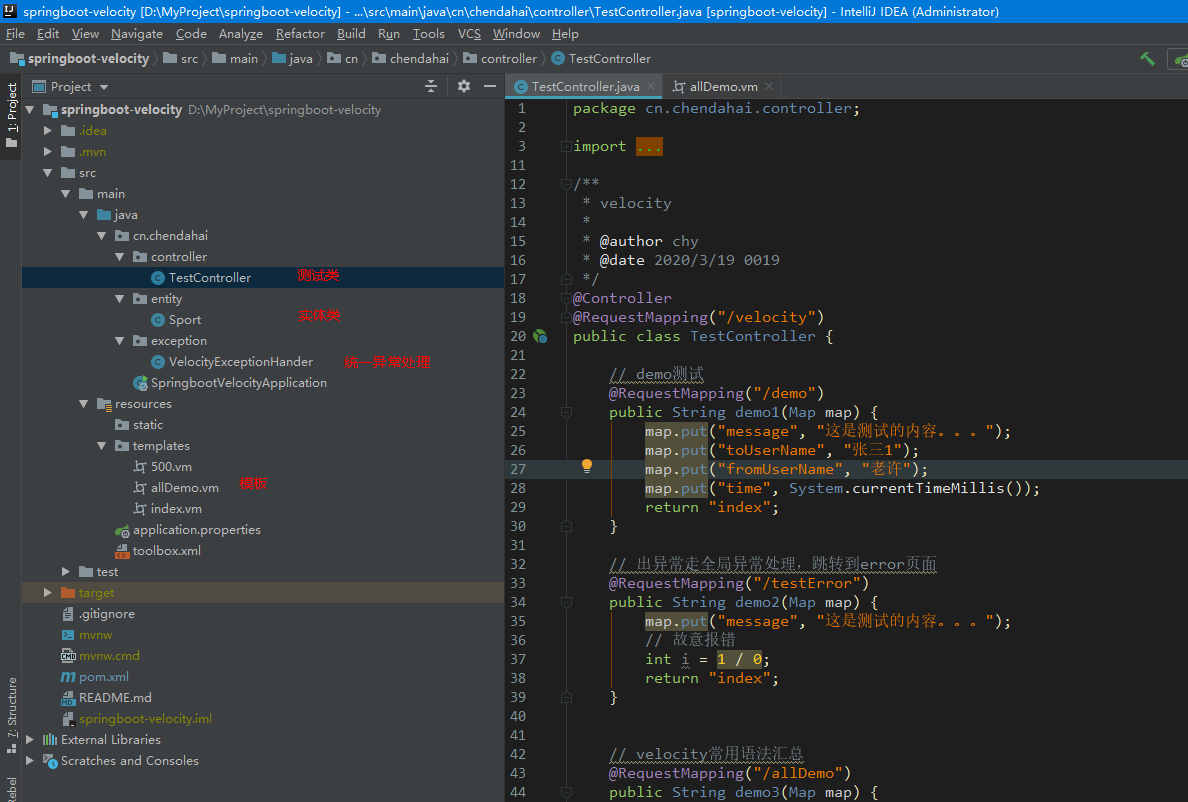
springboot整合velocity
版本选择
选择spring-boot-starter-velocity,高版本的springboot不支持,只能选用低版本的1.4.7
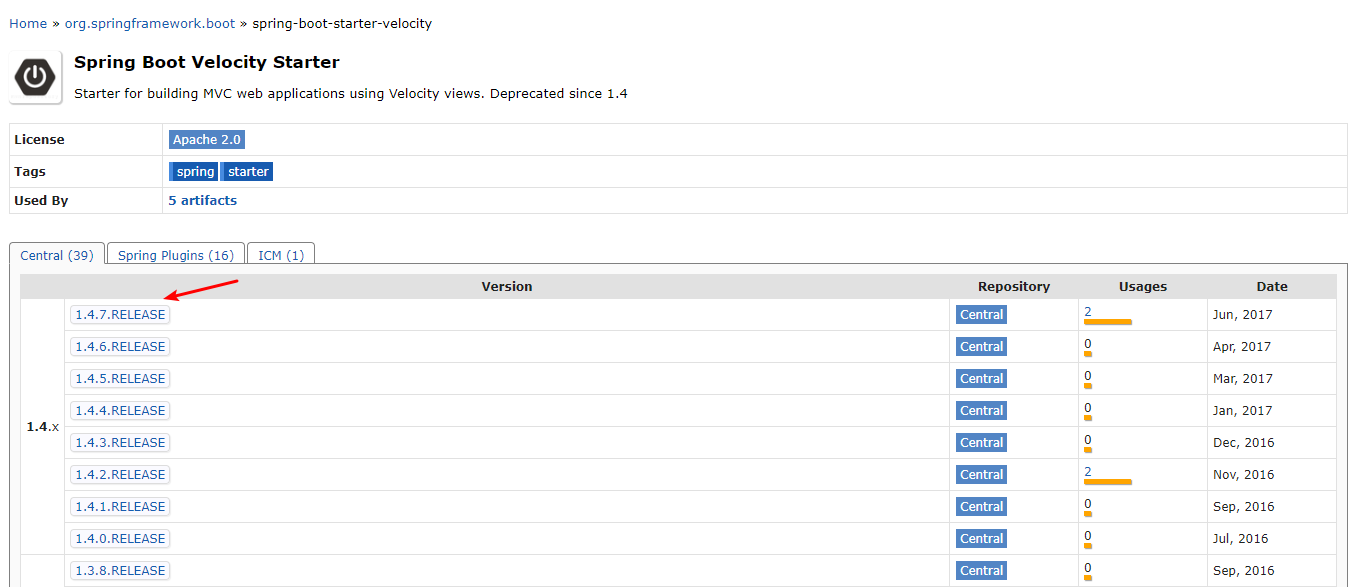
pom.xml添加依赖
<dependency>

      <groupId>org.springframework.boot</groupId>

      <artifactId>spring-boot-starter</artifactId>

    </dependency>

    <dependency>

      <groupId>org.springframework.boot</groupId>

      <artifactId>spring-boot-starter-web</artifactId>

    </dependency>

    <dependency>

      <groupId>org.springframework.boot</groupId>

      <artifactId>spring-boot-starter-velocity</artifactId>

    </dependency>
application.properties添加配置
server.port=2828

spring.velocity.cache=false

spring.velocity.charset=UTF-8

spring.velocity.check-template-location=true

spring.velocity.content-type=text/html

spring.velocity.enabled=true

spring.velocity.prefix=/templates/

spring.velocity.suffix=.vm
controller器层添加demo测试
@Controller

@RequestMapping("/velocity")

public class TestController {

    // demo测试

    @RequestMapping("/demo")

    public String demo1(Map map) {

        map.put("message", "这是测试的内容。。。");

        map.put("time", System.currentTimeMillis());

        return "index";

    }

}
templates文件夹下新家index.vm
<html>

<body>

    $!{message}

    $!{time}

</body>

</html>
访问index页面
http://localhost:2828/velocity/demo
ok,最简单的springboot整合velocity完毕
日期时间处理
如何将时间戳自定义时间格式呢
1. 添加toolbox.xml
内容如下
<?xml version="1.0" encoding="UTF-8"?>

<toolbox>

  <tool>

    <key>DateTool</key>

    <scope>application</scope>

    <class>org.apache.velocity.tools.generic.DateTool</class>

  </tool>

</toolbox>
当然,如果需要处理数字啥的,也可以引入一个tool即可
2. 指定toolbox.xml的位置
application.properties添加spring.velocity.toolbox-config-location=/toolbox.xml
3. 在vm页面中使用
<h1>日期处理</h1>

处理前:$time

<br>

处理后:$!DateTool.format($!time)
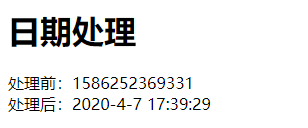
统一异常页面处理
新建VelocityExceptionHander
@ControllerAdvice

public class VelocityExceptionHander {

    @ExceptionHandler(value = Exception.class)

    @ResponseStatus(HttpStatus.INTERNAL_SERVER_ERROR)

    public String exceptionHandler(Exception e, HttpServletRequest request) {

        System.out.println("未知异常!原因是:" + e);

        request.setAttribute("msg", e);

        return "500";

    }

}
新建500.vm模板页面
<html>

<body>

error

<br>

    $!msg

</body>

</html>
之后如果出现异常,会跳转到500页面。
最后总结下常用的基础语法标签
    // velocity常用语法汇总

    @RequestMapping("/allDemo")

    public String demo3(Map map) {

        map.put("amount", 100);

        map.put("msg", "dahai");

        map.put("sex", "man");

        putString(map);

        putSportList(map);

        map.put("time", System.currentTimeMillis());

        return "allDemo";

    }

    private void putSportList(Map map) {

        List<Sport> sportList = new ArrayList<Sport>() {{

            add(new Sport(1, "Football"));

            add(new Sport(2, "Basketball"));

            add(new Sport(3, "tennis"));

            add(new Sport(4, "rugby"));

            add(new Sport(5, "cricket"));

        }};

        map.put("sportList", sportList);

        Map<Integer, Sport> sportMap = sportList.stream().collect(Collectors.toMap(Sport::getId, s -> s));

        map.put("sportMap", sportMap);

    }

    private void putString(Map map) {

        List<String> strings = new ArrayList<>();

        strings.add("a");

        strings.add("b");

        strings.add("c");

        map.put("strings", strings);

    }
vm模板页面
<!DOCTYPE HTML PUBLIC "-//W3C//DTD HTML 4.01 Transitional//EN"
"http://www.w3.org/TR/html4/loose.dtd">
<html>
<head>
<title>velocity test</title>
<meta http-equiv="Content-Type" content="text/html; charset=UTF-8"/>
</head>
<body>
<h1>字符串类型</h1>
$!msg
<h1>if标签</h1>
#if($!sex == 'man')
男
#else
女
#end
<h1>set操作(定义变量)</h1>
#set($hw = 'ok')
$hw
<h1>普通for循环</h1>
#foreach($!s in $!strings)
$s
#end
<h1>对象for循环</h1>
#foreach($!sport in $!sportList)
$!sport.name
#end
<h1>map for循环</h1>
#foreach($!sp in $!sportMap.keySet())
$sp $!sportMap.get($sp).name <br>
#end
<h1>日期处理</h1>
处理前:$time
<br>
处理后:$!DateTool.format($!time)
<h1>计算加减乘除</h1>
#set($jia = $amount + 10)
+10= $jia <br>
#set($jian = $amount - 10)
-10= $jian <br>
#set($cheng = $amount * 10)
×10= $cheng <br>
#set($chu = $amount / 10)
÷10= $chu <br>
</body>
</html>
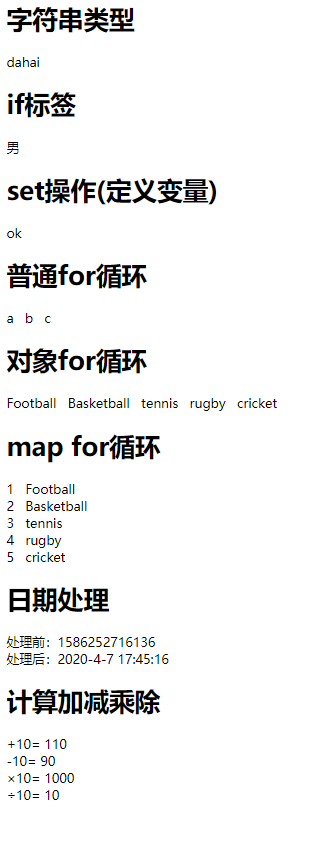
ok,完毕!重新温馨下熟悉而又陌生的前后端不分离(服务端渲染)的工程,؏؏☝ᖗ乛◡乛ᖘ☝؏؏
SringBoot整合velocity及常用语法的更多相关文章
- Velocity(2)——常用语法
Velocity是一个基于java的模板引擎(template engine),它允许任何人仅仅简单的使用模板语言(template language)来引用由java代码定义的对象.作为一个比较完善 ...
- Velocity基本常用语法
Velocity是一个基于java的模板引擎(template engine),它允许任何人仅仅简单的使用模板语言(template language)来引用由java代码定义的对象.作为一个比较完善 ...
- Markdown通用的常用语法说明
前言 Markdown 是一种轻量级的 标记语言,语法简洁明了.学习容易,还具有其他很多优点,目前被越来越多的人用来写作使用. Markdown具有一系列衍生版本,用于扩展Markdown的功能(如表 ...
- Markdown简介以及常用语法
Markdown简介以及常用语法 最近发现用markdown记录东西很方便,感觉和emacs的org mode很类似,但是windows下使用emacs不是很方便.特此记录一下markdown常用的语 ...
- Sql常用语法以及名词解释
Sql常用语法以及名词解释 SQL分类: DDL—数据定义语言(CREATE,ALTER,DROP,DECLARE) DML—数据操纵语言(SELECT,DELETE,UPDATE,INSERT) D ...
- Markdown常用语法
什么是Markdown Markdown 是一种方便记忆.书写的纯文本标记语言,用户可以使用这些标记符号以最小的输入代价生成极富表现力的文档. 通过Markdown简单的语法,就可以使普通文本内容具有 ...
- 2 hive的使用 + hive的常用语法
本博文的主要内容有: .hive的常用语法 .内部表 .外部表 .内部表,被drop掉,会发生什么? .外部表,被drop掉,会发生什么? .内部表和外部表的,保存的路径在哪? .用于创建一些临时表存 ...
- sql 常用语法汇总
Sql常用语法 SQL分类: DDL—数据定义语言(CREATE,ALTER,DROP,DECLARE) DML—数据操纵语言(SELECT,DELETE,UPDATE,INSERT) DCL—数据控 ...
- ES6常用语法
ECMAScript 6(以下简称ES6)是JavaScript语言的下一代标准.因为当前版本的ES6是在2015年发布的,所以又称ECMAScript 2015. 也就是说,ES6就是ES2015. ...
随机推荐
- 前端每日实战:17# 视频演示如何用纯 CSS 创作炫酷的同心矩形旋转动画
效果预览 按下右侧的"点击预览"按钮可以在当前页面预览,点击链接可以全屏预览. https://codepen.io/comehope/pen/bMvbRp 可交互视频教程 此视频 ...
- OpenGL 实现视频编辑中的转场效果
转场介绍 转场效果是什么? 转场效果,简单来说就是两段视频之间的衔接过渡效果. 现在拍摄 vlog 的玩家越来越多,要是视频没有一两个炫酷的转场效果,都不好意思拿出来炫酷了. 那么如何在视频编辑软件中 ...
- Flink消费Kafka到HDFS实现及详解
1.概述 最近有同学留言咨询,Flink消费Kafka的一些问题,今天笔者将用一个小案例来为大家介绍如何将Kafka中的数据,通过Flink任务来消费并存储到HDFS上. 2.内容 这里举个消费Kaf ...
- go学习第五天、运算符
算术运算符 下表列出了所有Go语言的算术运算符.假定 A 值为 10,B 值为 20 运算符 描述 实例 + 相加 A + B 输出结果 30 - 相减 A - B 输出结果 -10 * 相乘 A * ...
- Visual Studio 安装中出现闪退
问题描述:win7 系统下, 安装 Visual Studio Community 2017 过程中,安装界面闪退 原因:Visual Studio 的版本低了 解决方案:选择 Visual Stud ...
- tesseract的简单使用
Tesseract 是一个开源的 OCR 引擎,可以识别多种格式的图像文件并将其转换成文本,最初由 HP 公司开发,后来由 Google 维护.下载地址:https://digi.bib.uni-ma ...
- 【SpringBoot基础系列-实战】如何指定 bean 最先加载(应用篇)
[基础系列-实战]如何指定 bean 最先加载(应用篇) 在日常的业务开发中,绝大多数我们都是不关注 bean 的加载顺序,然而如果在某些场景下,当我们希望某个 bean 优于其他的 bean 被实例 ...
- Minio 集群扩容存储空间,配合nginx 负载反向代理后端minio 集群服务器,提升高可用性
环境:Centos 7 软件:minio,Etcd 需求:通过联盟两个集群实例,实现水平扩容存储空间问题: 服务器使用阿里云,一共4台服务器(官方说明最好4台服务器做分布式,测试节省服务器所以我们使 ...
- atomic的底层实现
atomic操作 在编程过程中我们经常会使用到原子操作,这种操作即不想互斥锁那样耗时,又可以保证对变量操作的原子性,常见的原子操作有fetch_add.load.increment等. 而对于atom ...
- 关于浏览器Number.toFixed的错误修复
问题描述如下: var n = 1.255; var fixed = n.toFixed(2); console.log(fixed);//结果:1.25 /* 以上代码运行预期的结果是1.26,但是 ...