
Entity FrameWork 实现分页
SQl语句进行分页
SQL语句进行分页主要是应用Entity FrameWork的SqlQuery()传入SQL语句进行查询时分页。
效果展示。
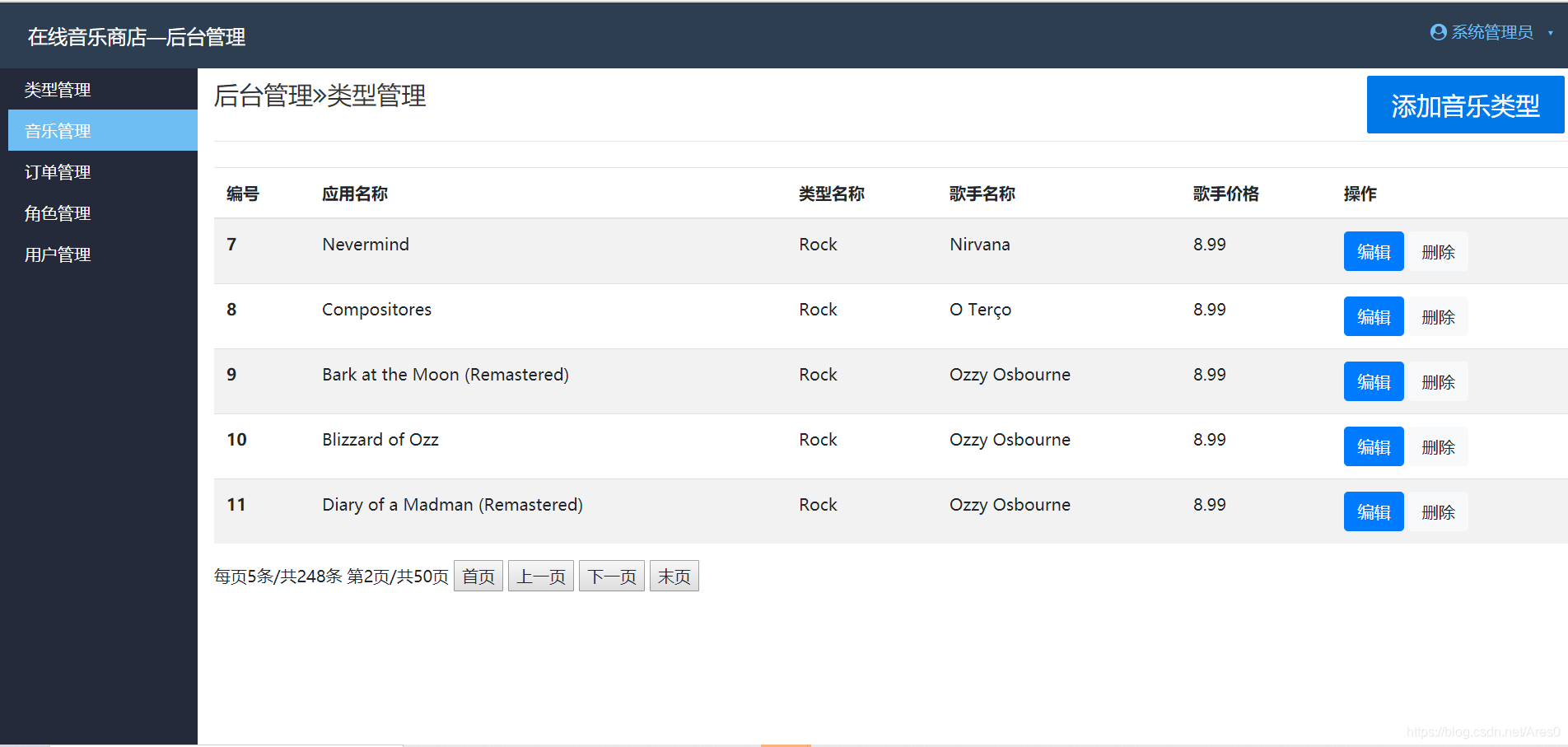
页面代码展示,显示是用Repeater控件进行动态显示
<%@ Page Title="" Language="C#" MasterPageFile="~/HoTai/HoTaiGuanLi.Master" AutoEventWireup="true" CodeBehind="HoTaiYingYYM.aspx.cs" Inherits="OLMS.HoTai.HoTaiYingYYM" %>

<asp:Content ID="Content1" ContentPlaceHolderID="head" runat="server">

    <link href="../Assets/css/input.css" rel="stylesheet" />

    <link rel="stylesheet" href="https://cdn.jsdelivr.net/npm/bootstrap@4.4.1/dist/css/bootstrap.min.css" integrity="sha384-Vkoo8x4CGsO3+Hhxv8T/Q5PaXtkKtu6ug5TOeNV6gBiFeWPGFN9MuhOf23Q9Ifjh" crossorigin="anonymous">

</asp:Content>

<asp:Content ID="Content2" ContentPlaceHolderID="ContentPlaceHolder1" runat="server">

    <div class="pure-form">

        <fieldset>

            <legend>后台管理<i class="fa fa-angle-double-right"></i>类型管理

            <asp:Button ID="Button1" CssClass="   pure-button pure-button-primary tools-button" runat="server" Text="添加音乐类型" OnClick="Button1_Click" />

            </legend>

        </fieldset>

    </div>

    <div>

        <table class="table table-striped">

            <thead>

                <tr>

                    <th scope="col">编号</th>

                    <th scope="col">应用名称</th>

                    <th scope="col">类型名称</th>

                    <th scope="col">歌手名称</th>

                    <th scope="col">歌手价格</th>

                    <th scope="col">操作</th>

                </tr>

            </thead>

            <tbody>

                <asp:Repeater ID="Repeater1" runat="server" OnItemCommand="Repeater1_ItemCommand">

                    <ItemTemplate>

                        <tr>

                            <th scope="row"><%# Eval("AlbumId") %></th> //表的id

                            <td><%# Eval("Title") %></td>

                            <td><%# Eval("Genres.Name") %></td>

                            <td><%# Eval("Artists.Name") %></td>

                            <td><%# Eval("Price") %></td>

                            <td>

                                <asp:LinkButton ID="LinkButton1" CssClass="btn btn-primary" CommandArgument='<%# Eval("AlbumId") %>' CommandName="dianjia" runat="server">编辑</asp:LinkButton>

                                <asp:LinkButton ID="LinkButton2" CssClass="btn btn-light" CommandArgument='<%# Eval("AlbumId") %>' CommandName="delete" runat="server">删除</asp:LinkButton></td>

                        </tr>

                    </ItemTemplate>

                </asp:Repeater>

            </tbody>

        </table>

    </div>

    <div>

        <asp:Label ID="Label1" runat="server" Text="Label"></asp:Label>

        <asp:Button ID="Button2" runat="server" Text="首页" OnClick="Button2_Click" />

        <asp:Button ID="Button3" runat="server" Text="上一页" OnClick="Button3_Click" />

        <asp:Button ID="Button4" runat="server" Text="下一页" OnClick="Button4_Click" />

        <asp:Button ID="Button5" runat="server" Text="末页" OnClick="Button5_Click" />

    </div>

</asp:Content>
后台事件代码
using OLMS.DAL;

using System;

using System.Collections.Generic;

using System.Linq;

using System.Web;

using System.Web.UI;

using System.Web.UI.WebControls;

namespace OLMS.HoTai

{

    public partial class HoTaiYingYYM : System.Web.UI.Page

    {

        static int x = 0;

        static int i = 1;

        static int zyes;

        static int ztian;

        static int tianos = 5;

        protected void Page_Load(object sender, EventArgs e)

        {

            if (!IsPostBack)

            {

                //刷新

                Select();

            }

        }

        private void Select()

        {

            using (OLMSDBEntities db = new OLMSDBEntities())

            {

                string sql = $"select * from Albums order by AlbumId offset {x} rows fetch next 5 rows only";

                Repeater1.DataSource = db.Albums.SqlQuery(sql).ToList();

                Repeater1.DataBind();

                var fy = db.Albums.ToList();

                ztian = fy.Count;

                zyes = ztian / tianos;

                Label1.Text = $"每页5条/共{ztian}条 第{i}页/共{zyes + 1}页";

            }

        }

        protected void Button2_Click(object sender, EventArgs e)

        {

         	//首页

            x = 0;

            i = 1;

            Select();

        }

        protected void Button4_Click(object sender, EventArgs e)

        {

        	//下一页

            x += 5;

            i++;

            if (i >= zyes)

            {

                x = zyes * 5;

                i = zyes + 1;

            }

            if (i >= (zyes + 1))

            {

                string strUrl = "<script>alert('已到末页');</script>";

                Response.Write(strUrl);

            }

            else

            {

                Select();

            }

        }

        protected void Button3_Click(object sender, EventArgs e)

        {

        	//上一页

            x -= 5;

            i--;

            if (x < 0)

            {

                x = 0;

                i = 1;

            }

            if (x <= 0)

            {

                string strUrl = "<script>alert('已到第一页');</script>";

                Response.Write(strUrl);

            }

            else

            {

                Select();

            }

        }

        protected void Button5_Click(object sender, EventArgs e)

        {

        	//末页

            x = zyes * 5;

            i = zyes + 1;

            Select();

        }

    }

}
Skip().Take()进行分页
Skip().Take()进行分页是应用Entity FrameWork的Skip(起始行).Take(每页多少行)方法来进行分页
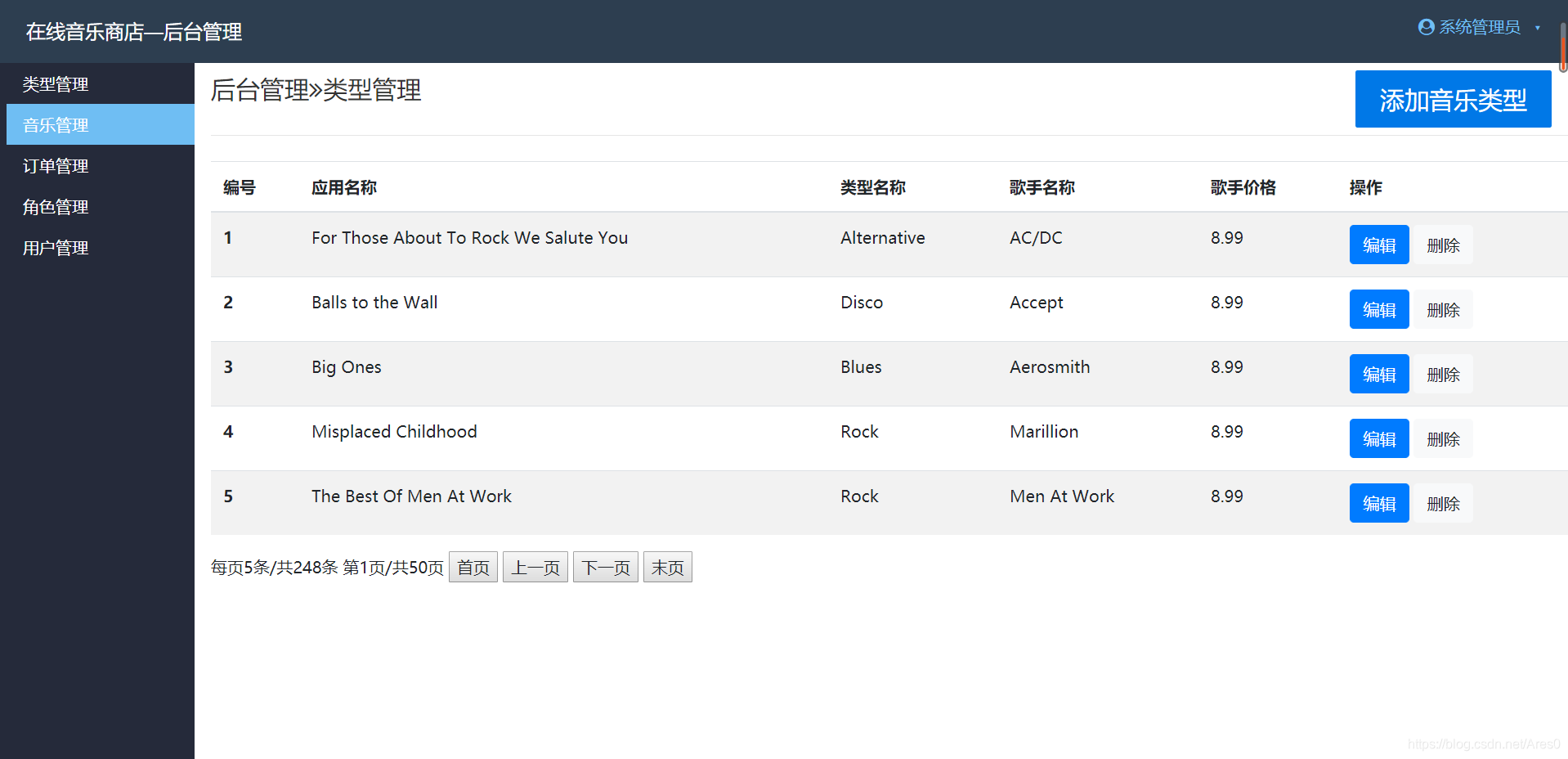
页面结构和上面是一样的,后台事件代码有区别
using OLMS.DAL;

using System;

using System.Collections.Generic;

using System.Linq;

using System.Web;

using System.Web.UI;

using System.Web.UI.WebControls;

namespace OLMS.HoTai

{

    public partial class HoTaiYingYYM : System.Web.UI.Page

    {

        static int i = 1; //起始页数

        static int zyes; //总条数

        static int ztian;//总页数

        static int tianos = 5; //每页多少条

        protected void Page_Load(object sender, EventArgs e)

        {

            if (!IsPostBack)

            {

                //刷新

                Select();

            }

        }

        private void Select()

        {

            using (OLMSDBEntities db = new OLMSDBEntities())

            {

                var fy = db.Albums.ToList();

                ztian = fy.Count;

                zyes = ztian / tianos;

               												    //起始行数        每页多少条

                Repeater1.DataSource = db.Albums.ToList().Skip((i - 1) * tianos).Take(tianos).ToList();

                Repeater1.DataBind();

                Label1.Text = $"每页{tianos}条/共{fy.Count}条 第{i}页/共{(fy.Count / 5) + 1}页";

            }

        }

        protected void Button2_Click(object sender, EventArgs e)

        {

            i = 1;

            Select();

        }

        protected void Button4_Click(object sender, EventArgs e)

        {

            i++;

            if (i >= zyes)

            {

                i = zyes + 1;

            }

            if (i >= (zyes + 1))

            {

                string strUrl = "<script>alert('已到末页');</script>";

                Response.Write(strUrl);

            }

            else

            {

                Select();

            }

        }

        protected void Button3_Click(object sender, EventArgs e)

        {

            i--;

            if (i < 0)

            {

                i = 1;

            }

            if (i <= 0)

            {

                string strUrl = "<script>alert('已到第一页');</script>";

                Response.Write(strUrl);

            }

            else

            {

                Select();

            }

        }

        protected void Button5_Click(object sender, EventArgs e)

        {

            i = zyes + 1;

            Select();

        }

    }

}
总结
Skip().Take()进行分页方法和SQl语句进行分页总体代码差不太多,按具体需要来进行选择。
Entity FrameWork 实现分页的更多相关文章
- entity framework 新手入门篇(3)-entity framework实现orderby,count,groupby,like,in,分页等
前面我们已经学习了entityframework的基本的增删改查,今天,我们将在EF中实现一些更加贴近于实际功能的SQL方法. 承接上面的部分,我们有一个叫做House的数据库,其中包含house表和 ...
- Entity Framework后台采用分页方式取数据与AspNetPager控件的使用
本文是一个对AspNetPager控件使用的笔记! 有关AspNetPager控件可以查看杨涛主页.这是一个开放的自定义ASP.NET控件,支持各种自定义的数据分页方式,使用很方便,而且功能也很强大, ...
- 基于Entity Framework的自定义分页,增删改的通用实现
简介 之前写个一个基于Dapper的分页实现,现在再来写一个基于Entity Framework的分页实现,以及增删改的通用实现. 代码 还是先上代码:https://github.com/jinwe ...
- Entity Framework分页扩展
Entity Framework分页在我初入门时总是困扰这我,无论是SQL分页还是Entity Framework的分页,总是显得那么麻烦,因此对于Entity Framework单独封装了分页. 一 ...
- 《Entity Framework 6 Recipes》中文翻译系列 (17) -----第三章 查询之分页、过滤和使用DateTime中的日期部分分组
翻译的初衷以及为什么选择<Entity Framework 6 Recipes>来学习,请看本系列开篇 3-12 分页和过滤 问题 你想使用分页和过滤来创建查询. 解决方案 假设你有如图3 ...
- [转]在Entity Framework中使用LINQ语句分页
本文转自:http://diaosbook.com/Post/2012/9/21/linq-paging-in-entity-framework 我们知道,内存分页效率很低.并且,如果是WebForm ...
- Working with Data » Getting started with ASP.NET Core and Entity Framework Core using Visual Studio » 排序、筛选、分页以及分组
Sorting, filtering, paging, and grouping 7 of 8 people found this helpful By Tom Dykstra The Contoso ...
- Entity Framework 学习之--Ling to entity实现分页
最近用MVC做的一个项目涉及到分页,中间用了entity framework来查数据库,不用直接写sql语句,方便了很多. 一般分页的思路是获得两个变量的值: 1.一共有多少条记录 totalCoun ...
- ASP.NET MVC with Entity Framework and CSS一书翻译系列文章之第五章:排序、分页和路由
本章的重点是对产品信息增加排序和分页的功能,以及使用ASP.NET Routing特性添加更加友好的URL支持. 注意:如果你想按照本章的代码编写示例,你必须完成第四章或者直接从www.apress. ...
随机推荐
- opencv-12-高斯滤波-双边滤波(附C++代码实现)
开始之前 这几天由于自己的原因没有写, 一个是因为自己懒了, 一个是感觉这里遇到点问题不想往下写了, 我们先努力结束这个章节吧, 之前介绍了比较常用而且比较好理解的均值和中值滤波, 但是呢,在例程Sm ...
- 关于C语言的位运算符
早期cpu架构在运行位运算时 略微领先 + - 运算 大幅领先 * / % 运算 '&' 运算符 总结 两个二进制中对应的位置都为 1 结果的对应二进制为 1 '&'运算符可以用到奇偶 ...
- 简述SpringCloud框架
1.什么是SpringCloud? SpringCloud是一系列框架的有序集合,它利用SpringBoot的开发便利性简化了分布式系统的开发,比如服务发现.服务网关.服务路由.链路追踪等.Sprin ...
- java ->Servlet接口
JavaWeb核心之Servlet Servlet简介 什么是Servlet(控制器的作用) Servlet 运行在服务端的Java小程序,是sun公司提供一套规范(接口),用来处理客户端请求.响应给 ...
- java ->IO流_File类
IO概述 回想之前写过的程序,数据都是在内存中,一旦程序运行结束,这些数据都没有了,等下次再想使用这些数据,可是已经没有了.那怎么办呢?能不能把运算完的数据都保存下来,下次程序启动的时候,再把这些数据 ...
- 【前端背景UI】鼠标磁性动态蜘蛛网背景源码
<div style="float:right;" id="hub_iframe"></div> <script type=&qu ...
- docer run 、docker attach 与 docker exec的区别
进入容器的方式有以下三种: 使用ssh登陆进容器 使用nsenter.nsinit等第三方工具 使用Docker本身提供的工具 最佳方案为使用Docker本身提供的工具 docker run:创建和启 ...
- React组件setState
注意: 1. 自定义组件首字母必须大写.这里是以函数表达式的方式定义子组件的. 2. 使用 ES6 的 class 关键字创建的 React 组件,组件中的方法遵循与常规 ES6 class 相同的语 ...
- P3366【模板】最小生成树
P3366[模板]最小生成树 Kruskal #include <bits/stdc++.h> using namespace std; typedef long long ll; ; ; ...
- 流复制-pg_start_backup(带自定义表空间)
一.准备slave库 archive_mode = on ---开启归档模式 archive_command = 'test ! -f /mysqldata/pg/archive_active/%f ...