
Android TextView 高亮字体并添加点击事件
运行效果
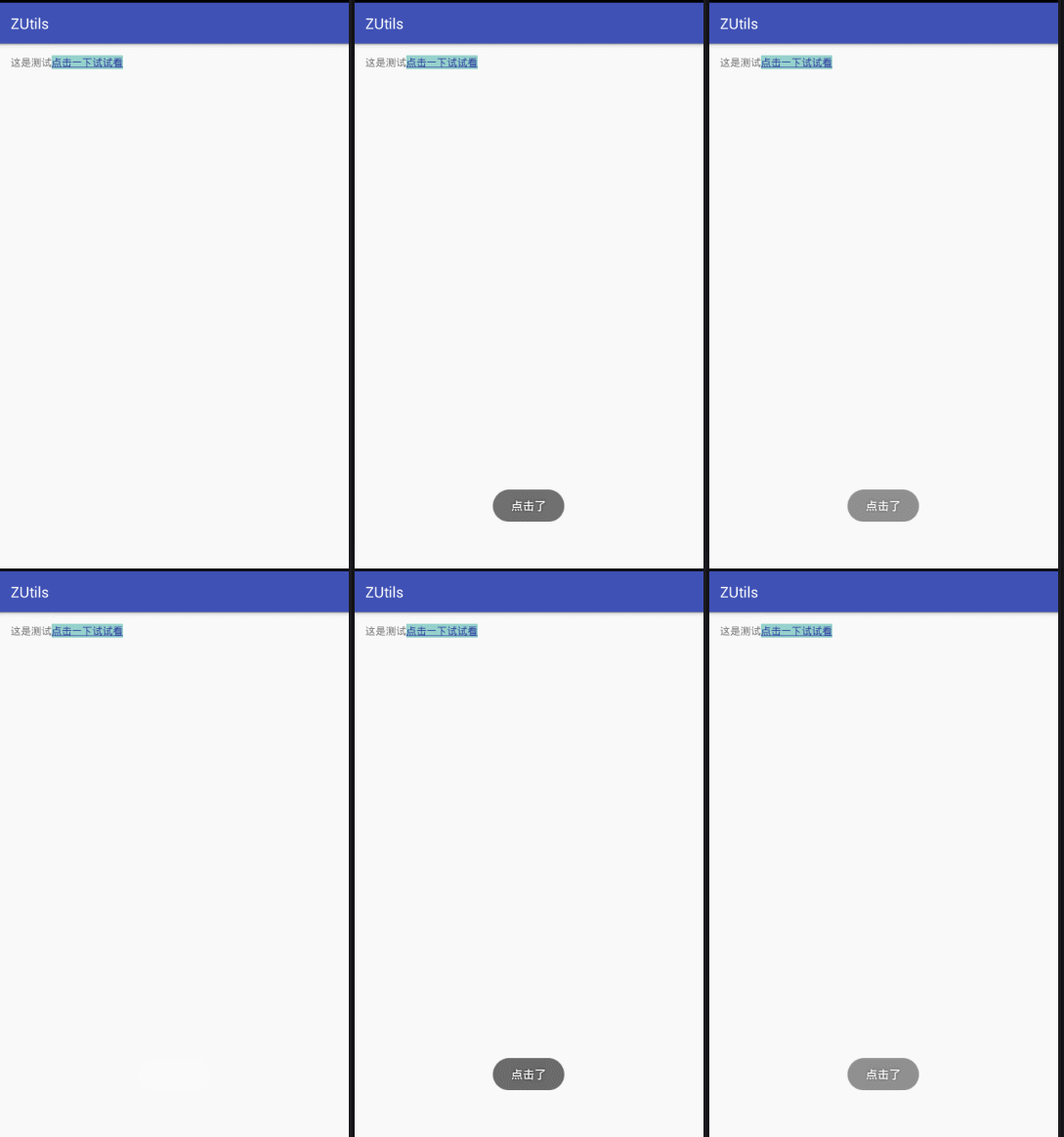
package com.zutil.lib;

import android.graphics.Typeface;

import android.os.Bundle;

import android.support.v7.app.AppCompatActivity;

import android.text.Spannable;

import android.text.SpannableStringBuilder;

import android.text.Spanned;

import android.text.TextPaint;

import android.text.method.LinkMovementMethod;

import android.text.style.ClickableSpan;

import android.text.style.ForegroundColorSpan;

import android.text.style.StyleSpan;

import android.text.style.UnderlineSpan;

import android.view.View;

import android.widget.TextView;

import android.widget.Toast;

public class MainActivity extends AppCompatActivity {

    private TextView tv1 ;

    @Override

    protected void onCreate(Bundle savedInstanceState) {

        super.onCreate(savedInstanceState);

        setContentView(R.layout.activity_main);

        tv1 = (TextView) findViewById( R.id.tv1 );

        String url1 =  "这是测试";

        String url2 = "点击一下试试看";

        String url = url1 + url2;

        SpannableStringBuilder style = new SpannableStringBuilder(url1 + url2);

        TextViewURLSpan myURLSpan = new TextViewURLSpan();

        style.setSpan(myURLSpan, url1.length(), url.length(), Spanned.SPAN_EXCLUSIVE_EXCLUSIVE);

        style.setSpan(new StyleSpan(Typeface.NORMAL ), url1.length(), url.length(), Spannable.SPAN_INCLUSIVE_EXCLUSIVE);

        style.setSpan(new UnderlineSpan(), url1.length(), url.length(), Spanned.SPAN_EXCLUSIVE_EXCLUSIVE);

        style.setSpan(new ForegroundColorSpan(getResources().getColor(R.color.colorPrimaryDark)), url1.length(), url.length(), Spanned.SPAN_EXCLUSIVE_EXCLUSIVE);

      //  style.setSpan(new BackgroundColorSpan(getResources().getColor(R.color.colorAccent)), url1.length(),url.length(), Spanned.SPAN_EXCLUSIVE_EXCLUSIVE);

        tv1.setText(style);

        //设置超链接为可点击状态

        tv1.setMovementMethod(LinkMovementMethod.getInstance());

    }

    class TextViewURLSpan extends ClickableSpan {

        @Override

        public void updateDrawState(TextPaint ds) {

            ds.setColor(getResources().getColor(R.color.colorAccent));

            ds.setUnderlineText(false); //去掉下划线

        }

        @Override

        public void onClick(View widget) {//点击事件

            Toast.makeText( MainActivity.this, "点击了", Toast.LENGTH_SHORT).show();

        }

    }

}
Android TextView 高亮字体并添加点击事件的更多相关文章
- 家庭版记账本app进度之关于listview显示账单,并为其添加点击事件
这个主要学习是关于listview的学习. 怎样去自定义adapter,以及使用.自己创建文件,还有就是为listview的每一个子控件添加点击事件. 在整个过程中收获到的知识点如下: 一.对于数据库 ...
- (二)AS给button添加点击事件
三种方法给Button添加点击事件 (一)通过button的id,添加继承View.OnClickListener的监听实现 <Button android:id="@+id/btn_ ...
- iOS开发小技巧 - label中的文字添加点击事件
Label中的文字添加点击事件 GitHub地址:https://github.com/lyb5834/YBAttributeTextTapAction 以前老师讲过类似的功能,自己懒得回头看了,找了 ...
- 【Swift 2.1】为 UIView 添加点击事件和点击效果
前言 UIView 不像 UIButton 加了点击事件就会有点击效果,体验要差不少,这里分别通过自定义和扩展来实现类似 UIButton 的效果. 声明 欢迎转载,但请保留文章原始出处:) 博客园: ...
- echart字符云之添加点击事件
// 路径配置 require.config({ paths : { echarts : 'jquery/echarts-2.2.7/build/dist' } }); // 使用EChart.js画 ...
- ThinkPHP框架下,给jq动态添加的标签添加点击事件移除标签
jq移除标签主要就是$("#要移除的id").remove();不再赘述,这里要提醒的是jq中动态添加标签后怎样添加点击事件.一般的jq添加点击事件是用这种方法$("#i ...
- 继承UIView的子控件添加点击事件
UITapGestureRecognizer*tapGesture = [[UITapGestureRecognizer alloc]initWithTarget:selfaction:@select ...
- 如何在UILable上添加点击事件?
最近开始学习iOS开发,今天上来写第一个iOS笔记 昨天碰到一个需求,在UILable上添加点击事件,网上找了写资料,有人建议用透明的UIButton覆盖,有人建议写一个集成自UILable的类,扩展 ...
- jquery无法为动态生成的元素添加点击事件的解决方法
遇到 jquery无法为动态生成的元素添加点击事件,谷歌一下,整理一下解决方法如下: (<li>中间的元素是动态生成的), 现在想为<i>添加点击事件, 例子如下: <d ...
随机推荐
- AngularJS中使用service,并同步数据
service是单例对象,在应用中不同代码块之间共享数据. 对一些公用的方法封装到service中,然后通过依赖注入在Controller中调用,示例代码: 1.创建一个模块: var module ...
- Asp.net 加密解密类
namespace Wedn.Net { /// <summary> /// EncryptHelper 来′自? wedn.net /// </summary> public ...
- js jquery 异常
1.0 TypeError: $(...).carousel is not a function原因:可能是没有引用或者引用了多个jquery:<script src="~/js/jq ...
- 127.0.0.1\SQLEXPRESS连接异常
当你的数据库为SQLEXPRESS时,在程序的数据库连接字符串的服务Server使用127.0.0.1\SQLEXPRESS时,如下: 它会显示一异常: Server Error in '/' App ...
- 在Winform开发中使用日程控件XtraScheduler
在一些应用场景中,我们可能需要记录某一天,某个时段的日程安排,那么这个时候就需要引入了DevExpress的日程控件XtraScheduler了,这个控件功能非常强大,提供了很好的界面展现方式,以及很 ...
- nested exception is org.hibernate.QueryException: could not resolve property
SSH框架出现了下面的错误: nested exception is org.hibernate.QueryException: could not resolve property 检查了hbm.x ...
- Delphi String 常用字串符处理函数
Delphi 在面对跨平台开发,程序语言也改进不少,不过有些改进,让原本 Delphi 开发者有些不适应,最显注的就是字串处理函数了,原本 Pascal 语言字串起始由 1 开始,几乎是它的经典了,新 ...
- 出现异常:Unsupported major.minor version
今天在使用springboot的最新版本的时候出现了这个问题 ,抛出来的异常是:UnsupportedClassVersionError 打开异常的源码看了一下 * Thrown when the J ...
- Data Structures/Algorithms 小甲鱼99讲笔记系列(1~~15讲)
参考资料地址: http://www.icoolxue.com/ 1.数据结构中四种逻辑结构. ① 集合 集合中任何两个数据元素之间都没有逻辑关系,组织形式松散. ② 线性结构 线性结构中的 结点按逻 ...
- Atom + activate-power-mode震屏插件Windows7下安装
Atom是Github推出的一个文本编辑器,搜索一下大概是给Web前端用的,最近比较火的是他的一个插件activate-power-mode,可以实现打字屏振效果. 用来装装逼还是挺适合的,本来想试试 ...