
Fiddler (六) 最常用的快捷键
使用QuickExec
Fiddler2成了网页调试必备的工具,抓包看数据。Fiddler2自带命令行控制,并提供以下用法。
Fiddler的快捷命令框让你快速的输入脚本命令。
键盘快捷键
按ALT+Q课迅速将焦点定位到快捷命令框。若Fiddler不在活跃状态(后台运行),可按Ctrl+Alt+F先行激活Fiddler(切换至Fiddler面板)
在QuickExec框,按CTRL + I插入会话列表中当前选定的会话的URL
默认命令
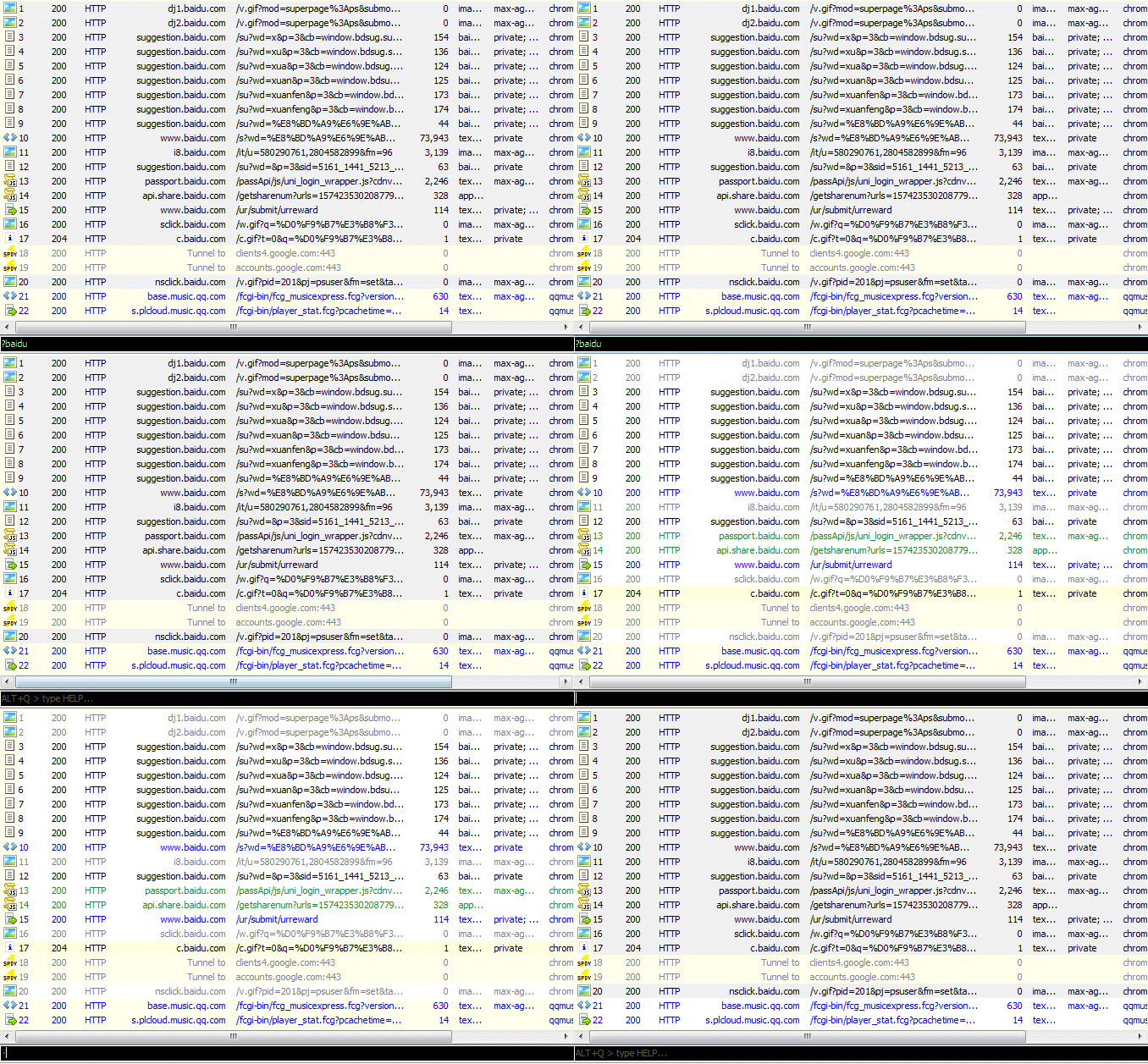
?sometext
当您键入一些字符串,如sometext ,Fiddler将突出会话所在的URL中包含sometext的请求 。此时按Enter键将高亮选中所有匹配的会话
|
1
|
?searchtext
|
选择请求响应大小大于size字节的会话
|
1
|
>40000 //选择大小超过40kb的响应
|
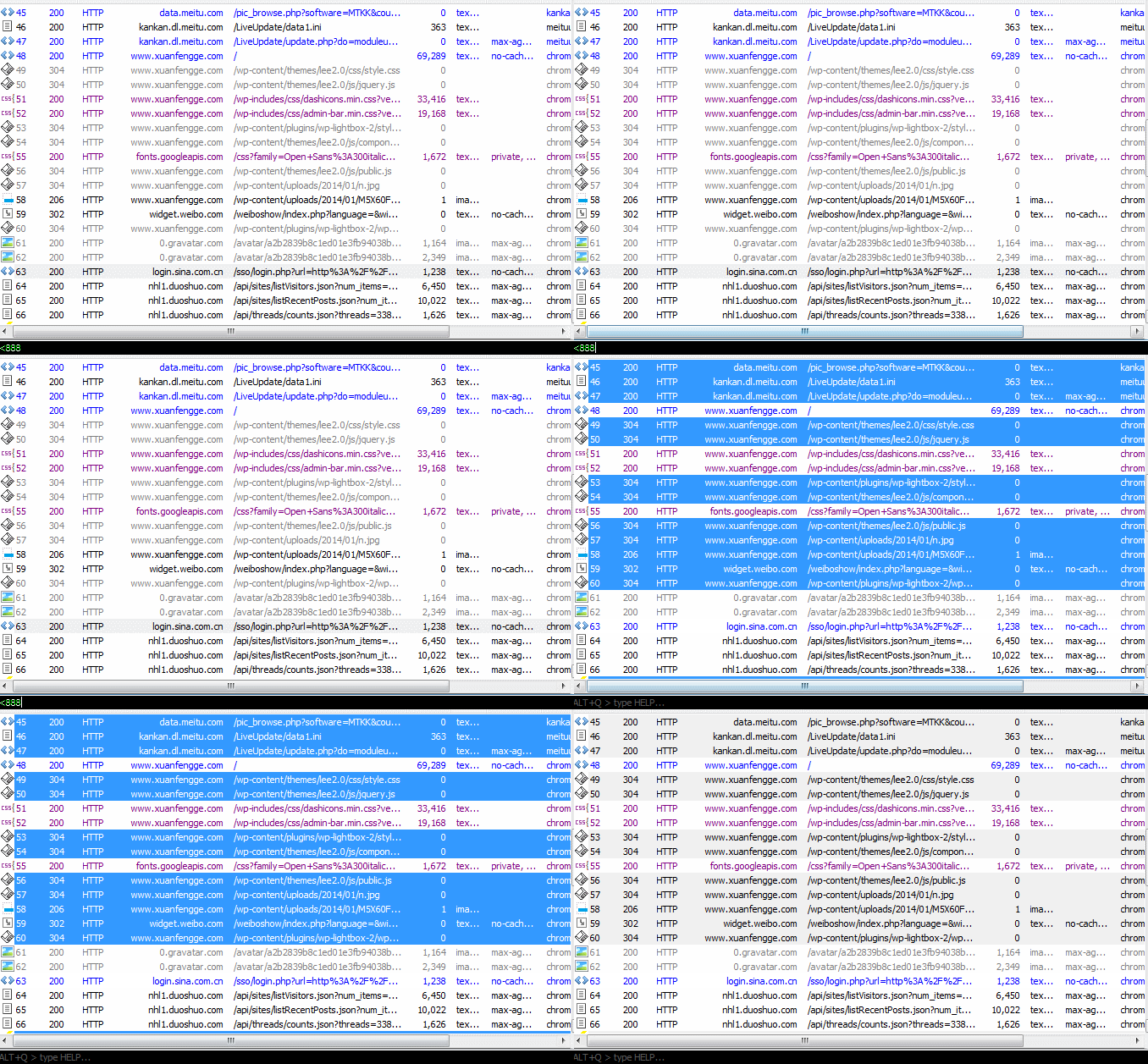
<size
选择请求响应大小小于size字节的会话
|
1
|
<5k //选择小于5kb的响应
|
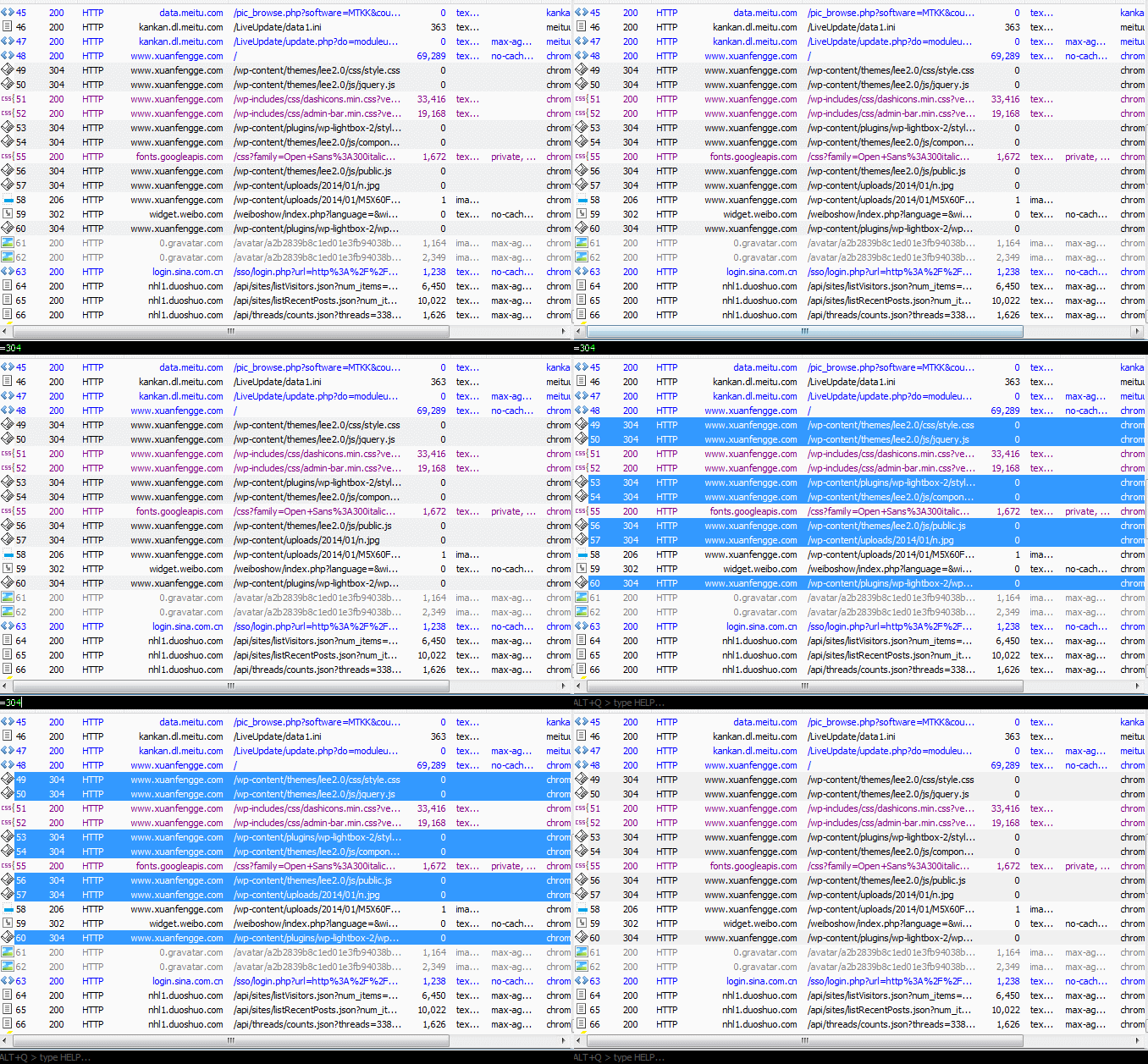
=status、 =method
选择响应状态=status 或请求方法=method的会话
|
1
2
|
=301 //选择301重定向响应
=POST //选择POST方式的请求
|
@host
选择会话中域名包含host的会话,此时按Enter键可高亮所有匹配的结果
|
1
|
@baidu.com //选择 www.baidu.com, map.baidu.com, 等等
|
bold
预先设置会话加粗:标记任何URL包含了目标字符串的后续请求
tip:再次输入bold取消设置
|
1
2
|
bold /index.php
bold //调用不带任何参数的命令来清除上一设置
|
bpafter
设置中断RequestURI中包含指定字符串的任何响应
tip:再次输入bpafter取消设置
|
1
2
|
bpafter /favicon.ico
bpafter //取消设置
|
bps
中断与设置的状态代码匹配的响应
|
1
2
|
bps 404
bps //取消设置
|
bpv or bpm
对指定的HTTP方法创建请求断点。设置此命令将清除该命令的任何以前的值,不带参数调用它会禁用断点
|
1
2
|
bpv POST
bpv //取消设置
|
bpu
对包含指定字符串的URI创建请求断点。设置此命令将清除该命令的任何以前的值,不带参数调用它会禁用断点
|
1
2
|
bpu /index.php
bpu //取消设置
|
cls or clear
清空会话列表
|
1
|
cls
|
dump
打包所有会话成zip归档文件并转存在C:\
|
1
|
dump
|
g or go
恢复所有设置断点的会话
|
1
|
g
|
help
打开帮助页面(即本文英文版)
|
1
|
help
|
hide
隐藏Fiddler界面,系统后台运行
|
1
|
hide
|
urlreplace
以一个不同的字符串替换URL中任何字符串。设置此命令将清除该命令的任何以前的值,不带参数调用它,将取消更换
|
1
2
|
urlreplace SeekStr ReplaceWithStr
urlreplace //取消设置
|
start
注册成为系统代理
|
1
|
start
|
stop
取消注册为系统代理
|
1
|
stop
|
show
将Fiddler从系统托盘中恢复,从ExecAction.exe获取更多有用的触发规则
|
1
|
show
|
select MIME
选择Content- Type头中包含指定字符串的响应,可用于选择文件格式等
|
1
2
3
|
select image
select css
select htm
|
select HeaderOrFlag PartialValue
选择已命名的header或SessionFlag包含指定字符串的响应
|
1
2
3
4
5
|
select ui-comments slow
select ui-bold * <-- unless preceded by a slash, * 表示任意值
select ui-comments \* <-- Find comments with a *
select @Request.Accept html <-- Find requests with Accept: html
select @Response.Set-Cookie domain <- Find responses that Set-Cookie on a domain
|
allbut or keeponly
隐藏Content-Type头中除了包含指定字符串的所有会话,用于筛选
|
1
2
|
allbut html
allbut java
|
quit
退出Fiddler
|
1
|
quit
|
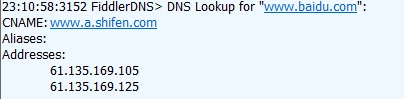
!dns hostname
进行目标域名的DNS查找,并将结果显示在LOG选项卡上
|
1
2
|
!dns www.baidu.com
!nslookup www.baidu.com
|
!listen PORT [CERTHOSTNAME]
在另一个端口增设一个监听器,选择安全的HTTPS证书
|
1
2
3
|
!listen 8889
!listen 4443 localhost
!listen 444 secure.example.com
|
附:
| Command | Action | Sample usage |
|---|---|---|
| ?sometext | As you typesometext, Fiddler will highlight sessions where the URL containssometext. Hit Enter to set focus to the selected matches. | ?searchtext |
| >size | Select sessions where response size is greater thansize bytes. | >40000 <-- Select responses over 40kb |
| <size | Select sessions where response size is less thansize bytes. | <5k <-- Select responses under 5kb |
| =status =method |
Select sessions whereresponse status =status orrequest method =method. | =301 <-- Select 301 redirect responses =POST <-- Select POST requests |
| @host | Select sessions where the request host contains host. Hit Enter to set focus to the selected matches. | @msn.com <-- Select www.msn.com, login.msn.com, etc |
| bold | Mark any future sessions in bold if the url contains the target string | bold /bar.aspx
bold <-- Call with no parameter to clear |
| bpafter | Break any response where the RequestURI contains the specified string | bpafter /favicon.ico
bpafter <-- Call with no parameter to clear |
| bps | Break any response where the status code matches | bps 404
bps <-- Call with no parameter to clear |
| bpv or bpm | Create a request breakpoint for the specified HTTP method. Setting this command will clear any previous value for the command; calling it with no parameter will disable the breakpoint. | bpv POST
bpv <-- Call with no parameter to clear |
| bpu | Create a request breakpoint for URIs containing the specified string. Setting this command will clear any previous value for the command; calling it with no parameter will disable the breakpoint. | bpu /myservice.asmx
bpu <-- Call with no parameter to clear |
| cls or clear | clear the session list | cls |
| dump | dump all sessions to a zip archive in C:\ | dump |
| g or go | Resume all breakpointed sessions | g |
| help | show this page | help |
| hide | Hide Fiddler in System tray | hide |
| urlreplace | Replace any string in URLs with a different string. Setting this command will clear any previous value for the command; calling it with no parameter will cancel the replacement. | urlreplace SeekStr ReplaceWithStr
urlreplace <-- Call with no parameters to clear |
| start | Register as the system proxy | start |
| stop | Unregister as the system proxy | stop |
| show | Restore Fiddler from system tray -- more useful when triggering rules from ExecAction.exe (see below) | show |
| select MIME | Select any session where the response Content-Type header contains the specified string. | select image
select css select htm |
| selectHeaderOrFlagPartialValue | Select any session where the named Header or SessionFlag contains the specified string. | select ui-comments slow
select ui-bold * <-- unless preceded by a slash, * means any value select ui-comments \* <-- Find comments with a * select @Request.Accept html <-- Find requests with Accept: html select @Response.Set-Cookie domain <- Find responses that Set-Cookie on a domain |
| allbut or keeponly | Hide all sessions except those where Content-Type header contains the specified string. | allbut xml
allbut java |
| quit | Shutdown Fiddler. | quit |
| !dns hostname | Perform a DNS lookup of the target host and show the results on the LOG tab | !dns www.example.com
!nslookup www.example.com |
| !listen PORT [CERTHOSTNAME] | Set up an additional listener on another port, optionally secured by a HTTPS certificate | !listen 8889
!listen 4443 localhost !listen 444 secure.example.com |
附: Fiddler 系列教程, (连载中, 敬请期待)
Fiddler (三) Composer创建和发送HTTP Request
Fiddler (六) 最常用的快捷键的更多相关文章
- 常用IDEA快捷键
[转]常用IDEA快捷键 阿烈的博客 2013-06-29 72 阅读 最近已经从eclipse转到IntelliJ IDEA,IDEA用起来太顺手了,许多功能正合我意. 看到时光印记写的一篇&l ...
- Xmind常用的快捷键
1.Xmind常用的快捷键 DEL --删除 TAB--新增下一级主题 ENTER--新建同级主题 Ctrl+I--插入图片 Ctrl+f --查找.替换 空格--当前主题内容编辑 通过概要.格式.联 ...
- oracle常用的快捷键
最近在开发过程中,遇到一些麻烦,就是开发效率问题,有时候其他同事使用PLSQL 编程效率明显高于自己,观察了好久,才发现他使用PLSQL 已经很长时间了而且,他自己也在其中添加了好多快捷方式, 1.登 ...
- 关于codeblock中一些常用的快捷键(搬运)
关于codeblock中一些常用的快捷键(搬运) codeblock作为一个常用的C/C++编译器,是我最常用的一款编译器,但也因为常用,所以有时为了更加快速的操作难免会用到一些快捷键,但是因为我本身 ...
- Xcode自定义Eclipse中常用的快捷键
转载自http://joeyio.com/2013/07/22/xcode_key_binding_like_eclipse/ Xcode自定义Eclipse中常用的快捷键 22 July 2013 ...
- MyEclipse中常用的快捷键大全,快来.....
在这里分享点常用的快捷键,希望对你有帮助! Eclipse的编辑功能非常强大,掌握了Eclipse快捷键功能,能够大大提高开发效率.Eclipse中有如下一些和编辑相关的快捷键. 1. [ALT+/] ...
- MonoDevelop几个常用的快捷键
MonoDevelop几个常用的快捷键 CTRL+K 删除光标所在行的该行后面的代码 CTRL + ALT +C 注释/不注释该行 CTRL+ DOWN 像鼠标滚轮一样向下拖 CTRL + UP ...
- Ubuntu终端常用的快捷键
Ubuntu终端常用的快捷键 Ubuntu中的许多操作在终端(Terminal)中十分的快捷,记住一些快捷键的操作更得心应手.在Ubuntu中打开终端的快捷键是Ctrl+Alt+T.其他的一些常用的快 ...
- xcode 自定义Eclipse里边常用的快捷键
之前在用Eclipse写Java的 时候,有几个常用的快捷键,比如删除当前行,在当前行下面插入空行,向上/下移动当前行等等,到了Xcode里怎么也找不到这些快捷键,一直觉得 Xcode自带的快捷键不够 ...
随机推荐
- 如何在win上搭建SVN服务器
本博文转自:http://www.cnblogs.com/armyfai/p/3985660.html SVN简介: 为什么要使用SVN? 程序员在编写程序的过程中,每个程序员都会生成很多不同的版本, ...
- python语言特性及其数据类型
- Partial backup 备份指定表/库
Partial Backups XtraBackup支持partial backups,这意味着你可以只备份部分表或库.要备份的表必须是独立表空间,即innodb_file_per_table=1 有 ...
- multiple definition of `err_sys' 《UNIX环境高级编程》
本文地址:http://www.cnblogs.com/yhLinux/p/4079930.html 问题描述: [点击此处直接看解决方案] 在练习<UNIX环境高级编程>APUE程序清单 ...
- rails日记1
assert_select "div" <div>foobar</div>assert_select "div", "foob ...
- http协议与网页优化泛谈
最近公司开展职业技能培训,本人招录了部分内容写成博客,若有纰漏,欢迎拍砖. http简述: http又称超文本传输协议,是一种无状态&无记忆协议的运用层协议,处于tcp传输层协议之上,采用请求 ...
- vim插件神器spf13在Linux上的安装
官网给出的安装办法很简单: curl http://j.mp/spf13-vim3 -L -o - | sh 可惜有问题: connection reset by peer 正确的姿势是: curl ...
- 每天记一些php函数,jQuery函数和linux命令(三)
简介:学习完了php和jQuery之后,对函数的记忆不到位,导致很多函数没记住,所以为了促进自己的记忆,每天花一点时间来写这个博客. 时间:2016-12-21 地点:太原 天气:雨夹雪 一 ...
- windows编程:画线,简单的碰撞检测,简单的帧率锁定
#define WIN32_LEAN_AND_MEAN #include <windows.h> #include <windowsx.h> #include <mmsy ...
- Sprint评分表
组名:第七班 姓名:王炳午 1.Cs 小分队: 项目: 游戏与办公的集合一些小的程序的整合有2048,倒计时,记 ...