
Android开发学习之路-抢红包助手开发全攻略
背景:新年之际,微信微博支付宝红包是到处飞,但是,自己的手速总是比别人慢一点最后导致红包没抢到,红包助手就应运而生。
需求:收到红包的时候进行提醒,然后跳转到红包的界面方便用户
思路:获取“读取通知信息”权限,然后开启服务监控系统通知,判断如果是微信红包就进行提醒(声音),然后跳转到红包所在的地方
界面:
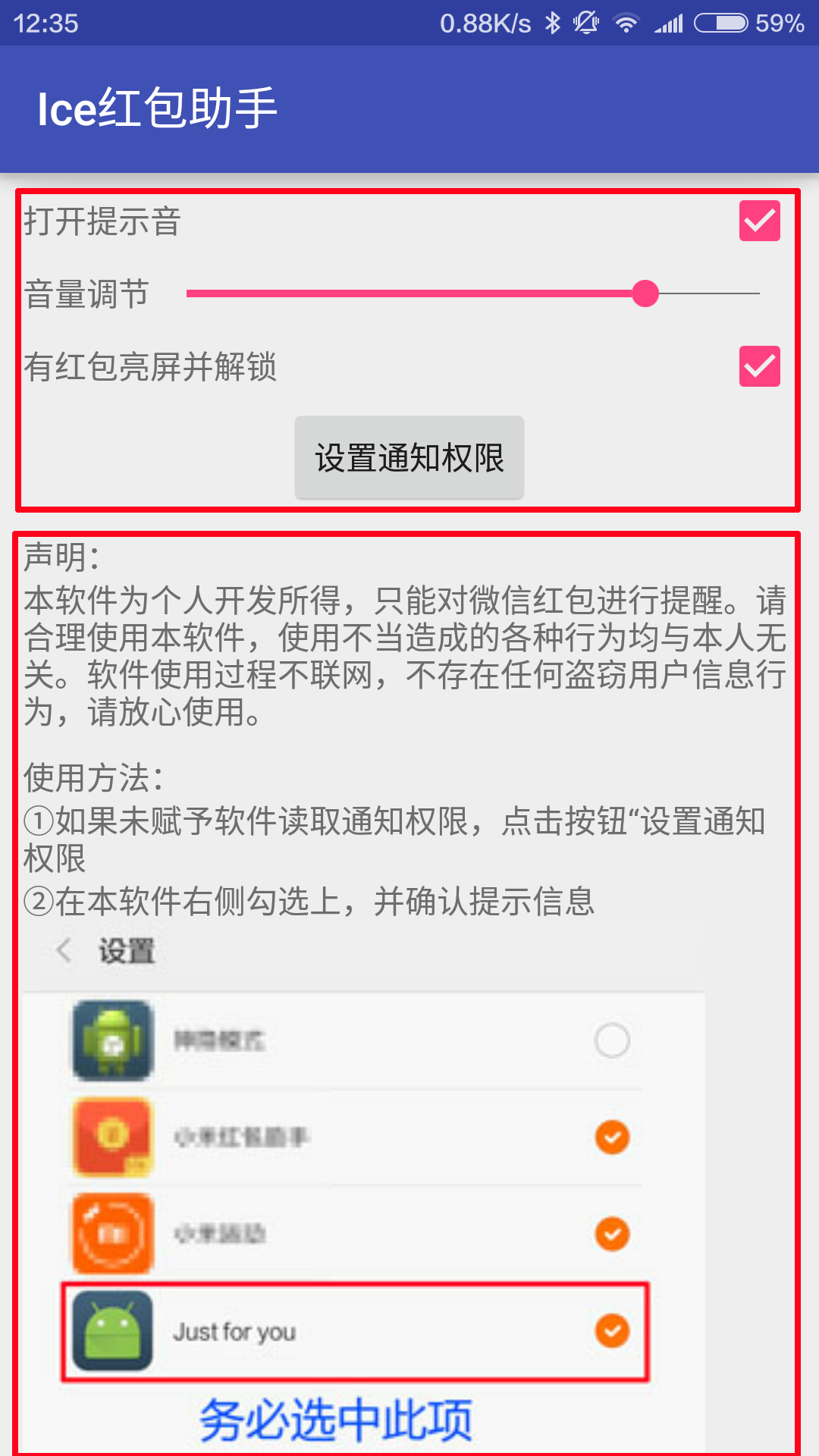
界面分为两部分,一部分是可以对App进行操作的,下面是一个可以滑动的界面,提示用户如何是软件正常工作,布局代码如下:
<?xml version="1.0" encoding="utf-8"?>

<LinearLayout

    android:id="@+id/root"

    xmlns:android="http://schemas.android.com/apk/res/android"

    xmlns:tools="http://schemas.android.com/tools"

    android:layout_width="match_parent"

    android:layout_height="match_parent"

    android:layout_marginLeft="10dp"

    android:layout_marginRight="10dp"

    android:layout_marginTop="5dp"

    android:orientation="vertical"

    tools:context="com.fndroid.administrator.justforyou.MainActivity">

    <LinearLayout

        android:layout_width="match_parent"

        android:layout_height="wrap_content"

        android:orientation="horizontal">

        <TextView

            android:layout_width="wrap_content"

            android:layout_height="wrap_content"

            android:layout_weight="3"

            android:text="打开提示音"/>

        <CheckBox

            android:id="@+id/isMusic"

            android:layout_width="wrap_content"

            android:layout_height="wrap_content"/>

    </LinearLayout>

    <LinearLayout

        android:layout_width="match_parent"

        android:layout_height="wrap_content">

        <TextView

            android:layout_width="wrap_content"

            android:layout_height="wrap_content"

            android:layout_gravity="center"

            android:text="音量调节"/>

        <SeekBar

            android:id="@+id/seekbar"

            android:layout_width="wrap_content"

            android:layout_height="wrap_content"

            android:layout_gravity="center"

            android:layout_weight="1"/>

    </LinearLayout>

    <LinearLayout

        android:layout_width="match_parent"

        android:layout_height="wrap_content"

        android:orientation="horizontal">

        <TextView

            android:layout_width="0dp"

            android:layout_height="wrap_content"

            android:layout_weight="3"

            android:text="有红包亮屏并解锁"/>

        <CheckBox

            android:id="@+id/isUnlock"

            android:layout_width="wrap_content"

            android:layout_height="wrap_content"/>

    </LinearLayout>

    <Button

        android:id="@+id/setPermision"

        android:layout_width="wrap_content"

        android:layout_height="wrap_content"

        android:layout_gravity="center"

        android:text="设置通知权限"/>

    <ScrollView

        android:layout_width="match_parent"

        android:layout_height="match_parent">

        <LinearLayout

            android:layout_width="match_parent"

            android:layout_height="match_parent"

            android:orientation="vertical">

            <TextView

                android:layout_width="wrap_content"

                android:layout_height="wrap_content"

                android:layout_marginTop="10dp"

                android:text="声明:"/>

            <TextView

                android:layout_width="wrap_content"

                android:layout_height="wrap_content"

                android:text="本软件为个人开发所得,只能对微信红包进行提醒。请合理使用本软件,使用不当造成的各种行为均与本人无关。软件使用过程不联网,不存在任何盗窃用户信息行为,请放心使用。"/>

            <TextView

                android:layout_width="wrap_content"

                android:layout_height="wrap_content"

                android:layout_marginTop="10dp"

                android:text="使用方法:"/>

            <TextView

                android:layout_width="wrap_content"

                android:layout_height="wrap_content"

                android:text="①如果未赋予软件读取通知权限,点击按钮“设置通知权限"/>

            <TextView

                android:layout_width="wrap_content"

                android:layout_height="wrap_content"

                android:text="②在本软件右侧勾选上,并确认提示信息"/>

            <ImageView

                android:layout_width="wrap_content"

                android:layout_height="wrap_content"

                android:scaleType="fitCenter"

                android:src="@drawable/inf"/>

            <TextView

                android:layout_width="wrap_content"

                android:layout_height="wrap_content"

                android:text="③关闭微信群的消息免打扰(取消图中的绿色按钮)"/>

            <ImageView

                android:layout_width="wrap_content"

                android:layout_height="wrap_content"

                android:src="@drawable/inf2"/>

        </LinearLayout>

    </ScrollView>

</LinearLayout>
app打开的时候开启一个服务,编写一个NotificationListenerService的子类并实现onNotificationPosted和onNotificationRemoved方法,前面的方法会在收到通知的时候调用
// 编写一个NotificationListenerService的子类并实现onNotificationPosted和onNotificationRemoved方法

// 这两个方法在从SDK版本21的时候开始变成了非抽象,不重写则不能兼容21以下设备

public class NotificationService extends NotificationListenerService {

    private KeyguardManager.KeyguardLock kl;

    @Override

    public void onNotificationPosted(StatusBarNotification sbn) {

        // 主界面设置的信息保存在SharedPreferences中,在这里进行获取

        SharedPreferences sharedPreferences = getSharedPreferences("userdata", MODE_PRIVATE);

        // 判断消息是否为微信红包

        if (sbn.getNotification().tickerText.toString().contains("[微信红包]") && sbn.getPackageName

                ().equals("com.tencent.mm")) {

            // 读取设置信息,判断是否该点亮屏幕并解开锁屏,解锁的原理是把锁屏关闭掉

            if (sharedPreferences.getBoolean("isUnlock",true)) {

                KeyguardManager km = (KeyguardManager) getSystemService(getApplicationContext()

                        .KEYGUARD_SERVICE);

                kl = km.newKeyguardLock("unlock");

                // 把系统锁屏暂时关闭

                kl.disableKeyguard();

                PowerManager pm = (PowerManager) getSystemService(getApplicationContext()

                        .POWER_SERVICE);

                PowerManager.WakeLock wl = pm.newWakeLock(PowerManager.ACQUIRE_CAUSES_WAKEUP |

                        PowerManager.SCREEN_DIM_WAKE_LOCK, "bright");

                wl.acquire();

                wl.release();

            }

            try {

                // 打开notification所对应的pendingintent

                sbn.getNotification().contentIntent.send();

            } catch (PendingIntent.CanceledException e) {

                e.printStackTrace();

            }

            // 判断是否该播放提示音

            if (sharedPreferences.getBoolean("isMusic",true)){

                MediaPlayer mediaPlayer = new MediaPlayer().create(this, R.raw.heihei);

                mediaPlayer.start();

            }

            // 这里监听一下系统广播,判断如果屏幕熄灭就把系统锁屏还原

            IntentFilter intentFilter = new IntentFilter();

            intentFilter.addAction("android.intent.action.SCREEN_OFF");

            ScreenOffReceiver screenOffReceiver = new ScreenOffReceiver();

            registerReceiver(screenOffReceiver, intentFilter);

        }

    }

    class ScreenOffReceiver extends BroadcastReceiver {

        @Override

        public void onReceive(Context context, Intent intent) {

            if (kl != null) {

                // 还原锁屏

                kl.reenableKeyguard();

            }

        }

    }

    @Override

    public void onNotificationRemoved(StatusBarNotification sbn) {

        super.onNotificationRemoved(sbn);

    }

}
主的activity,注释在代码中了,就不详细说了
public class MainActivity extends AppCompatActivity implements CompoundButton

        .OnCheckedChangeListener, View.OnClickListener,SeekBar.OnSeekBarChangeListener {

    private LinearLayout root;

    private CheckBox isMusic;

    private CheckBox isUnlock;

    private SharedPreferences.Editor editor;

    private SharedPreferences sharedPreferences;

    private Button setPermision;

    private SeekBar seekBar;

    private AudioManager audioManager;

    @Override

    protected void onCreate(Bundle savedInstanceState) {

        super.onCreate(savedInstanceState);

        setContentView(R.layout.activity_main);

        // 获取控件实例

        root = (LinearLayout) findViewById(R.id.root);

        isMusic = (CheckBox) findViewById(R.id.isMusic);

        isUnlock = (CheckBox) findViewById(R.id.isUnlock);

        setPermision = (Button) findViewById(R.id.setPermision);

        seekBar = (SeekBar) findViewById(R.id.seekbar);

        // 注册监听

        isMusic.setOnCheckedChangeListener(this);

        isUnlock.setOnCheckedChangeListener(this);

        setPermision.setOnClickListener(this);

        seekBar.setOnSeekBarChangeListener(this);

        // 读取设置信息

        sharedPreferences = getSharedPreferences("userdata", MODE_PRIVATE);

        editor = sharedPreferences.edit();

        boolean music = sharedPreferences.getBoolean("isMusic", true);

        boolean unlock = sharedPreferences.getBoolean("isUnlock", true);

        isMusic.setChecked(music);

        isUnlock.setChecked(unlock);

        // 获得Audiomanager,控制系统音量

        audioManager = (AudioManager) getSystemService(this.AUDIO_SERVICE);

        seekBar.setMax(audioManager.getStreamMaxVolume(AudioManager.STREAM_MUSIC));

        seekBar.setProgress(audioManager.getStreamVolume(AudioManager.STREAM_MUSIC));

        // 监听系统媒体音量改变,并改变界面上的Seekbar的进度

        IntentFilter intentFilter = new IntentFilter();

        intentFilter.addAction("android.media.VOLUME_CHANGED_ACTION");

        VolumReceiver receiver = new VolumReceiver();

        registerReceiver(receiver,intentFilter);

        // 开启服务

        Intent intent = new Intent(MainActivity.this, NotificationService.class);

        startService(intent);

    }

    @Override

    public boolean onKeyDown(int keyCode, KeyEvent event) {

        // 判断返回键点击,提示用户是否确认退出

        if (keyCode == KeyEvent.KEYCODE_BACK && event.getRepeatCount() == 0) {

            Snackbar snackbar = Snackbar.make(root, "退出软件", Snackbar.LENGTH_LONG)

                    .setAction("确认", new View.OnClickListener() {

                        @Override

                        public void onClick(View v) {

                            MainActivity.this.finish();

                        }

                    });

            snackbar.show();

            return true;

        }

        return super.onKeyDown(keyCode, event);

    }

    @Override

    public void onCheckedChanged(CompoundButton buttonView, boolean isChecked) {

        // checkbox的点击监听

        switch (buttonView.getId()) {

            case R.id.isMusic:

                editor.putBoolean("isMusic", isChecked);

                editor.commit();

                break;

            case R.id.isUnlock:

                editor.putBoolean("isUnlock", isChecked);

                editor.commit();

                break;

        }

    }

    @Override

    public void onClick(View v) {

        switch (v.getId()){

            case R.id.setPermision:

                // 打开系统里面的服务,方便用户直接赋予权限

                Intent intent = new Intent(Settings.ACTION_NOTIFICATION_LISTENER_SETTINGS);

                startActivity(intent);

                break;

        }

    }

    @Override

    public void onProgressChanged(SeekBar seekBar, int progress, boolean fromUser) {

    }

    @Override

    public void onStartTrackingTouch(SeekBar seekBar) {

    }

    @Override

    public void onStopTrackingTouch(SeekBar seekBar) {

        // seekbar的监听,滑动停止就修改系统媒体音量

        audioManager.setStreamVolume(AudioManager.STREAM_MUSIC,seekBar.getProgress(),0);

    }

    // 音量广播接收

    class VolumReceiver extends BroadcastReceiver{

        @Override

        public void onReceive(Context context, Intent intent) {

            seekBar.setProgress(audioManager.getStreamVolume(AudioManager.STREAM_MUSIC));

        }

    }

}
Mainfest
<?xml version="1.0" encoding="utf-8"?>

<manifest package="com.fndroid.administrator.justforyou"

          xmlns:android="http://schemas.android.com/apk/res/android">

    <uses-permission android:name="android.permission.BIND_NOTIFICATION_LISTENER_SERVICE"/>

    <uses-permission android:name="android.permission.WAKE_LOCK" />

    <uses-permission android:name="android.permission.DISABLE_KEYGUARD" />

    <application

        android:allowBackup="true"

        android:icon="@mipmap/ic_launcher"

        android:label="@string/app_name"

        android:supportsRtl="true"

        android:theme="@style/AppTheme">

        <activity android:name=".MainActivity">

            <intent-filter>

                <action android:name="android.intent.action.MAIN"/>

                <category android:name="android.intent.category.LAUNCHER"/>

            </intent-filter>

        </activity>

        <service android:name=".NotificationService"

                 android:permission="android.permission.BIND_NOTIFICATION_LISTENER_SERVICE">

            <intent-filter>

                <action android:name="android.service.notification.NotificationListenerService" />

            </intent-filter>

        </service>

    </application>

</manifest>
gradle添加依赖,因为用了Snackbar
dependencies {

    compile fileTree(dir: 'libs', include: ['*.jar'])

    testCompile 'junit:junit:4.12'

    compile 'com.android.support:appcompat-v7:23.1.1'

    compile 'com.android.support:design:23.1.1'

}
Android开发学习之路-抢红包助手开发全攻略的更多相关文章
- Android 7.0终极开发者预览版全攻略!
近日,Google的工程部副总裁Dave Burke在官方博客上正式发布开发者预览版5,此预览版是android 7.0 “牛轧糖”正式发布前最后一个预览版,同时也是在性能.功能上等多方面的表现上最接 ...
- Android开发学习之路-RecyclerView滑动删除和拖动排序
Android开发学习之路-RecyclerView使用初探 Android开发学习之路-RecyclerView的Item自定义动画及DefaultItemAnimator源码分析 Android开 ...
- Android开发学习之路--基于vitamio的视频播放器(二)
终于把该忙的事情都忙得差不多了,接下来又可以开始good good study,day day up了.在Android开发学习之路–基于vitamio的视频播放器(一)中,主要讲了播放器的界面的 ...
- Android开发学习之路--Android Studio cmake编译ffmpeg
最新的android studio2.2引入了cmake可以很好地实现ndk的编写.这里使用最新的方式,对于以前的android下的ndk编译什么的可以参考之前的文章:Android开发学习之路– ...
- Android开发学习之路--网络编程之xml、json
一般网络数据通过http来get,post,那么其中的数据不可能杂乱无章,比如我要post一段数据,肯定是要有一定的格式,协议的.常用的就是xml和json了.在此先要搭建个简单的服务器吧,首先呢下载 ...
- Android开发学习之路--Activity之初体验
环境也搭建好了,android系统也基本了解了,那么接下来就可以开始学习android开发了,相信这么学下去肯定可以把android开发学习好的,再加上时而再温故下linux下的知识,看看androi ...
- Android开发学习之路--Android系统架构初探
环境搭建好了,最简单的app也运行过了,那么app到底是怎么运行在手机上的,手机又到底怎么能运行这些应用,一堆的电子元器件最后可以运行这么美妙的界面,在此还是需要好好研究研究.这里从芯片及硬件模块-& ...
- Android开发学习之路--MAC下Android Studio开发环境搭建
自从毕业开始到现在还没有系统地学习android应用的开发,之前一直都是做些底层的驱动,以及linux上的c开发.虽然写过几个简单的app,也对android4.0.3的源代码做过部分的分析,也算入门 ...
- 2021年正确的Android逆向开发学习之路
2021年正确的Android逆向开发学习之路 说明 文章首发于HURUWO的博客小站,本平台做同步备份发布.如有浏览或访问异常或者相关疑问可前往原博客下评论浏览. 原文链接 2021年正确的Andr ...
随机推荐
- 关于Java深clone 的例子学习
之前http://www.cnblogs.com/lhppom/p/4857702.html里有提到关于Java的深克隆的学习,深浅区别就是在于仅复制对象引用和复制对象引用所指向的对象,最近在看< ...
- js中返回上一页失效的解决办法
最近在做移动端的时候,碰到了一个问题,就是点击返回按键,使用history.go(-1)或history.back(-1)不能够生效.于是便寻找其他的方法,终于找到了一位大神的方法如下: if(win ...
- Python GUI编程--Tkinter
今天看到了GUI编程,书上推荐用wxPython,去官网上看了看,发现Windows的最高支持到2.7,我用的是3.4版本,咋办,用自带的库--Tkinter呗,它是Python的默认GUI库,几乎是 ...
- grunt
Grunt是node的自动化构建工具,可以执行像压缩, 编译, 单元测试, 代码检查以及打包发布的任务. 类似于C/C++程序通过makefile管理编译测试打包的过程,Java程序通过Maven,A ...
- setenv.bat
@echo off rem Licensed to the Apache Software Foundation (ASF) under one or more rem contributor lic ...
- C#的对象赋值
例如 Class A { int x = 0; int y = 0; } public void test() { A test1 = new A( ); ...
- js基础知识:变量
一.什么是变量? 在JavaScript中,变量用来存放值的,存放任何数据类型的值都可以,它就是值的容器. 二.变量怎么用? (一)用var声明1个变量 在使用变量之前,需要var关键字来声明变量,变 ...
- 改变html中鼠标形状
要修改的属性是: style=”cursor:default” 1 2 3 4 5 6 7 8 9 10 11 12 13 14 15 16 17 pointer:是手型. crosshair:是十字 ...
- Swift让编程更简单 人人都是开发者
全称为苹果全球开发者大会的WWDC,每年的这个时候,都会如这段时间前后所举行的Google I/O 和微软的BUILD开发者会议一样,吸引全球科技媒体的目光.近几年来,因为在会上爆的猛料越来越多,“开 ...
- 开启个人blog~
希望自己能坚持写blog,不断的总结,不断的沉淀.